Renesas Electronics Corporation

Description

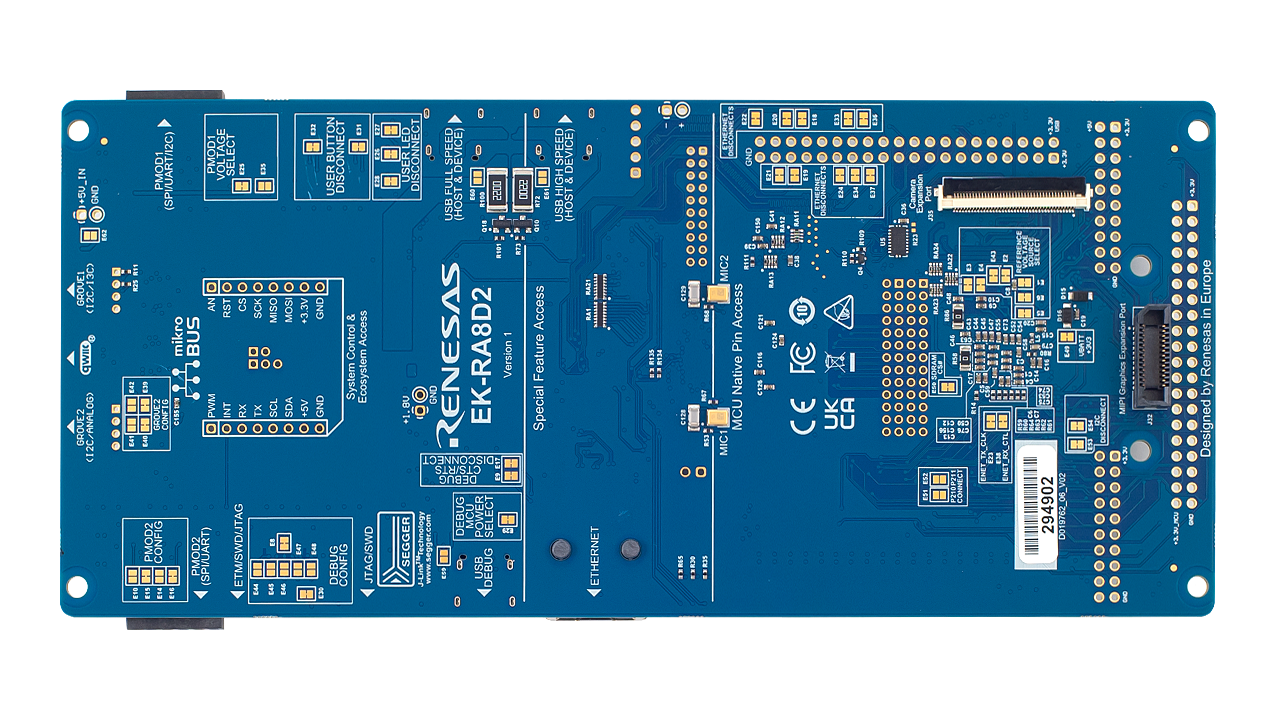
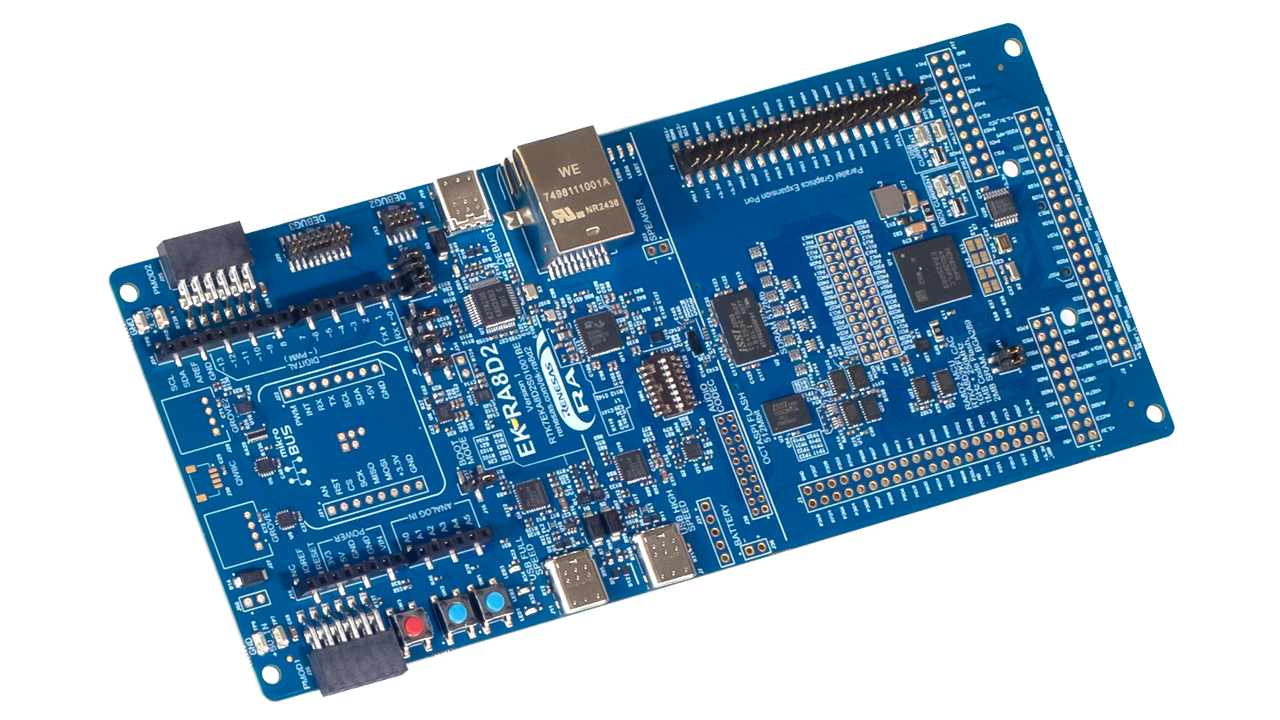
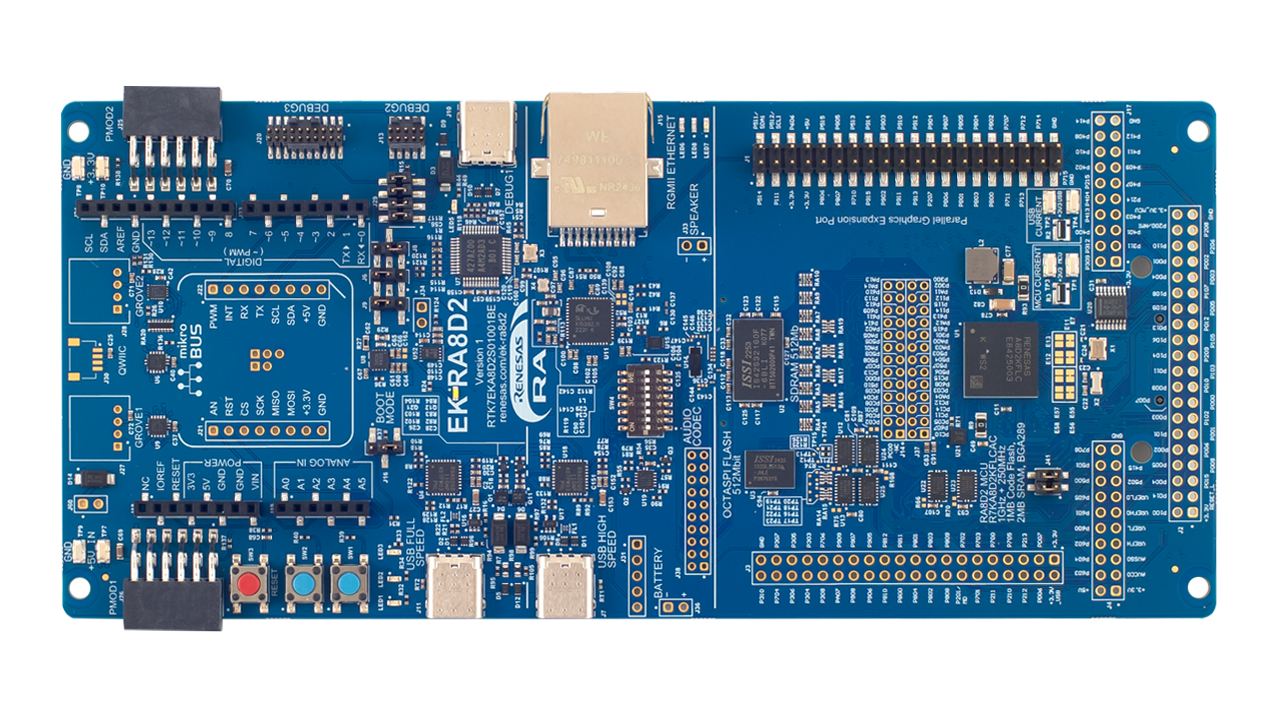
The EK-RA8D2 evaluation kit is designed to enable users to easily evaluate the RA8D2 MCU features and develop embedded system applications using Renesas' Flexible Software Package (FSP) and e2 studio IDE. Users can utilize the rich onboard features and their choice of popular ecosystem add-ons to implement a broad range of applications, including vision AI and high-end HMI applications. A bundle of example projects is available for users to download and quickly evaluate key peripherals to accelerate proof-of-concept development.

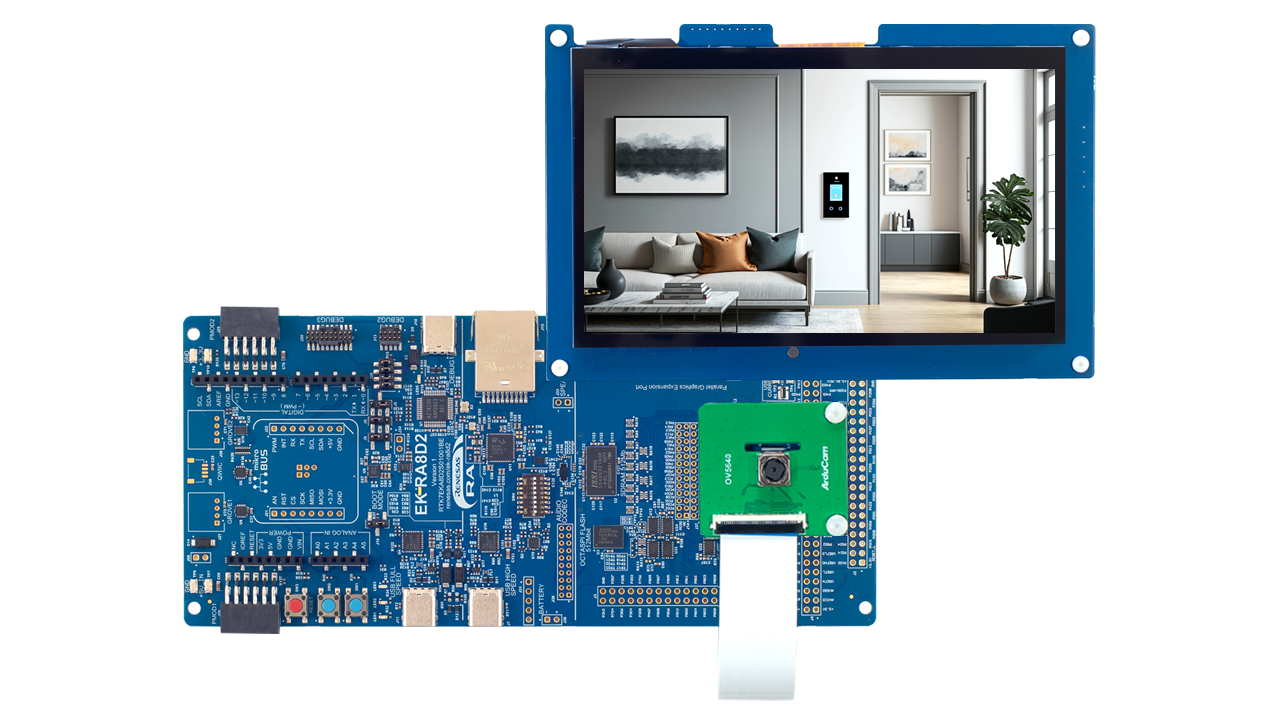
This kit is packed with a 7.0-inch, 1024x600 parallel LCD board and a 5Mpx camera module. Preloaded demonstrations that showcase the excellent performance of the RA8D2 can be found within the kit. Combine the LCD board and camera module with the EK-RA8D2 board to enable rapid display and vision developments.

Features

  • MCU Native Pin Access Area
    • R7KA8D2KFLCAC MCU
    • 1GHz, Arm® Cortex®-M85 core
    • 250MHz, Arm Cortex-M33 core
    • 1MB MRAM, 2MB SRAM with ECC
    • 289 pins, BGA package, 12mm x 12mm x 1.38mm, 0.65mm pitch
    • Native pin access through 2 x 20-pin, and 2 x 40-pin headers (not populated)
    • Camera expansion port
    • 2-lane MIPI graphics expansion port
    • Parallel graphics expansion port
    • MCU and USB current measurement points
  • Special Feature Access Area
    • Ethernet (RGMII interface)
    • USB High Speed Host and Device
    • 64MB External Octo-SPI Flash
    • 64MB SDRAM
    • PDM MEMS microphones
    • Audio codec with speaker out connections
  • Ecosystem & System Control Access Area
    • USB Full Speed Host and Device
    • Four 5V input sources
      • USB (Debug, Full Speed, High Speed)
      • External power supply
    • SEGGER J-Link™ on-board programmer and debugger
    • Debug modes
      • SEGGER J-Link debug on-board (SWD and JTAG)
      • Debug in (ETM, SWD, SWO, and JTAG)
      • Debug out (SWD, SWO, and JTAG)
    • User LEDs and buttons
      • Three user LEDs (red, blue, green)
      • Power LED indicating availability of regulated power (white)
      • Debug LED indicating the debug connection (yellow)
      • Two user buttons
      • One reset button
    • Five most popular ecosystem expansions
      • MikroElektronika™ mikroBUS connector
      • SparkFun® Qwiic® connector *not populated
      • Two SeeedGrove® system (I2C and Analog) connectors *not populated
      • Two Digilent Pmod™ (SPI/UART/I2C) connectors
      • Arduino™ (Uno R3) connector
    • MCU boot configuration jumper
  • Parallel Graphics Expansion Board
    • 1024x600 pixels 7.0-inch backlit TFT display
    • 24-bit RGB interface
    • Capacitive touch overlay
  • Camera Expansion Board
    • Off-the-shelf Arducam CMOS OV5640 camera module
    • ¼ Inch 5.0 Megapixel image sensor
    • Up to 15fps in QXSGA (2592x1944 pixels) resolution
  • Kit Contents: EK-RA8D2 board, parallel graphics expansion board, camera expansion board, camera FFC cable, and mounting hardware
Applications

Type Title Date
Manual - Development Tools PDF 7.28 MB 日本語
See an outline of the functionality of EK-RA8D2 and how to quickly evaluate RA8D2 features.
Quick Start Guide PDF 3.92 MB 日本語
Describes the out-of-box demonstration for the EK-RA8D2 and how to customize the demonstration for application development.
PCB Design Files
Log in to Download ZIP 103.08 MB
The design data for the RA8D2 evaluation kit EK-RA8D2 includes the schematic, BOM, PCB layout files, and Gerber artwork - essential tools for enabling complete evaluation of the RA8D2.
Manual - Development Tools PDF 646 KB 日本語
The Parallel Graphics Expansion Board 1 v1 features a high-resolution 7-inch capacitive touch display and 2 options for LCD connectivity, empowering developers to quickly prototype and showcase embedded applications with stunning visuals.
Manual - Development Tools PDF 471 KB 日本語
Renesas RA8 MIPI Graphics Expansion Board 1 v1 adds high-resolution LCD and capacitive touch functionality to RA8 MCU evaluation kits via a 2-lane MIPI DSI interface. It features a 4.5-inch 480×854 TFT display and PWM-controlled backlight, and complies with global EMC and safety standards—ideal for embedded display applications in lab environments.
Application Note PDF 3.85 MB
Learn how Renesas MCU security is built around integrated security engines. The RA family includes various types, which can be identified in each MCU’s hardware manual. These engines operate in two modes: Compatibility and Protected. This application note defines both and outlines their use cases.
Application Note PDF 698 KB
The EK-RA8D2 example project bundle demonstrates how to write code for various Renesas Flexible Software Package (FSP) modules supported by the EK-RA8D2 kit. It includes multiple example projects that highlight peripheral usage and system functionality, while leveraging the optimized, scalable, and high‑quality FSP for embedded system design.
Quick Start Guide PDF 5.58 MB 日本語
The Modbus protocol stack operates on RA evaluation boards to enable efficient development of Modbus TCP applications. This quick start guide provides an overview of the protocol stack features and introduces a Modbus sample application to assist with the development and implementation of applications using the stack.
Application Note PDF 2.83 MB
Learn multicore application project creation using the MCUboot module on the Renesas EK-RA8P1 kit using FSP v6.4.0, and recreate the bootloader and link the application projects to work with the bootloader using the FSP solution project. Understand the procedures for configuring an application to work with the bootloader, and for downloading and updating a new application image.
Manual - Development Tools PDF 2.93 MB 日本語
The e² studio integrated development environment demonstrates the process of generating, building, and debugging projects designed for multicore devices in the Renesas RA Family of microcontrollers. Read “Renesas RA Family e² studio 2023-10 or Higher Quick Start Guide” before reading this document.
Application Note PDF 4.16 MB 日本語
Featuring a 1GHz Arm Cortex-M85 and 250MHz Arm Cortex-M33, the RA8 dual-core MCU delivers high performance through asymmetric processing. The document explains the architecture, illustrates effective task partitioning, and provides practical use cases, demonstrating how developers can leverage both cores to optimize application throughput and responsiveness.
Application Note PDF 4.46 MB
This thermostat application provides a reference for developing complex dual-core, multi-threaded applications with a touch screen graphical Human Machine Interface (HMI) by using Renesas FSP and Azure RTOS GUIX. It describes steps to create a basic GUIX for FSP, integrates touch driver, handles multiple hardware accesses across cores, manages system updates, and performs event handling.
Device Errata PDF 396 KB 日本語
The EK-RA8D2 v1 errata document outlines known issues and deviations from the functional specifications for the RA8D2 MCU evaluation kit. It details exceptions that may affect expected behavior and serves as a reference for developers and engineers working with this hardware.
Application Note PDF 5.17 MB
Explore the development of a graphics application built for the RA8D2 MCU, running on a MIPI graphics expansion board with the RA8D2 evaluation kit. This application note provides a comprehensive overview of key concepts and implementation techniques for building high-performance HMI applications using the RA8D2 MCU.
Tool News - Release PDF 353 KB 日本語
This is a Tool News announcing the revision of QE for Camera[RA] V1.2.0, Development Assistance Tool for Camera Applications. This development assistance tool supports the development of embedded systems which use the camera functions of display controllers from Renesas. The main revision upgrades include support for the new device RA8D2 and support for MIPI PHY, MIPI CSI interface, and video input module (VIN).
Tool News - Release PDF 153 KB 日本語
This is the Tool News announcing the revision upgrade to QE for Display [RX,RA] V3.7.0, Development Assistance Tool for Display Applications. QE for Display [RX,RA] is a development assistance tool that supports the development of embedded systems using the LCD display functions of display controllers from Renesas. With this revision upgrade, the tool now supports the new device RA8D2.
Application Note PDF 4.24 MB
Learn how to effectively interface with the boot mode on Renesas RA Family MCUs through practical examples and guidance. This application note builds on the official boot mode interface specifications (such as those for RA8M1 and RA8P1) to provide hands-on insights from both hardware and software perspectives. It helps developers understand the process of accessing boot mode on these devices, making it easier to implement and troubleshoot boot mode features in their applications.
PCB Design Files
Log in to Download ZIP 16.33 MB
The design data includes the schematic, BOM, PCB layout files, and Gerber artwork for the parallel graphics expansion board which is compatible with the EK-RA8D2 and EK-RA8P1 kits.
PCB Design Files
Log in to Download ZIP 20.61 MB
Report PDF 187 KB 日本語
20 items

Software & Tools

Software & Tools

Software title
Software type
Company
Renesas Flash Programmer (Programming GUI)
Flash memory programming software [Support MCU/MPU and devices: RA, RE, RX, RL78, RH850, RISC-V MCU, Renesas Synergy, DA1453x, DA1459x, DA1469x, DA1470x, DA148xx, Power Management, Renesas USB Power Delivery Family, ICs for Motor Driver/Actuator Driver, V850, 78K0R, 78K0]
Programmer (Unit/SW) Renesas
RA Flexible Software Package (FSP)
FSP is an enhanced software package designed to provide easy-to-use, scalable, high-quality software for embedded system designs using Renesas RA Family of Arm Microcontrollers. Note: FSP with e² studio Installer (Platform Installer) will install the e² studio tool, FSP packs, GCC toolchain, and Segger J-Link drivers required to use this software. No additional installations are required.
Software Package Renesas
SEGGER™ J-Link™ Software and Documentation Package
Software utilities, firmware updates, and supporting documentation for the J-Link on-board programmer and debugger on the RA MCU kits.
Software Package Segger Microcontroller GmbH
QuickConnect Platform
QuickConnect platform enables fast prototyping by providing compatible hardware and software building blocks.
Software and Hardware Development Tools Renesas
e² studio - information for RA Family
Eclipse-based Renesas integrated development environment (IDE).
IDE and Coding Tool Renesas
QE for Camera: Development Assistance Tool for Camera Applications
This development assistance tool supports the development of embedded systems which use the camera functions of display controllers from Renesas. [Plugin for Renesas IDE "e2 studio"]
Solution Toolkit Renesas
QE for Display: Development Assistance Tool for Display Applications
This development assistance tool supports the development of embedded systems which use the LCD display functions of display controllers from Renesas. [Plugin for Renesas IDE "e² studio"] [Standalone Version] [Support MCU/MPU:RZ, RX, RA]
Solution Toolkit Renesas
7 items

Software Downloads

Type Title Date
Software & Tools - Other ZIP 22.11 MB
This firmware patch fixes the incorrect touch panel calibration on some kits that have the issue.
1 item

Sample Code

Sample Code

Filters
Type Title Date Date
Sample Code
Log in to Download ZIP 3.94 MB
Learn how Renesas MCU security revolves around integrated security engines. There are different types of security engines across the RA MCU. Users can find the specific engine used in a particular MCU from its hardware user’s manual. The security engines can operate in two different modes, called Compatibility Mode and Protected Mode. The application note “Renesas Security Engine Operational Modes” explains the definition of the two modes and their use cases.
Sample Code
Log in to Download ZIP 62.64 MB
The EK-RA8D2 example project bundle demonstrates how to write code for various Renesas Flexible Software Package (FSP) modules supported by the EK-RA8D2 kit. The sample code provides ready‑to‑build reference implementations that illustrate peripheral operation and system behavior, enabling developers to quickly evaluate FSP features and accelerate embedded application development.
Sample Code
Log in to Download ZIP 3.74 MB
The EK-RA8D2 Quick Start Example Project demonstrates specific capabilities of the EK-RA8D2 kit and Renesas Flexible Software Package (FSP) by using multiple peripherals. The project initializes the OSPI, MIPI CSI, GLCD, and GPIO modules along with various supporting stacks to create an interactive user demo.
Sample Code
Log in to Download ZIP 3.02 MB
Learn multicore application project creation using the MCUboot module on the Renesas EK-RA8P1 kit using FSP v6.4.0, and recreate the bootloader and link the application projects to work with the bootloader using the FSP solution project. Understand the procedures for configuring an application to work with the bootloader, and for downloading and updating a new application image.
Sample Code ZIP 4.41 MB
Featuring a 1GHz Arm Cortex-M85 and 250MHz Arm Cortex-M33, the RA8 dual-core MCU delivers high performance through asymmetric processing. This sample package provides practical use cases showing how both cores can be leveraged to maximize throughput and responsiveness.
Sample Code
Log in to Download ZIP 6.18 MB
This thermostat application provides a reference for developing complex dual-core, multi-threaded applications with a touch screen graphical Human Machine Interface (HMI) by using Renesas FSP and Azure RTOS GUIX. It describes steps to create a basic GUIX for FSP, integrates touch driver, handles multiple hardware accesses across cores, manages system updates, and performs event handling.
Sample Code ZIP 8.34 MB
Explore the development of a graphics application built for the RA8D2 MCU, running on a MIPI graphics expansion board with the RA8D2 evaluation kit. Developers can use this sample code as a reference for integrating graphics functionality and accelerating development on RA8D2-based platforms.
Sample Code
Log in to Download ZIP 3.98 MB
The accompanying demo code, provided in Python, demonstrates how to access and interact with the boot mode on RA8M1 and RA8P1 MCUs. It serves as a practical example for developers to see the boot mode interface in action, showing step-by-step procedures for communication and control. Although targeted at RA8M1 and RA8P1, the code and methodology can be adapted to other RA8 MCU devices by following the guidelines laid out in the application note, thereby accelerating development and reducing errors when working with boot mode features.
8 items
Part NumberStatusStockBudgetary Price (USD)Sampleable
RTK7EKA8D2S01001BEActiveIn Stock1u | $183.92Available

The EK-RA8D2 kit meets the following certifications/standards. Refer to the EK-RA8D2 user manual for the disclaimer, precautions and more details on the certifications.

EMC/EMI Standards

  • FCC Notice (Class A) – Part 15
  • Innovation, Science and Economic Development Canada ICES-003 Compliance: CAN ICES-3 (A)/NMB-3(A)
  • CE Class A (EMC Directive 2004/108/EEC)
  • UKCA Class A (EMC)
  • Taiwan Chinese National Standard 13438, C6357 compliance, Class A limits
  • Australia/New Zealand AS/NZS CISPR 32:2015, Class A

Material Selection, Waste, Recycling, and Disposal Standards

  • EU RoHS
  • WEEE
  • China SJ/T 113642014, 10-year environmental protection use period

Safety Standards

  • UL 94V-0

Partners

Zephyr Logo
Zephyr Project

The Zephyr Project is an open-source, scalable real‑time operating system (RTOS) designed for resource-constrained embedded systems and supports a wide range of hardware architectures and development boards. For the Renesas RA8D2 Evaluation Kit, Zephyr provides focused documentation covering board features, supported peripherals, and basic build, flashing, and debugging workflows to help developers quickly get started.

See the Zephyr Project RA8D2 Evaluation Kit Documentation

Support Communities

  1. LVGL Pro Editor License

    Where to find LVGL Pro Editor License - for E2studio plugin..? This thread was automatically locked due to age.

    Jan 7, 2026

Knowledge Base

  1. LVGL: Using 32-bit Color Formats with GLCDC

    ... the-box. These examples are available on GitHub and demonstrate working configurations for display, timing, color format, etc. RX72N Envision Kit EK-RA8D1 EK-RA6M3GEK-RA8D2EK-RA8P1 *Note that FSP LVGL port requires the GLCDC HAL Layer. If your MCU does not contain a GLCDC, then you must ...

    Jan 6, 2026
Support Communities

Support Communities

Get quick technical support online from Renesas Engineering Community technical staff.
Browse Articles

Knowledge Base

Browse our knowledge base for helpful articles, FAQs, and other useful resources.
Submit a Ticket

Submit a Ticket

Need to ask a technical question or share confidential information?