
概要
説明
高機能なS7G2 MCUグループ によるヒューマンマシンインタフェース(HMI)の具体的な製品開発例を示すソリューションです。
製品型名が変更されています。旧製品型名は各種ドキュメントで引き続き使用されます。新旧の製品型名については、Look-up Tableを参照してください。
お客様の実際の機器開発に応用することにより、開発の効率化と開発期間の大幅な短縮が図れます。
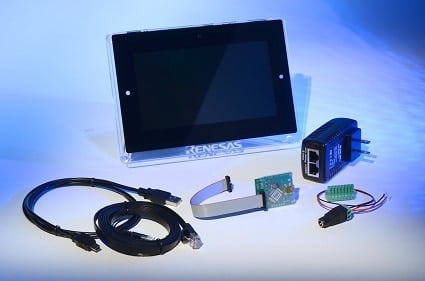
Kit Contents
- S7G2マイクロコントローラおよびI/Oボード
- 7インチ静電容量式WVGA 800x480カラーディスプレイ
- クイックスタートガイド
- USB Type A-USB Micro-B変換ケーブル
- イーサネットケーブル
- PoE電源
- RS232/485/CANコネクタ
- J-Link® Liteデバッガ
* ACアダプタ(電源)は別途ご準備ください
System Requirements
- Microsoft® Windows® 7または10、2.0GHz以上で動作するIntel® CoreTM ファミリープロセッサまたは同等のプロセッサ搭載
- システムRAM:8GB以上
- ハードディスク空き容量:2GB以上
- USB2.0ポート
- インターネット接続環境
特長
- ウェザーパネルアプリケーションデモ - 描画とユーザインプットを同時に管理するマルチスレッドなHMI
- サーモスタットアプリケーションデモ - タッチスクリーン、Wi-Fi、スマートフォン/タブレットから無線アクセス
- マルチグラフィカルスクリーン - オンチップLCDコントローラ、ビデオフレームキャプチャエンジン、2D描画エンジン、アルファブレンディングを使用したオーバレイ
- 7インチマルチ視野角(MVA)カラーLCD - バックライト、静電容量式タッチディスプレイ、付属のGUIX StudioTMでグラフィックスを追加
- 豊富な接続オプション - オンボードイーサネット、Bluetooth® Dual Mode、USB、PmodTM
- ルネサス提供の回路図、BOMリスト、PCBレイアウトガイドが回路設計を最適化
- 高度に統合、認定されたSynergy Software Package (SSP)でコード開発を加速
- J-Link® Liteを使用してデバッグとプログラミングを実行
アプリケーション
ドキュメント
ピックアップ
ログイン後、ご登録が可能となります。
|
|
|
|
|---|---|---|
| 分類 | タイトル | 日時 |
| クイックスタートガイド | PDF 785 KB English | |
| EOL通知 | PDF 221 KB | |
| アプリケーションノート |
PDF
2.21 MB
AI生成コンテンツ:
This document guides users through setting up and developing a simple GUI application using GUIX Studio on the Renesas Synergy Platform for PE-HMI1. It explains how to import a completed project into e2 studio or create a new project from scratch. Steps include launching e2 studio, selecting or creating a workspace, starting a new Synergy C/C++ project, naming the project, and verifying the GCC ARM Embedded toolchain. The document also references a project import guide and a zipped completed project file for quick verification.
|
|
| アプリケーションノート |
PDF
61 KB
AI生成コンテンツ:
The document provides a comprehensive look-up table for Synergy MCU Kits, listing current and new orderable part numbers to assist customers in ordering through distributors. It emphasizes precautions for handling microprocessing and microcontroller units, including electrostatic discharge prevention, power-on processing, signal input during power-off, unused pin handling, clock signal stability, and voltage waveform considerations. It also covers prohibitions on accessing reserved addresses, product differences, and safety and legal disclaimers. The document includes URLs for support, software, and additional resources related to the Synergy Platform. It highlights quality grades and usage restrictions for Renesas products, emphasizing user responsibility for safety and compliance.
|
|
| アプリケーションノート | PDF 488 KB English | |
| アプリケーションノート | PDF 277 KB | |
| アプリケーションノート | PDF 2.17 MB English | |
| アプリケーションノート | PDF 2.45 MB English | |
| アプリケーションノート | PDF 224 KB | |
| アプリケーションノート |
PDF
586 KB
AI生成コンテンツ:
This document explains how to connect and configure a target board for use with the NetX Web Server on the Renesas Synergy Platform. It details setting up the SEGGER J-Link debugger, enabling Ethernet ports via DIP switches on specific DK-S7G2 board versions, and connecting the board to a PC using an Ethernet cable. It also guides configuring a static IP address on the PC and selecting a unique IP address for the board. Instructions for running the command prompt as an administrator and using the ipconfig command to verify network settings are included.
|
|
| アプリケーションノート | PDF 2.00 MB | |
| マニュアル-ソフトウェア | PDF 48.11 MB | |
| アプリケーションノート |
PDF
250 KB
AI生成コンテンツ:
The USBX Host Class Hub Module manages USB hubs, supporting stand-alone or compound devices, self-powered or bus-powered modes, and cascading of up to five hubs. It requires defining USB host controllers and device classes for operation. The module uses USB controller interrupts and transfer module interrupts, with priority settings configurable in the Synergy Configuration tool. Integration involves adding the module to a thread stack via the SSP configurator, which automatically includes necessary lower-level modules. The module itself has no user APIs or configurable properties; configuration occurs through associated modules.
|
|
| アプリケーションノート | PDF 456 KB | |
| アプリケーションノート | PDF 306 KB | |
| アプリケーションノート |
PDF
439 KB
AI生成コンテンツ:
The document explains how to create and migrate custom Board Support Packages (BSPs) for Renesas Synergy SSP versions 1.1.z and 1.2.0. It details the use of the Custom BSP Creator and Custom Pack Creator tools to generate, modify, and package BSPs. Custom BSPs mainly require changes in the board folder, including essential files like bsp.h and bsp_init.c. The process involves creating a base BSP, making a template pack for modifications, editing in e2 studio, and finalizing a standard pack for distribution. An example using the DK-S7G2 board illustrates these steps.
|
|
| アプリケーションノート | PDF 3.57 MB English | |
| アプリケーションノート |
PDF
538 KB
AI生成コンテンツ:
The DK-S7G2 kit powers on via a 5 V barrel connector, indicated by LED3 status lights. Connecting the USB J-Link OB to the PC enables programming through a batch file using SEGGER J-Link, with a recommended firmware update. The demonstration application loads automatically, initializing LEDs and Ethernet indicators. The LCD displays a splash screen with date and time. Users can access a Thermostat Demonstration, adjust settings such as time, date, and sound, and navigate the Thermostat Control Menu for further controls.
|
|
| アプリケーションノート |
PDF
587 KB
English
AI生成コンテンツ:
本資料は、J-Linkデバッガとイーサネットを用いて対象ボードを接続・設定する方法を説明しています。PCの固定IPアドレス設定と、ボードに異なる未使用のIPアドレスを割り当てる手順を詳述しています。管理者権限のコマンドプロンプトで「ipconfig」コマンドを使いネットワーク設定を確認する方法も含まれています。DIPスイッチやイーサネット接続の設定も解説しています。
|
|
| アプリケーションノート |
PDF
217 KB
AI生成コンテンツ:
Connect the J-Link Lite for Cortex M to the PC using the supplied USB cable and ensure the LED shows solid green for proper communication. Attach the provided Ethernet cable from the PE-HMI1 board to a Power over Ethernet (PoE) supply. Run the “Program PE-HMI1 OOB Demo.bat” file to program the PE-HMI1 with the demo application, updating the J-Link firmware if prompted. The demo displays a weather pane on the LCD, allowing interaction with graphics effects like alpha-blending by pressing different days of the week. Support and technical contact details are provided online.
|
|
| アプリケーションノート | PDF 4.66 MB English | |
| アプリケーションノート |
PDF
1.68 MB
English
AI生成コンテンツ:
本ガイドは、Synergy S7G2 MCUとGUIX Studioを用いた天気パネルアプリケーションの設定および開発方法を説明しています。PE-HMI1ボードのDIPスイッチ設定や、ThreadX RTOSを用いたマルチスレッド、メッセージフレームワーク、GLCD設定などのソフトウェア設計を含みます。SPI初期化やタッチパネルドライバの制御方法も解説し、Synergyフレームワークによる効率的な開発を強調しています。
|
|
| アプリケーションノート |
PDF
528 KB
English
AI生成コンテンツ:
SK-S7G2ボードで使用可能なオーディオプレイヤーアプリケーションについて説明しています。対応ファイルはモノラル、符号付き、16ビット、44.1kHzのPCM WAVE形式です。ボード接続、e2studioへのプロジェクトインポート、ビルドと実行方法を解説。アプリはスプラッシュ画面、USB検出画面、動的GUIを備えたメイン画面を持ち、再生状態に応じて画面表示を切り替えます。
|
|
| クイックスタートガイド | PDF 169 KB | |
| PCB設計ファイル | Renesas Synergy™ PE-HMI1 Product Example Design Data
|
|
| マニュアル-開発ツール | PDF 2.04 MB English | |
| PCB設計ファイル | Renesas Synergy™ PE-HMI1 Product Example v2.0 Design Data
|
|
27件
|
||
設計・開発
サンプルコード
サンプルコード
フィルター
|
||
|---|---|---|
| 分類 | タイトル | 日時 日時 |
| サンプルコード | GUIX "Hello World" for PE-HMI1– Application Project - Sample Code
|
|
| サンプルコード | Advanced GUIX Application Rev.1.02 - Sample Code
|
|
| サンプルコード | Getting Started with the Audio Player Application using SSP - Application Project Rev.1.03 - Sample Code
|
|
| サンプルコード | USBX™ Host Class CDC-ACM Module Guide - Application Project Rev.1.02 - Sample Code
|
|
| サンプルコード | USBX™ Device Class HID Module Guide - Application Project Rev.1.04 - Sample Code
|
|
| サンプルコード | USBX™ Device Class Mass Storage Module Guide - Application Project (r11an0104eu0104) Rev.1.04 - Sample Code
|
|
| サンプルコード | Getting Started with the Weather Panel Application - Application Project Rev.2.10 - Sample Code
|
|
| サンプルコード | Getting Started with the Thermostat Application for S7G2 and S5D9 - Application Project Rev.1.06 - Sample Code
|
|
| サンプルコード | Getting Started with NetX Duo™ Web Server - Application Project Rev.1.08 - Sample Code
|
|
| サンプルコード | Getting Started with NetX™ Web Server - Application Project Rev.1.10 - Sample Code
|
|
| サンプルコード | USBX™ Host Class Hub Module Guide - Application Project Rev.1.01 - Sample Code
|
|
| サンプルコード | USBX™ Device Class CDC-ACM Module Guide - Application Project Rev.1.01 - Sample Code
|
|
| サンプルコード | USBX™ Host Class Video Module Guide - Application Project Rev.1.00 - Sample Code
|
|
| サンプルコード | Creating a Custom Board Support Package for SSP 1.1.z - Application Project Rev.1.06 - Sample Code
|
|
| サンプルコード | DK-S7G2 v3.0 Out-of-Box Demonstration Programming Guidelines - Application Project (r12an0024eu0125) Rev.1.25 - Sample Code
|
|
| サンプルコード | USBX™ Device Class Mass Storage Module Guide - Application Project (r11an0104eu0102) Rev.1.02 - Sample Code
|
|
16件
|
||
製品選択
| 型名 | 状態 | 在庫 | Sampleable | Pb (Lead) Free | ECCN (US) | HTS (US) |
|---|---|---|---|---|---|---|
| RTK7PEHMP1S00002BU | Last Time Buy | 在庫あり | N/A | No | 3A991.a.2 | 8471.50.0150 |
| YSPEHMI1S20 | NRND | 在庫あり | N/A | No | 3A991.a.2 | 8471.50.0150 |


