
概要
説明
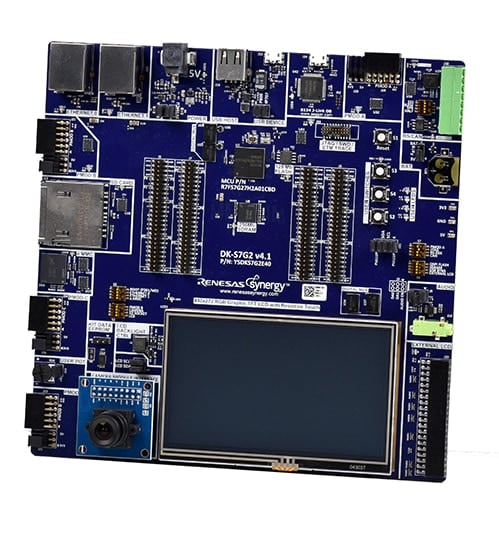
Renesas SynergyTM マイクロコントローラファミリのフラッグシップを体験し、Renesas SynergyTM プラットフォームを使用してシームレスに開発を行い、拡張ボードにより特殊機能を実現します。
製品型名が変更されています。旧製品型名は各種ドキュメントで引き続き使用されます。新旧の製品型名については、Look-up Tableを参照してください。
Kit Contents
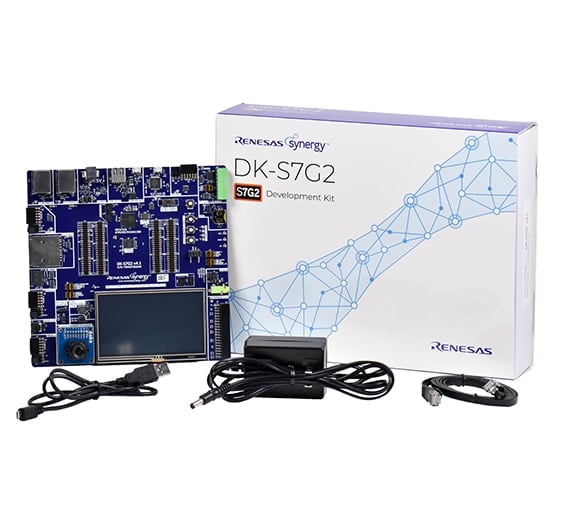
- DK-S7G2メインボード
- DK-S7G2ブレークアウトボード
- 取り外し可能な4.3インチ抵抗膜方式タッチWQVGA(480 x 272)TFT LCDパネル
- 取り外し可能なCMOS VGAカメラモジュール
- クイックスタートガイド
- USB Type A- Micro-B変換ケーブル x 1
- イーサネットケーブル x 1
* ACアダプタ(電源)は別途ご準備ください
System Requirements
- Microsoft® Windows® 7または10、2.0GHz以上で動作するIntel® CoreTMファミリプロセッサまたは同等のプロセッサ搭載
- システムRAM 8GB以上
- ハードディスク空き容量 2GB以上
- USB2.0以上のポート x 2
- インターネット接続環境
特長
- モジュール設計 - プロトタイプ開発のために、メインボード上のS7G2 MCUグループと交換可能なブレークアウトボードの全端子にアクセス可能
- 密に統合され、認定されたSynergy Software Package(SSP)を使用してコード開発を加速
- ルネサスe2 studio ISDEまたはIAR Embedded Workbench® for Renesas SynergyTMを使用して、コードの表示、ステップスルー、およびデバッグを実行
- サードパーティ製ボード、既存ボード、およびカスタムの多機能ボードのための、USB、イーサネット、CAN、Bluetooth® Low Energy、およびPmodTM コネクタ
- ユーザインタフェース画面開発用の静電容量式タッチ検出ユニット、4.3インチWQVGA(480x272)抵抗膜方式タッチTFT LCDディスプレイ、VGAカメラインタフェース、およびGUIX StudioTMによるヒューマンマシンインタフェース(HMI)機能
- AES、DSA、3DES、RSA、SHA、およびGHASHなどの業界標準アルゴリズムをサポートするセキュアなデータ通信およびストレージのためのセキュリティおよび暗号化機能
- ハードウェア診断、メモリー保護、ウォッチドッグタイムアウトを含むセーフティ機能
- 所望の信号構成に対してルーティングが正しいことを保証するための、簡単でエラープルーフな構成および自動LED表示のためのDIPスイッチ
- オンボードJ-Link® OBを使用してデバッグとプログラミングを実行
アプリケーション
ドキュメント
ピックアップ
ログイン後、ご登録が可能となります。
|
|
|
|
|---|---|---|
| 分類 | タイトル | 日時 |
| クイックスタートガイド | PDF 768 KB English | |
| アプリケーションノート | PDF 2.92 MB | |
| アプリケーションノート |
PDF
61 KB
AI生成コンテンツ:
The document provides a comprehensive look-up table for Synergy MCU Kits, listing current and new orderable part numbers to assist customers in ordering through distributors. It emphasizes precautions for handling microprocessing and microcontroller units, including electrostatic discharge prevention, power-on processing, signal input during power-off, unused pin handling, clock signal stability, and voltage waveform considerations. It also covers prohibitions on accessing reserved addresses, product differences, and safety and legal disclaimers. The document includes URLs for support, software, and additional resources related to the Synergy Platform. It highlights quality grades and usage restrictions for Renesas products, emphasizing user responsibility for safety and compliance.
|
|
| アプリケーションノート |
PDF
612 KB
English
AI生成コンテンツ:
フラッシュHALモジュールは、コードフラッシュおよびデータフラッシュのブランクチェック、セクタ消去、読み取り、書き込み、アクセスウィンドウ設定などのAPIを提供します。セミホスティング機能により操作結果やエラーコードをコンソールに表示可能です。アプリケーションプロジェクトは標準的なAPIの使用例を示し、Flash HP HALの初期化、フラッシュ操作、LEDのトグルを実行します。関連ファイルはISDEにインポートして利用できます。
|
|
| アプリケーションノート | PDF 488 KB English | |
| アプリケーションノート |
PDF
445 KB
English
AI生成コンテンツ:
この文書はRenesas SynergyのAGT HALモジュールについて説明し、その特徴、API概要、アプリケーションへの組み込み方法を示しています。2つのAGTタイマを使用したアプリケーションプロジェクトの設定やタイマ周期、コールバックによるLEDトグル、デバッグコンソール出力について解説しています。ISDEでのタイマ初期化や起動、プロパティ設定、関連コードファイルの説明も含みます。
|
|
| アプリケーションノート |
PDF
555 KB
English
AI生成コンテンツ:
本資料は、PDC HALモジュールのアプリケーションプロジェクトについて説明し、ISDEを用いた開発手順や設定方法を解説しています。PDCの初期化、カメラとLCDの設定、画像キャプチャの開始、LCDへの表示を扱います。APIを利用した制御、ダブルバッファリングやセマフォ管理、転送完了やエラー処理のコールバック関数も説明し、動作に必要なハードウェア・ソフトウェア設定を示します。
|
|
| アプリケーションノート | PDF 277 KB | |
| アプリケーションノート |
PDF
643 KB
AI生成コンテンツ:
This guide explains how to connect the camera module to the main board and configure DIP switches for proper operation. It instructs setting JTAG and DRAM switches to ON on the main board and base board, enabling CAM and ENET0 switches, and connecting the Ethernet cable to the J113 port linked to a DHCP-enabled LAN. It also details DIP switch settings for the DK-S7G2 V4.1 board to ensure correct JTAG and DRAM configuration. The guide references additional documents for power setup and project import into e2 studio.
|
|
| アプリケーションノート | PDF 2.17 MB English | |
| マニュアル-開発ツール | PDF 7.46 MB | |
| アプリケーションノート | PDF 2.45 MB English | |
| アプリケーションノート |
PDF
586 KB
AI生成コンテンツ:
This document explains how to connect and configure a target board for use with the NetX Web Server on the Renesas Synergy Platform. It details setting up the SEGGER J-Link debugger, enabling Ethernet ports via DIP switches on specific DK-S7G2 board versions, and connecting the board to a PC using an Ethernet cable. It also guides configuring a static IP address on the PC and selecting a unique IP address for the board. Instructions for running the command prompt as an administrator and using the ipconfig command to verify network settings are included.
|
|
| アプリケーションノート | PDF 2.00 MB | |
| マニュアル-ソフトウェア | PDF 48.11 MB | |
| アプリケーションノート |
PDF
250 KB
AI生成コンテンツ:
The USBX Host Class Hub Module manages USB hubs, supporting stand-alone or compound devices, self-powered or bus-powered modes, and cascading of up to five hubs. It requires defining USB host controllers and device classes for operation. The module uses USB controller interrupts and transfer module interrupts, with priority settings configurable in the Synergy Configuration tool. Integration involves adding the module to a thread stack via the SSP configurator, which automatically includes necessary lower-level modules. The module itself has no user APIs or configurable properties; configuration occurs through associated modules.
|
|
| アプリケーションノート | PDF 456 KB | |
| PCB設計ファイル | Renesas Synergy™ Development Board Kit S7G2 v4.1 Design Data
|
|
| アプリケーションノート | PDF 394 KB | |
| アプリケーションノート |
PDF
1.25 MB
English
AI生成コンテンツ:
UART通信フレームワークモジュールは、ThreadXオブジェクトを用いたスレッドセーフな通信フレームワークを提供し、UARTプロトコルと排他チャネルアクセスをサポートします。open、close、read、write、lock、unlock、versionGetなどのAPIを備え、エラー処理のためのステータス戻り値を定義しています。全チャネルでリエントラント動作し、DTCを用いた効率的なデータ転送も可能です。アプリケーション組み込みにはSSPコンフィグレータとスレッド管理の理解が必要です。
|
|
| アプリケーションノート |
PDF
484 KB
AI生成コンテンツ:
The ELC HAL module enables linking peripheral operations via events within the Synergy MCU, allowing one peripheral's event to trigger another's operation without CPU intervention. It supports multiple input and output triggers specific to the S7G2 MCU. The module requires no pin, clock, or interrupt configuration but needs I/O pin setup when linking I/O ports. The ISDE automatically includes the ELC HAL module in projects, and configuration is simplified through the SSP configurator, highlighting required settings and locking conflicting properties to reduce errors.
|
|
| アプリケーションノート |
PDF
406 KB
AI生成コンテンツ:
The DOC HAL module controls the DOC peripheral on a Synergy MCU, comparing 16-bit data and detecting mismatches, overflows, or underflows. It uses two 16-bit registers for input and setting data. The module supports callbacks triggered by interrupts. Configuration occurs via the SSP configurator, which highlights required settings like interrupt priority. The module requires no specific clock or pin configurations. Typical use involves initializing, writing data, streaming input, reading status, clearing flags, and closing the module.
|
|
| アプリケーションノート | PDF 306 KB | |
| アプリケーションノート |
PDF
439 KB
AI生成コンテンツ:
The document explains how to create and migrate custom Board Support Packages (BSPs) for Renesas Synergy SSP versions 1.1.z and 1.2.0. It details the use of the Custom BSP Creator and Custom Pack Creator tools to generate, modify, and package BSPs. Custom BSPs mainly require changes in the board folder, including essential files like bsp.h and bsp_init.c. The process involves creating a base BSP, making a template pack for modifications, editing in e2 studio, and finalizing a standard pack for distribution. An example using the DK-S7G2 board illustrates these steps.
|
|
| アプリケーションノート |
PDF
538 KB
AI生成コンテンツ:
The DK-S7G2 kit powers on via a 5 V barrel connector, indicated by LED3 status lights. Connecting the USB J-Link OB to the PC enables programming through a batch file using SEGGER J-Link, with a recommended firmware update. The demonstration application loads automatically, initializing LEDs and Ethernet indicators. The LCD displays a splash screen with date and time. Users can access a Thermostat Demonstration, adjust settings such as time, date, and sound, and navigate the Thermostat Control Menu for further controls.
|
|
| アプリケーションノート | PDF 714 KB English | |
| アプリケーションノート |
PDF
587 KB
English
AI生成コンテンツ:
本資料は、J-Linkデバッガとイーサネットを用いて対象ボードを接続・設定する方法を説明しています。PCの固定IPアドレス設定と、ボードに異なる未使用のIPアドレスを割り当てる手順を詳述しています。管理者権限のコマンドプロンプトで「ipconfig」コマンドを使いネットワーク設定を確認する方法も含まれています。DIPスイッチやイーサネット接続の設定も解説しています。
|
|
| アプリケーションノート | PDF 2.17 MB English | |
| アプリケーションノート |
PDF
1.68 MB
English
AI生成コンテンツ:
本ガイドは、Synergy S7G2 MCUとGUIX Studioを用いた天気パネルアプリケーションの設定および開発方法を説明しています。PE-HMI1ボードのDIPスイッチ設定や、ThreadX RTOSを用いたマルチスレッド、メッセージフレームワーク、GLCD設定などのソフトウェア設計を含みます。SPI初期化やタッチパネルドライバの制御方法も解説し、Synergyフレームワークによる効率的な開発を強調しています。
|
|
| アプリケーションノート |
PDF
528 KB
English
AI生成コンテンツ:
SK-S7G2ボードで使用可能なオーディオプレイヤーアプリケーションについて説明しています。対応ファイルはモノラル、符号付き、16ビット、44.1kHzのPCM WAVE形式です。ボード接続、e2studioへのプロジェクトインポート、ビルドと実行方法を解説。アプリはスプラッシュ画面、USB検出画面、動的GUIを備えたメイン画面を持ち、再生状態に応じて画面表示を切り替えます。
|
|
| PCB設計ファイル | Renesas Synergy™ Development Kit DK-S7G2 Design Data
|
|
| マニュアル-開発ツール | PDF 3.33 MB English | |
| PCB設計ファイル | Renesas Synergy™ Development Kit DK-S7G2 v3.0 Design Data
|
|
|
33件
|
||
設計・開発
ソフトウェア/ツール
ソフトウェア/ツール
| Software title
|
Software type
|
会社名
|
|---|---|---|
| クイックコネクトプラットフォーム QuickConnectプラットフォームは、互換性のあるハードウェアとソフトウェアのビルディングブロックを提供することで、迅速なプロトタイピングを可能にします。
|
Software and Hardware Development Tools | ルネサス |
1件
|
||
サンプルコード
サンプルコード
フィルター
|
||
|---|---|---|
| 分類 | タイトル | 日時 日時 |
| サンプルコード | GUIX "Hello World" for SK-S7G2 and PK-S5D9 – Application Project - Sample Code
|
|
| サンプルコード | GUIX "Hello World" for DK-S7G2 - Application Project - Sample Code
|
|
| サンプルコード | USBX™ Host Class CDC-ACM Module Guide - Application Project Rev.1.02 - Sample Code
|
|
| サンプルコード | USBX™ Device Class HID Module Guide - Application Project Rev.1.04 - Sample Code
|
|
| サンプルコード | Audio Record ADC Framework Module Guide - Application Project Rev.1.20 - Sample Code
|
|
| サンプルコード | NetX™ Telnet Client Module Guide - Application Project Rev.1.02 - Sample Code
|
|
| サンプルコード | USBX™ Device Class Mass Storage Module Guide - Application Project (r11an0104eu0104) Rev.1.04 - Sample Code
|
|
| サンプルコード | Getting Started with the Weather Panel Application - Application Project Rev.2.10 - Sample Code
|
|
| サンプルコード | Getting Started with the Thermostat Application for S7G2 and S5D9 - Application Project Rev.1.06 - Sample Code
|
|
| サンプルコード | Getting Started with NetX Duo™ Web Server - Application Project Rev.1.08 - Sample Code
|
|
| サンプルコード | Getting Started with NetX™ Web Server - Application Project Rev.1.10 - Sample Code
|
|
| サンプルコード | PDC HAL Module Guide - Application Project Rev.1.02 - Sample Code
|
|
| サンプルコード | USBX™ Host Class Hub Module Guide - Application Project Rev.1.01 - Sample Code
|
|
| サンプルコード | USBX™ Device Class CDC-ACM Module Guide - Application Project Rev.1.01 - Sample Code
|
|
| サンプルコード | AGT HAL Module Guide - Application Project Rev.1.01 - Sample Code
|
|
| サンプルコード | Touch Panel Framework Module Guide - Application Project Rev.1.03 - Sample Code
|
|
| サンプルコード | UART Communications Framework Module Guide - Application Project Rev.1.10 - Sample Code
|
|
| サンプルコード | ELC HAL Module Guide - Application Project Rev.1.10 - Sample Code
|
|
| サンプルコード | DOC HAL Module Guide - Application Project Rev.1.10 - Sample Code
|
|
| サンプルコード | USBX™ Host Class Video Module Guide - Application Project Rev.1.00 - Sample Code
|
|
| サンプルコード | Creating a Custom Board Support Package for SSP 1.1.z - Application Project Rev.1.06 - Sample Code
|
|
| サンプルコード | DK-S7G2 v3.0 Out-of-Box Demonstration Programming Guidelines - Application Project (r12an0024eu0125) Rev.1.25 - Sample Code
|
|
| サンプルコード | USBX™ Device Class Mass Storage Module Guide - Application Project (r11an0104eu0102) Rev.1.02 - Sample Code
|
|
|
23件
|
||
製品選択
| 型名 | 状態 | 在庫 | 参考価格(米ドル) | Sampleable |
|---|---|---|---|---|
| RTK7DKS7G2S00004BU | Active | 在庫あり | 1u | $505.88 | N/A |
| YSDKS7G2E40 | NRND | 在庫切れ | N/A | |
| YSDKS7G2S30 | NRND | 在庫あり | N/A |
サポート
サポートコミュニティ
- 評価ボードDK-S7G2をつかったセルフプログラミングについて
初めて投稿させていただきます。 外部フラッシュメモリをつかったセルフプログラミング(プログラムの書き換え処 ...
2019年2月7日 - Synergy スタータキット(DK-S7G2)
DK-S7G2のスターターキットでGPIOとして使えるポートは何本になるのでしょうか? また、それを確認するためには、回路図 ...
2017年12月12日 - USBフラッシュメモリ化の際の名称変更と容量変更について
はじめまして 初めてルネサスの基板を購入しました。基板は「DK-S7G2M ver3.1」です。こちらの基板をe2studioを使って、サンプルプロ ...
2019年3月26日
ナレッジベース
- Renesas Synergy™: DK-S7G2等で外部メモリインタフェース使用時のCS0設定
CS0を使用するためには、bsp_sdram_init () callを消去するとともに、クロックコンフィグレーション(clock configuration)中のSDCLKoutをオフにしてくだ ...
2017年7月25日 - Renesas Synergy™: Gainspan社SDIOワイヤレスボードをDK-S7G2接続時の電力供給低下
DK-S7G2キットのボードデザインでは、SDIOワイヤレスボードを接続すると20msで電力供給が約600mV低下します。その結果、パワ ...
2017年7月5日 - Renesas Synergy™: DK-S7G2キットでカメラとEthernetを同時使用する際の制約は?
制約があります。 Ethernet 1 ポートはカメラがピンを共有しているため、同時に使用することができません。 その場合、Ethernet 0 ポ ...
2017年7月25日


