
Overview
Description
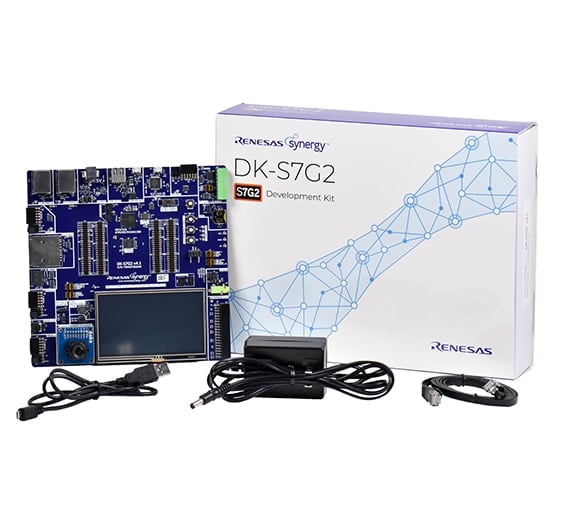
Discover the flagship of the Synergy™ microcontroller (MCU) family, develop seamlessly with the Synergy Platform, and implement special functions with the expansion board.
System Requirements
- Microsoft® Windows® 7 or 10 with Intel® Core™ family processor or equivalent running at ≥2.0GHz
- ≥8GB system RAM
- ≥2GB free hard drive space
- ≥2 USB 2.0 ports
- Internet connection
Features
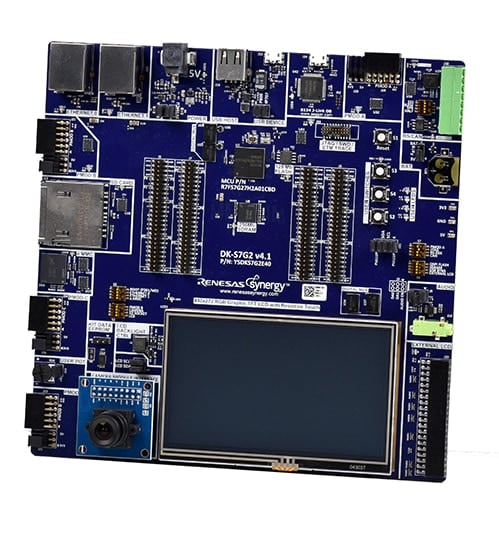
- Modular design with full pin access to the S7G2 MCU Group
- Accelerate code development with the tightly integrated and qualified Synergy Software Package (SSP)
- View, step through, and debug code with the e2 studio IDE from Renesas or IAR Embedded Workbench® for Renesas Synergy
- USB, Ethernet, CAN, Bluetooth® Low Energy (LE), and Pmod™ connectors for third-party, off-the-shelf, and custom multi-function boards
- Human machine interface (HMI) functionality with a capacitive touch sensing unit (CTSU), 4.3-inch WQVGA (480 x 272) resistive touch TFT LCD, VGA camera interface, and GUIX Studio™ for developing user interface screens
- Security and encryption functions for secure data communications and storage, supporting industry standard algorithms such as AES, DSA, 3DES, RSA, SHA, and GHASH
- Safety features including hardware diagnostics, memory protection, and watchdog timeout
- DIP switches for easy, error-proof configuration and auto LED indication, ensuring routing is correct for the desired configuration of signals
- Debugging and programming with J-Link® OB on-board
Applications
Documentation
|
|
|
|
|---|---|---|
| Type | Title | Date |
| Quick Start Guide | PDF 416 KB 日本語 | |
| Application Note |
PDF
2.27 MB
日本語
AI-generated Summary:
Create a simple two-screen GUI application using GUIX Studio for SK-S7G2 and PK-S5D9 Synergy MCU kits. Configure hardware functions such as LCD, SPI, and I2C, manage threads, message passing, interrupts, LCD driver, and touchscreen. Develop and debug the project in e2 studio using the Renesas Synergy Software Package, which integrates ThreadX RTOS and X-Ware stacks. The package includes source files like guiapp_event_handlers.c and lcd_setup.c. The guide covers project creation, configuration, GUI design, custom controls, and running the application with touchscreen interaction.
|
|
| Application Note | PDF 2.92 MB | |
| Application Note |
PDF
61 KB
AI-generated Summary:
The document provides a comprehensive look-up table for Synergy MCU Kits, listing current and new orderable part numbers to assist customers in ordering through distributors. It emphasizes precautions for handling microprocessing and microcontroller units, including electrostatic discharge prevention, power-on processing, signal input during power-off, unused pin handling, clock signal stability, and voltage waveform considerations. It also covers prohibitions on accessing reserved addresses, product differences, and safety and legal disclaimers. The document includes URLs for support, software, and additional resources related to the Synergy Platform. It highlights quality grades and usage restrictions for Renesas products, emphasizing user responsibility for safety and compliance.
|
|
| Application Note | PDF 2.27 MB 日本語 | |
| Application Note |
PDF
1.04 MB
日本語
AI-generated Summary:
The document explains how to use the Audio Player application on supported Renesas Synergy boards, including S7G2 and PK-S5D9. It details connecting the board, importing the project into e² studio, and running the application. Supported audio files are mono, signed, 16-bit, 44.1 kHz PCM WAVE files. The UI includes splash, USB, and main screens, with volume control via buttons or GUI. It notes a current limitation in smooth audio switching, recommending stopping playback before changing tracks.
|
|
| Application Note | PDF 1.66 MB 日本語 | |
| Application Note | PDF 277 KB | |
| Application Note | PDF 284 KB 日本語 | |
| Application Note |
PDF
409 KB
日本語
AI-generated Summary:
The Flash HAL module provides APIs for managing on-chip flash memory, including code and data flash. It supports operations like blank checking, erasing, programming, and setting access windows. Blocking operations are used for code flash, while data flash supports background mode operation (BGO). The module enforces precautions to avoid accessing flash during operations, especially for code flash where interrupts and multithreading can cause errors. Functions exist to select startup areas, update flash clock frequency, and retrieve status or version information. Error codes help diagnose issues such as invalid addresses, locked states, or operation failures.
|
|
| Application Note |
PDF
643 KB
AI-generated Summary:
This guide explains how to connect the camera module to the main board and configure DIP switches for proper operation. It instructs setting JTAG and DRAM switches to ON on the main board and base board, enabling CAM and ENET0 switches, and connecting the Ethernet cable to the J113 port linked to a DHCP-enabled LAN. It also details DIP switch settings for the DK-S7G2 V4.1 board to ensure correct JTAG and DRAM configuration. The guide references additional documents for power setup and project import into e2 studio.
|
|
| Manual - Development Tools | PDF 7.46 MB | |
| Application Note |
PDF
2.14 MB
日本語
AI-generated Summary:
The document details the setup and configuration of the PE-HMI1 and DK-S7G2 boards for running the Weather Panel application, including specific DIP switch settings and J-Link programming interface connections. It highlights the application’s use of complex HMI designs with GUIX Studio, multi-threading with ThreadX RTOS, and Synergy messaging for inter-thread communication. The Weather Panel leverages Synergy S7G2 or S5D9 MCUs based on ARM Cortex-M4, utilizing various peripherals and drivers to streamline embedded application development.
|
|
| Application Note |
PDF
644 KB
日本語
AI-generated Summary:
This section explains how to connect the target board using the SEGGER J-Link debugger and power it up. It details setting DIP switches for specific DK-S7G2 board versions and connecting an Ethernet cable between the board and PC. It guides configuring a static IP address on the PC Ethernet port, using 192.168.0.200 as an example, and running the command prompt as administrator to verify IP settings with the ipconfig command. Finally, it advises selecting a unique IP address for the board, such as 192.168.0.2.
|
|
| Application Note |
PDF
586 KB
AI-generated Summary:
This document explains how to connect and configure a target board for use with the NetX Web Server on the Renesas Synergy Platform. It details setting up the SEGGER J-Link debugger, enabling Ethernet ports via DIP switches on specific DK-S7G2 board versions, and connecting the board to a PC using an Ethernet cable. It also guides configuring a static IP address on the PC and selecting a unique IP address for the board. Instructions for running the command prompt as an administrator and using the ipconfig command to verify network settings are included.
|
|
| Application Note | PDF 2.00 MB | |
| Application Note |
PDF
272 KB
日本語
AI-generated Summary:
The PDC HAL module manages image capture from an external camera connected to a Synergy microcontroller. It requires the camera to be configured and generating a PIXCLK input. The module uses DMA for high-speed data transfer due to fast data rates. Buffers store image data, with size depending on resolution and pixel depth, and may reside in external memory like SDRAM. Configuration is done via SSP configurator, including interrupt priorities and buffer settings. A user callback can be registered for frame capture events, but should avoid lengthy ISR processing.
|
|
| Application Note |
PDF
250 KB
AI-generated Summary:
The USBX Host Class Hub Module manages USB hubs, supporting stand-alone or compound devices, self-powered or bus-powered modes, and cascading of up to five hubs. It requires defining USB host controllers and device classes for operation. The module uses USB controller interrupts and transfer module interrupts, with priority settings configurable in the Synergy Configuration tool. Integration involves adding the module to a thread stack via the SSP configurator, which automatically includes necessary lower-level modules. The module itself has no user APIs or configurable properties; configuration occurs through associated modules.
|
|
| Application Note | PDF 456 KB | |
| PCB Design Files | Renesas Synergy™ Development Board Kit S7G2 v4.1 Design Data
|
|
| Application Note |
PDF
301 KB
日本語
AI-generated Summary:
The AGT HAL module configures timers with user-defined periods, enabling CPU interrupts, port pin toggling, or peripheral triggers upon expiration. It supports 16-bit counters clocked by various sources and allows cascading timers for extended periods. The GPT module offers a 32-bit counter with higher resolution and more channels. Timer periods depend on clock frequency and resolution, with detailed calculations provided. Interrupts and output signals are configurable for precise timer control.
|
|
| Application Note | PDF 394 KB | |
| Application Note |
PDF
391 KB
日本語
AI-generated Summary:
The UART Communications Framework module provides an easy-to-use interface for UART communication using SCI and data-transfer peripherals on Synergy MCUs. It supports functions like open, close, read, write, lock, and unlock, with callback events for transmission and reception completion. The module integrates with ThreadX for synchronization and supports locking UART channels. Configuration is managed via the SSP Configurator, which highlights required settings and restricts changes to prevent conflicts. Interrupt priority and queue sizes are key configurable parameters.
|
|
| Application Note |
PDF
484 KB
AI-generated Summary:
The ELC HAL module enables linking peripheral operations via events within the Synergy MCU, allowing one peripheral's event to trigger another's operation without CPU intervention. It supports multiple input and output triggers specific to the S7G2 MCU. The module requires no pin, clock, or interrupt configuration but needs I/O pin setup when linking I/O ports. The ISDE automatically includes the ELC HAL module in projects, and configuration is simplified through the SSP configurator, highlighting required settings and locking conflicting properties to reduce errors.
|
|
| Application Note |
PDF
406 KB
AI-generated Summary:
The DOC HAL module controls the DOC peripheral on a Synergy MCU, comparing 16-bit data and detecting mismatches, overflows, or underflows. It uses two 16-bit registers for input and setting data. The module supports callbacks triggered by interrupts. Configuration occurs via the SSP configurator, which highlights required settings like interrupt priority. The module requires no specific clock or pin configurations. Typical use involves initializing, writing data, streaming input, reading status, clearing flags, and closing the module.
|
|
| Application Note | PDF 306 KB | |
| Application Note |
PDF
1.71 MB
日本語
AI-generated Summary:
The guide explains how to import and build projects using IAR Embedded Workbench (EW) for Renesas Synergy. It details opening the workspace file from an extracted example project, viewing the project structure, and configuring settings for the Synergy Standalone Configurator (SSC) and Synergy Software Package (SSP). It also covers setting the SSC/SSP path and license file, and launching the Synergy Standalone Configurator within the IDE to generate project files.
|
|
| Application Note |
PDF
439 KB
AI-generated Summary:
The document explains how to create and migrate custom Board Support Packages (BSPs) for Renesas Synergy SSP versions 1.1.z and 1.2.0. It details the use of the Custom BSP Creator and Custom Pack Creator tools to generate, modify, and package BSPs. Custom BSPs mainly require changes in the board folder, including essential files like bsp.h and bsp_init.c. The process involves creating a base BSP, making a template pack for modifications, editing in e2 studio, and finalizing a standard pack for distribution. An example using the DK-S7G2 board illustrates these steps.
|
|
| Application Note |
PDF
538 KB
AI-generated Summary:
The DK-S7G2 kit powers on via a 5 V barrel connector, indicated by LED3 status lights. Connecting the USB J-Link OB to the PC enables programming through a batch file using SEGGER J-Link, with a recommended firmware update. The demonstration application loads automatically, initializing LEDs and Ethernet indicators. The LCD displays a splash screen with date and time. Users can access a Thermostat Demonstration, adjust settings such as time, date, and sound, and navigate the Thermostat Control Menu for further controls.
|
|
| PCB Design Files | Renesas Synergy™ Development Kit DK-S7G2 v3.0 Design Data
|
|
| Manual - Development Tools | PDF 1.28 MB 日本語 | |
|
31 items
|
||
Design & Development
Software & Tools
Software & Tools
| Software title
|
Software type
|
Company
|
|---|---|---|
| QuickConnect Platform QuickConnect platform enables fast prototyping by providing compatible hardware and software building blocks.
|
Software and Hardware Development Tools | Renesas |
1 item
|
||
Sample Code
Sample Code
Filters
|
||
|---|---|---|
| Type | Title | Date Date |
| Sample Code | GUIX "Hello World" for SK-S7G2 and PK-S5D9 – Application Project - Sample Code
|
|
| Sample Code | GUIX "Hello World" for DK-S7G2 - Application Project - Sample Code
|
|
| Sample Code | USBX™ Host Class CDC-ACM Module Guide - Application Project Rev.1.02 - Sample Code
|
|
| Sample Code | USBX™ Device Class HID Module Guide - Application Project Rev.1.04 - Sample Code
|
|
| Sample Code | Audio Record ADC Framework Module Guide - Application Project Rev.1.20 - Sample Code
|
|
| Sample Code | NetX™ Telnet Client Module Guide - Application Project Rev.1.02 - Sample Code
|
|
| Sample Code | USBX™ Device Class Mass Storage Module Guide - Application Project (r11an0104eu0104) Rev.1.04 - Sample Code
|
|
| Sample Code | Getting Started with the Weather Panel Application - Application Project Rev.2.10 - Sample Code
|
|
| Sample Code | Getting Started with the Thermostat Application for S7G2 and S5D9 - Application Project Rev.1.06 - Sample Code
|
|
| Sample Code | Getting Started with NetX Duo™ Web Server - Application Project Rev.1.08 - Sample Code
|
|
| Sample Code | Getting Started with NetX™ Web Server - Application Project Rev.1.10 - Sample Code
|
|
| Sample Code | PDC HAL Module Guide - Application Project Rev.1.02 - Sample Code
|
|
| Sample Code | USBX™ Host Class Hub Module Guide - Application Project Rev.1.01 - Sample Code
|
|
| Sample Code | USBX™ Device Class CDC-ACM Module Guide - Application Project Rev.1.01 - Sample Code
|
|
| Sample Code | AGT HAL Module Guide - Application Project Rev.1.01 - Sample Code
|
|
| Sample Code | Touch Panel Framework Module Guide - Application Project Rev.1.03 - Sample Code
|
|
| Sample Code | UART Communications Framework Module Guide - Application Project Rev.1.10 - Sample Code
|
|
| Sample Code | ELC HAL Module Guide - Application Project Rev.1.10 - Sample Code
|
|
| Sample Code | DOC HAL Module Guide - Application Project Rev.1.10 - Sample Code
|
|
| Sample Code | USBX™ Host Class Video Module Guide - Application Project Rev.1.00 - Sample Code
|
|
| Sample Code | Creating a Custom Board Support Package for SSP 1.1.z - Application Project Rev.1.06 - Sample Code
|
|
| Sample Code | DK-S7G2 v3.0 Out-of-Box Demonstration Programming Guidelines - Application Project (r12an0024eu0125) Rev.1.25 - Sample Code
|
|
|
22 items
|
||
Product Options
| Part Number | Status | Stock | Budgetary Price (USD) | Sampleable |
|---|---|---|---|---|
| RTK7DKS7G2S00004BU | Active | In Stock | 1u | $505.88 | N/A |
| YSDKS7G2E40 | NRND | Out of Stock | N/A | |
| YSDKS7G2S30 | NRND | In Stock | N/A |
Support
Support Communities
- DK-S7G2 access point example.
Can anyone help me with the access point example where the dk hosts a small webpage? Regards, Suren
Nov 26, 2019 - DK S7G2 board Bluetooth related problem
I used DK S7G2 board and I phase some problem on Bluetooth. so can you please provide me DK S7G2 related Bluetooth program.I used e2 studio and ssp 1.6.0 and ssp 1.4.0
May 19, 2020 - battery backup in DK S7G2 Board
Hello everyone, I have RTC program in DK S7G2 Board and I saw Time and Date In LCD.But How to Used Battery Backup in Dk S7G2 Board When I make Power Off and ON Then It was not show what about running time it was show starting time.i ...
Aug 31, 2018
Knowledge Base
- Flashloader and Downloader for DK-S7G2 with SSP 1.7.8 ( also available - updated to SSP 2.6.1 )
Also attached is an updated pack file. This one disabled the stack monitor before jumping to the main applications. This is a requirement now due to a change in more recent SSP versions. Please see the instructions in src/downloader_entry.c for how to use the projects. The ...
Sep 23, 2020 - How do I configure USB to work correctly with the DK-S7G2 kit using SSP 1.1.0 alpha?
... of the controller when the controller is registered with host stack :- #define UX_SYNERGY_S7G2_USBHS_BASE 0x40060000UL status = ux_host_stack_hcd_register((UCHAR *)"DK-S7G2", _ux_hcd_synergy_initialize, UX_SYNERGY_S7G2_USBHS_BASE, UX_SYNERGY_CONTROLLER_S7G2); [Tags] 1.1.0 Alpha, DK-S7G2, Synergy, USB
- Using SCI-7 Pins as IO on DK-S7G2 Board prior to SSP 1.7.8
Last Updated:09/16/2020 The BSP for the S7G2-DK board configures pins PA02 and PA03 as SCI pins for simple I2C to read from an EEPROM to determine the board version. This occurs after the .pincfg settings have been applied. After this action has occurred the ...
Sep 16, 2020

Support Communities


