Mar 19, 2026
About This Video
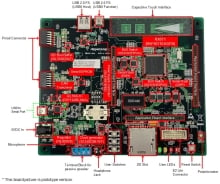
Learn how to set up your RX development environment in Visual Studio Code using the Renesas Platform extension. The content walks through the installation wizard to add required tools and packages, including CMake, Ninja, Python, and the Support Files for the RX Family. It also covers installing the RX Smart Configurator and the required toolchain (CC‑RX or GCC for Renesas GNURX), then creating an RX project with Smart Configurator, building it, and debugging it on the Renesas Starter Kit+ for RX671 via E2 Emulator Lite.
Related Resources

IDE and Coding Tool
Extensions for Visual Studio code to develop Renesas MCU SW