
Overview
Description
- The QE for Capacitive Touch supports the new devices RL78/F22, RL78/F25 and RL78/L23.
- The QE for Capacitive Touch supports the new device RA0L1.
- Improvement of Sensor Drive Pulse Frequency Determined by automatic tuning (CTSU2).
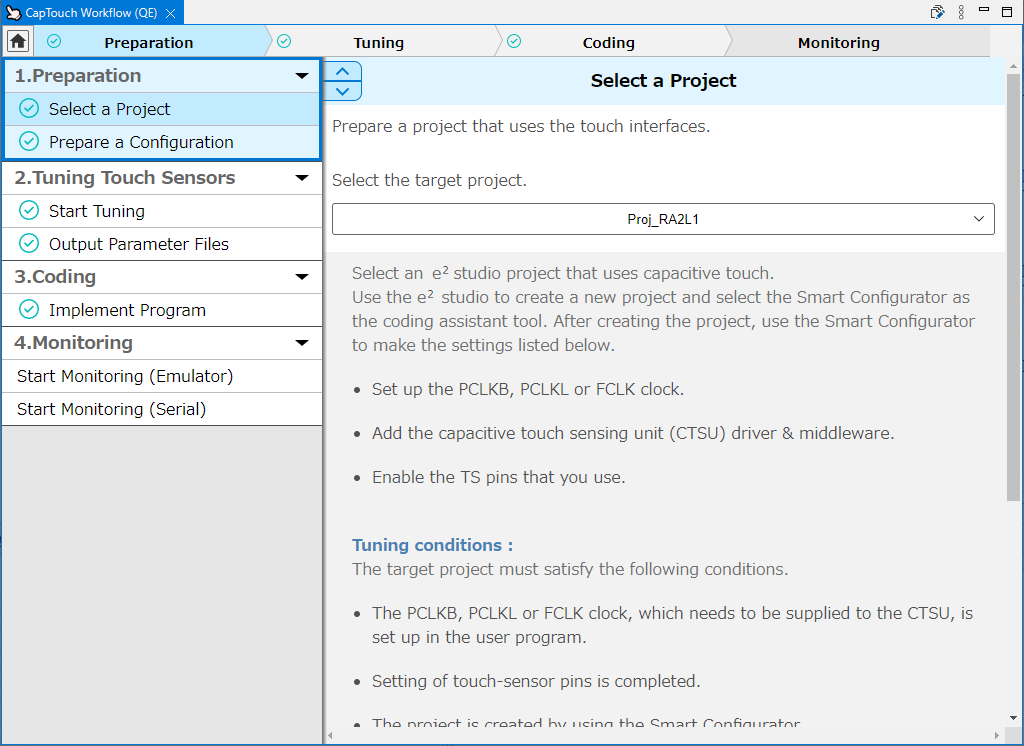
- Added Emulator/Serial selection step to Workflow
The notes in the following tool news have been fixed.
[Notes] e² studio 2025-07 not compatible with Reality AI Utilities, AI Navigator, QE for Capacitive Touch, QE for AFE and other QE products (PDF | English, 日本語)
QE for Capacitive Touch is a tool for assisting in the development of embedded systems that include the use of capacitive touch keys.
This tool simplifies the initial settings of the touch user interface and the tuning of the sensitivity.
This product is available free of charge.
Features
- The GUI makes it easy for even a beginner to develop touch user interfaces.
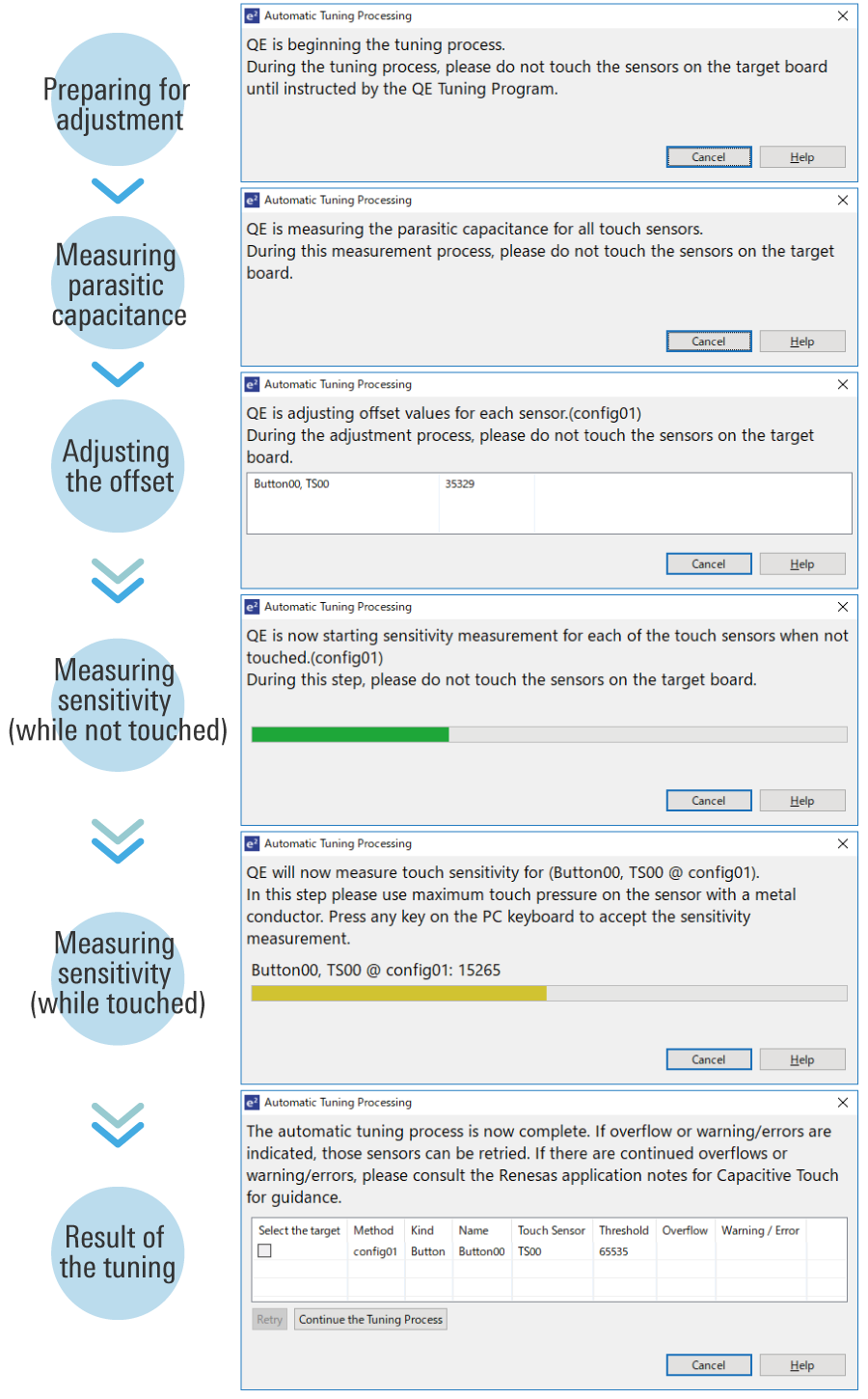
- Automatic tuning for touch sensor sensitivity
- Learn More
Release Information
| Product Name | Latest Ver. | Released | Target Device (Note1) | Details of upgrade | Download | Operating Environment |
|---|---|---|---|---|---|---|
| QE for Capacitive Touch | V4.2.0 | Aug 01, 2025 | RA Family RL78 Family RX Family Renesas SynergyTM | See Release Note | Download | e² studio plug-in(Note2)(Note3) Operating Environment |
Notes
- For details on supported MCUs, refer to the section Target Devices.
- We recommend using the e² studio installer provided for the RA Family for customers using RA Family. For details, see the GitHub page on the Flexible Software Package (FSP).
- For development of Renesas Synergy™, we recommend to install e² studio by platform installer included SSP(Synergy Software Package).
For details
Target Devices
Design & Development
Explore
Videos & Training
QE for Capacitive Touch from Renesas enables the development of touch sensors by simply following a guide on a GUI, thus contributing to shortening the development period for touch sensor functions that take advantage of the performance of the Capacitive Sensing Unit (CTSU2).
Related Resources
- Capacitive Touch Sensor Solutions
- QE for Capacitive Touch: Development Assistance Tool for Capacitive Touch Sensors
- Getting Started with QE for Capacitive Touch for RA [this video]
- QE for Capacitive Touch Tutorial: Step 1 Configuration for RA
- QE for Capacitive Touch Tutorial: Step 2 Tuning for RA
- QE for Capacitive Touch Tutorial: Step 3 Monitoring for RA
News & Blog Posts
Additional Details
Features
The GUI makes it easy for even a beginner to develop touch user interfaces.
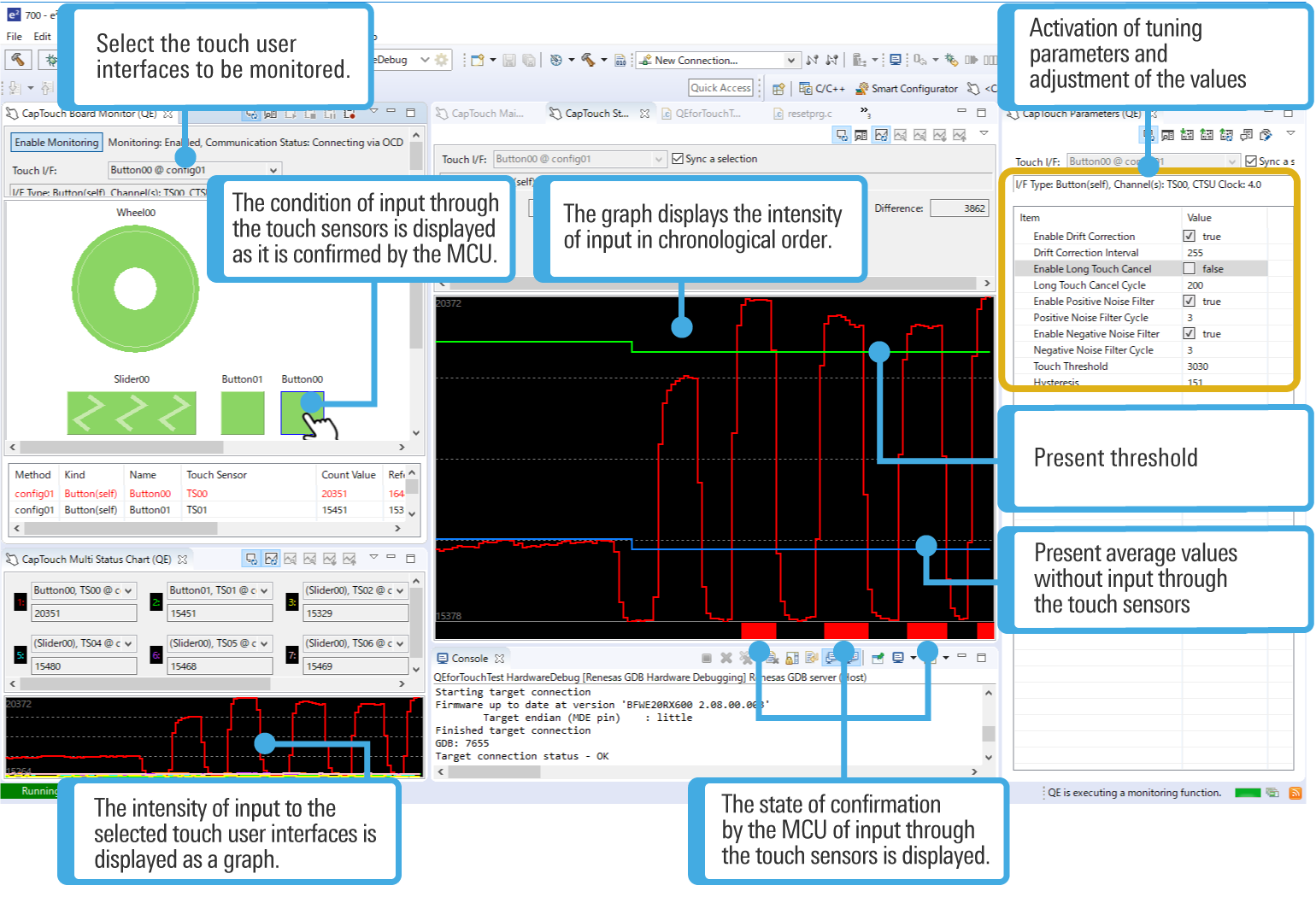
Simple GUI operations allow even a beginner to create the configuration for use with a touch user interface, monitor the state of input through the touch sensors, and adjust parameters.
Furthermore, since this tool can adjust tuning parameters and reflect the results through display in real-time, it is very useful for finding the appropriate parameters in various situations, such as in the presence of much static electricity or in cases of use with wet hands.
Automatic tuning for touch sensor sensitivity
This tool enables automatic tuning for the sensitivity of the capacitive touch sensors. You can complete basic tuning within a few minutes by following the instructions in the pop-up messages.
3D gesture recognition
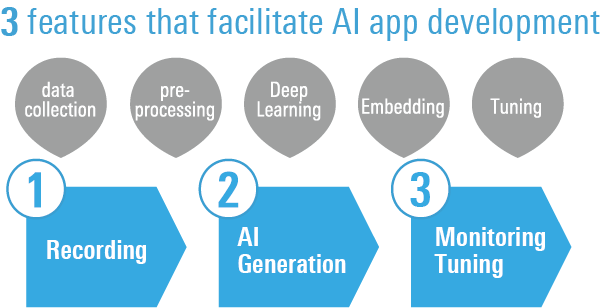
You can develop a gesture application that reacts "by anyone's hand" without any specialized skills just by actually performing the gesture that you want AI to remember on the capacitance sensor.
Supported Driver and Middleware
| Device | Driver | Version |
|---|---|---|
| RA Family | CSTU (Capacitive Touch Sensing Unit) Driver Flexible Software Package (FSP) Component for RA Family Component name: r_ctsu | V6.0.0 |
| Touch Middleware Flexible Software Package (FSP) Component for RA Family Component name: rm_touch | V6.0.0 | |
| RX Family | Driver for capacitive touch sensor unit RX Family QE CTSU Module Using Firmware Integration Technology Module name: r_ctsu_qe | V3.20 |
| Middleware for touch sensors RX Family QE Touch Module Using Firmware Integration Technology Module name: rm_touch_qe | V3.20 | |
| RL78 Family | Driver for capacitive touch sensor unit RL78 Family QE CTSU Module Software Integration System Module name: r_ctsu | V2.20 |
| Middleware for touch sensors RL78 Family QE Touch Module Software Integration System Module name: rm_touch | V2.20 | |
| Renesas Synergy | CTSU (Capacitive Touch Sensing Unit) Driver Synergy Software Package (SSP) Component for Renesas Synergy Component name: r_ctsuv2 | V2.6.0 |
| Capacitive Touch Framework Synergy Software Package (SSP) Component for Renesas Synergy Component name: sf_touch_ctsuv2 | V2.6.0 |
See here for details on adding and setting middleware related to QE for Capacitive Touch
The confirmed debugging tools
| Device | E2 emulator | E2 emulator Lite | SEGGER J-Link |
|---|---|---|---|
| RA Family | ✔ | ✔ | ✔ |
| RX Family | ✔ | ✔ | ✔ |
| RL78 Family | ✔ | ✔ | |
| Renesas Synergy | ✔ |
Support
Support Communities
- New Release QE for Capacitive Touch
... Synergy device families to enable capacitive touch on those microcontrollers. Information on the new tool can be found here: QE for Capacitive Touch: Development Assistance Tool for Capacitive Touch Sensors | Renesas Please visit the Renesas weblink above to get all the latest information on the new QE for Capacitive Touch.
Sep 22, 2021 - RL78/G16 Capacitive Touch example code
Hi, Is there have any example code for the capacitive touch? I have try to run the CTSU examples function but it is not working well
Feb 14, 2024 - RA2E1 RA Smart Configurator CTSU HAL Layer
... the configuration side. 1 - For CTSU implementation, I basically add a CTSU driver from stacks. But on the configuration side, there's only an option for selecting the CTSU pins, I couldn't see any other configuration options such as touch threshold parameters, calibration parameters,etc. 2- On the software ...
Jun 3, 2021
Knowledge Base
- RA Family: The serial communication monitor that is provided by QE for Capacitive Touch, Development Assistance Tool for Capacitive Touch sensors, fails to start.
Last Updated: 02/17/2025 Question: I am trying to perform the serial communication monitor that is provided by QE for Capacitive Touch. I wrote a capacitive touch application for the RA MCU and executed it, but the error message "Failed to connect to the serial port." is ...
Feb 17, 2025 - An error occurs in e2 studio during project build. (E0520005: "qe_common.h" not found)
... 11 or earlier Please use the latest version of QE for Capacitive Touch as a development support tool for capacitive touch sensors.QE for Capacitive Touch can be downloaded from the following URL.QE for Capacitive Touch: Development Assistance Tool for Capacitive Touch Sensors Suitable Products e² studioQE for Capacitive ...
Apr 11, 2024 - RL78 Family: Touch development with the RL78 microcontroller
... When using CS+, please also install Smart Configurator:https://www.renesas.com/software-tool/rl78-smart-configurator Click here to install QE for Capacitive Touch:https://www.renesas.com/software-tool/qe-capacitive-touch-development-assistance-tool-capacitive-touch-sensors#download
Aug 27, 2025

Support Communities

