Features
- 1:12 PLL Based Low-Voltage Clock Generator
- 3.3 V Power Supply
- Internal Power-On Reset
- Generates Cock Signals Up to 240 MHz
- Maximum Output Skew of 250 ps
- On-Chip Crystal Oscillator Clock Reference
- Two LVCMOS PLL Reference Clock Inputs
- External PLL Feedback Supports Zero-Delay Capability
- Various Feedback and Output Dividers (See Applications Information Section)
- Supports Up to Three Individual Generated Output Clock Frequencies
- Synchronous Output Clock Stop Circuitry for Each Individual Output for Power Down Support
- Drives Up to 24 Clock Lines
- Ambient Temperature Range 0°C to +70°C
- Pin and Function Compatible To the MPC972
- 52-Lead Pb-Free Package Available
Description
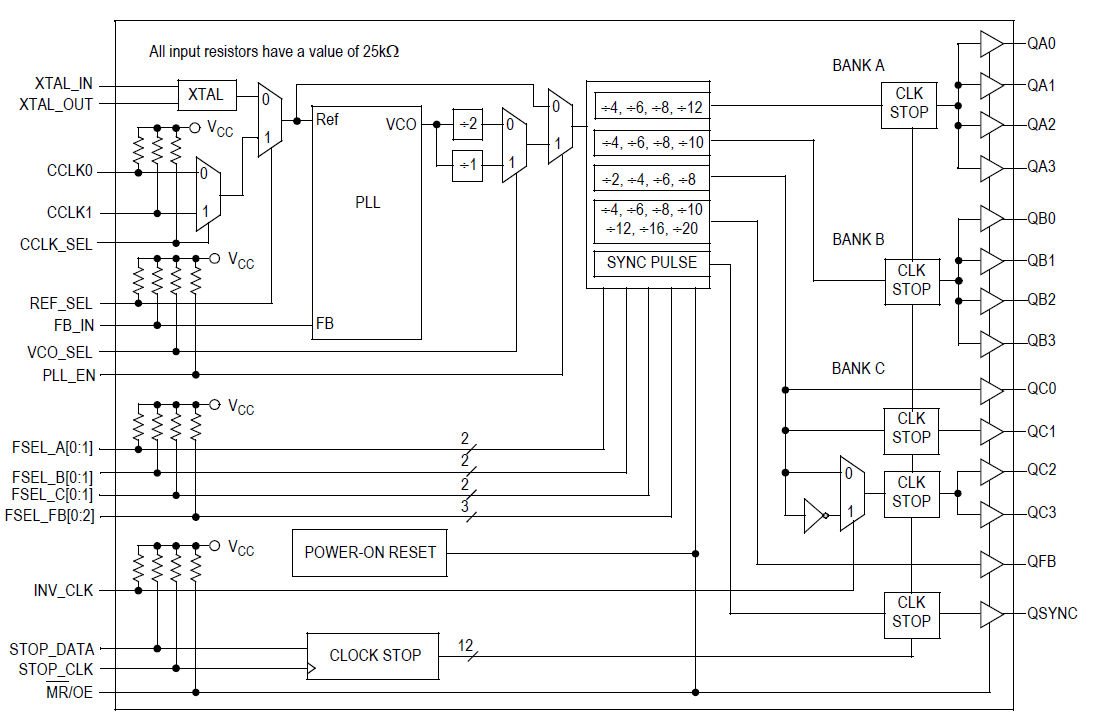
The MPC9772 utilizes PLL technology to frequency lock its outputs onto an input reference clock. Normal operation of the MPC9772 requires the connection of the PLL feedback output QFB to feedback input FB_IN to close the PLL feedback path. The reference clock frequency and the divider for the feedback path determine the VCO frequency. Both must be selected to match the VCO frequency range. The MPC9772 features an extensive level of frequency programmability between the 12 outputs as well as the output to input relationships, for instance 1:1, 2:1, 3:1, 3:2, 4:1, 4:3, 5:1, 5:2, 5:3, 5:4, 5:6, 6:1, 8:1, and 8:3. The QSYNC output will indicate when the coincident rising edges of the above relationships will occur. The selectability of the feedback frequency is independent of the output frequencies. This allows for very flexible programming of the input reference versus output frequency relationship. The output frequencies can be either odd or even multiples of the input reference. In addition the output frequency can be less than the input frequency for applications where a frequency needs to be reduced by a nonbinary factor. The MPC9772 also supports the 180° phase shift of one of its output banks with respect to the other output banks. The QSYNC outputs reflects the phase relationship between the QA and QC outputs and can be used for the generation of system baseline timing signals. The REF_SEL pin selects the internal crystal oscillator or the LVCMOS compatible inputs as the reference clock signal. Two alternative LVCMOS compatible clock inputs are provided for clock redundancy support. The PLL_EN control selects the PLL bypass configuration for test and diagnosis. In this configuration, the selected input reference clock is routed directly to the output dividers bypassing the PLL. The PLL bypass is fully static and the minimum clock frequency specification and all other PLL characteristics do not apply. The outputs can be individually disabled (stopped in logic low state) by programming the serial CLOCK_STOP interface of the MPC9772. The MPC9772 has an internal power-on reset. The MPC9772 is fully 3.3 V compatible and requires no external loop filter components. All inputs (except XTAL) accept LVCMOS signals while the outputs provide LVCMOS compatible levels with the capability to drive terminated 50 ? transmission lines. For series terminated transmission lines, each of the MPC9772 outputs can drive one or two traces giving the devices an effective fanout of 1:24. The device is pin and function compatible to the MPC972 and is packaged in a 52-lead LQFP package.
| Part Number | Status | Samples | Stock | Package | Lead Count (#) | Carrier Type | Moisture Sensitivity Level (MSL) | Qty. per Reel (#) | Qty. per Carrier (#) | Pb (Lead) Free | Pb Free Category | Temp. Range (°C) |
|---|---|---|---|---|---|---|---|---|---|---|---|---|
| MPC9772AE | Obsolete | N/A | Out of Stock | TQFP | 52# | Tray | 2 | 0 | 160# | Yes | e3 Sn | 0 to 70°C |
| MPC9772AER2 | Obsolete | N/A | Out of Stock | TQFP | 52# | Reel | 2 | 500# | 0 | Yes | e3 Sn | 0 to 70°C |
Loading
Filters
Applied Filters
Log in required to subscribe
- Application NotePDF 187 KB R31AN0065EU0101 Rev.1.01 Nov 14, 2023
- Application NotePDF 170 KB 7WDXRDKU4E7E-5-57318 May 13, 2014
- Application NotePDF 495 KB 7WDXRDKU4E7E-5-57312 May 12, 2014
- Application NotePDF 442 KB 7WDXRDKU4E7E-5-57298 May 08, 2014
- Application NotePDF 115 KB 7WDXRDKU4E7E-5-57294 May 07, 2014
- Application NotePDF 136 KB 7WDXRDKU4E7E-5-57044 Mar 12, 2014
Recommended Documents (1)
Datasheets (1)
No Results Found.
Check Spelling
Make sure all keywords are spelled correctly.
Adjust Keywords
Try fewer, different, or more general terms to vary your search.
Review Filters
If you have filters applied, consider deselecting some to broaden your results.
Need help?
- Search our extensive knowledgebase, designed to help customers with their FAQs.
- Get help from our expert Renesas technical staff and community on our support forums.
- Application NotePDF 187 KB R31AN0065EU0101 Rev.1.01 Nov 14, 2023
- Application NotePDF 1.99 MB 7WDXRDKU4E7E-5-57242 Mar 01, 2022
Application Notes & White Papers (18)
- End Of Life NoticePDF 161 KB 7WDXRDKU4E7E-5-59976 Mar 07, 2016
- Product Change NoticePDF 95 KB 7WDXRDKU4E7E-5-59609 Oct 22, 2015
- Product Change NoticePDF 50 KB 7WDXRDKU4E7E-5-59245 Jul 21, 2015
- Product Change NoticePDF 36 KB 7WDXRDKU4E7E-5-56946 Feb 16, 2014
- End Of Life NoticePDF 138 KB 7WDXRDKU4E7E-5-55610 Jun 14, 2013View More (8)
Product Notices (PCN, EOL, etc) (8)
Errata & Technical Updates (1)
No Results Found.
Check Spelling
Make sure all keywords are spelled correctly.
Adjust Keywords
Try fewer, different, or more general terms to vary your search.
Review Filters
If you have filters applied, consider deselecting some to broaden your results.
Need help?
- Search our extensive knowledgebase, designed to help customers with their FAQs.
- Get help from our expert Renesas technical staff and community on our support forums.
No Results Found.
Check Spelling
Make sure all keywords are spelled correctly.
Adjust Keywords
Try fewer, different, or more general terms to vary your search.
Review Filters
If you have filters applied, consider deselecting some to broaden your results.
Need help?
- Search our extensive knowledgebase, designed to help customers with their FAQs.
- Get help from our expert Renesas technical staff and community on our support forums.
No Results Found.
Check Spelling
Make sure all keywords are spelled correctly.
Adjust Keywords
Try fewer, different, or more general terms to vary your search.
Review Filters
If you have filters applied, consider deselecting some to broaden your results.
Need help?
- Search our extensive knowledgebase, designed to help customers with their FAQs.
- Get help from our expert Renesas technical staff and community on our support forums.
No Results Found.
Check Spelling
Make sure all keywords are spelled correctly.
Adjust Keywords
Try fewer, different, or more general terms to vary your search.
Review Filters
If you have filters applied, consider deselecting some to broaden your results.
Need help?
- Search our extensive knowledgebase, designed to help customers with their FAQs.
- Get help from our expert Renesas technical staff and community on our support forums.
No Results Found.
Check Spelling
Make sure all keywords are spelled correctly.
Adjust Keywords
Try fewer, different, or more general terms to vary your search.
Review Filters
If you have filters applied, consider deselecting some to broaden your results.
Need help?
- Search our extensive knowledgebase, designed to help customers with their FAQs.
- Get help from our expert Renesas technical staff and community on our support forums.
No Results Found.
Check Spelling
Make sure all keywords are spelled correctly.
Adjust Keywords
Try fewer, different, or more general terms to vary your search.
Review Filters
If you have filters applied, consider deselecting some to broaden your results.
Need help?
- Search our extensive knowledgebase, designed to help customers with their FAQs.
- Get help from our expert Renesas technical staff and community on our support forums.
No Results Found.
Check Spelling
Make sure all keywords are spelled correctly.
Adjust Keywords
Try fewer, different, or more general terms to vary your search.
Review Filters
If you have filters applied, consider deselecting some to broaden your results.
Need help?
- Search our extensive knowledgebase, designed to help customers with their FAQs.
- Get help from our expert Renesas technical staff and community on our support forums.
No Results Found.
Check Spelling
Make sure all keywords are spelled correctly.
Adjust Keywords
Try fewer, different, or more general terms to vary your search.
Review Filters
If you have filters applied, consider deselecting some to broaden your results.
Need help?
- Search our extensive knowledgebase, designed to help customers with their FAQs.
- Get help from our expert Renesas technical staff and community on our support forums.
No Results Found.
Check Spelling
Make sure all keywords are spelled correctly.
Adjust Keywords
Try fewer, different, or more general terms to vary your search.
Review Filters
If you have filters applied, consider deselecting some to broaden your results.
Need help?
- Search our extensive knowledgebase, designed to help customers with their FAQs.
- Get help from our expert Renesas technical staff and community on our support forums.
Support Communities
Get quick technical support online from Renesas Engineering Community technical staff.
Knowledge Base
Browse our knowledge base for helpful articles, FAQs, and other useful resources.