Features
- 6 channels
- 6V to 24V input
- 34.5V output maximum
- Drive maximally 54 (3.5V/30mA each) or 60 (3.2V/20mA each) LEDs
- Current matching ±1% typical
- Dynamic headroom control
- Dimming controls
- SMBus 8-bit PWM current control
- SMbus 8-bit DC current control
- External PWM input up to 20kHz dimming
- SMBus and external PWM DPST dimming control
- DC-to-PWM dimming control
- Protections
- String open circuit detection
- String short-circuit detection with selectable thresholds
- Over-temperature protection
- Overvoltage protection
- Input overcurrent protection with disconnect switch
- 600kHz/1.2MHz selectable fSW
- Selectable channels allows scrolling backlight
- 24 Ld (4mmx4mm) QFN package
- Pb-free (RoHS compliant)
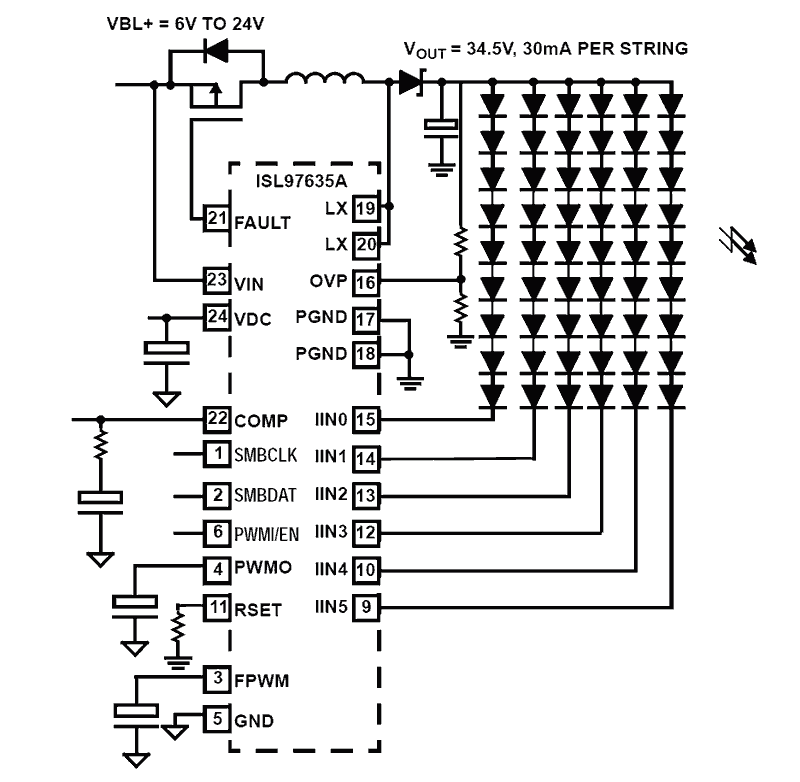
Description
The ISL97635A is a digitally controlled LED driver that controls 6 channels of LED current for LCD backlight applications. The ISL97635A is capable of driving typically 54 (6x9) pieces of 3. 5V/30mA or 60 (6x10) pieces of 3. 2V/20mA LEDs. The ISL97635A contains 6 channels of voltage controlled current sources with typical currents matching of ±1%, which compensate for the non-uniformity effect of forward voltages variance in the LED stacks. To minimize the voltage headroom and power loss in the typical multi-strings operation, the ISL97635A features a dynamic headroom control that monitors the highest LED forward voltage string and uses its feedback signal for output regulation. The LED dimming control can be achieved through a SMBus, an external PWM, or a variable DC (analog light sensor) input. SMBus controlled dimming allows 256 levels each of PWM and DC current adjustments. The SMBus PWM dimming frequency can be adjusted from 100Hz to 5kHz by an external capacitor. External PWM input allows up to 20kHz audio noise free PWM dimming. The SMBus PWM setting and an external PWMI signal can also be combined to provide a dynamic PWM dimming that complies with Intel’s DPST (Display Power Saving Technology) requirement. One or more channels can be selected sequentially in any order allowing scrolling in RGB LED backlighting applications. The ISL97635A features extensive protection functions that include string open and short-circuit detections, OVP, OTP, thermal shutdown, and an optional input overcurrent protection with master fault disconnect switch. The fault conditions will be recorded in the Fault/Status register. There are selectable short-circuit thresholds and the switching frequency can be programmed between 600kHz and 1. 2MHz. Available in the 24 Ld 4mmx4mm QFN, the ISL97635A operates from -40°C to +85°C with input voltage ranging from 6V to 24V for high LEDs count applications.
Applications
- Notebook Displays WLED or RGB LED Backlighting
- LCD Monitor LED Backlighting
- Automotive Displays LED Backlighting
- Automotive or Traffic Lighting
| Part Number | Status | Samples | Stock | RoHS | Package | Lead Count (#) | Carrier Type | Moisture Sensitivity Level (MSL) | Pb (Lead) Free | Pb Free Category | Temp. Range (°C) |
|---|---|---|---|---|---|---|---|---|---|---|---|
| ISL97635AIRZ | Obsolete | N/A | Out of Stock | RoHS:EN | QFN | 24# | Tube | 3 | Yes | Pb-Free 100% Matte Tin Plate w/Anneal-e3 | -40 to +85°C |
| ISL97635AIRZ-T | Obsolete | N/A | Out of Stock | RoHS:EN | QFN | 24# | Reel | 3 | Yes | Pb-Free 100% Matte Tin Plate w/Anneal-e3 | -40 to +85°C |
| ISL97635AIRZ-TK | Obsolete | N/A | Out of Stock | RoHS:EN | QFN | 24# | Reel | 3 | Yes | Pb-Free 100% Matte Tin Plate w/Anneal-e3 | -40 to +85°C |
- Product Change NoticePDF 202 KB Jul 07, 2021
- Product Change NoticePDF 326 KB May 21, 2021
- Product Change NoticePDF 398 KB PCN15046 Jan 07, 2016
- Product Change NoticePDF 299 KB PCN13038A Feb 07, 2014
- Product Change NoticePDF 248 KB PCN10055 Jun 30, 2010
Recommended Documents (1)
Datasheets (1)
No Results Found.
Make sure all keywords are spelled correctly.
Try fewer, different, or more general terms to vary your search.
If you have filters applied, consider deselecting some to broaden your results.
- Search our extensive knowledgebase, designed to help customers with their FAQs.
- Get help from our expert Renesas technical staff and community on our support forums.
No Results Found.
Make sure all keywords are spelled correctly.
Try fewer, different, or more general terms to vary your search.
If you have filters applied, consider deselecting some to broaden your results.
- Search our extensive knowledgebase, designed to help customers with their FAQs.
- Get help from our expert Renesas technical staff and community on our support forums.
- Product Change NoticePDF 202 KB Jul 07, 2021
- Product Change NoticePDF 326 KB May 21, 2021
- Product Change NoticePDF 398 KB PCN15046 Jan 07, 2016
- Product Change NoticePDF 299 KB PCN13038A Feb 07, 2014
- Product Change NoticePDF 248 KB PCN10055 Jun 30, 2010
Product Notices (PCN, EOL, etc) (5)
No Results Found.
Make sure all keywords are spelled correctly.
Try fewer, different, or more general terms to vary your search.
If you have filters applied, consider deselecting some to broaden your results.
- Search our extensive knowledgebase, designed to help customers with their FAQs.
- Get help from our expert Renesas technical staff and community on our support forums.
No Results Found.
Make sure all keywords are spelled correctly.
Try fewer, different, or more general terms to vary your search.
If you have filters applied, consider deselecting some to broaden your results.
- Search our extensive knowledgebase, designed to help customers with their FAQs.
- Get help from our expert Renesas technical staff and community on our support forums.
No Results Found.
Make sure all keywords are spelled correctly.
Try fewer, different, or more general terms to vary your search.
If you have filters applied, consider deselecting some to broaden your results.
- Search our extensive knowledgebase, designed to help customers with their FAQs.
- Get help from our expert Renesas technical staff and community on our support forums.
No Results Found.
Make sure all keywords are spelled correctly.
Try fewer, different, or more general terms to vary your search.
If you have filters applied, consider deselecting some to broaden your results.
- Search our extensive knowledgebase, designed to help customers with their FAQs.
- Get help from our expert Renesas technical staff and community on our support forums.
No Results Found.
Make sure all keywords are spelled correctly.
Try fewer, different, or more general terms to vary your search.
If you have filters applied, consider deselecting some to broaden your results.
- Search our extensive knowledgebase, designed to help customers with their FAQs.
- Get help from our expert Renesas technical staff and community on our support forums.
No Results Found.
Make sure all keywords are spelled correctly.
Try fewer, different, or more general terms to vary your search.
If you have filters applied, consider deselecting some to broaden your results.
- Search our extensive knowledgebase, designed to help customers with their FAQs.
- Get help from our expert Renesas technical staff and community on our support forums.
No Results Found.
Make sure all keywords are spelled correctly.
Try fewer, different, or more general terms to vary your search.
If you have filters applied, consider deselecting some to broaden your results.
- Search our extensive knowledgebase, designed to help customers with their FAQs.
- Get help from our expert Renesas technical staff and community on our support forums.
No Results Found.
Make sure all keywords are spelled correctly.
Try fewer, different, or more general terms to vary your search.
If you have filters applied, consider deselecting some to broaden your results.
- Search our extensive knowledgebase, designed to help customers with their FAQs.
- Get help from our expert Renesas technical staff and community on our support forums.
No Results Found.
Make sure all keywords are spelled correctly.
Try fewer, different, or more general terms to vary your search.
If you have filters applied, consider deselecting some to broaden your results.
- Search our extensive knowledgebase, designed to help customers with their FAQs.
- Get help from our expert Renesas technical staff and community on our support forums.