Features
- Works Under All Light Sources Including Sunlight
- Dual ADCs Measure ALS/Prox Concurrently
- Intelligent Interrupt Scheme Simplifies μC Code
- 0.5% Typical Nonlinearity
- Simple Output Code Directly Proportional to lux
- 50Hz/60Hz Flicker Noise and IR Rejection
- Light Sensor Close to Human Eye Response
- Selectable 125/2000 Lux Range
- Proximity Sensor with Broad IR Spectrum
- Can Use 850nm and 950nm External IR LEDs
- IR LED Driver with I2C Programmable Sink Currents
- Net 100μs Pulse with 110mA or 220mA Amplitudes
- Periodic Sleep Time up to 800ms Between Pulses
- Ambient IR Noise Cancellation (Including Sunlight)
- Independent ALS/Prox Interrupt Thresholds
- Adjustable Interrupt Persistency
- 1/4/8/16 Consecutive Triggers Required Before Interrupt
- 138μA DC Typical Supply Current for ALS/Prox Sensing
- 110μA for Sensors and Internal Circuitry
- 28μA Typical Current for External IR LED (Assuming 220mA for 100μs Every 800ms)
- <1.0μA Supply Current When Powered Down
- Set Registers; Wait for Interrupt
- I2C (SMBus Compatible) Output
- Temperature Compensated
- Tiny ODFN8 2.0mm x 2.1mm x 0.7mm Package
- 1.7V to 3.63V Supply for I2C Interface
- 2.25V to 3.63V Sensor Power Supply
- Pb-Free (RoHS Compliant)
- I2C Address Selection Pin
Description
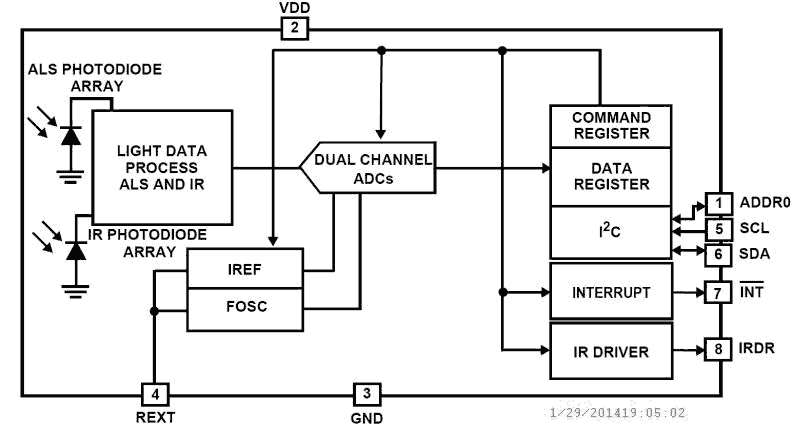
The ISL29028A is an integrated ambient and infrared light-to-digital converter with a built-in IR LED driver and I2C interface (SMBus compatible). This device uses two independent ADCs for concurrently measuring ambient light and proximity in parallel. The flexible interrupt scheme is designed for minimal microcontroller utilization. For ambient light sensor (ALS) data conversions, an ADC converts photodiode current (with a light sensitivity range up to 2000 Lux) in 100ms per sample. The ADC rejects 50Hz/60Hz flicker noise caused by artificial light sources. For proximity sensor (Prox) data conversions, the built-in driver turns on an external infrared LED and the proximity sensor ADC converts the reflected IR intensity to digital. This ADC rejects ambient IR noise (such as sunlight) and has a 540μs conversion time. The ISL29028A provides low power operation of ALS and proximity sensing with a typical 138μA normal operation current (110μA for sensors and internal circuitry, ~28μA for external LED) with 220mA current pulses for a net 100μs, repeating every 800ms (or under). The ISL29028A uses both a hardware pin and software bits to indicate an interrupt event has occurred. An ALS interrupt is defined as a measurement which is outside a set window. A proximity interrupt is defined as a measurement over a threshold limit. The user may also require that both ALS/prox interrupts occur at once, up to 16 times in a row before activating the interrupt pin. The ISL29028A is designed to operate from 2.25V to 3.63V over the -40 °C to +85 °C ambient temperature range. It is packaged in a clear, lead-free 8 lead ODFN package.
Applications
- Display and Keypad Dimming Adjustment and Proximity Sensing
- Mobile Devices: Smartphones, PDAs, GPS
- Computing Devices: Laptop PCs, Netbooks
- Consumer Devices: LCD-TVs, Digital Picture Frames, Digital Cameras
- Industrial and Medical Light and Proximity Sensing
| Part Number | Status | Samples | Stock | RoHS | Package | Carrier Type | MOQ |
|---|---|---|---|---|---|---|---|
| ISL29028AIROZ-T7 | Obsolete | N/A | In Stock | RoHS:EN | HODFN | Reel | 3000 |
Filters
Applied Filters
- Product Change NoticePDF 138 KB Apr 23, 2021
- Product Change NoticePDF 76 KB PCN15010 Dec 08, 2015
- Application NotePDF 563 KB an1436 Oct 30, 2008AI-generated Summary: The document explains the mechanical design considerations for proximity sensing systems, focusing on the placement and spacing of IR LEDs, sensors, and barriers to optimize detection sensitivity and minimize crosstalk. It details how distances between components (sensor to LED, sensor to barrier, LED to barrier) affect proximity readout and sensitivity. The importance of barrier height and glass cover transmissivity on sensor performance is discussed. Additionally, it covers the impact of window lens material and dimensions on viewing angle and sensor effectiveness.
- Application NotePDF 712 KB an1737 Jan 19, 2004AI-generated Summary: The document explains eye safety considerations for proximity sensing using infrared LEDs. It details how to calculate total irradiance and retinal thermal hazard exposure limits based on LED specifications, source size, pupil diameter, and wavelength. The retinal hazard depends on exposure time and angular subtense, with specific limits defined by IEC-62471 standards. It introduces an Intersil Eye Safety Calculator that helps designers input LED and sensor data to assess eye safety risks, including corneal and retinal exposure hazards, with clear pass/fail indicators based on exposure duration and distance.
- Application NotePDF 276 KB an1682 Jan 19, 2004AI-generated Summary: The document outlines Renesas Electronics' disclaimers and responsibilities regarding the use of their semiconductor products, circuits, and software. It emphasizes that users bear full responsibility for product design and safety measures, including compliance with laws and regulations. The products are categorized into Standard and High Quality grades, with specific application guidelines. Renesas disclaims liability for damages from improper use, modifications, or use outside specified conditions. Contact information for global sales offices is provided.
Recommended Documents (1)
Datasheets (1)
No Results Found.
Make sure all keywords are spelled correctly.
Try fewer, different, or more general terms to vary your search.
If you have filters applied, consider deselecting some to broaden your results.
- Search our extensive knowledgebase, designed to help customers with their FAQs.
- Get help from our expert Renesas technical staff and community on our support forums.
- Application NotePDF 563 KB an1436 Oct 30, 2008AI-generated Summary: The document explains the mechanical design considerations for proximity sensing systems, focusing on the placement and spacing of IR LEDs, sensors, and barriers to optimize detection sensitivity and minimize crosstalk. It details how distances between components (sensor to LED, sensor to barrier, LED to barrier) affect proximity readout and sensitivity. The importance of barrier height and glass cover transmissivity on sensor performance is discussed. Additionally, it covers the impact of window lens material and dimensions on viewing angle and sensor effectiveness.
- Application NotePDF 712 KB an1737 Jan 19, 2004AI-generated Summary: The document explains eye safety considerations for proximity sensing using infrared LEDs. It details how to calculate total irradiance and retinal thermal hazard exposure limits based on LED specifications, source size, pupil diameter, and wavelength. The retinal hazard depends on exposure time and angular subtense, with specific limits defined by IEC-62471 standards. It introduces an Intersil Eye Safety Calculator that helps designers input LED and sensor data to assess eye safety risks, including corneal and retinal exposure hazards, with clear pass/fail indicators based on exposure duration and distance.
- Application NotePDF 276 KB an1682 Jan 19, 2004AI-generated Summary: The document outlines Renesas Electronics' disclaimers and responsibilities regarding the use of their semiconductor products, circuits, and software. It emphasizes that users bear full responsibility for product design and safety measures, including compliance with laws and regulations. The products are categorized into Standard and High Quality grades, with specific application guidelines. Renesas disclaims liability for damages from improper use, modifications, or use outside specified conditions. Contact information for global sales offices is provided.
Application Notes & White Papers (3)
- Product Change NoticePDF 138 KB Apr 23, 2021
- Product Change NoticePDF 76 KB PCN15010 Dec 08, 2015
Product Notices (PCN, EOL, etc) (3)
No Results Found.
Make sure all keywords are spelled correctly.
Try fewer, different, or more general terms to vary your search.
If you have filters applied, consider deselecting some to broaden your results.
- Search our extensive knowledgebase, designed to help customers with their FAQs.
- Get help from our expert Renesas technical staff and community on our support forums.
No Results Found.
Make sure all keywords are spelled correctly.
Try fewer, different, or more general terms to vary your search.
If you have filters applied, consider deselecting some to broaden your results.
- Search our extensive knowledgebase, designed to help customers with their FAQs.
- Get help from our expert Renesas technical staff and community on our support forums.
No Results Found.
Make sure all keywords are spelled correctly.
Try fewer, different, or more general terms to vary your search.
If you have filters applied, consider deselecting some to broaden your results.
- Search our extensive knowledgebase, designed to help customers with their FAQs.
- Get help from our expert Renesas technical staff and community on our support forums.
No Results Found.
Make sure all keywords are spelled correctly.
Try fewer, different, or more general terms to vary your search.
If you have filters applied, consider deselecting some to broaden your results.
- Search our extensive knowledgebase, designed to help customers with their FAQs.
- Get help from our expert Renesas technical staff and community on our support forums.
No Results Found.
Make sure all keywords are spelled correctly.
Try fewer, different, or more general terms to vary your search.
If you have filters applied, consider deselecting some to broaden your results.
- Search our extensive knowledgebase, designed to help customers with their FAQs.
- Get help from our expert Renesas technical staff and community on our support forums.
No Results Found.
Make sure all keywords are spelled correctly.
Try fewer, different, or more general terms to vary your search.
If you have filters applied, consider deselecting some to broaden your results.
- Search our extensive knowledgebase, designed to help customers with their FAQs.
- Get help from our expert Renesas technical staff and community on our support forums.
No Results Found.
Make sure all keywords are spelled correctly.
Try fewer, different, or more general terms to vary your search.
If you have filters applied, consider deselecting some to broaden your results.
- Search our extensive knowledgebase, designed to help customers with their FAQs.
- Get help from our expert Renesas technical staff and community on our support forums.
No Results Found.
Make sure all keywords are spelled correctly.
Try fewer, different, or more general terms to vary your search.
If you have filters applied, consider deselecting some to broaden your results.
- Search our extensive knowledgebase, designed to help customers with their FAQs.
- Get help from our expert Renesas technical staff and community on our support forums.
No Results Found.
Make sure all keywords are spelled correctly.
Try fewer, different, or more general terms to vary your search.
If you have filters applied, consider deselecting some to broaden your results.
- Search our extensive knowledgebase, designed to help customers with their FAQs.
- Get help from our expert Renesas technical staff and community on our support forums.
No Results Found.
Make sure all keywords are spelled correctly.
Try fewer, different, or more general terms to vary your search.
If you have filters applied, consider deselecting some to broaden your results.
- Search our extensive knowledgebase, designed to help customers with their FAQs.
- Get help from our expert Renesas technical staff and community on our support forums.