
Features
- 62ns total delay
- 2ns delay step increments
- Operates from ±5V supply
- Up to 122MHz bandwidth
- Low power consumption
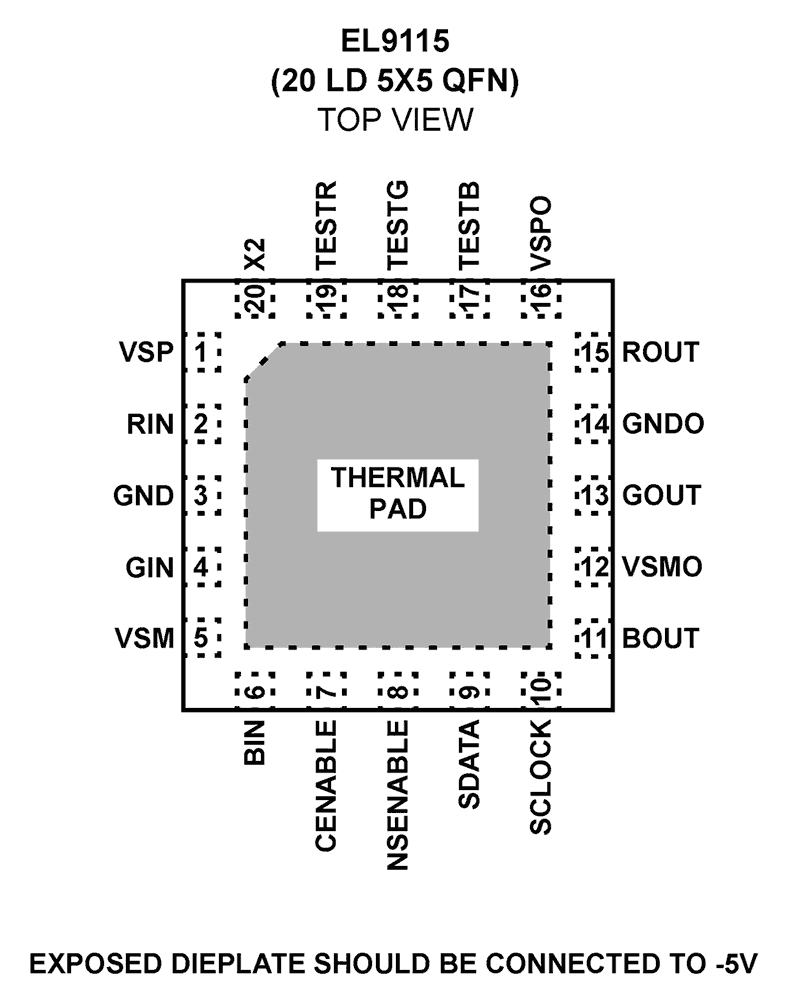
- 20 Ld QFN (5mmx5mm) package
- Pb-free (RoHS compliant)
EL9115 Functional Diagram
Description
The EL9115 is a triple analog delay line that allows skew compensation between any three signals. This part is perfect for compensating for the skew introduced by a typical CAT-5 cable with differing electrical lengths on each pair. The EL9115 can be programmed in steps of 2ns up to 62ns total delay on each channel.
Applications
- Skew control for RGB
- Analog beamforming
| Part Number | Status | Samples | Stock | RoHS | Package | Carrier Type |
|---|---|---|---|---|---|---|
| EL9115ILZ | Obsolete | N/A | In Stock | RoHS:EN | QFN | Tube |
| EL9115ILZ-T13 | Obsolete | N/A | Out of Stock | RoHS:EN | QFN | Reel |
| EL9115ILZ-T7 | Obsolete | N/A | Out of Stock | RoHS:EN | QFN | Reel |
Loading
Filters
Applied Filters
Log in required to subscribe
- Product Change NoticePDF 291 KB PCN11102 Sep 30, 2011
- Application NotePDF 644 KB an1695 Jan 19, 2004AI-generated Summary: The document explains video synchronization pulses, focusing on bi-level and tri-level sync used in analog and HD video respectively. Tri-level sync reduces DC offset, improving HD signal accuracy. Video signal levels are measured in IRE units, with specific values for sync and blanking levels. It discusses video display concepts such as refresh rate, frame rate, interlaced and progressive scanning, and scan lines. High definition video standards like 720p and 1080i frame rates and refresh rate conversions for film content are also covered.
- Application NotePDF 929 KB an1307 Jan 19, 2004AI-generated Summary: The document addresses common video transmission issues over CAT-5 cables, including ghosting caused by improper termination, color mismatch due to gain or offset differences, common-mode noise affecting synchronization, power supply noise causing picture disturbances, and channel timing mismatches leading to color blurring. It explains termination schemes for driver and receiver sides, and presents equalization techniques to compensate for signal attenuation and distortion inherent in CAT-5 cables. Solutions include hardware adjustments and integrated circuits for delay and gain correction.
- Application NotePDF 311 KB an1099 Apr 15, 2003AI-generated Summary: The document outlines important legal disclaimers and usage guidelines for semiconductor products. It emphasizes user responsibility for product design and safety, disclaims liability for damages from misuse, and clarifies intellectual property rights. Products are categorized into Standard and High Quality grades with specific application scopes. Users must comply with environmental, export, and safety regulations and consult Renesas for further information.
- Application NotePDF 320 KB an9738 Jan 10, 2002AI-generated Summary: The content details typical vertical blanking intervals and data formats for video systems using rectangular and square pixels at 525/60 and 625/50 standards. It explains line numbering, field activity (VACTIVE), and blanking periods for odd and even fields. Figures illustrate timing relationships and digital active line starts for these video formats, highlighting synchronization and pixel timing specifics.
- Application NotePDF 250 KB an9764 Aug 20, 1998AI-generated Summary: The document provides important legal and usage disclaimers for semiconductor products, emphasizing user responsibility for design incorporation and compliance with laws. It clarifies that Renesas disclaims liability for damages from improper use, alteration, or reverse engineering. Products are categorized into 'Standard' and 'High Quality' grades with specific application guidelines. Users must follow specified operating conditions and implement safety measures. Environmental and export regulations must be observed. Contact details for Renesas sales offices worldwide are provided for further inquiries.
- Application NotePDF 1002 KB an9759 Aug 20, 1998AI-generated Summary: This section explains key parameters and applications of amplifiers, analog switches, multiplexers, and video crosspoint switches. It details amplifier characteristics such as bandwidth, gain flatness, slew rate, differential gain and phase, output current, and supply voltage. Special amplifier features include output voltage limiting and programmable gain. Analog switches enable high-speed signal routing controlled digitally. Multiplexers select among multiple analog signals for routing or sampling. Video crosspoint switches route multiple video sources to multiple destinations using buffer amplifiers with enable control.
- Application NotePDF 2.79 MB an9644 Aug 15, 1998AI-generated Summary: The document explains composite video separation techniques including color trap filter and comb filter methods. The color trap filter uses a notch filter centered at the color subcarrier frequency to separate chrominance but limits bandwidth and causes cross color artifacts. The comb filter exploits chrominance phase inversion between lines to separate luminance and chrominance, preserving full bandwidth luminance and reducing cross color effects. However, it can produce hanging dots on sharp vertical transitions. PAL video requires additional correction due to different chroma interleaving.
- Application NotePDF 410 KB an9741 Jun 25, 1997AI-generated Summary: The document explains the design and operation of bipolar and CMOS DACs, highlighting their structures, characteristics, and applications. Bipolar DACs use bipolar junction transistors for high speed and output current but consume more power. CMOS DACs employ CMOS transistors and R-2R ladders with bit switches, offering lower power consumption. It discusses DAC output current conversion to voltage, compensation techniques for op amps, and inverted DAC operation. Key DAC errors such as offset, gain, and linearity are detailed with correction methods.
Recommended Documents (1)
Datasheets (1)
No Results Found.
Check Spelling
Make sure all keywords are spelled correctly.
Make sure all keywords are spelled correctly.
Adjust Keywords
Try fewer, different, or more general terms to vary your search.
Try fewer, different, or more general terms to vary your search.
Review Filters
If you have filters applied, consider deselecting some to broaden your results.
If you have filters applied, consider deselecting some to broaden your results.
Need help?
- Search our extensive knowledgebase, designed to help customers with their FAQs.
- Get help from our expert Renesas technical staff and community on our support forums.
- Application NotePDF 644 KB an1695 Jan 19, 2004AI-generated Summary: The document explains video synchronization pulses, focusing on bi-level and tri-level sync used in analog and HD video respectively. Tri-level sync reduces DC offset, improving HD signal accuracy. Video signal levels are measured in IRE units, with specific values for sync and blanking levels. It discusses video display concepts such as refresh rate, frame rate, interlaced and progressive scanning, and scan lines. High definition video standards like 720p and 1080i frame rates and refresh rate conversions for film content are also covered.
- Application NotePDF 929 KB an1307 Jan 19, 2004AI-generated Summary: The document addresses common video transmission issues over CAT-5 cables, including ghosting caused by improper termination, color mismatch due to gain or offset differences, common-mode noise affecting synchronization, power supply noise causing picture disturbances, and channel timing mismatches leading to color blurring. It explains termination schemes for driver and receiver sides, and presents equalization techniques to compensate for signal attenuation and distortion inherent in CAT-5 cables. Solutions include hardware adjustments and integrated circuits for delay and gain correction.
- Application NotePDF 311 KB an1099 Apr 15, 2003AI-generated Summary: The document outlines important legal disclaimers and usage guidelines for semiconductor products. It emphasizes user responsibility for product design and safety, disclaims liability for damages from misuse, and clarifies intellectual property rights. Products are categorized into Standard and High Quality grades with specific application scopes. Users must comply with environmental, export, and safety regulations and consult Renesas for further information.
- Application NotePDF 320 KB an9738 Jan 10, 2002AI-generated Summary: The content details typical vertical blanking intervals and data formats for video systems using rectangular and square pixels at 525/60 and 625/50 standards. It explains line numbering, field activity (VACTIVE), and blanking periods for odd and even fields. Figures illustrate timing relationships and digital active line starts for these video formats, highlighting synchronization and pixel timing specifics.
- Application NotePDF 250 KB an9764 Aug 20, 1998AI-generated Summary: The document provides important legal and usage disclaimers for semiconductor products, emphasizing user responsibility for design incorporation and compliance with laws. It clarifies that Renesas disclaims liability for damages from improper use, alteration, or reverse engineering. Products are categorized into 'Standard' and 'High Quality' grades with specific application guidelines. Users must follow specified operating conditions and implement safety measures. Environmental and export regulations must be observed. Contact details for Renesas sales offices worldwide are provided for further inquiries.View More (8)
Application Notes & White Papers (8)
- Product Change NoticePDF 291 KB PCN11102 Sep 30, 2011
Product Notices (PCN, EOL, etc) (2)
No Results Found.
Check Spelling
Make sure all keywords are spelled correctly.
Make sure all keywords are spelled correctly.
Adjust Keywords
Try fewer, different, or more general terms to vary your search.
Try fewer, different, or more general terms to vary your search.
Review Filters
If you have filters applied, consider deselecting some to broaden your results.
If you have filters applied, consider deselecting some to broaden your results.
Need help?
- Search our extensive knowledgebase, designed to help customers with their FAQs.
- Get help from our expert Renesas technical staff and community on our support forums.
No Results Found.
Check Spelling
Make sure all keywords are spelled correctly.
Make sure all keywords are spelled correctly.
Adjust Keywords
Try fewer, different, or more general terms to vary your search.
Try fewer, different, or more general terms to vary your search.
Review Filters
If you have filters applied, consider deselecting some to broaden your results.
If you have filters applied, consider deselecting some to broaden your results.
Need help?
- Search our extensive knowledgebase, designed to help customers with their FAQs.
- Get help from our expert Renesas technical staff and community on our support forums.
No Results Found.
Check Spelling
Make sure all keywords are spelled correctly.
Make sure all keywords are spelled correctly.
Adjust Keywords
Try fewer, different, or more general terms to vary your search.
Try fewer, different, or more general terms to vary your search.
Review Filters
If you have filters applied, consider deselecting some to broaden your results.
If you have filters applied, consider deselecting some to broaden your results.
Need help?
- Search our extensive knowledgebase, designed to help customers with their FAQs.
- Get help from our expert Renesas technical staff and community on our support forums.
No Results Found.
Check Spelling
Make sure all keywords are spelled correctly.
Make sure all keywords are spelled correctly.
Adjust Keywords
Try fewer, different, or more general terms to vary your search.
Try fewer, different, or more general terms to vary your search.
Review Filters
If you have filters applied, consider deselecting some to broaden your results.
If you have filters applied, consider deselecting some to broaden your results.
Need help?
- Search our extensive knowledgebase, designed to help customers with their FAQs.
- Get help from our expert Renesas technical staff and community on our support forums.
No Results Found.
Check Spelling
Make sure all keywords are spelled correctly.
Make sure all keywords are spelled correctly.
Adjust Keywords
Try fewer, different, or more general terms to vary your search.
Try fewer, different, or more general terms to vary your search.
Review Filters
If you have filters applied, consider deselecting some to broaden your results.
If you have filters applied, consider deselecting some to broaden your results.
Need help?
- Search our extensive knowledgebase, designed to help customers with their FAQs.
- Get help from our expert Renesas technical staff and community on our support forums.
No Results Found.
Check Spelling
Make sure all keywords are spelled correctly.
Make sure all keywords are spelled correctly.
Adjust Keywords
Try fewer, different, or more general terms to vary your search.
Try fewer, different, or more general terms to vary your search.
Review Filters
If you have filters applied, consider deselecting some to broaden your results.
If you have filters applied, consider deselecting some to broaden your results.
Need help?
- Search our extensive knowledgebase, designed to help customers with their FAQs.
- Get help from our expert Renesas technical staff and community on our support forums.
No Results Found.
Check Spelling
Make sure all keywords are spelled correctly.
Make sure all keywords are spelled correctly.
Adjust Keywords
Try fewer, different, or more general terms to vary your search.
Try fewer, different, or more general terms to vary your search.
Review Filters
If you have filters applied, consider deselecting some to broaden your results.
If you have filters applied, consider deselecting some to broaden your results.
Need help?
- Search our extensive knowledgebase, designed to help customers with their FAQs.
- Get help from our expert Renesas technical staff and community on our support forums.
No Results Found.
Check Spelling
Make sure all keywords are spelled correctly.
Make sure all keywords are spelled correctly.
Adjust Keywords
Try fewer, different, or more general terms to vary your search.
Try fewer, different, or more general terms to vary your search.
Review Filters
If you have filters applied, consider deselecting some to broaden your results.
If you have filters applied, consider deselecting some to broaden your results.
Need help?
- Search our extensive knowledgebase, designed to help customers with their FAQs.
- Get help from our expert Renesas technical staff and community on our support forums.
No Results Found.
Check Spelling
Make sure all keywords are spelled correctly.
Make sure all keywords are spelled correctly.
Adjust Keywords
Try fewer, different, or more general terms to vary your search.
Try fewer, different, or more general terms to vary your search.
Review Filters
If you have filters applied, consider deselecting some to broaden your results.
If you have filters applied, consider deselecting some to broaden your results.
Need help?
- Search our extensive knowledgebase, designed to help customers with their FAQs.
- Get help from our expert Renesas technical staff and community on our support forums.
No Results Found.
Check Spelling
Make sure all keywords are spelled correctly.
Make sure all keywords are spelled correctly.
Adjust Keywords
Try fewer, different, or more general terms to vary your search.
Try fewer, different, or more general terms to vary your search.
Review Filters
If you have filters applied, consider deselecting some to broaden your results.
If you have filters applied, consider deselecting some to broaden your results.
Need help?
- Search our extensive knowledgebase, designed to help customers with their FAQs.
- Get help from our expert Renesas technical staff and community on our support forums.

Support Communities
Get quick technical support online from Renesas Engineering Community technical staff.

Knowledge Base
Browse our knowledge base for helpful articles, FAQs, and other useful resources.

