Features
- Designed to be Microsoft Windows 8 touch compliant
- Designed to work with Intel Ultrabook™
- Supports screen sizes up to 36 inches
- Supports edge-to-edge, bezel-free top cover lens
- 10 bits touch resolution
- Smooth pressure sensing
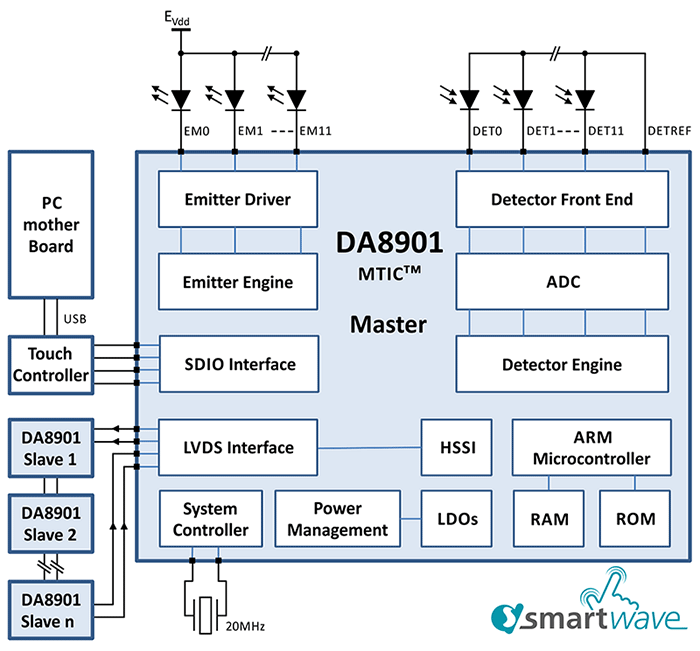
- Scalable master/slave operation supporting up to 15 slaves
- Configurable emitter engine
- 12x fully integrated emitter drivers (internal mode)
- Provides control for 100s of emitters (external mode)
- 12 channel detector
- High dynamic range for flexible screen sizes
- Dynamic ambient light cancellation for robust operation
- High linearity ADC for stable operation
- 3 full custom ALUs for optimized processing efficiency
- Power management with fast start up for optimal power saving
- Integrated Arm® Cortex®-M0 processor and memory system
- Small footprint package for ultra-narrow PCB design
Description
Highly Integrated MTIC™ Supporting FlatFrog Planar Scatter Detection Touch
Using in-lens infrared light, the system can detect and track multiple touches, gestures and pressures from gloved hands, a stylus and other objects providing a more natural true-touch user experience at performance levels comparable to the latest capacitance-based solutions but at a fraction of the cost.
The DA8901 is optimized for any display type between 11 and 36 inches using FlatFrog PSD Touch and is suitable for both Microsoft Windows 8 and Intel Ultrabook PCs including All-in-Ones, laptops and monitors.
FlatFrog PSD Touch works with glass or plastic cover lenses, eliminating the need for expensive ITO layers. It uses standard low-cost electrical components and high-yielding assembly processes to provide superior multi-touch at a lower cost compared to projected capacitive.
Packages
- aQFN (5.7mm x 5.0mm)
- 59-pin 0.4mm pitch
Applications
- Intel Ultrabook™, ultra-slim, convertibles, and notebook PCs
- All-in-One PCs, PC monitors and IPTVs
- White PaperPDF 430 KB Feb 16, 2016Touchscreen design is no longer limited to a few traditional performance factors. FlatFrog InGlass™ FTIR technology removes barriers to large-format touchscreens, enabling new interactive options without key design concessions and offering a more comprehensive, high-performance user experience.
Recommended Documents (1)
No Results Found.
Make sure all keywords are spelled correctly.
Try fewer, different, or more general terms to vary your search.
If you have filters applied, consider deselecting some to broaden your results.
- Search our extensive knowledgebase, designed to help customers with their FAQs.
- Get help from our expert Renesas technical staff and community on our support forums.
No Results Found.
Make sure all keywords are spelled correctly.
Try fewer, different, or more general terms to vary your search.
If you have filters applied, consider deselecting some to broaden your results.
- Search our extensive knowledgebase, designed to help customers with their FAQs.
- Get help from our expert Renesas technical staff and community on our support forums.
- White PaperPDF 430 KB Feb 16, 2016Touchscreen design is no longer limited to a few traditional performance factors. FlatFrog InGlass™ FTIR technology removes barriers to large-format touchscreens, enabling new interactive options without key design concessions and offering a more comprehensive, high-performance user experience.
Application Notes & White Papers (1)
No Results Found.
Make sure all keywords are spelled correctly.
Try fewer, different, or more general terms to vary your search.
If you have filters applied, consider deselecting some to broaden your results.
- Search our extensive knowledgebase, designed to help customers with their FAQs.
- Get help from our expert Renesas technical staff and community on our support forums.
No Results Found.
Make sure all keywords are spelled correctly.
Try fewer, different, or more general terms to vary your search.
If you have filters applied, consider deselecting some to broaden your results.
- Search our extensive knowledgebase, designed to help customers with their FAQs.
- Get help from our expert Renesas technical staff and community on our support forums.
No Results Found.
Make sure all keywords are spelled correctly.
Try fewer, different, or more general terms to vary your search.
If you have filters applied, consider deselecting some to broaden your results.
- Search our extensive knowledgebase, designed to help customers with their FAQs.
- Get help from our expert Renesas technical staff and community on our support forums.
No Results Found.
Make sure all keywords are spelled correctly.
Try fewer, different, or more general terms to vary your search.
If you have filters applied, consider deselecting some to broaden your results.
- Search our extensive knowledgebase, designed to help customers with their FAQs.
- Get help from our expert Renesas technical staff and community on our support forums.
No Results Found.
Make sure all keywords are spelled correctly.
Try fewer, different, or more general terms to vary your search.
If you have filters applied, consider deselecting some to broaden your results.
- Search our extensive knowledgebase, designed to help customers with their FAQs.
- Get help from our expert Renesas technical staff and community on our support forums.
No Results Found.
Make sure all keywords are spelled correctly.
Try fewer, different, or more general terms to vary your search.
If you have filters applied, consider deselecting some to broaden your results.
- Search our extensive knowledgebase, designed to help customers with their FAQs.
- Get help from our expert Renesas technical staff and community on our support forums.
No Results Found.
Make sure all keywords are spelled correctly.
Try fewer, different, or more general terms to vary your search.
If you have filters applied, consider deselecting some to broaden your results.
- Search our extensive knowledgebase, designed to help customers with their FAQs.
- Get help from our expert Renesas technical staff and community on our support forums.
Marketing Collateral (1)
No Results Found.
Make sure all keywords are spelled correctly.
Try fewer, different, or more general terms to vary your search.
If you have filters applied, consider deselecting some to broaden your results.
- Search our extensive knowledgebase, designed to help customers with their FAQs.
- Get help from our expert Renesas technical staff and community on our support forums.
No Results Found.
Make sure all keywords are spelled correctly.
Try fewer, different, or more general terms to vary your search.
If you have filters applied, consider deselecting some to broaden your results.
- Search our extensive knowledgebase, designed to help customers with their FAQs.
- Get help from our expert Renesas technical staff and community on our support forums.