Features
- Zero latency synthetic current control for excellent HF current balance
- Dual edge modulation for fastest transient response
- Auto phase add/drop for excellent load vs efficiency profile
- PMBus V1.3 support - Telemetry: VIN, VOUT, IOUT, power IN/OUT, temperature, and various fault status registers; Up to 1MHz bus interface
- Flexible phase configuration: 7+0, 6+1, 5+2, and 4+3 phase operation; Operation using fewer than seven phases between two outputs is also supported
- Diode braking for overshoot reduction
- Differential remote voltage sensing supports ±0.5% closed loop system accuracy over load, line, and temperature
- Highly accurate current sensing for excellent load line regulation and accurate OCP
- Comprehensive fault management enables high reliability systems
- Intuitive configuration using PowerNavigator; NVM to store up to eight configurations
- Pb-free (RoHS compliant)
Description
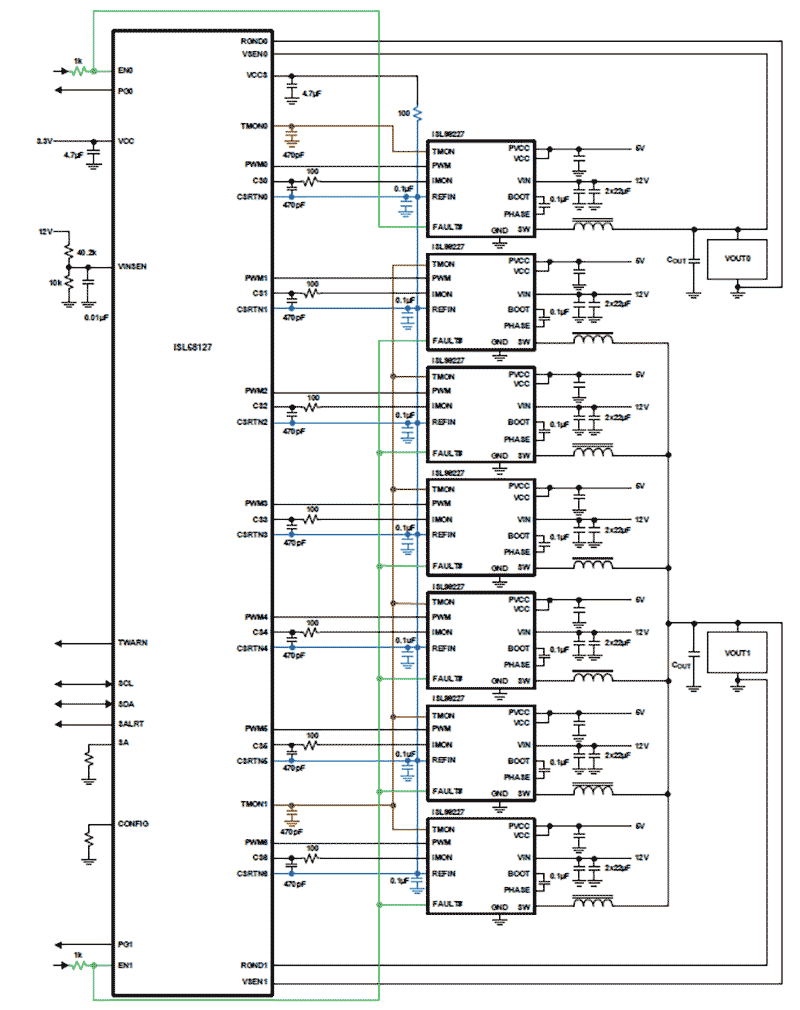
The ISL68127 is a digital dual output, flexible multiphase (X+Y ≤ 7) PWM controller supporting the latest PMBus V1. 3 specifications. The ISL68127can be configured to support any desired phase assignments up to a maximum of seven phases across the two outputs (X+Y). For example, 6+1, 5+2, 4+2, 3+3, 3+2, or even a single output operation as a 7+0 configuration are supported. The ISL68127 uses the Renesas proprietary linear synthetic digital current modulation scheme to achieve the industry's best combination of transient response and ease of tuning while addressing the challenges of modern multiphase designs. You can configure the device and monitor telemetry using the intuitive Renesas PowerNavigator GUI. The ISL68127 device supports on-chip nonvolatile memory to store various configuration settings that are user-selectable through pin-strap, giving system designers increased power density to configure and deploy multiple configurations. The automatic phase add/drop feature allows maximum efficiency across all load ranges. Thresholds for automatic phase add/drop are user-programmable using PowerNavigator. The ISL68127 supports a comprehensive fault management system to enable the design of highly reliable systems. From a multitiered overcurrent protection scheme to the configurable power-good and output overvoltage/undervoltage fault thresholds and temperature monitoring, almost any need is accommodated. With minimal external components, easy configuration, robust fault management, and highly accurate regulation capability, implementing a high-performance, multiphase regulator has never been easier.
Parameters
| Attributes | Value |
|---|---|
| Outputs (Max) (#) | 2 |
| Phases (Max) | 7 |
| Input Voltage (Min) (V) | 4.5 |
| Input Voltage (Max) (V) | 25 |
| Output Voltage (Max) (V) | 3.05 |
| Output Current (Max) [Rail 1] (A) | 450 |
| Bias Voltage Range (V) | 3.3 - 3.3 |
| Parametric Applications | Networking equipment, Telecom/datacom equipment, Server/storage equipment, Point-of-load power supply (Memory, DSP, ASIC, FPGA) |
| Qualification Level | Standard |
| Temp. Range (°C) | -40 to +85°C |
Package Options
| Pkg. Type | Pkg. Dimensions (mm) | Lead Count (#) | Pitch (mm) |
|---|---|---|---|
| QFN | 6.0 x 6.0 x 0.90 | 48 | 0.4 |
Complete Your Design
Explore complementary products to elevate your design
| Part Number | Status | Samples | Stock | RoHS | Package | Budgetary Price (USD) | Lead Count (#) | Carrier Type | Moisture Sensitivity Level (MSL) | Pb (Lead) Free | Pb Free Category | Temp. Range (°C) | Country of Assembly | Country of Wafer Fabrication |
|---|---|---|---|---|---|---|---|---|---|---|---|---|---|---|
| ISL68127IRAZ-T | Active | Available | In Stock | RoHS:EN | QFN | 1ku | $4.98 | 48# | Reel | 3 | Yes | Pb-Free 100% Matte Tin Plate w/Anneal-e3 | -40 to +85°C | MALAYSIA, TAIWAN | SINGAPORE |
| ISL68127IRAZ | Obsolete | N/A | In Stock | RoHS:EN | QFN | 48# | Tray | 3 | Yes | Pb-Free 100% Matte Tin Plate w/Anneal-e3 | -40 to +85°C | |||
| ISL68127IRAZ-T7A | Last Time Buy | N/A | In Stock | RoHS:EN | QFN | 1ku | $5.53 | 48# | Reel | 3 | Yes | Pb-Free 100% Matte Tin Plate w/Anneal-e3 | -40 to +85°C | MALAYSIA, TAIWAN | SINGAPORE |
Complete Your Design
Explore complementary products to elevate your design
Filters
Applied Filters
- Product Change NoticePDF 169 KB Nov 17, 2022
- Product Change NoticePDF 166 KB Dec 03, 2021
- Product Change NoticePDF 166 KB Aug 09, 2021
- Manual - Development ToolsPDF 257 KB r12uz0043eu-islusbeval1z-user-manual Feb 28, 2019
- White PaperPDF 298 KB how-to-power-iot-infrastructure-more-efficiently_de Aug 14, 2018
- Manual - Development ToolsPDF 5.52 MB powernavigator-digital-multiphase-user-guide Apr 09, 2018
- Product Change NoticePDF 490 KB PCN17030 Jul 07, 2017
- GuidePDF 714 KB production-config-tool-guide Oct 29, 2016
- Application NotePDF 397 KB an1684 Jan 19, 2004AI-generated Summary: The document outlines important legal disclaimers and usage guidelines for semiconductor products. It emphasizes user responsibility for product design and safety, disclaims liability for damages, and clarifies no intellectual property licenses are granted. Products are categorized by quality grades with specific application recommendations. Users must comply with laws, avoid unauthorized modifications, and ensure safe use within specified conditions. Contact details for Renesas Electronics sales offices worldwide are provided.
- Application NotePDF 509 KB an1681 Jan 19, 2004AI-generated Summary: The document explains grounding techniques for PCB layouts using a dual op amp example on a single-layer copper board. It compares three grounding schemes: a center spine ground trace, an outer ground plane, and a split/star ground plane, highlighting the benefits of single-point grounding to minimize noise and antenna effects. It emphasizes following current paths, minimizing loop lengths, and ensuring close forward and return paths to reduce interference. The document also includes disclaimers on product use, quality grades, safety, and legal compliance.
Recommended Documents (1)
Datasheets (1)
- Manual - Development ToolsPDF 257 KB r12uz0043eu-islusbeval1z-user-manual Feb 28, 2019
- Manual - Development ToolsPDF 5.52 MB powernavigator-digital-multiphase-user-guide Apr 09, 2018
- GuidePDF 714 KB production-config-tool-guide Oct 29, 2016
Manuals & Guides (3)
- White PaperPDF 298 KB how-to-power-iot-infrastructure-more-efficiently_de Aug 14, 2018
- Application NotePDF 397 KB an1684 Jan 19, 2004AI-generated Summary: The document outlines important legal disclaimers and usage guidelines for semiconductor products. It emphasizes user responsibility for product design and safety, disclaims liability for damages, and clarifies no intellectual property licenses are granted. Products are categorized by quality grades with specific application recommendations. Users must comply with laws, avoid unauthorized modifications, and ensure safe use within specified conditions. Contact details for Renesas Electronics sales offices worldwide are provided.
- Application NotePDF 509 KB an1681 Jan 19, 2004AI-generated Summary: The document explains grounding techniques for PCB layouts using a dual op amp example on a single-layer copper board. It compares three grounding schemes: a center spine ground trace, an outer ground plane, and a split/star ground plane, highlighting the benefits of single-point grounding to minimize noise and antenna effects. It emphasizes following current paths, minimizing loop lengths, and ensuring close forward and return paths to reduce interference. The document also includes disclaimers on product use, quality grades, safety, and legal compliance.
Application Notes & White Papers (3)
- Product Change NoticePDF 169 KB Nov 17, 2022
- Product Change NoticePDF 166 KB Dec 03, 2021
- Product Change NoticePDF 166 KB Aug 09, 2021
- Product Change NoticePDF 490 KB PCN17030 Jul 07, 2017
Product Notices (PCN, EOL, etc) (4)
No Results Found.
Make sure all keywords are spelled correctly.
Try fewer, different, or more general terms to vary your search.
If you have filters applied, consider deselecting some to broaden your results.
- Search our extensive knowledgebase, designed to help customers with their FAQs.
- Get help from our expert Renesas technical staff and community on our support forums.
No Results Found.
Make sure all keywords are spelled correctly.
Try fewer, different, or more general terms to vary your search.
If you have filters applied, consider deselecting some to broaden your results.
- Search our extensive knowledgebase, designed to help customers with their FAQs.
- Get help from our expert Renesas technical staff and community on our support forums.
No Results Found.
Make sure all keywords are spelled correctly.
Try fewer, different, or more general terms to vary your search.
If you have filters applied, consider deselecting some to broaden your results.
- Search our extensive knowledgebase, designed to help customers with their FAQs.
- Get help from our expert Renesas technical staff and community on our support forums.
No Results Found.
Make sure all keywords are spelled correctly.
Try fewer, different, or more general terms to vary your search.
If you have filters applied, consider deselecting some to broaden your results.
- Search our extensive knowledgebase, designed to help customers with their FAQs.
- Get help from our expert Renesas technical staff and community on our support forums.
No Results Found.
Make sure all keywords are spelled correctly.
Try fewer, different, or more general terms to vary your search.
If you have filters applied, consider deselecting some to broaden your results.
- Search our extensive knowledgebase, designed to help customers with their FAQs.
- Get help from our expert Renesas technical staff and community on our support forums.
No Results Found.
Make sure all keywords are spelled correctly.
Try fewer, different, or more general terms to vary your search.
If you have filters applied, consider deselecting some to broaden your results.
- Search our extensive knowledgebase, designed to help customers with their FAQs.
- Get help from our expert Renesas technical staff and community on our support forums.
No Results Found.
Make sure all keywords are spelled correctly.
Try fewer, different, or more general terms to vary your search.
If you have filters applied, consider deselecting some to broaden your results.
- Search our extensive knowledgebase, designed to help customers with their FAQs.
- Get help from our expert Renesas technical staff and community on our support forums.
No Results Found.
Make sure all keywords are spelled correctly.
Try fewer, different, or more general terms to vary your search.
If you have filters applied, consider deselecting some to broaden your results.
- Search our extensive knowledgebase, designed to help customers with their FAQs.
- Get help from our expert Renesas technical staff and community on our support forums.
No Results Found.
Make sure all keywords are spelled correctly.
Try fewer, different, or more general terms to vary your search.
If you have filters applied, consider deselecting some to broaden your results.
- Search our extensive knowledgebase, designed to help customers with their FAQs.
- Get help from our expert Renesas technical staff and community on our support forums.
Filters
Applied Filters
Software & Tools
Filter by Type
Filter by Provider
Sample Code
Filter by Application
Filter by Function
Filter by Compiler
Filter by IDE
Simulation Models
Partner Solutions
- Software & Tools - Other
- Monitor Debugger/RAM MonitorRenesas' PowerNavigator™ software allows simple configuration and monitoring of multiple Digital-DC devices using a PC with a USB interface.
No Results Found.
Make sure all keywords are spelled correctly.
Try fewer, different, or more general terms to vary your search.
If you have filters applied, consider deselecting some to broaden your results.
- Search our extensive knowledgebase, designed to help customers with their FAQs.
- Get help from our expert Renesas technical staff and community on our support forums.
- Software & Tools - Other
- Monitor Debugger/RAM MonitorRenesas' PowerNavigator™ software allows simple configuration and monitoring of multiple Digital-DC devices using a PC with a USB interface.
Software & Tools (2)
No Results Found.
Make sure all keywords are spelled correctly.
Try fewer, different, or more general terms to vary your search.
If you have filters applied, consider deselecting some to broaden your results.
- Search our extensive knowledgebase, designed to help customers with their FAQs.
- Get help from our expert Renesas technical staff and community on our support forums.
No Results Found.
Make sure all keywords are spelled correctly.
Try fewer, different, or more general terms to vary your search.
If you have filters applied, consider deselecting some to broaden your results.
- Search our extensive knowledgebase, designed to help customers with their FAQs.
- Get help from our expert Renesas technical staff and community on our support forums.
No Results Found.
Make sure all keywords are spelled correctly.
Try fewer, different, or more general terms to vary your search.
If you have filters applied, consider deselecting some to broaden your results.
- Search our extensive knowledgebase, designed to help customers with their FAQs.
- Get help from our expert Renesas technical staff and community on our support forums.
Support Communities
-
ISL68127
How to use PowerNavigator and ISLUSBEVAL1Z to save the existing configuration of ISL68127 and flash it into another chip? Do I need to supply a full 12V voltage or is 3.3V enough from ISLUSBEVAL1Z? The connection to the chip is good and I see it in the PowerNavigator but ...
Aug 26, 2019 -
ISL68127 have no PWM output
Hi, I'm using ISL68127 with ISL99227 power stage.I connect my board with ISLUSBEVAL1Z and checked VCC/PVCC/VIN/LGCTRL in ISL99227 is correct. When I enable rail 0 I got no PWM output from the ISL68127. I tested IMON-REFIN = 0V and FAILT# is ...
Mar 16, 2024 -
3rd party USB to PMBus adapter
Hello.Can I use a third party USB-PMBus adapter for programming the voltage regulators driven by ISL68127 PWM Controller using PowerNavigator Software? Thanks
May 16, 2019