Renesas Electronics Corporation - June is Pride Month, a month to raise awareness of the rights and the culture of the LGBTQ+ community

Description

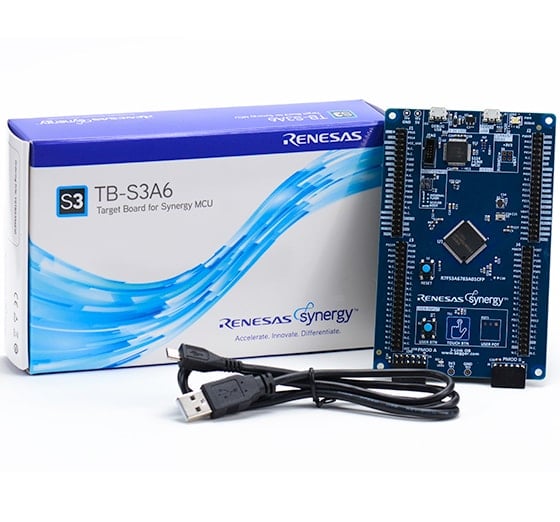
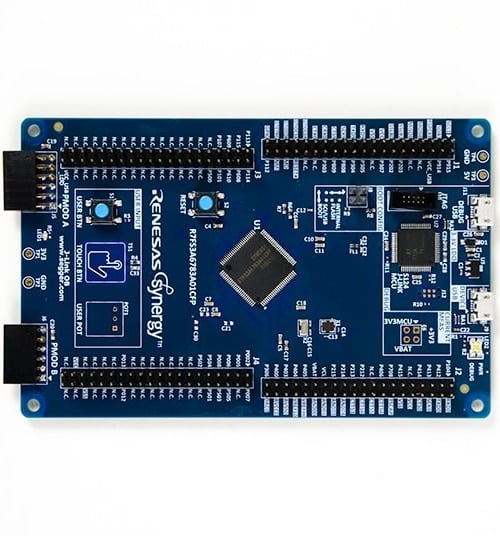
The S3A6 Target Board (TB-S3A6) features the 48MHz Arm® Cortex®-M4 core, microcontrollers (MCUs) that provide a host of analog and security functions to realize a variety of embedded systems and IoT designs. Users can experience the full features of the Synergy™ S3A6 MCUs with access to all pins, standardized expansion ports, and preinstalled demo software.

Features

  • Access all pins and on‑board peripherals of the Synergy S3A6 MCU Group
  • Accelerate code development with the tightly integrated and qualified Synergy Software Package (SSP)
  • View, step through, and debug code using the Renesas e² studio IDE or IAR Embedded Workbench® for Renesas Synergy
  • Flexible connectivity options with USB and a Pmod™ connector, enabling rapid prototyping with plug‑in modules
  • Human machine interface (HMI) functionality with a capacitive touch sensing unit (CTSU), a segment LCD controller, and user push buttons
  • Monitor system status and test functionality using programmable LEDs, capacitive buttons, or mechanical buttons
  • Measure real‑time power consumption during program execution
  • Operate using high‑precision on‑board crystals or a lower‑precision internal clock
  • Security and encryption functions enable secure data communication and storage, with support for industry‑standard algorithms such as AES‑128, AES‑256, and GHASH
  • Safety features include hardware diagnostics, memory protection, and watchdog timers
  • Debugging and programming supported by on‑board J‑Link® OB
Applications

Type Title Date
Quick Start Guide PDF 367 KB 日本語
Application Note PDF 61 KB
AI-generated Summary: The document provides a comprehensive look-up table for Synergy MCU Kits, listing current and new orderable part numbers to assist customers in ordering through distributors. It emphasizes precautions for handling microprocessing and microcontroller units, including electrostatic discharge prevention, power-on processing, signal input during power-off, unused pin handling, clock signal stability, and voltage waveform considerations. It also covers prohibitions on accessing reserved addresses, product differences, and safety and legal disclaimers. The document includes URLs for support, software, and additional resources related to the Synergy Platform. It highlights quality grades and usage restrictions for Renesas products, emphasizing user responsibility for safety and compliance.
Manual - Development Tools PDF 1.79 MB 日本語
PCB Design Files
Log in to Download ZIP 30.38 MB
Application Note PDF 2.27 MB 日本語
Application Note PDF 250 KB
Application Note PDF 586 KB
Application Note PDF 650 KB
AI-generated Summary: The document explains the use of the Capacitive Touch Sensing Unit (CTSU) button functionality on Renesas Synergy Target boards, integrating ThreadX RTOS, CTSU Framework, and device drivers. It details CTSU architecture, including self-capacitance single-scan mode for touch detection, and provides a block diagram of CTSU components. The CTSU framework resources and button states are described, along with configuration data specific to Renesas Synergy boards.
Application Note PDF 1.71 MB 日本語
AI-generated Summary: The guide explains how to import and build projects using IAR Embedded Workbench (EW) for Renesas Synergy. It details opening the workspace file from an extracted example project, viewing the project structure, and configuring settings for the Synergy Standalone Configurator (SSC) and Synergy Software Package (SSP). It also covers setting the SSC/SSP path and license file, and launching the Synergy Standalone Configurator within the IDE to generate project files.
Application Note PDF 439 KB
AI-generated Summary: The document explains how to create and migrate custom Board Support Packages (BSPs) for Renesas Synergy SSP versions 1.1.z and 1.2.0. It details the use of the Custom BSP Creator and Custom Pack Creator tools to generate, modify, and package BSPs. Custom BSPs mainly require changes in the board folder, including essential files like bsp.h and bsp_init.c. The process involves creating a base BSP, making a template pack for modifications, editing in e2 studio, and finalizing a standard pack for distribution. An example using the DK-S7G2 board illustrates these steps.
10 items

Software & Tools

Software & Tools

Software title
Software type
Company
QuickConnect Platform
QuickConnect platform enables fast prototyping by providing compatible hardware and software building blocks.
Software and Hardware Development Tools Renesas
1 item

Sample Code

Sample Code

Filters
Type Title Date Date
Sample Code
Log in to Download ZIP 6.84 MB Compiler: GNUARM-NONE IDE: e2 studio, IAR EW for Synergy
Sample Code
Log in to Download ZIP 6.46 MB Compiler: GNUARM-NONE IDE: e2 studio, IAR EW for Synergy
Sample Code
Log in to Download ZIP 7.40 MB Compiler: GNUARM-NONE IDE: e2 studio, IAR EW for Synergy
Sample Code
Log in to Download ZIP 8.43 MB IDE: e2 studio
4 items
Part NumberStatusStockBudgetary Price (USD)Sampleable
RTK7TBS3A6S00001BUActiveIn Stock1u | $34.12N/A
YSTBS3A6E10NRNDOut of StockN/A

Support Communities

  1. CAN bit rate on TB-S3A6

    Hi, We would like to evaluate the CAN communication between the SK-S7G2 card (which we already have) and the TB-S3A6 card (to be purchased) with high bit rates (500KBits and 1 MBits). Does the basic X2=32 KHz quartz on the TB-S3A6 board allow these tests or ...

    Apr 27, 2018
  2. Strange Clock Problem on S3A6

    I have a strange problem. I couldn't find out what is wrong with the first configuration. If I use the first configuration, the application is stuck at SystemInit(). Can you please have a look at it? Problem: No Problem:

    Sep 27, 2021
  3. Measuring a signal using GPT

    Hi all, Maybe it's a silly question, but I've been stuck for several days and I think I need help. I am using TB-S3A6. I have written a small program that generates a frequency of 420kHz using the GPT162 and outputs at the P500 pin. This works ...

    Jun 6, 2019
View All Results from Support Communities (10)
Support Communities

Support Communities

Get quick technical support online from Renesas Engineering Community technical staff.
Browse Articles

Knowledge Base

Browse our knowledge base for helpful articles, FAQs, and other useful resources.
Submit a Ticket

Submit a Ticket

Need to ask a technical question or share confidential information?