
Overview
Description
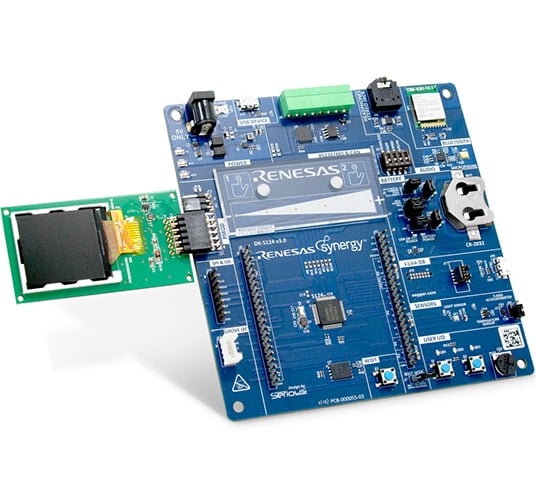
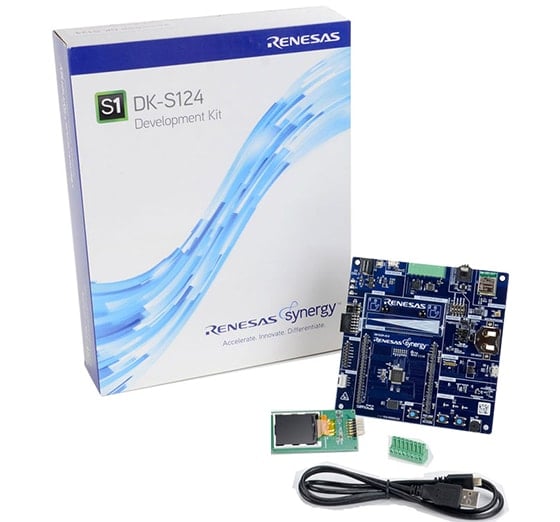
The DK‑S124 is a development kit for the Renesas Synergy™ S124 microcontroller (MCU) group, intended for software and hardware developers to develop firmware, experiment, and evaluate the S124 I/O features prior to designing custom hardware using Synergy software and tools.
System Requirements
- Microsoft® Windows® 7 or 10 with Intel® Core™ family processor or equivalent running at ≥2.0GHz
- ≥8GB system RAM
- ≥2GB free hard drive space
- ≥2 USB 2.0 ports
- Internet connection
Features
- Access most pins and on-board peripherals of the Synergy S124 MCU Group
- Accelerate code development with the tightly integrated and qualified Synergy Software Package (SSP)
- View and debug code with the e2 studio IDE from Renesas or IAR Embedded Workbench® for Renesas Synergy
- Flexible connectivity options including USB, CAN, SEEED Grove I2C I/F, and Pmod™ connectors for third‑party, off‑the‑shelf, and custom multi‑function boards
- Wireless radio expansion capabilities with a Bluetooth® Low Energy (LE) module
- Human machine interface (HMI) functionality with a capacitive touch sensing unit (CTSU) and Pmod LCD for visualization
- On-board accelerometer, light, and temperature sensors
- Measure real-time power consumption of the current over program execution
- Security and encryption functions enable data communications and storage, with support for industry-standard algorithms such as AES 128/256
- Safety features include hardware diagnostics, memory protection, and watchdog timeout
- Debugging and programming with J-Link® OB on-board
Applications
Documentation
Featured Documentation
Log in required to subscribe
|
|
|
|
|---|---|---|
| Type | Title | Date |
| Quick Start Guide | PDF 446 KB 日本語 | |
| Application Note |
PDF
61 KB
AI-generated Summary:
The document provides a comprehensive look-up table for Synergy MCU Kits, listing current and new orderable part numbers to assist customers in ordering through distributors. It emphasizes precautions for handling microprocessing and microcontroller units, including electrostatic discharge prevention, power-on processing, signal input during power-off, unused pin handling, clock signal stability, and voltage waveform considerations. It also covers prohibitions on accessing reserved addresses, product differences, and safety and legal disclaimers. The document includes URLs for support, software, and additional resources related to the Synergy Platform. It highlights quality grades and usage restrictions for Renesas products, emphasizing user responsibility for safety and compliance.
|
|
| Application Note | PDF 2.27 MB 日本語 | |
| Application Note | PDF 284 KB 日本語 | |
| Application Note |
PDF
409 KB
日本語
AI-generated Summary:
The Flash HAL module provides APIs for managing on-chip flash memory, including code and data flash. It supports operations like blank checking, erasing, programming, and setting access windows. Blocking operations are used for code flash, while data flash supports background mode operation (BGO). The module enforces precautions to avoid accessing flash during operations, especially for code flash where interrupts and multithreading can cause errors. Functions exist to select startup areas, update flash clock frequency, and retrieve status or version information. Error codes help diagnose issues such as invalid addresses, locked states, or operation failures.
|
|
| Application Note | PDF 224 KB | |
| Application Note |
PDF
1.93 MB
AI-generated Summary:
The document explains the power control and low power modes of the Arm Cortex-M0+ based S124 Synergy MCU, focusing on five power control modes (High-speed, Middle-speed, Low-voltage, Low-speed, and Subosc-speed) with different operating frequencies and voltages. It details the voltage and frequency ranges for each mode, including restrictions on flash memory operations. The document also describes the procedure for transitioning between power modes, emphasizing register settings and oscillator management.
|
|
| Application Note |
PDF
848 KB
AI-generated Summary:
The DK-S124 board uses an onboard microphone and a 12-bit DAC to record and playback audio. It samples analog data at 16 kHz via the ADC and outputs through the DAC to an earphone amplifier. The application supports passthrough mode, which sends audio directly to the earphone, and record mode, which stores audio in internal SRAM for later playback. Two pushbuttons control the modes, and LEDs provide feedback. The design maximizes RAM by minimizing framework use and operates with a single audio thread handling recording, playback, and passthrough. The accelerometer shares an IRQ line with a button, requiring initialization on some board versions.
|
|
| Application Note |
PDF
329 KB
AI-generated Summary:
The document explains how to run and debug the Simple Audio Playback application on the DK-S124 board using Renesas e2 studio. It details selecting debug configurations, handling perspective switches, and controlling audio playback via board buttons and a potentiometer. The application uses SSP modules arranged in threads for audio playback, with controls including pushbuttons and volume adjustment. Debugging steps include starting, resuming, and stopping the session.
|
|
| Application Note |
PDF
576 KB
日本語
AI-generated Summary:
The DK-S124 Synergy MCU Group uses a 32-MHz Arm Cortex-M0+ CPU with 128 KB flash to interface with a 128x128 PMOD SPI LCD. It supports simple HMI applications displaying sensor data from a potentiometer, temperature sensor, light sensor, and 3-axis accelerometer. The out-of-box program uses multi-threading to read sensors, update the LCD, and control LED flashing based on sensor inputs and pushbutton switches. Peripheral connections and pin assignments are detailed for development.
|
|
| Application Note |
PDF
2.57 MB
日本語
AI-generated Summary:
The document explains the capacitive touch slider and button functionalities on the DK-S124 Synergy MCU board using the CTSU framework. It details how sliding a finger on the slider lights up onboard LEDs and button presses toggle specific LEDs. The SSP framework processes touch data, triggering callbacks for slider and button events. The sample project includes configuration data and source files to build and customize applications using the CTSU slider and button features.
|
|
| Application Note |
PDF
755 KB
AI-generated Summary:
The document explains how to import, build, and debug a simple PMOD display project using the Renesas Synergy platform. It details the use of pushbuttons S1 and S2 to navigate screens and change orientation, and a potentiometer to adjust backlight intensity. The application uses hardware interrupts managed by the external IRQ framework for responsive control. The Okaya PMOD LCD driver operates on the SCI peripheral in Simple SPI mode, with configurable SPI settings and an overridden callback for efficient data flow.
|
|
| Application Note | PDF 456 KB | |
| Application Note |
PDF
1.71 MB
日本語
AI-generated Summary:
The guide explains how to import and build projects using IAR Embedded Workbench (EW) for Renesas Synergy. It details opening the workspace file from an extracted example project, viewing the project structure, and configuring settings for the Synergy Standalone Configurator (SSC) and Synergy Software Package (SSP). It also covers setting the SSC/SSP path and license file, and launching the Synergy Standalone Configurator within the IDE to generate project files.
|
|
| Application Note |
PDF
439 KB
AI-generated Summary:
The document explains how to create and migrate custom Board Support Packages (BSPs) for Renesas Synergy SSP versions 1.1.z and 1.2.0. It details the use of the Custom BSP Creator and Custom Pack Creator tools to generate, modify, and package BSPs. Custom BSPs mainly require changes in the board folder, including essential files like bsp.h and bsp_init.c. The process involves creating a base BSP, making a template pack for modifications, editing in e2 studio, and finalizing a standard pack for distribution. An example using the DK-S7G2 board illustrates these steps.
|
|
| Application Note | PDF 815 KB 日本語 | |
| Application Note |
PDF
970 KB
AI-generated Summary:
The document explains how to use the Renesas Synergy S124 MCU's ADC and low power modes to create a low power IoT sensor hub. The CPU remains in sleep mode while environmental sensors are monitored via the ADC in Snooze mode. The MCU transitions between Sleep, Software Standby, and Snooze modes to minimize power consumption. The ADC compare function triggers wake-up events based on sensor readings, optimizing power efficiency without frequent CPU wake-ups.
|
|
| PCB Design Files | Renesas Synergy™ Development Kit DK-S124 v3.1 Design Data
|
|
| PCB Design Files | Renesas Synergy™ Development Kit DK-S124 v2.0 Design Data
|
|
| Manual - Development Tools | PDF 9.40 MB 日本語 | |
20 items
|
||
Design & Development
Sample Code
Sample Code
Filters
|
||
|---|---|---|
| Type | Title | Date Date |
| Sample Code | USBX™ Device Class HID Module Guide - Application Project Rev.1.04 - Sample Code
|
|
| Sample Code | Flash HAL Module Guide - Application Project Rev.1.20 - Sample Code
|
|
| Sample Code | USBX™ Device Class Mass Storage Module Guide - Application Project (r11an0104eu0104) Rev.1.04 - Sample Code
|
|
| Sample Code | Low-Power Modes and Mode Transitions on the DK-S124 - Application Project Rev.1.25 - Sample Code
|
|
| Sample Code | DK-S124 Simple Record/Playback - Application Project Rev.1.16 - Sample Code
|
|
| Sample Code | Simple Audio Playback Example for DK-S124 - Application Project Rev.1.06 - Sample Code
|
|
| Sample Code | DK-S124 Out-of-Box Programming Guide - Application Project Rev.1.16 - Sample Code
|
|
| Sample Code | CTSU Slider Example on DK-S124 - Application Project Rev.1.15 - Sample Code
|
|
| Sample Code | Simple PMOD Display Application Example for DK-S124 - Application Project Rev.1.06 - Sample Code
|
|
| Sample Code | USBX™ Device Class CDC-ACM Module Guide - Application Project Rev.1.01 - Sample Code
|
|
| Sample Code | Creating a Custom Board Support Package for SSP 1.1.z - Application Project Rev.1.06 - Sample Code
|
|
| Sample Code | DK-S124 Simple Tone Generator - Application Project (r12an0051eu0104) Rev.1.04 - Sample Code
|
|
| Sample Code | Using ADC to Wake Up the MCU from Low Power Modes - Application Project (r12an0049eu0122) Rev.1.22 - Sample Code
|
|
13 items
|
||
Product Options
| Part Number | Status | Stock | Sampleable | Pb (Lead) Free | ECCN (US) | HTS (US) | RoHS Compliant | China RoHS Compliant |
|---|---|---|---|---|---|---|---|---|
| RTK7DKS124S00002BU | Active | In Stock | N/A | No | 3A991.a.2 | 8471.50.0150 | No | No |
| YSDKS124S20 | NRND | Out of Stock | N/A | No | 3A991.a.2 | 8471.50.0150 | No | No |
Support

Support Communities
Get quick technical support online from Renesas Engineering Community technical staff.

Knowledge Base
Browse our knowledge base for helpful articles, FAQs, and other useful resources.

