
概要
説明
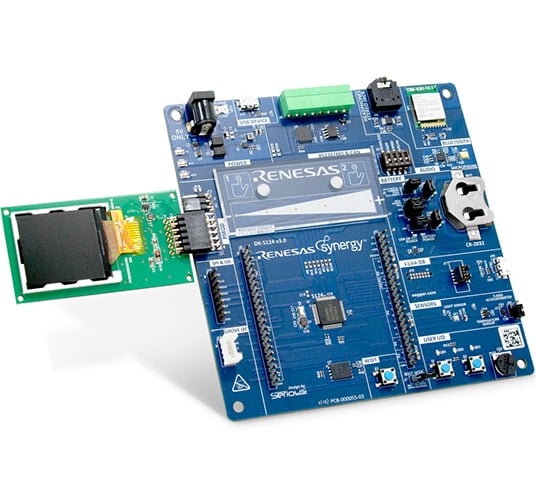
Renesas SynergyTM S124 MCUグループのすべての機能を評価し、Renesas SynergyTM ソフトウェアおよびツールを使用して低消費電力アプリケーションを開発します。
製品型名が変更されています。旧製品型名は各種ドキュメントで引き続き使用されます。新旧の製品型名については、Look-up Tableを参照してください。
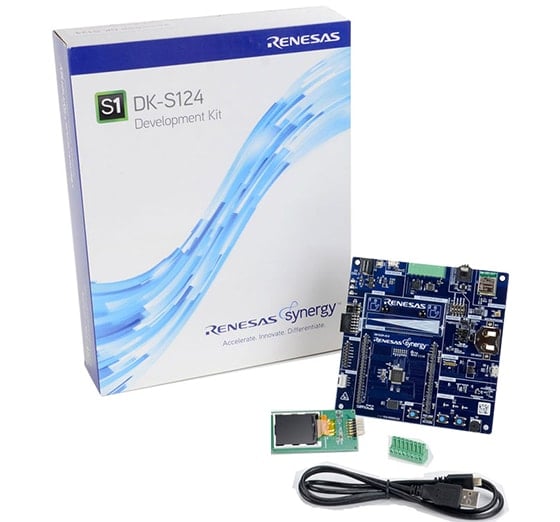
Kit Contents
- DK-S124メインボード
- PMOD LCDディスプレイモード
- クイックスタートガイド
- USB Type A-USB Micro-B変換ケーブル
- 8ポジションプラグ
- シャントジャンパー x 8
System Requirements
- Microsoft® Windows® 7または10、2.0GHz以上で動作するIntel® CoreTMファミリプロセッサまたは同等のプロセッサ搭載
- システムRAM 8GB以上
- ハードディスク空き容量 2GB以上
- USB2.0以上のポート x 2
- インターネット接続環境
特長
- Renesas SynergyTM S124 MCUグループのほとんどの端子とオンボード周辺機器にアクセス可能
- 密に統合され、認定されたSynergy Software Package(SSP)を使用してコード開発を加速
- ルネサスe2 studio ISDEまたはIAR Embedded Workbench® for Renesas SynergyTMを使用して、コードの表示、ステップスルー、およびデバッグを実行
- 多様な接続オプション - サードパーティ製ボード、既存ボード、およびカスタム多機能ボードのための、USB、CAN、SEEED Grove I2C I/F、およびPmodTMコネクタ
- Bluetooth® Low Energyモジュールによる無線拡張機能
- 可視化用の静電容量式タッチ検出ユニットおよびPmodTM LCDディスプレイによるヒューマンマシンインタフェース(HMI)機能
- オンボード加速度計、光センサ、および温度センサ
- プログラム実行により消費電力をリアルタイムに測定
- セキュリティおよび暗号化機能により、AES128/256などの業界標準アルゴリズムをサポートしたデータ通信およびストレージが可能
- ハードウェア診断、メモリ保護、ウォッチドッグタイムアウトを含むセーフティ機能
- オンボードJ-Link® OBを使用してデバッグとプログラミングを実行
アプリケーション
ドキュメント
ピックアップ
ログイン後、ご登録が可能となります。
|
|
|
|
|---|---|---|
| 分類 | タイトル | 日時 |
| クイックスタートガイド | PDF 704 KB English | |
| アプリケーションノート |
PDF
61 KB
AI生成コンテンツ:
The document provides a comprehensive look-up table for Synergy MCU Kits, listing current and new orderable part numbers to assist customers in ordering through distributors. It emphasizes precautions for handling microprocessing and microcontroller units, including electrostatic discharge prevention, power-on processing, signal input during power-off, unused pin handling, clock signal stability, and voltage waveform considerations. It also covers prohibitions on accessing reserved addresses, product differences, and safety and legal disclaimers. The document includes URLs for support, software, and additional resources related to the Synergy Platform. It highlights quality grades and usage restrictions for Renesas products, emphasizing user responsibility for safety and compliance.
|
|
| アプリケーションノート |
PDF
612 KB
English
AI生成コンテンツ:
フラッシュHALモジュールは、コードフラッシュおよびデータフラッシュのブランクチェック、セクタ消去、読み取り、書き込み、アクセスウィンドウ設定などのAPIを提供します。セミホスティング機能により操作結果やエラーコードをコンソールに表示可能です。アプリケーションプロジェクトは標準的なAPIの使用例を示し、Flash HP HALの初期化、フラッシュ操作、LEDのトグルを実行します。関連ファイルはISDEにインポートして利用できます。
|
|
| アプリケーションノート | PDF 488 KB English | |
| アプリケーションノート | PDF 2.17 MB English | |
| アプリケーションノート | PDF 2.45 MB English | |
| アプリケーションノート | PDF 224 KB | |
| アプリケーションノート |
PDF
1.93 MB
AI生成コンテンツ:
The document explains the power control and low power modes of the Arm Cortex-M0+ based S124 Synergy MCU, focusing on five power control modes (High-speed, Middle-speed, Low-voltage, Low-speed, and Subosc-speed) with different operating frequencies and voltages. It details the voltage and frequency ranges for each mode, including restrictions on flash memory operations. The document also describes the procedure for transitioning between power modes, emphasizing register settings and oscillator management.
|
|
| アプリケーションノート |
PDF
848 KB
AI生成コンテンツ:
The DK-S124 board uses an onboard microphone and a 12-bit DAC to record and playback audio. It samples analog data at 16 kHz via the ADC and outputs through the DAC to an earphone amplifier. The application supports passthrough mode, which sends audio directly to the earphone, and record mode, which stores audio in internal SRAM for later playback. Two pushbuttons control the modes, and LEDs provide feedback. The design maximizes RAM by minimizing framework use and operates with a single audio thread handling recording, playback, and passthrough. The accelerometer shares an IRQ line with a button, requiring initialization on some board versions.
|
|
| アプリケーションノート |
PDF
329 KB
AI生成コンテンツ:
The document explains how to run and debug the Simple Audio Playback application on the DK-S124 board using Renesas e2 studio. It details selecting debug configurations, handling perspective switches, and controlling audio playback via board buttons and a potentiometer. The application uses SSP modules arranged in threads for audio playback, with controls including pushbuttons and volume adjustment. Debugging steps include starting, resuming, and stopping the session.
|
|
| アプリケーションノート |
PDF
755 KB
AI生成コンテンツ:
The document explains how to import, build, and debug a simple PMOD display project using the Renesas Synergy platform. It details the use of pushbuttons S1 and S2 to navigate screens and change orientation, and a potentiometer to adjust backlight intensity. The application uses hardware interrupts managed by the external IRQ framework for responsive control. The Okaya PMOD LCD driver operates on the SCI peripheral in Simple SPI mode, with configurable SPI settings and an overridden callback for efficient data flow.
|
|
| マニュアル-ソフトウェア | PDF 48.11 MB | |
| アプリケーションノート | PDF 456 KB | |
| アプリケーションノート |
PDF
439 KB
AI生成コンテンツ:
The document explains how to create and migrate custom Board Support Packages (BSPs) for Renesas Synergy SSP versions 1.1.z and 1.2.0. It details the use of the Custom BSP Creator and Custom Pack Creator tools to generate, modify, and package BSPs. Custom BSPs mainly require changes in the board folder, including essential files like bsp.h and bsp_init.c. The process involves creating a base BSP, making a template pack for modifications, editing in e2 studio, and finalizing a standard pack for distribution. An example using the DK-S7G2 board illustrates these steps.
|
|
| アプリケーションノート |
PDF
970 KB
AI生成コンテンツ:
The document explains how to use the Renesas Synergy S124 MCU's ADC and low power modes to create a low power IoT sensor hub. The CPU remains in sleep mode while environmental sensors are monitored via the ADC in Snooze mode. The MCU transitions between Sleep, Software Standby, and Snooze modes to minimize power consumption. The ADC compare function triggers wake-up events based on sensor readings, optimizing power efficiency without frequent CPU wake-ups.
|
|
| アプリケーションノート |
PDF
809 KB
English
AI生成コンテンツ:
本資料は、Renesas Synergy DK-S124プラットフォームを用いたシンプルトーンジェネレータの設計と動作について説明しています。12ビットD/Aコンバータを介して増幅器に接続されたイヤホンジャックから正弦波トーンを生成し、ボタン押下で周波数を変更します。ポテンショメータのアナログ電圧を周期的ADCスキャンで読み取り、音量を調整します。タイマと高レベルフレームワークを使い、低レベルドライバコード不要で制御します。
|
|
| アプリケーションノート |
PDF
510 KB
English
AI生成コンテンツ:
Synergyプラットフォームは、PMOD LCD駆動ライブラリを除き、DK-S124 OOBプログラムで示されるアプリケーションの迅速な試作に必要なリソースを提供します。DK-S124ボードには3軸加速度センサ、ポテンショメータ、温度センサ、光センサが搭載され、センサ値を連続的に読み込みPMOD LCDに表示します。LEDの点滅はセンサ入力や押しボタンの状態に応じて制御されます。マルチスレッド構成でLED制御、LCD更新、入力ポーリングを別々に行い、簡単なデバウンス処理を実装しています。
|
|
| マニュアル-開発ツール | PDF 8.39 MB English | |
| PCB設計ファイル | Renesas Synergy™ Development Kit DK-S124 v3.1 Design Data
|
|
| PCB設計ファイル | Renesas Synergy™ Development Kit DK-S124 v2.0 Design Data
|
|
| アプリケーションノート |
PDF
747 KB
English
AI生成コンテンツ:
CTSUは静電容量を測定し、自己容量シングルスキャンモードでスライダとボタン機能の指接触を検出します。複数の計測モードとノイズ対策を備えています。スライダ機能はスライド動作を検出し、3つのLEDを点灯させ、ボタン押下はLED点滅で応答します。SSPフレームワークが生データを処理し、イベントと位置をコールバックします。サンプルはDK-S124ボードで動作し、圧縮ファイルで提供されます。
|
|
21件
|
||
設計・開発
サンプルコード
サンプルコード
フィルター
|
||
|---|---|---|
| 分類 | タイトル | 日時 日時 |
| サンプルコード | USBX™ Device Class HID Module Guide - Application Project Rev.1.04 - Sample Code
|
|
| サンプルコード | Flash HAL Module Guide - Application Project Rev.1.20 - Sample Code
|
|
| サンプルコード | USBX™ Device Class Mass Storage Module Guide - Application Project (r11an0104eu0104) Rev.1.04 - Sample Code
|
|
| サンプルコード | Low-Power Modes and Mode Transitions on the DK-S124 - Application Project Rev.1.25 - Sample Code
|
|
| サンプルコード | DK-S124 Simple Record/Playback - Application Project Rev.1.16 - Sample Code
|
|
| サンプルコード | Simple Audio Playback Example for DK-S124 - Application Project Rev.1.06 - Sample Code
|
|
| サンプルコード | DK-S124 Out-of-Box Programming Guide - Application Project Rev.1.16 - Sample Code
|
|
| サンプルコード | CTSU Slider Example on DK-S124 - Application Project Rev.1.15 - Sample Code
|
|
| サンプルコード | Simple PMOD Display Application Example for DK-S124 - Application Project Rev.1.06 - Sample Code
|
|
| サンプルコード | USBX™ Device Class CDC-ACM Module Guide - Application Project Rev.1.01 - Sample Code
|
|
| サンプルコード | Creating a Custom Board Support Package for SSP 1.1.z - Application Project Rev.1.06 - Sample Code
|
|
| サンプルコード | DK-S124 Simple Tone Generator - Application Project (r12an0051eu0104) Rev.1.04 - Sample Code
|
|
| サンプルコード | USBX™ Device Class Mass Storage Module Guide - Application Project (r11an0104eu0102) Rev.1.02 - Sample Code
|
|
| サンプルコード | Using ADC to Wake Up the MCU from Low Power Modes - Application Project (r12an0049eu0122) Rev.1.22 - Sample Code
|
|
14件
|
||
製品選択
| 型名 | 状態 | 在庫 | Sampleable | Pb (Lead) Free | ECCN (US) | HTS (US) | RoHS Compliant | China RoHS Compliant |
|---|---|---|---|---|---|---|---|---|
| RTK7DKS124S00002BU | Active | 在庫あり | N/A | No | 3A991.a.2 | 8471.50.0150 | No | No |
| YSDKS124S20 | NRND | 在庫切れ | N/A | No | 3A991.a.2 | 8471.50.0150 | No | No |


