
Overview
Description
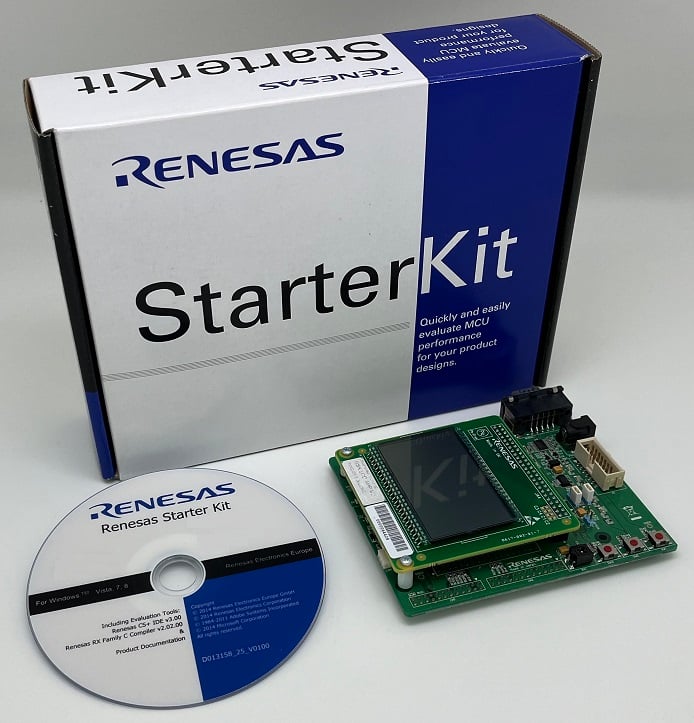
The Renesas Starter Kit for RL78/L13 is intended as a user-friendly introductory and evaluation tool for the RL78/L13 microcontroller. The board provides a useful platform for evaluating the Renesas suite of development tools for coding and debugging, using CubeSuite+.
The purpose of the board is to enable the user to evaluate the capabilities of the device and its peripherals by giving the user a simple platform on which code can be run, only minutes after opening the box. It can also prove an invaluable tool in development by providing a useful test platform for code already debugged using one of our more powerful emulation tools.
In order to make a product installer active, this product needs an internet connection. CubeSuite+ is not generally promoted to the U.S. and European customers. Customers in the U.S. and Europe who are interested in CubeSuite+ are requested to contact our regional marketing departments for details.
Features
- Renesas microcontroller programming
- User code debugging
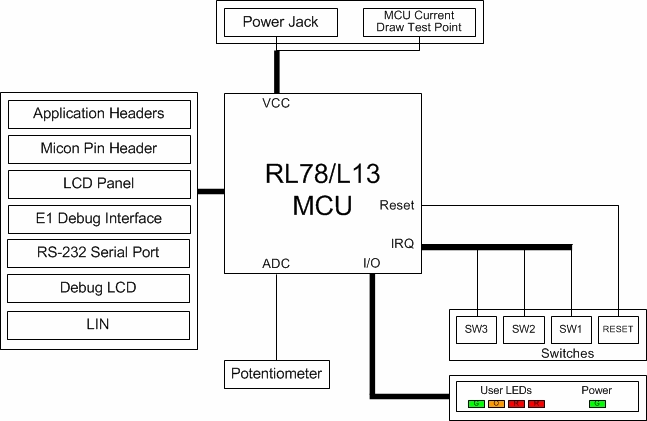
- User circuitry such as switches, LEDs, and a potentiometer
- Sample application
- Sample peripheral device initialization code
Applications
Documentation
|
|
|
|
|---|---|---|
| Type | Title | Date |
| Manual - Development Tools | PDF 928 KB 日本語 | |
| Manual - Development Tools | PDF 1.26 MB | |
| PCB Design Files | RSK RL78L13 Design Data
|
|
| Tool News - Notification | PDF 153 KB 日本語 | |
| Quick Start Guide | PDF 199 KB 日本語 | |
| Application Note |
PDF
340 KB
AI-generated Summary:
CubeSuite+ enables creating, opening, and managing projects for RL78/L13 Renesas Starter Kit sample code. It supports importing projects from older IDEs like e2studio and converting build options between compatible compilers. Sample projects are provided for immediate use, organized by microcontroller type. Source files, including main.c and Applilet4-generated files, are grouped by type and accessible via the Project Tree. Each sample demonstrates peripheral initialization and functionality, useful even without the hardware kit.
|
|
| Manual - Development Tools | PDF 413 KB 日本語 | |
| Manual - Development Tools | PDF 798 KB 日本語 | |
| Application Note |
PDF
311 KB
AI-generated Summary:
The document explains how to import the RL78/L13 Renesas Starter Kit sample code into the e2 studio development environment. It guides users to select 'Go to the Workbench' on the welcome screen, then right-click in the project explorer to choose 'Import...'. Users should select 'Existing Projects into Workspace' under the General folder, browse to the project directory, and ensure the 'Copy projects into workspace' option is checked before finishing the import. This process loads the sample code project into e2 studio for development.
|
|
| Manual - Development Tools | PDF 740 KB | |
| Quick Start Guide | PDF 228 KB | |
| Schematic | PDF 115 KB | |
| Quick Start Guide | PDF 635 KB 日本語 | |
| Schematic | PDF 56 KB | |
14 items
|
||
Design & Development
Software & Tools
Software Downloads
|
|
|
|
|---|---|---|
| Type | Title | Date |
| Software & Tools - Other | Renesas Starter Kit for RL78/L13 Installer V.1.00 (CubeSuite+ Version)
|
|
| Software & Tools - Other | Renesas Starter Kit for RL78/L13 Installer V.1.00 (e² studio Version)
|
|
| Software & Tools - Other | Product Activation Code for the RL78/L13 Renesas Starter Kit
|
|
3 items
|
||
Sample Code
Product Options
| Part Number | Status | Stock | Budgetary Price (USD) | Description | Debugger supplied |
|---|---|---|---|---|---|
| R0K5010WMS900BE | Active | In Stock | 1u | $223.53 | Renesas Starter Kit for RL78/L13 (Kit with CubeSuite+) | None |
Videos & Training
Additional Videos
Support
Support Communities
- RL78/L13-Starter-kit details
Dear Team, I am working on RL78/L13 starter kit (WIth CS+ IDE) and could not find any related documents and example codes on Renesas web page (RL78/L13-Starter-kit - Renesas Starter Kit for RL78/L13 | Renesas). Can some one please share the design files for ...
Apr 8, 2022

Support Communities

Knowledge Base


