Renesas Electronics Corporation - June is Pride Month, a month to raise awareness of the rights and the culture of the LGBTQ+ community

Description

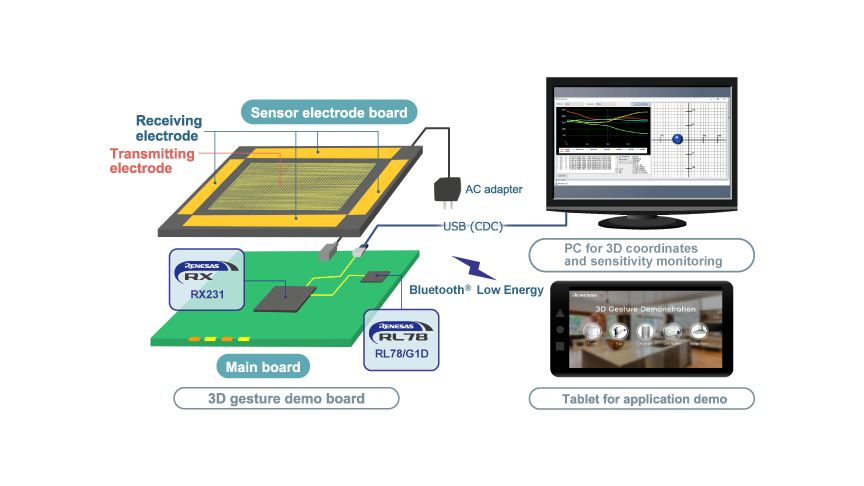
The 3D Gesture reference design detects the position of a hand in space by measuring its x-, y-, and z-coordinates using Renesas' Capacitive Touch Sensing Unit (CTSU). The system can track hand movement up to 200mm above the panel surface and convert it into precise spatial coordinates. High-speed coordinate sensing enables reliable gesture recognition, such as up and down, left and right, and forward and backward motions, as well as simple pattern recognition for intuitive device control.

Features

  • Based on Renesas' high‑sensitivity, noise‑tolerant capacitive touch technology
  • Touch sensing through any non‑conductive material, enabling hidden or embedded designs (e.g., behind walls or panels)
  • Enables system control and gesture operation using a high‑performance, low‑power 32‑bit microcontroller with integrated touch IP
  • Supports combined use of gesture recognition and capacitive touch buttons
  • Compliant with IEC 61000‑4‑3 Level 3 immunity standards

Applications

Type Title Date
PCB Design Files
Log in to Download ZIP 168 KB
Manual - Development Tools PDF 435 KB 日本語
Application Note PDF 522 KB 日本語
AI-generated Summary: The software enables capacitive touch sensing using the RX140 MCU and a 3D Gesture Electrode Board to detect gestures within a 5 cm range. It performs CTSU measurements, calculates 3D positions, and recognizes gestures, communicating results via SCI6 to an evaluation tool called '3D Monitor'. The system operates at 48 MHz with a 5 V supply and uses Renesas development tools. Key software components include initialization routines, CTSU measurement, gesture detection, communication handling, and adjustable measurement timing to support various gesture speeds. The package includes source files for gesture recognition, 3D position calculation, and peripheral control.
Application Note PDF 4.53 MB 日本語
AI-generated Summary: The guide explains how to develop 3D gesture recognition applications using AI with capacitive touch sensors via the QE for Capacitive Touch tool. It supports devices with capacitive touch IP in RX, RA, and RL78 families and Renesas Synergy™ platform. Key features include gesture data recording, AI model generation through automated deep learning, and real-time monitoring and tuning to improve recognition accuracy. The tool simplifies AI development without requiring specialized skills. The operating environment includes e2 studio IDE, GNU Arm toolchain, and specific evaluation boards and emulators. The guide covers setup, tuning, gesture recording, learning, coding, and monitoring workflows.
Application Note PDF 440 KB 日本語
AI-generated Summary: The software enables capacitive touch sensing using the RA2L1 Group's CTSU2 hardware to detect 3D gestures via mutual capacitance measurement. It integrates QE Touch and QE CTSU modules for capacitive measurement and employs a gesture recognition library to analyze 3D position changes and identify gestures. The software communicates gesture data to a PC via USB. The package includes source files for 3D position calculation, gesture recognition, and configuration files generated by QE and FSP configurator. The software runs on RA2L1 MCU at 48MHz using e2 studio and GCC ARM compiler, tested on the RTK0EG0018C01001BJ evaluation board.
Application Note PDF 979 KB 日本語
AI-generated Summary: 3D Monitor is a Windows 10 application that connects to the 3D Gesture Demo Set via a COM port to display real-time gesture data. It shows numerical and graphical values for 4-electrode counts, reference values, 3D position calculations, gesture recognition results, and noise environment judgments. Users can save communication logs and prepare header files for pre-measured values. The tool requires no installation and operates at a default baud rate of 38400.
6 items

Software & Tools

Software & Tools

Software title
Software type
Company
QE for Capacitive Touch: Development Assistance Tool for Capacitive Touch Sensors
In developing embedded system using the capacitive touch sensor of MCUs, you can easily setup initial configurations of the touch interface as well as process the tuning of sensors, and reduce development time. [Plugin for Renesas IDE "e2 studio"] [Standalone Version] [Support MCU/MPU:RA, RL78, RX, Renesas Synergy™]
Solution Toolkit Renesas
1 item

Sample Code

Sample Code

Filters
Type Title Date Date
Sample Code
Log in to Download ZIP 13.47 MB
Sample Code
Log in to Download ZIP 2.08 MB
Sample Code
Log in to Download ZIP 1.04 MB 日本語
3 items

Lab on the Cloud

Lab on the Cloud

Use our PC-based GUI to instantly start configuring and testing designs in our virtual lab, no physical board needed.
Support Communities

Support Communities

Get quick technical support online from Renesas Engineering Community technical staff.
Browse Articles

Knowledge Base

Browse our knowledge base for helpful articles, FAQs, and other useful resources.
Submit a Ticket

Submit a Ticket

Need to ask a technical question or share confidential information?
Icon showing CD-ROM illustration, indicating compact disc storage.

ROM Ordering

Embed your custom code into Renesas masked MCUs during manufacturing for tailored device functionality.