
Overview
Description
In situations requiring the shutdown of gas meters, such as during disasters or extended absences, there is a need for a system that can automatically handle this without human intervention. Long Range Wide Area Network (LoRaWAN®) enables efficient, long-distance data transmission with low power consumption. The LoRaWAN Class B standard is ideal for gas meters due to its low power usage and reduced latency for remote control. Moreover, the LoRaWAN network supports other IoT solutions that can address regional challenges and drive revitalization efforts.
System Benefits:
- The MCU features the industry's lowest power consumption and integrates seamlessly with LoRa® software for LoRa-based ICs, ensuring energy-efficient operation and broad application compatibility, particularly for battery-powered gas meters.
- The sensor signal conditioner (SSC) IC delivers high-resolution sensor accuracy, offering offset, span, and first and second-order temperature compensation for pressure sensor signals.
Comparison
Applications
Test This Board Remotely
Available on Lab on the Cloud, use our PC-based GUI to instantly start configuring and testing designs in our virtual lab, no physical board needed.
MCU
Products
MCU
Products
Boost Regulator
Products
Sensor Signal Conditioner
Products
Exiting Interactive Block Diagram
Related Boards & Kits
Evaluation
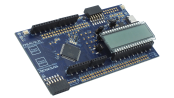
FPB-RL78L23 Active
RL78/L23 Fast Prototyping Board
Prototype low‑power embedded designs with built‑in LCD and capacitive touch using an RL78/L23 fast prototyping board.
Support

Support Communities
Get quick technical support online from Renesas Engineering Community technical staff.

Knowledge Base
Browse our knowledge base for helpful articles, FAQs, and other useful resources.
