
Overview
Description
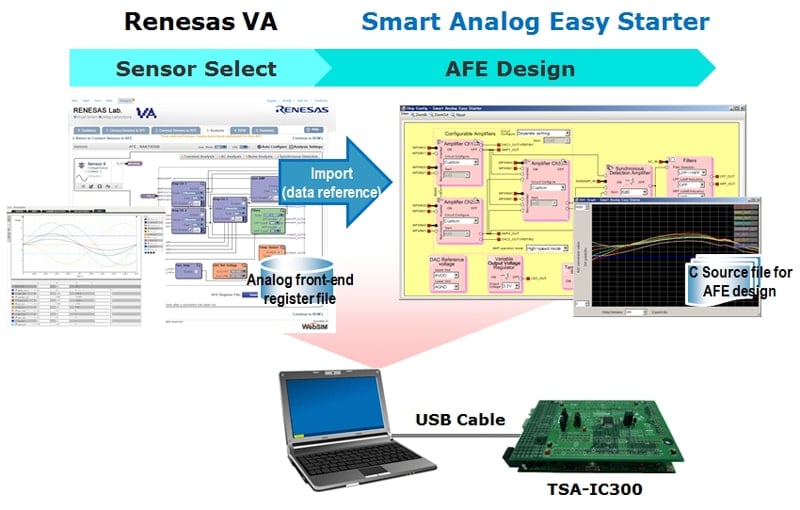
Smart Analog Easy Starter is a GUI evaluation tool for designing the analog front-end circuit of Smart Analog devices and editing analog circuit data while observing the waveforms on a computer screen. Circuit design can be performed easily by operating a mouse on a computer screen using a Smart Analog evaluation board manufactured by Tessera Technology.

Features
- GUI tool for Smart Analog evaluation board
- Perform circuit design and customization using a circuit block diagram style GUI.
- The circuit data (register values, etc.) you create can be displayed in a list, saved, and restored
- AFE register files created in the Renesas VA online simulator can be imported*1
- Edit circuit data while observing waveforms in Easy Starter
- Generate C source code for circuit design*2
- Generated C source code is compatible with files generated by SA-Designer (project not registered to CS+)
- Notes:
- AFE register files created in Renesas VA cannot be imported to Smart Analog Easy Starter 101.
- Except interface C source code.
Release Information
Hardware Requirements
| Supported OS | Windows® 7, Windows Vista®, Windows® XP SP3 |
|---|---|
| CPU | At least 1 GHz (multicore CPU supported) |
| Main memory | At least 1 GB |
| Display | At least 800 x 600 |
| Interface | At least 1 USB port that supports USB 1.1 |
| Other software requirements in addition to Windows OS | Microsoft .NET Framework 3.0 USB driver for target board |
Target Devices
Additional Details
| Smart Analog Easy Starter 101 | Smart Analog Easy Starter | |
|---|---|---|
| Supported evaluation boards | Smart Analog IC101 RSK Option Board TSA-OP-IC101 | Smart Analog IC Evaluation Board TSA-IC300 Smart Analog IC Evaluation Board TSA-IC301 Smart Analog IC Evaluation Board TSA-IC500*3 Smart Analog Stick (RL78/G1E Stick Starter kit) RL78/G1E-STICK |
| Supported devices | Smart Analog IC101 | Smart Analog IC300 Smart Analog IC301 Smart Analog IC500 Smart Analog IC501 Smart Analog IC502 Smart Analog MCU (RL78/G1E) |
Please download USB drivers for TSA-IC300 and TSA-IC301 for Windows 7, Windows XP, and Windows Vista from Tessera Technology's website:
TSA-IC300/301 USB drivers
Resources
Support

Support Communities
Get quick technical support online from Renesas Engineering Community technical staff.

Knowledge Base
Browse our knowledge base for helpful articles, FAQs, and other useful resources.
