
Features
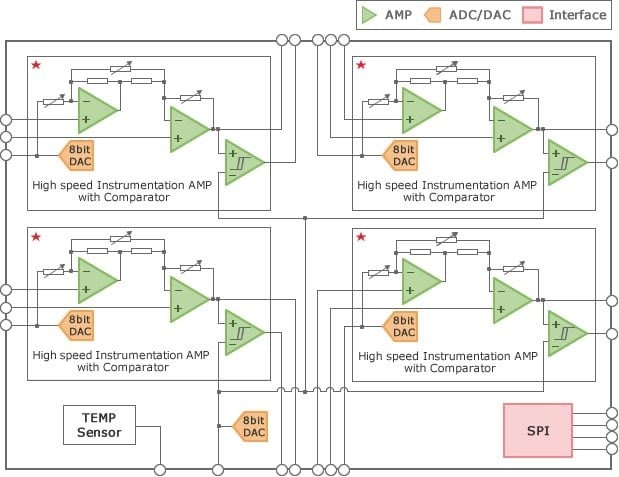
- The RAA730502 is a monolithic programmable analog IC with a range of on-chip circuits
- On-chip high-speed instrumentation amplifier with comparator x 4 ch
- On-chip D/A converter x 5 ch
- On-chip temperature sensor x 1 ch
- On-chip SPI x 1 ch
- Includes a low-current mode
- Operating voltage range: 3.0 V ≤ VDD ≤ 5.5 V
- Operating temperature range: -40ºC ≤ TA ≤ 105ºC
- Package: 48-pin plastic LQFP (fine pitch) (7 x 7)
Description
Smart Analog IC502 has a built-in high-speed instrument amplifier with comparator and D/A converter. It is suitable for home appliances that require motor control.
The RAA730502 is a monolithic programmable analog IC with a range of on-chip circuits such as high-speed instrumentation amplifiers with comparators, D/A converters, and a temperature sensor, allowing the RAA730502 to be used as an analog front-end device for sensing current in motor control applications. The RAA730502 uses a Serial Peripheral Interface (SPI) to allow external devices to control each on-chip circuit, enabling a more compact package and a reduction in the number of control pins. The compact package used by the RAA730502—a 48-pin LQFP—in turns enables a more compact set design.
Applications
- Motor control for home appliances
- Air purifiers
- Air conditioners
- Refrigerators
- Dishwashers
- Electric bicycles
| Part Number | Status | Samples | Stock | Package | Lead Count (#) | Pb (Lead) Free | Temp. Range (°C) |
|---|---|---|---|---|---|---|---|
| RAA730502CFP#AC0 | Obsolete | N/A | Out of Stock | LFQFP | 48# | Yes | -40 to +105 |
| RAA730502DFP#AC0 | Obsolete | N/A | Out of Stock | LFQFP | 48# | Yes | -40 to +105 |
Filters
Applied Filters
- GuidePDF 222 KB smartanalog-product-number-guide Apr 04, 2018
- DatasheetRAA730502 Monolithic Programmable Analog ICRECOMMENDED
- Application NoteAI-generated Summary: The hardware setup for sensor evaluation using Smart Analog Easy Starter requires a sensor board, evaluation board, computer, and USB cable. Power can come from USB or an external supply, with external power recommended to reduce noise. The sensor output is amplified and A/D converted by Smart Analog IC and RL78/G1A, then sent to the computer via USB for display. Software setup involves launching Easy Starter, detecting the virtual serial port, and configuring analog circuit parameters in the Chip Config window.
- Application NoteAI-generated Summary: The document outlines the development procedure for Smart Analog Systems using SA-Designer with the RX family. It details the hardware setup including the GR-SAKURA evaluation board and RX63N Smart Analog IC, and the software environment comprising SA-Designer and CubeSuite+. The development process involves designing the analog front-end circuit, programming source codes for system operation, registering circuit data into CubeSuite+, and performing operation checks using an emulator. Instructions for starting SA-Designer and creating new circuit designs are also provided.
- Flyer
- DatasheetRAA730502 Monolithic Programmable Analog ICRECOMMENDED
Recommended Documents (1)
- DatasheetRAA730502 Monolithic Programmable Analog ICRECOMMENDED
Datasheets (1)
- GuidePDF 222 KB smartanalog-product-number-guide Apr 04, 2018
Manuals & Guides (1)
- Application NoteAI-generated Summary: The hardware setup for sensor evaluation using Smart Analog Easy Starter requires a sensor board, evaluation board, computer, and USB cable. Power can come from USB or an external supply, with external power recommended to reduce noise. The sensor output is amplified and A/D converted by Smart Analog IC and RL78/G1A, then sent to the computer via USB for display. Software setup involves launching Easy Starter, detecting the virtual serial port, and configuring analog circuit parameters in the Chip Config window.
- Application NoteAI-generated Summary: The document outlines the development procedure for Smart Analog Systems using SA-Designer with the RX family. It details the hardware setup including the GR-SAKURA evaluation board and RX63N Smart Analog IC, and the software environment comprising SA-Designer and CubeSuite+. The development process involves designing the analog front-end circuit, programming source codes for system operation, registering circuit data into CubeSuite+, and performing operation checks using an emulator. Instructions for starting SA-Designer and creating new circuit designs are also provided.
Application Notes & White Papers (2)
No Results Found.
Make sure all keywords are spelled correctly.
Try fewer, different, or more general terms to vary your search.
If you have filters applied, consider deselecting some to broaden your results.
- Search our extensive knowledgebase, designed to help customers with their FAQs.
- Get help from our expert Renesas technical staff and community on our support forums.
No Results Found.
Make sure all keywords are spelled correctly.
Try fewer, different, or more general terms to vary your search.
If you have filters applied, consider deselecting some to broaden your results.
- Search our extensive knowledgebase, designed to help customers with their FAQs.
- Get help from our expert Renesas technical staff and community on our support forums.
No Results Found.
Make sure all keywords are spelled correctly.
Try fewer, different, or more general terms to vary your search.
If you have filters applied, consider deselecting some to broaden your results.
- Search our extensive knowledgebase, designed to help customers with their FAQs.
- Get help from our expert Renesas technical staff and community on our support forums.
No Results Found.
Make sure all keywords are spelled correctly.
Try fewer, different, or more general terms to vary your search.
If you have filters applied, consider deselecting some to broaden your results.
- Search our extensive knowledgebase, designed to help customers with their FAQs.
- Get help from our expert Renesas technical staff and community on our support forums.
No Results Found.
Make sure all keywords are spelled correctly.
Try fewer, different, or more general terms to vary your search.
If you have filters applied, consider deselecting some to broaden your results.
- Search our extensive knowledgebase, designed to help customers with their FAQs.
- Get help from our expert Renesas technical staff and community on our support forums.
No Results Found.
Make sure all keywords are spelled correctly.
Try fewer, different, or more general terms to vary your search.
If you have filters applied, consider deselecting some to broaden your results.
- Search our extensive knowledgebase, designed to help customers with their FAQs.
- Get help from our expert Renesas technical staff and community on our support forums.
No Results Found.
Make sure all keywords are spelled correctly.
Try fewer, different, or more general terms to vary your search.
If you have filters applied, consider deselecting some to broaden your results.
- Search our extensive knowledgebase, designed to help customers with their FAQs.
- Get help from our expert Renesas technical staff and community on our support forums.
- Flyer
Marketing Collateral (1)
No Results Found.
Make sure all keywords are spelled correctly.
Try fewer, different, or more general terms to vary your search.
If you have filters applied, consider deselecting some to broaden your results.
- Search our extensive knowledgebase, designed to help customers with their FAQs.
- Get help from our expert Renesas technical staff and community on our support forums.
No Results Found.
Make sure all keywords are spelled correctly.
Try fewer, different, or more general terms to vary your search.
If you have filters applied, consider deselecting some to broaden your results.
- Search our extensive knowledgebase, designed to help customers with their FAQs.
- Get help from our expert Renesas technical staff and community on our support forums.
No Results Found.
Make sure all keywords are spelled correctly.
Try fewer, different, or more general terms to vary your search.
If you have filters applied, consider deselecting some to broaden your results.
- Search our extensive knowledgebase, designed to help customers with their FAQs.
- Get help from our expert Renesas technical staff and community on our support forums.
Filters
Applied Filters
Software & Tools
Filter by Type
Filter by Provider
Sample Code
Filter by Application
Filter by Function
Filter by Compiler
Filter by IDE
Simulation Models
Partner Solutions
- Circuit Design ToolSmart Analog Easy Starter is a GUI evaluation tool for designing the analog front-end circuit of Smart Analog devices.
No Results Found.
Make sure all keywords are spelled correctly.
Try fewer, different, or more general terms to vary your search.
If you have filters applied, consider deselecting some to broaden your results.
- Search our extensive knowledgebase, designed to help customers with their FAQs.
- Get help from our expert Renesas technical staff and community on our support forums.
- Circuit Design ToolSmart Analog Easy Starter is a GUI evaluation tool for designing the analog front-end circuit of Smart Analog devices.
Software & Tools (1)
No Results Found.
Make sure all keywords are spelled correctly.
Try fewer, different, or more general terms to vary your search.
If you have filters applied, consider deselecting some to broaden your results.
- Search our extensive knowledgebase, designed to help customers with their FAQs.
- Get help from our expert Renesas technical staff and community on our support forums.
No Results Found.
Make sure all keywords are spelled correctly.
Try fewer, different, or more general terms to vary your search.
If you have filters applied, consider deselecting some to broaden your results.
- Search our extensive knowledgebase, designed to help customers with their FAQs.
- Get help from our expert Renesas technical staff and community on our support forums.
No Results Found.
Make sure all keywords are spelled correctly.
Try fewer, different, or more general terms to vary your search.
If you have filters applied, consider deselecting some to broaden your results.
- Search our extensive knowledgebase, designed to help customers with their FAQs.
- Get help from our expert Renesas technical staff and community on our support forums.

Support Communities


