
Overview
Description
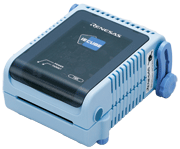
The IECUBE for 78K0 is a high-Performance full-spec emulator for 78K MCUs. It provides high-performance debugging functions such as time measurement, coverage, and trace. In addition, a self-testing function detects faults in the IECUBE and performs maintenance.
Features
- Functions [Learn More]
- Specifications [Learn More]
- Components [Learn More]
- Optional Products (Sold Separately) [Learn More]
- Learn More
Release Information
Integrated Development Environment CS+ (CS+ for CA, CX)
Details of CS+ upgrade (See Tool News)
*The following tool produced by partner is also available.
- IAR Embedded Workbench (Contact IAR Systems.)
Target Devices
Downloads
|
|
|
|
|---|---|---|
| Type | Title | Date |
| Upgrade - Debugger | Upgrade tool for QB-78K0FX2L Rev.C
|
|
| Upgrade - Debugger | Upgrade tool for QB-78K0IX2 Rev.C
|
|
| Upgrade - Debugger | Upgrade tool for QB-78K0FX1 Rev.C
|
|
| Upgrade - Debugger | Upgrade tool for QB-78K0FX2 Rev.B
|
|
| Upgrade - Debugger | Upgrade tool for QB-78K0KX1H Rev.G
|
|
| Upgrade - Debugger | Upgrade tool for QB-78K0KX2L Rev.D
|
|
| Upgrade - Debugger | Upgrade tool for QB-78K0LX2 Rev.D
|
|
| Upgrade - Debugger | Upgrade tool for QB-179F124 Rev.C
|
|
8 items
|
||
Documentation
|
|
|
|
|---|---|---|
| Type | Title | Date |
| Manual - Development Tools | PDF 343 KB 日本語 | |
| Manual - Development Tools | PDF 243 KB 日本語 | |
| Tool News - Featured Tool | PDF 288 KB 日本語 | |
| Tool News - Featured Tool | PDF 173 KB 日本語 | |
| Manual - Development Tools | PDF 272 KB 日本語 | |
| Manual - Development Tools | PDF 272 KB 日本語 | |
| Release Note | PDF 200 KB 日本語 | |
| Release Note | PDF 206 KB 日本語 | |
| Tool News - Release | PDF 324 KB 日本語 | |
| Tool News - Release | PDF 325 KB 日本語 | |
| Manual - Development Tools | PDF 132 KB 日本語 | |
| Manual - Development Tools | PDF 173 KB 日本語 | |
| Tool News - Note | PDF 202 KB 日本語 | |
| Tool News - Note | PDF 202 KB 日本語 | |
| Tool News - Note | PDF 422 KB 日本語 | |
| Manual - Development Tools | PDF 686 KB 日本語 | |
| Tool News - Release | PDF 203 KB 日本語 | |
| Tool News - Note | PDF 202 KB 日本語 | |
| Release Note | PDF 153 KB 日本語 | |
| Tool News - Note | PDF 202 KB 日本語 | |
| Tool News - Note | PDF 202 KB 日本語 | |
| Application Note |
PDF
335 KB
日本語
AI-generated Summary:
The ID78K0-QB V3.21 debugger requires a host machine with at least a 1GHz processor, 512MB memory, USB 1.1/2.0, and 32-bit Windows XP, Vista, or 7. It supports multiple versions of development tools and emulators, including RA78KO assembler, CC78K0 compiler, and IECUBE, MINICUBE hardware. Installation requires administrator rights, ASCII-only folder names, and manual environment variable setup. The USB driver installs separately and must be completed before connecting the emulator.
|
|
| Technical Update | PDF 67 KB 日本語 | |
| Technical Update | PDF 595 KB 日本語 | |
| Manual - Hardware | PDF 89 KB 日本語 | |
| Technical Update | PDF 97 KB 日本語 | |
| Technical Update | PDF 93 KB 日本語 | |
| Technical Update | PDF 113 KB 日本語 | |
| Manual - Development Tools | PDF 886 KB 日本語 | |
| Manual - Development Tools | PDF 1023 KB 日本語 | |
| Manual - Development Tools | PDF 914 KB 日本語 | |
| Manual - Development Tools | PDF 922 KB 日本語 | |
| Manual - Development Tools | PDF 4.88 MB 日本語 | |
| Manual - Development Tools | PDF 776 KB 日本語 | |
| Manual - Development Tools | PDF 940 KB 日本語 , 简体中文 | |
| Manual - Hardware | PDF 949 KB 日本語 | |
| Manual - Development Tools | PDF 321 KB 日本語 | |
| Technical Update | PDF 224 KB 日本語 | |
| Technical Update | PDF 260 KB 日本語 | |
| Technical Update | PDF 98 KB 日本語 | |
| Technical Update | PDF 44 KB | |
| Technical Update | PDF 86 KB 日本語 | |
| Technical Update | PDF 87 KB 日本語 | |
| Technical Update | PDF 81 KB 日本語 | |
| Manual - Development Tools | PDF 986 KB 日本語 | |
| Manual - Development Tools | PDF 965 KB 日本語 | |
| Technical Update | PDF 72 KB 日本語 | |
| Technical Update | PDF 144 KB 日本語 | |
| Manual - Development Tools | PDF 1.09 MB 日本語 , 简体中文 | |
| Manual - Development Tools | PDF 207 KB 日本語 | |
| Technical Update | PDF 71 KB | |
| Technical Update | PDF 109 KB | |
| Technical Update | PDF 46 KB | |
| Technical Update | PDF 131 KB 日本語 | |
| Technical Update | PDF 69 KB 日本語 | |
| Manual - Development Tools | PDF 199 KB 日本語 | |
| Manual - Development Tools | PDF 4.37 MB 日本語 , 简体中文 | |
| Manual - Hardware | PDF 4.33 MB 日本語 | |
| Guide | PDF 213 KB | |
| Manual - Development Tools | PDF 832 KB 日本語 , 简体中文 | |
| Manual - Development Tools | PDF 829 KB 日本語 , 简体中文 | |
| Manual - Development Tools | PDF 1.08 MB 日本語 , 简体中文 | |
| Technical Update | PDF 334 KB 日本語 | |
| Technical Update | PDF 85 KB 日本語 | |
| Technical Update | PDF 103 KB 日本語 | |
| Technical Update | PDF 104 KB 日本語 | |
| Manual - Development Tools | PDF 107 KB 日本語 | |
| Guide | PDF 291 KB | |
| Flyer | PDF 312 KB | |
| Technical Update | PDF 71 KB 日本語 | |
| Guide | PDF 171 KB | |
| Guide | PDF 173 KB | |
| Technical Update | PDF 197 KB 日本語 | |
| Manual - Development Tools | PDF 4.74 MB 日本語 | |
| Flyer | PDF 212 KB | |
| Technical Update | PDF 54 KB 日本語 | |
| Technical Update | PDF 121 KB 日本語 | |
| Technical Update | PDF 123 KB 日本語 | |
78 items
|
||
Additional Details
Functions
See related documents. (user's manual, release note, etc.)
Specifications
See related documents. (user's manual, release note, etc.)
Components
See related documents. (user's manual, release note, etc.)
Optional Products (Sold Separately)
- Emulation Probe
- Exchange Adapter
- Space Adapter
- YQ Connector
- Target Connector
- Mount Adapter
Optional product list of IECUBE for 78K0 (PDF | English, 日本語) - Check pin adapter Drawings of QB-144-CA-01 (PDF)
* Usable in common with RL78, 78K0R, 78K0, 78K0S, V850.
The pin header cover corresponded to the pin arrangement of the MCU is required. You can get the pin header cover package from the following package list. Please print the package and cut out the pin header cover for using.
Package list of pin header cover (PDF | English, 日本語)
Usage of Pin Header Cover - Power Supply Adapter
Specifications of the power supply adapter, QB-COMMON-PW-xx, vary depending on the region. Be sure to use an adapter designed for your region.
Support
Knowledge Base
- Using the E1 or E20 emulator, is it possible to use the AZ78V4 performance analyzer to obtain a trace display for an application which is using the RI78V4 operating system? (E2, E2 Lite, E1, E20)
No, it is not possible. This is because the AZ78V4 uses a record of data access to obtain a trace display. To use the AZ78V4 in tracing, you need to• use IECUBE, or• use a simulator.
Mar 8, 2021

Support Communities


