
Overview
Description
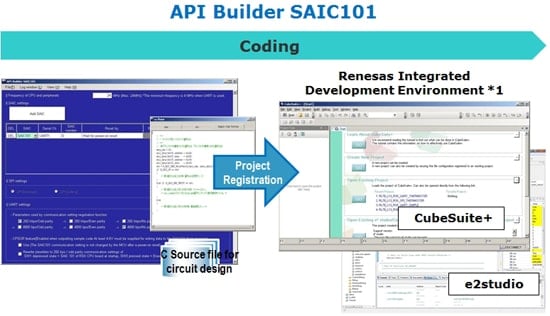
API Builder SAIC101 is a coding assistance tool for editing the API for controlling the Smart Analog IC101, generating various sample code that uses the edited API, and assisting integration work. All operations, from editing the API and selecting sample code, to output, can be performed easily using a GUI (graphical user interface).
Features
- Automatically integrate SAIC101 sample code into project files created using CS+ or e2 studio.
- Use a GUI to easily edit serial interface settings to suit your system environment and apply to API.
- Select an integrating target from the various sample code that uses the edited API, and generate sample C source code for an RSK (Renesas Starter Kit) board.*2
- Notes:
- The Renesas integrated development environments (IDE) that are currently supported are CS+ and e2 studio.
- Currently, only Renesas Starter Kit for RL78/L13 is supported.
Release Information
- Supported Devices: Smart Analog IC101
Target Devices
Downloads
|
|
|
|
|---|---|---|
| Type | Title | Date |
| Software & Tools - Other | Coding assistance tool API Builder SAIC101
|
|
1 item
|
||
Documentation
Featured Documentation
Log in required to subscribe
|
|
|
|
|---|---|---|
| Type | Title | Date |
| Application Note |
PDF
1.65 MB
日本語
AI-generated Summary:
The document details API specifications for controlling Smart Analog IC101 via UART and SPI interfaces. It covers functions for SPI data transmission, error checking, UART command handling, flash memory operations including read, write, erase, and verification, as well as ADC control and power supply management. It also specifies operation confirmation conditions, including target devices, development environments, and compiler versions.
|
|
| Application Note |
PDF
989 KB
日本語
AI-generated Summary:
The document explains how to use Smart Analog IC101's API and sample code with other MCUs, focusing on compatibility with the RL78 family code generation tool. For supported MCUs, users add an MCU definition file to API Builder SAIC101 to automatically include sample code. For unsupported MCUs, users must manually create compatible functions and integrate the API. It provides a tutorial for adding an RL78/G14 MCU, detailing how to prepare and edit the MCU definition file using Excel or a text editor.
|
|
| Application Note |
PDF
3.92 MB
日本語
AI-generated Summary:
The document explains the usage flow of API Builder SAIC101 for integrating APIs or sample code into projects created with CubeSuite+ or e2studio. It guides through creating a project, setting MCU peripheral functions, connecting SAIC and MCU via serial communication, generating and integrating sample code, and finally building and running the project. It also details using CubeSuite+ for code generation, setting debug tools, and creating project templates for the RL78/L13 MCU, specifically for operating a thermistor on the TSA-OP-IC101 evaluation board via UART.
|
|
| Application Note |
PDF
709 KB
日本語
AI-generated Summary:
The document provides sample code examples for operating the SAIC101 Smart Analog IC via SPI and UART interfaces. It explains how to read and write register bytes, including reading the fixed CHIPID register and writing to the CH4CNT2 register for DC offset adjustment. It also covers reading flash memory data from specified addresses with limitations on read size. Error handling for communication and parameter issues is included in the examples.
|
|
4 items
|
||
Design & Development
Additional Details
Hardware Requirements
| Supported OS | Windows® 8 (32-bit or 64-bit), Windows® 7 (32-bit or 64-bit) |
|---|---|
| Other software requirements in addition to Windows OS | .NET Framework 4 or later |
Resources
Support

Support Communities
Get quick technical support online from Renesas Engineering Community technical staff.

Knowledge Base
Browse our knowledge base for helpful articles, FAQs, and other useful resources.

