Features
- 16 touch sensor channels
- 2ms update rate per active sensor
- Built-in Slider/Scroll Support
- Configurable hysteresis and debounce
- Integrated LED drivers with configurable visual effects
- 1.65-5.5v supply voltage
- <125uW (full power), <50uW (low power)
- I2C, SPI, SMBus serial I/F options with VDDIO
- DCM Outputs
- TQFN and SSOP packages available
Description
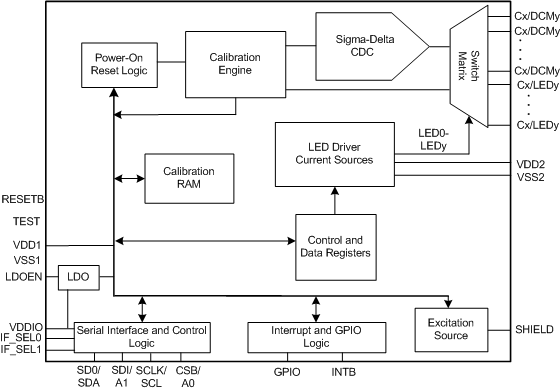
The LDS6128 PureTouch® capacitive touch sensor IC is a highly integrated solution that includes an integrated keypad LED driver with integrated visual effects. The device contains 16 capacitive sensor input pins, 8 of which may also be optionally configured for use as keypad LED drivers, with the other 8 optionally configurable as Direct Communication Mode (DCM) outputs to emulate mechanical button operation.
| Part Number | Status | Samples | Stock | Package | Lead Count (#) | Temp. Grade | Pb (Lead) Free | Carrier Type |
|---|---|---|---|---|---|---|---|---|
| LDS6128NQGI8 | Obsolete | N/A | Out of Stock | VFQFPN | 40# | I | Yes | Reel |
| LDS6128PVGI8 | Obsolete | N/A | Out of Stock | SSOP | 48# | I | Yes | Reel |
Loading
Filters
Applied Filters
Log in required to subscribe
- End Of Life NoticePDF 56 KB 7WDXRDKU4E7E-5-55878 Jul 25, 2013
- Application NotePDF 1.77 MB 7WDXRDKU4E7E-5-54696 Dec 12, 2012
- Datasheet
- ReportPDF 240 KB 7WDXRDKU4E7E-5-50660 Apr 05, 2010
- Datasheet
Recommended Documents (1)
- Datasheet
Datasheets (1)
No Results Found.
Check Spelling
Make sure all keywords are spelled correctly.
Adjust Keywords
Try fewer, different, or more general terms to vary your search.
Review Filters
If you have filters applied, consider deselecting some to broaden your results.
Need help?
- Search our extensive knowledgebase, designed to help customers with their FAQs.
- Get help from our expert Renesas technical staff and community on our support forums.
- Application NotePDF 1.77 MB 7WDXRDKU4E7E-5-54696 Dec 12, 2012
Application Notes & White Papers (1)
- End Of Life NoticePDF 56 KB 7WDXRDKU4E7E-5-55878 Jul 25, 2013
Product Notices (PCN, EOL, etc) (1)
No Results Found.
Check Spelling
Make sure all keywords are spelled correctly.
Adjust Keywords
Try fewer, different, or more general terms to vary your search.
Review Filters
If you have filters applied, consider deselecting some to broaden your results.
Need help?
- Search our extensive knowledgebase, designed to help customers with their FAQs.
- Get help from our expert Renesas technical staff and community on our support forums.
No Results Found.
Check Spelling
Make sure all keywords are spelled correctly.
Adjust Keywords
Try fewer, different, or more general terms to vary your search.
Review Filters
If you have filters applied, consider deselecting some to broaden your results.
Need help?
- Search our extensive knowledgebase, designed to help customers with their FAQs.
- Get help from our expert Renesas technical staff and community on our support forums.
No Results Found.
Check Spelling
Make sure all keywords are spelled correctly.
Adjust Keywords
Try fewer, different, or more general terms to vary your search.
Review Filters
If you have filters applied, consider deselecting some to broaden your results.
Need help?
- Search our extensive knowledgebase, designed to help customers with their FAQs.
- Get help from our expert Renesas technical staff and community on our support forums.
No Results Found.
Check Spelling
Make sure all keywords are spelled correctly.
Adjust Keywords
Try fewer, different, or more general terms to vary your search.
Review Filters
If you have filters applied, consider deselecting some to broaden your results.
Need help?
- Search our extensive knowledgebase, designed to help customers with their FAQs.
- Get help from our expert Renesas technical staff and community on our support forums.
No Results Found.
Check Spelling
Make sure all keywords are spelled correctly.
Adjust Keywords
Try fewer, different, or more general terms to vary your search.
Review Filters
If you have filters applied, consider deselecting some to broaden your results.
Need help?
- Search our extensive knowledgebase, designed to help customers with their FAQs.
- Get help from our expert Renesas technical staff and community on our support forums.
No Results Found.
Check Spelling
Make sure all keywords are spelled correctly.
Adjust Keywords
Try fewer, different, or more general terms to vary your search.
Review Filters
If you have filters applied, consider deselecting some to broaden your results.
Need help?
- Search our extensive knowledgebase, designed to help customers with their FAQs.
- Get help from our expert Renesas technical staff and community on our support forums.
Marketing Collateral (1)
- ReportPDF 240 KB 7WDXRDKU4E7E-5-50660 Apr 05, 2010
Other (2)
No Results Found.
Check Spelling
Make sure all keywords are spelled correctly.
Adjust Keywords
Try fewer, different, or more general terms to vary your search.
Review Filters
If you have filters applied, consider deselecting some to broaden your results.
Need help?
- Search our extensive knowledgebase, designed to help customers with their FAQs.
- Get help from our expert Renesas technical staff and community on our support forums.
Support Communities
Get quick technical support online from Renesas Engineering Community technical staff.
Knowledge Base
Browse our knowledge base for helpful articles, FAQs, and other useful resources.