Features
- Switch-Mode Power Converter for Lowest Dissipation
- Boost PWM with >92% Efficiency
- Selectable 13V or 18V Outputs
- Digital Cable Length Compensation (1V)
- Vsw tracks Vout ensures low dissipation
- I2C Compatible Interface for Remote Device Control
- Registered Slave Address 0001 00XX
- Fully Functional 3.3V, 5V Operation up to 400kHz
- Built-In Tone Oscillator Factory Trimmed to 22kHz
- Facilitates DiSEqC™ (EUTELSAT) Encoding
- External Modulation input DSQIN
- Internal Over Temperature Protection and Diagnostics
- Internal Overload and Over Temperature Flags (Visible on I2C)
- Output Back-Bias Protection to 24V
- LNB Short-Circuit Protection and Diagnostics
- QFN Package
- Compliant to JEDEC PUB95 MO-220 QFN - Quad Flat No Leads - Product Outline
- Near Chip-Scale Package Footprint
- External Pins to Select 13V/18V Options
- Pb-Free Available (RoHS Compliant)
Description
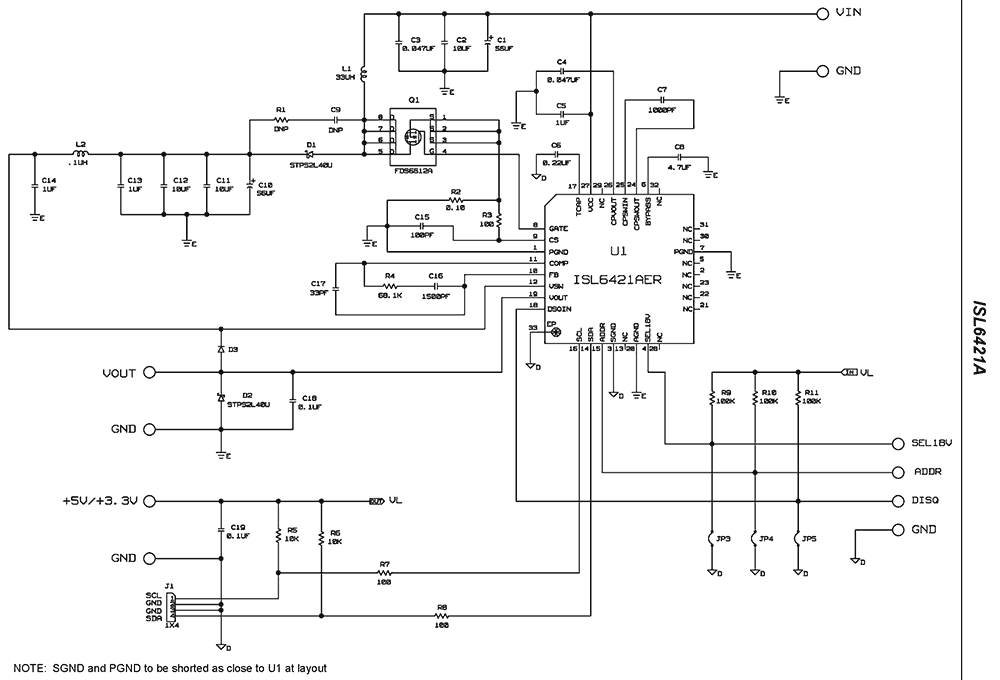
The ISL6421A is a highly integrated solution for providing power and control signals from advanced satellite set-top box (STB) modules to the low noise block (LNB). The internal architecture of this device contains a current-mode boost PWM and a low-noise linear regulator, along with the circuitry required for I2C device interfacing and for providing DiSEqC™ standard control signals to the LNB. A regulated output voltage is available at the output terminal (VOUT) to support the operation of the antenna port in advanced satellite STB applications. The regulated output may be set to either 13V or 18V by use of the voltage select command bit (VSEL) through the I2C bus. Additionally, to compensate for the voltage drop in the coaxial cable, the voltage may be increased by 1V with the line length compensation bit (LLC) feature. The device can be put into a standby mode by means of the enable bit (EN), this disables the PWM and Linear regulator combination and helps conserve power. The input to the linear regulator is derived from the current mode boost converter, such that the required voltage is the sum of the output voltage and the linear regulator drop (1. 0V typical). This ensures that the power dissipation is minimized and maintains a constant voltage drop across the linear pass element, while permitting an adequate voltage range for tone injection. The device is capable of providing 450mA (typical). The overcurrent limit is either digitally or resistor programmable.
Applications
- LNB Power Supply and Control for Satellite Set-Top Box
| Part Number | Status | Samples | Stock | RoHS | Package | Carrier Type | MOQ |
|---|---|---|---|---|---|---|---|
| ISL6421AERZ | Obsolete | N/A | In Stock | RoHS:EN | QFN | Tube | 1200 |
| ISL6421AERZ-T | Obsolete | N/A | In Stock | RoHS:EN | QFN | Reel | 6000 |
Filters
Applied Filters
- Product Change NoticePDF 326 KB May 21, 2021
- Product Change NoticePDF 398 KB PCN15046 Jan 07, 2016
- Product Change NoticePDF 248 KB PCN10055 Jun 30, 2010
- Application NoteAN1161: ISL6421A Single LNB Controller with I2C Interface for Advanced Satellite Set-Top Box DesignsPDF 1.46 MB an1161 Nov 12, 2004AI-generated Summary: The ISL6421A single LNB controller uses an I2C interface for communication and control, enabling voltage output monitoring and load management. It supports USB-I2CIO board driver installation for PC communication, with detailed steps for setup and troubleshooting. The device features soft-start, shutdown via I2C, high boost PWM efficiency, and built-in 22kHz tone generation for DiSEqC compliance. Overcurrent protection operates in hiccup mode, and output ripple and back-bias protection circuits are described to ensure stable operation and device safety.
- Application NotePDF 397 KB an1684 Jan 19, 2004AI-generated Summary: The document outlines important legal disclaimers and usage guidelines for semiconductor products. It emphasizes user responsibility for product design and safety, disclaims liability for damages, and clarifies no intellectual property licenses are granted. Products are categorized by quality grades with specific application recommendations. Users must comply with laws, avoid unauthorized modifications, and ensure safe use within specified conditions. Contact details for Renesas Electronics sales offices worldwide are provided.
- Application NotePDF 509 KB an1681 Jan 19, 2004AI-generated Summary: The document explains grounding techniques for PCB layouts using a dual op amp example on a single-layer copper board. It compares three grounding schemes: a center spine ground trace, an outer ground plane, and a split/star ground plane, highlighting the benefits of single-point grounding to minimize noise and antenna effects. It emphasizes following current paths, minimizing loop lengths, and ensuring close forward and return paths to reduce interference. The document also includes disclaimers on product use, quality grades, safety, and legal compliance.
Recommended Documents (1)
Datasheets (1)
No Results Found.
Make sure all keywords are spelled correctly.
Try fewer, different, or more general terms to vary your search.
If you have filters applied, consider deselecting some to broaden your results.
- Search our extensive knowledgebase, designed to help customers with their FAQs.
- Get help from our expert Renesas technical staff and community on our support forums.
- Application NoteAN1161: ISL6421A Single LNB Controller with I2C Interface for Advanced Satellite Set-Top Box DesignsPDF 1.46 MB an1161 Nov 12, 2004AI-generated Summary: The ISL6421A single LNB controller uses an I2C interface for communication and control, enabling voltage output monitoring and load management. It supports USB-I2CIO board driver installation for PC communication, with detailed steps for setup and troubleshooting. The device features soft-start, shutdown via I2C, high boost PWM efficiency, and built-in 22kHz tone generation for DiSEqC compliance. Overcurrent protection operates in hiccup mode, and output ripple and back-bias protection circuits are described to ensure stable operation and device safety.
- Application NotePDF 397 KB an1684 Jan 19, 2004AI-generated Summary: The document outlines important legal disclaimers and usage guidelines for semiconductor products. It emphasizes user responsibility for product design and safety, disclaims liability for damages, and clarifies no intellectual property licenses are granted. Products are categorized by quality grades with specific application recommendations. Users must comply with laws, avoid unauthorized modifications, and ensure safe use within specified conditions. Contact details for Renesas Electronics sales offices worldwide are provided.
- Application NotePDF 509 KB an1681 Jan 19, 2004AI-generated Summary: The document explains grounding techniques for PCB layouts using a dual op amp example on a single-layer copper board. It compares three grounding schemes: a center spine ground trace, an outer ground plane, and a split/star ground plane, highlighting the benefits of single-point grounding to minimize noise and antenna effects. It emphasizes following current paths, minimizing loop lengths, and ensuring close forward and return paths to reduce interference. The document also includes disclaimers on product use, quality grades, safety, and legal compliance.
Application Notes & White Papers (3)
- Product Change NoticePDF 326 KB May 21, 2021
- Product Change NoticePDF 398 KB PCN15046 Jan 07, 2016
- View More (6)
Product Notices (PCN, EOL, etc) (6)
No Results Found.
Make sure all keywords are spelled correctly.
Try fewer, different, or more general terms to vary your search.
If you have filters applied, consider deselecting some to broaden your results.
- Search our extensive knowledgebase, designed to help customers with their FAQs.
- Get help from our expert Renesas technical staff and community on our support forums.
No Results Found.
Make sure all keywords are spelled correctly.
Try fewer, different, or more general terms to vary your search.
If you have filters applied, consider deselecting some to broaden your results.
- Search our extensive knowledgebase, designed to help customers with their FAQs.
- Get help from our expert Renesas technical staff and community on our support forums.
No Results Found.
Make sure all keywords are spelled correctly.
Try fewer, different, or more general terms to vary your search.
If you have filters applied, consider deselecting some to broaden your results.
- Search our extensive knowledgebase, designed to help customers with their FAQs.
- Get help from our expert Renesas technical staff and community on our support forums.
No Results Found.
Make sure all keywords are spelled correctly.
Try fewer, different, or more general terms to vary your search.
If you have filters applied, consider deselecting some to broaden your results.
- Search our extensive knowledgebase, designed to help customers with their FAQs.
- Get help from our expert Renesas technical staff and community on our support forums.
No Results Found.
Make sure all keywords are spelled correctly.
Try fewer, different, or more general terms to vary your search.
If you have filters applied, consider deselecting some to broaden your results.
- Search our extensive knowledgebase, designed to help customers with their FAQs.
- Get help from our expert Renesas technical staff and community on our support forums.
No Results Found.
Make sure all keywords are spelled correctly.
Try fewer, different, or more general terms to vary your search.
If you have filters applied, consider deselecting some to broaden your results.
- Search our extensive knowledgebase, designed to help customers with their FAQs.
- Get help from our expert Renesas technical staff and community on our support forums.
No Results Found.
Make sure all keywords are spelled correctly.
Try fewer, different, or more general terms to vary your search.
If you have filters applied, consider deselecting some to broaden your results.
- Search our extensive knowledgebase, designed to help customers with their FAQs.
- Get help from our expert Renesas technical staff and community on our support forums.
No Results Found.
Make sure all keywords are spelled correctly.
Try fewer, different, or more general terms to vary your search.
If you have filters applied, consider deselecting some to broaden your results.
- Search our extensive knowledgebase, designed to help customers with their FAQs.
- Get help from our expert Renesas technical staff and community on our support forums.
No Results Found.
Make sure all keywords are spelled correctly.
Try fewer, different, or more general terms to vary your search.
If you have filters applied, consider deselecting some to broaden your results.
- Search our extensive knowledgebase, designed to help customers with their FAQs.
- Get help from our expert Renesas technical staff and community on our support forums.
Filters
Applied Filters
Software & Tools
Filter by Type
Filter by Provider
Sample Code
Filter by Application
Filter by Function
Filter by Compiler
Filter by IDE
Simulation Models
Partner Solutions
- LibraryEXE 2.64 MB intersil_i2c_comm_installer_v316 Nov 17, 2017
No Results Found.
Make sure all keywords are spelled correctly.
Try fewer, different, or more general terms to vary your search.
If you have filters applied, consider deselecting some to broaden your results.
- Search our extensive knowledgebase, designed to help customers with their FAQs.
- Get help from our expert Renesas technical staff and community on our support forums.
- LibraryEXE 2.64 MB intersil_i2c_comm_installer_v316 Nov 17, 2017
Software & Tools (2)
No Results Found.
Make sure all keywords are spelled correctly.
Try fewer, different, or more general terms to vary your search.
If you have filters applied, consider deselecting some to broaden your results.
- Search our extensive knowledgebase, designed to help customers with their FAQs.
- Get help from our expert Renesas technical staff and community on our support forums.
No Results Found.
Make sure all keywords are spelled correctly.
Try fewer, different, or more general terms to vary your search.
If you have filters applied, consider deselecting some to broaden your results.
- Search our extensive knowledgebase, designed to help customers with their FAQs.
- Get help from our expert Renesas technical staff and community on our support forums.
No Results Found.
Make sure all keywords are spelled correctly.
Try fewer, different, or more general terms to vary your search.
If you have filters applied, consider deselecting some to broaden your results.
- Search our extensive knowledgebase, designed to help customers with their FAQs.
- Get help from our expert Renesas technical staff and community on our support forums.