Features
- Ambient IR Cancellation During Proximity Sensing
- Works Under Direct Sunlight
- IR LED Driver with Programmable Source Current
- Adjustable Current Drive from 100mA to 12.5mA
- Programmable LED current Modulation Frequency
- Variable Conversion Resolution
- Simple Output Code Directly Proportional to lux
- Adjustable Sensitivity up to 65 Counts per lux
- Selectable Range (via I2C)
- Range 1 = 0.015 lux to 1,000 lux
- Range 2 = 0.06 lux to 4,000 lux
- Range 3 = 0.24 lux to 16,000 lux
- Range 4 = 0.96 lux to 64,000 lux
- Integrated 50/60Hz Noise Rejection
- Works Under Various Light Sources, Including Sunlight
- Ideal Spectral Response for Light and Proximity Sensor
- Light Sensor Close to Human Eye Response
- Excellent Light Sensor IR and UV Rejection
- Proximity sensor range from 850nm to 950nm
- Can use either 850nm or 950nm LED solution
- 90μA Max Operating Current
- Software Shutdown and Automatic Shutdown
- 0.5μA Max Shutdown Current
- I2C (SMBus Compatible) Output
- No Complex Algorithms Needed
- Temperature Compensated
- Small Form Factor
- 8 Ld 2.0mm x 2.1mm x 0.7mm ODFN Package
- I2C and SMBus Compatible
- 1.7V to 3.63V Supply for I2C Interface
- 2.25V to 3.63V Sensor Power Supply
- Pb-Free (RoHS compliant)
Description
Support is limited to customers who have already adopted these products.
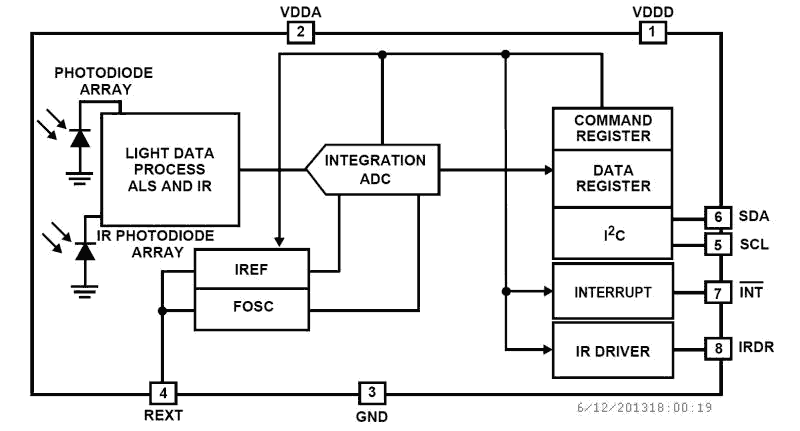
The ISL29018 is an integrated ambient and infrared light to digital converter with a built-in IR LED driver and I2C Interface (SMBus compatible). This device provides not only ambient light sensing to allow robust backlight/display brightness control but also infrared sensing to allow proximity estimation featured with interrupt function. For ambient light sensing, an internal ADC has been designed based on the charge-balancing A/D conversion technique. The ADC conversion time is nominally 90ms and is user adjustable from 11µs to 90ms, depending on oscillator frequency and ADC resolution. This ADC is capable of rejecting 50Hz and 60Hz flicker noise caused by artificial light sources. The lux-range-select feature allows users to program the lux range for optimized counts/lux. For proximity sensing, the ADC is used to digitize the output signal from the photodiode array when the internal IR LED driver is turned on and off for the programmed time periods under user-selected modulation frequency to drive the external IR LED. As this proximity sensor employs a noise cancellation scheme to highly reject unwanted IR noise, the digital output of proximity sensing decreases with distance. The driver output current is user selectable up to 100mA to drive different types of IR emitters LEDs. Six different modes of operation can be selected via the I2C interface: Programmable ALS once with auto power-down, programmable IR sensing once, programmable proximity sensing once, programmable continuous ALS sensing, programmable continuous IR sensing and programmable continuous proximity sensing. The programmable one-time operation modes greatly reduce power because an immediate automatic shutdown reduces overall supply current less than 0.5µA. The ISL29018 supports both hardware and software interrupts that remain asserted until the host clears it through I2C interface for ambient light sensing and proximity detection. Designed to operate on supplies from 2.25V to 3.63V, the ISL29018 is specified for operation over the -40 °C to +85 °C ambient temperature range. It is packaged in a clear, Pb-free 8 Ld ODFN package.
Applications
- Display and Keypad Dimming Adjustment and Proximity Sensing
- Mobile Devices: Smartphones, PDAs, GPS
- Computing Devices: Notebook PCs, Webpads
- Consumer Devices: LCD-TVs, Digital Picture Frames, Digital Cameras
- Industrial and Medical Light and Proximity Sensing
| Part Number | Status | Samples | Stock | Package | Carrier Type | MOQ |
|---|---|---|---|---|---|---|
| ISL29018IROZ-T7 | Obsolete | N/A | Out of Stock | DODFN | Reel | 1000 |
Filters
Applied Filters
- Product AdvisoryPDF 85 KB PA12079 Oct 08, 2012
- Product AdvisoryPDF 80 KB PA11104 Oct 05, 2011
- Application NotePDF 563 KB an1436 Oct 30, 2008AI-generated Summary: The document explains the mechanical design considerations for proximity sensing systems, focusing on the placement and spacing of IR LEDs, sensors, and barriers to optimize detection sensitivity and minimize crosstalk. It details how distances between components (sensor to LED, sensor to barrier, LED to barrier) affect proximity readout and sensitivity. The importance of barrier height and glass cover transmissivity on sensor performance is discussed. Additionally, it covers the impact of window lens material and dimensions on viewing angle and sensor effectiveness.
- Application NotePDF 186 KB an1534 Jan 19, 2004
Recommended Documents (1)
Datasheets (1)
No Results Found.
Make sure all keywords are spelled correctly.
Try fewer, different, or more general terms to vary your search.
If you have filters applied, consider deselecting some to broaden your results.
- Search our extensive knowledgebase, designed to help customers with their FAQs.
- Get help from our expert Renesas technical staff and community on our support forums.
- Application NotePDF 563 KB an1436 Oct 30, 2008AI-generated Summary: The document explains the mechanical design considerations for proximity sensing systems, focusing on the placement and spacing of IR LEDs, sensors, and barriers to optimize detection sensitivity and minimize crosstalk. It details how distances between components (sensor to LED, sensor to barrier, LED to barrier) affect proximity readout and sensitivity. The importance of barrier height and glass cover transmissivity on sensor performance is discussed. Additionally, it covers the impact of window lens material and dimensions on viewing angle and sensor effectiveness.
- Application NotePDF 186 KB an1534 Jan 19, 2004
Application Notes & White Papers (2)
- Product AdvisoryPDF 85 KB PA12079 Oct 08, 2012
- Product AdvisoryPDF 80 KB PA11104 Oct 05, 2011
Product Notices (PCN, EOL, etc) (3)
No Results Found.
Make sure all keywords are spelled correctly.
Try fewer, different, or more general terms to vary your search.
If you have filters applied, consider deselecting some to broaden your results.
- Search our extensive knowledgebase, designed to help customers with their FAQs.
- Get help from our expert Renesas technical staff and community on our support forums.
No Results Found.
Make sure all keywords are spelled correctly.
Try fewer, different, or more general terms to vary your search.
If you have filters applied, consider deselecting some to broaden your results.
- Search our extensive knowledgebase, designed to help customers with their FAQs.
- Get help from our expert Renesas technical staff and community on our support forums.
No Results Found.
Make sure all keywords are spelled correctly.
Try fewer, different, or more general terms to vary your search.
If you have filters applied, consider deselecting some to broaden your results.
- Search our extensive knowledgebase, designed to help customers with their FAQs.
- Get help from our expert Renesas technical staff and community on our support forums.
No Results Found.
Make sure all keywords are spelled correctly.
Try fewer, different, or more general terms to vary your search.
If you have filters applied, consider deselecting some to broaden your results.
- Search our extensive knowledgebase, designed to help customers with their FAQs.
- Get help from our expert Renesas technical staff and community on our support forums.
No Results Found.
Make sure all keywords are spelled correctly.
Try fewer, different, or more general terms to vary your search.
If you have filters applied, consider deselecting some to broaden your results.
- Search our extensive knowledgebase, designed to help customers with their FAQs.
- Get help from our expert Renesas technical staff and community on our support forums.
No Results Found.
Make sure all keywords are spelled correctly.
Try fewer, different, or more general terms to vary your search.
If you have filters applied, consider deselecting some to broaden your results.
- Search our extensive knowledgebase, designed to help customers with their FAQs.
- Get help from our expert Renesas technical staff and community on our support forums.
No Results Found.
Make sure all keywords are spelled correctly.
Try fewer, different, or more general terms to vary your search.
If you have filters applied, consider deselecting some to broaden your results.
- Search our extensive knowledgebase, designed to help customers with their FAQs.
- Get help from our expert Renesas technical staff and community on our support forums.
No Results Found.
Make sure all keywords are spelled correctly.
Try fewer, different, or more general terms to vary your search.
If you have filters applied, consider deselecting some to broaden your results.
- Search our extensive knowledgebase, designed to help customers with their FAQs.
- Get help from our expert Renesas technical staff and community on our support forums.
No Results Found.
Make sure all keywords are spelled correctly.
Try fewer, different, or more general terms to vary your search.
If you have filters applied, consider deselecting some to broaden your results.
- Search our extensive knowledgebase, designed to help customers with their FAQs.
- Get help from our expert Renesas technical staff and community on our support forums.