
Overview
Description
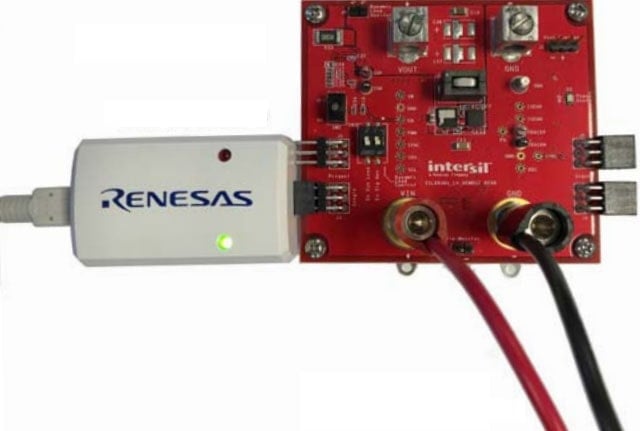
The Renesas USB to PMBus adapter (often referred to as a "dongle") is used to connect a demonstration board with a PMBus interface to a PC. The USB to PMBus adapter is powered from the USB output of the host PC. The USB interface utilizes the USB Mini format, and the output uses a standard 2 row, 6 pin header on 0.100 inch centers. The PMBus command set is accessed by using the PowerNavigator™ evaluation software from a PC running Microsoft Windows.
The ISLUSBEVAL1Z is the replacement part for ZLUSBEVAL3Z which is now end of life (EOL).
Features
- Connect the USB Mini provided between the host computer and the USB to PMBus adapter
- Connect USB to PMBus adapter to demonstration board to test or evaluate
- Apply input power (labeled VIN) to the demonstration board
- Using the host PC's internet browser, navigate to the PowerNavigator™ software page.
- Follow the download instructions.
- Once the PowerNavigator™ software is installed, double-click on the PowerNavigator™ icon and follow the software's instructions.
Applications
Documentation
|
|
|
|
|---|---|---|
| Type | Title | Date |
| Manual - Development Tools | PDF 257 KB | |
| PCB Design Files | ZIP 410 KB | |
| PCB Design Files | ZIP 963 KB | |
| Guide | PDF 4.68 MB | |
| Guide | PDF 393 KB | |
5 items
|
||
Design & Development
Software & Tools
Software & Tools
| Software title
|
Software type
|
Company
|
|---|---|---|
| PowerNavigator Software Renesas' PowerNavigator™ software allows simple configuration and monitoring of multiple Digital-DC devices using a PC with a USB interface.
|
Monitor Debugger/RAM Monitor | Renesas |
1 item
|
||
Product Options
| Part Number | Status | Stock | Budgetary Price (USD) | Sampleable | Pb (Lead) Free | ECCN (US) | HTS (US) |
|---|---|---|---|---|---|---|---|
| ISLUSBEVAL1Z | Active | In Stock | 1u | $77.8 | Available | Yes | EAR99 | 8473.30.1180 |
Support
Support Communities
- SO#468053 (PN#ISLUSBEVAL1Z)
Hi Support Team, Good day. My customer currently experiencing an issue where the programmer (PN#ISLUSBEVAL1Z) is not powering on. A video of the issue has been attached for your reference. Could you kindly advise us on the next steps to resolve this? Thanks. Regards, Kent
Dec 11, 2025 - ISLUSBEVAL1Z
Hello, I'm currently using a ISLUSBEVAL1Z USB to PMBUS adapter. However, there's a problem: when I connect it to the PC, the dongle shows up as disconnected. I've tried reinstalling the PowerNavigator software multiple times with no luck. Currently, I'm running windows 11. Has anyone run ...
May 28, 2026 - What is the difference between the two usb to pmbus adapters ZLUSBEVAL3Z and ISLUSBEVAL1Z.
Based on the schematics in the user guide, the only difference is the micro controllers. ZLUSBEVAL3Z uses C8051F320ISLUSBEVAL1Z uses C8051F381-GQ At digikey, ZLUSBEVAL3Z is priced at $123 where as is priced at ISLUSBEVAL1Z $27 Can both adapters be interchangeably used? or are there any dependencies or requirements to ...
Apr 30, 2019

Support Communities


