
Overview
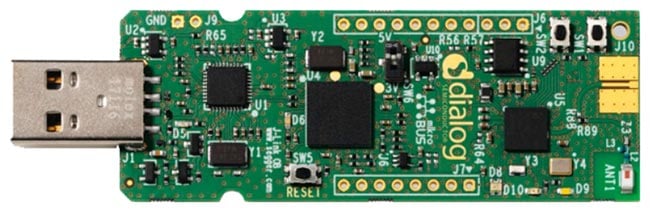
This USB development kit with onboard Flash gives users the flexibility to develop rechargeable applications like wearables, smart homes, or VR controllers with confidence. All of the DA14683’s I/Os are available and mapped onto expansion connectors. A debugger is provided on the PCB in combination with SmartSnippets™, Renesas' complete software environment, enabling users to program and test their Bluetooth® Low Energy application.
Features
- Highly integrated DA14683 Bluetooth Low Energy system-on-chip (SoC)
- Access to general-purpose input-outputs (GPIOs) is provided from the chip when no MikroBUS™ is plugged in
- The ability to be connected directly to a PC USB without extra cables
- Reset push button
- General-purpose LEDs and buttons
- RGB LEDs connecting each color to dedicated PWM pins (LED1, LED2, LED3)
- Using USB (5V) or a low-dropout regulator (LDO) (3V3) as the power source
- JTAG and UART interface over USB via Segger
- QSPI flash on board
- 2.4GHz chip antenna and slot for SMA connector
- 16MHz main crystal and 32.768KHz low-power crystal
- Low cost
- Compact design
- A dimension of 89mm x 26.7mm x 4.5mm
Sample & Buy
DA14683-00A9DEVKT-U
Active| MOQ: | 1 |
| SPQ: | 1 |
| Pb (Lead) Free: | Yes |
| Carrier Type: | Box |
| Assembly Location: | GERMANY |
Videos & Training
Resources
Support
Support Communities
- My DA14683-00A9DEVKT-U USB Develepment Kit
Hi Dialog, I can not find same files on my USB development kit when I insert it to my PC. In my USB development kit there are two files are NoFlashConfig.txt Segger.html they are total difference with DA14683 USB Kit Readme. The Readme introduction the Kit has two ...
Oct 24, 2019 - DA14683: What is the lowest sleep current when powering FLASH from 3.3V?
Setup: Hardware = DA14683 USB Kit Dev Board (DA14683-00A9DEVKT-U) SDK = 1.0.14 FLASH = 128MB = W25Q128JVSIM-ND Modifications to USB Kit Dev Board: 1) Replaced FLASH with above part (with legs bent under to fit SMT pads) 2) Removed R57 (V18) and Installed 0ohm in R56 (V33). 3) Powering ...
Sep 24, 2022 - Building problem
Hi Dialog, I using development tool of DA14683-00A9DEVKT-U. I don't why I always met this problem when build project. No matter I use MESH SDK or SKD 1.0.14 Thank you
Oct 24, 2019

Support Communities

