
Overview
Description
[Updated: Jul. 21, 2026 Rev. 1.10] [Notes] Emulator and Flash Memory Programmer Products Notice Regarding Changes to Windows Driver Policy (PDF | English, 日本語)
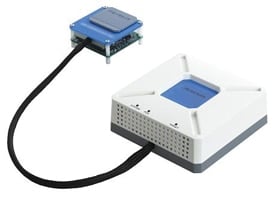
The IE850 is equipped with a rich variety of debugging functions, such as event, trace, and time measurement functions.
Features
- Large Trace Capacity
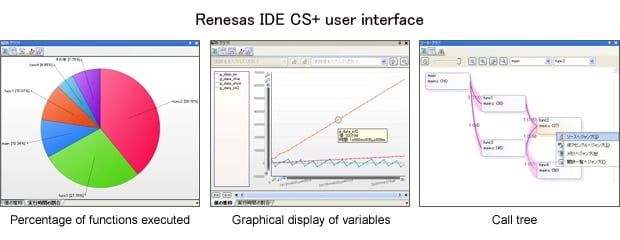
The IE850 supports a larger (512-KB) frame for tracing than the earlier product, the IECUBE for the V850 family, which supported a 256-KB frame as the capacity for trace information. Furthermore, you can also extend the trace capacity to 2.25 GB (128 Mframes) by using the optional QB-V850E2-SP product, which is usable with the Multi IDE from Green Hills Software, LLC. - The CS+ IDE from Renesas can realize various analytical features such as the percentage of functions executed, graphical display of variables, and visualization of function call relationships.
- Rich Variety of Debugging Functions
As a full-spec. emulator, the IE850 is equipped with a rich variety of debugging functions. Along with basic functions such as stepped execution, breaks and RAM monitoring, it also supports time measurement, tracing and measurement of coverage for more efficient system development. - Superb Versatility
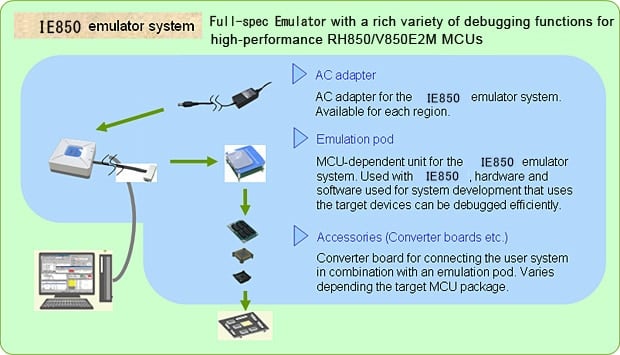
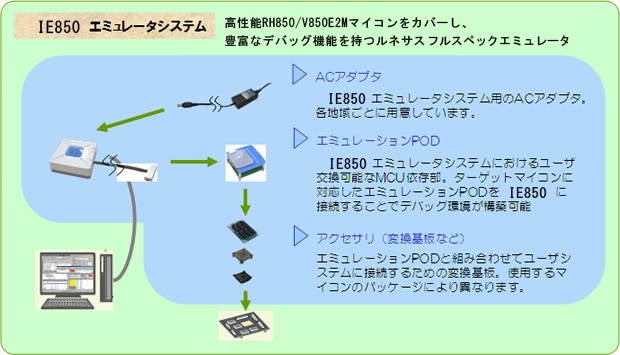
The IE850 is used by combining the IE850 main unit part with a pod section. By exchanging emulation pods to suit the MCUs you are using, the emulator can support any series of RH850 and V850E2M microcontrollers.
Release Information
| Software to be used | Target devices | Operating Environment |
|---|---|---|
| CS+ Evaluation Software Download | RH850Note1, V850 [Details] Functions Supported by CS+ (XLSX) (XLSX | English, 日本語) | Operating Environment |
| IAR Embedded Workbench | RH850, V850 | For the details, contact IAR Systems. |
| Green Hills Multi | RH850, V850 | For the details, contact Green Hills Software. |
Notes:
- Rewrite the data in the QB-V850E2 (main unit) when debugging systems that include MCUs of the RH850 family. For the details, see Data rewriting for debugging the RH850 family MCU (Preparation for the system).
- As target devices, In addition to the above, the IE850 supports MCUs, R7F701417 and R7F701437, as well.
Details of upgrade (See Tool News)
Target Devices
Videos & Training
This video introduces emulators used in RH850 family microcontroller development. It covers the E2 emulator, an on-chip debug emulator, as well as the IE850A and IE850 full-spec emulators. A comparison table is included to help customers easily determine which emulator best suits their needs. Additionally, the extended functions of the E2 emulator are explained in detail.
Additional Details
Specifications of IE850 Main Unit (QB-V850E2)
| Item | Description |
|---|---|
| Host machine interface | USB (USB2.0, High-speed) |
| Power supply for emulator | Supplied from the AC adapter separately available |
| Emulator main unit external dimensions (mm) | 104(W) x 104(D) x 43(H) |
| Emulator main unit weight | Approx. 300 g |
| Conformance with overseas standards | European Standards: EN 55022 Class A, EN 55024 US FCC Standard: FCC part 15 Class A |
Components
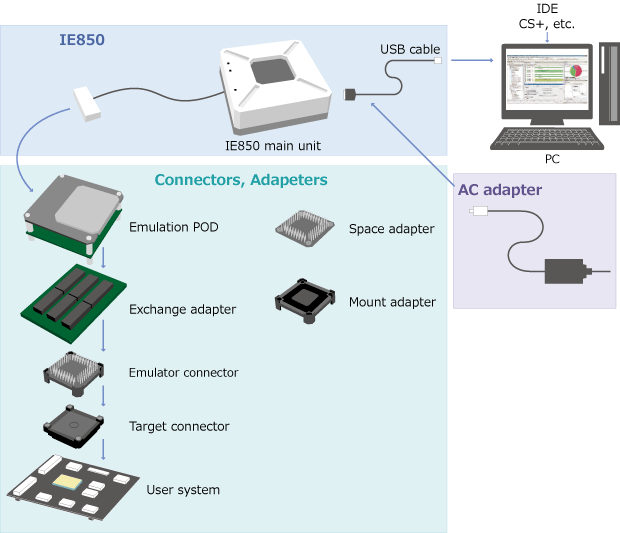
- Emulator main unit (QB-V850E2)
- USB interface cable
- Stick for unplugging EA from POD
Note that optional products such as emulation PODs or the AC adapter, or converter boards are sold separately.
System Configuration
Optional Products (Sold Separately)
- Emulation POD
- Exchange adapter
- Emulator connector (YQ Connector)
- Target connector
- Space adapter
- Mount adapter
- AC adapter *See "AC adapter".
Emulation POD for RH850 Family
| Emulation POD | Target MCU |
|---|---|
| RTE7701460EPA00000R | RH850/D1L1, RH850/D1L2, RH850/D1L2H, RH850/D1M1, RH850/D1M1-V2, RH850/D1M1H, RH850/D1M1A, RH850/D1M2, RH850/D1M2H, R7F701417, R7F701437 |
| RTE7701216EPA00000R | RH850/E1M-S2 |
| RTE7701202EPA00000J | RH850/E1M-S, RH850/E1L |
| RTE7701427EPA00000R (Non Promotion) | RH850/D1M1, RH850/D1M1H, RH850/D1L2, RH850/D1L2H, RH850/D1L1 |
| RTE7701412EPA00000R (Non Promotion) | RH850/D1M2, RH850/D1M2H |
For other optional products, refer to Product Lineup (IE850 for RH850) and Option Products (PDF | English, 日本語).
Emulation POD for V850E2M
| Emulation POD | Target MCU |
|---|---|
| QB-V850E2FX4H-PD (Discontinued product) | V850E2/Fx4, V850E2/Fx4-H, V850E2/Fx4-M |
| QB-V850E2SX4H-PD (Discontinued product) | V850E2/Sx4-H |
| QB-70F3529-PD-EE | V850E2/DK4 |
| QB-70F3532-PD-EE | V850E2/DN4-H |
| QB-70F3534-PD-EE | V850E2/DJ4, V850E2/DP4-H |
For other optional products, refer to Product Lineup (IE850 for V850E2M) and Option Products (PDF | English, 日本語).
AC adapter
Specifications of the AC adapter for IE850 vary depending on the region. Be sure to use an adapter designed for your region. AC adapter is not bundled with the IE850.
| Region | Model No. | |
|---|---|---|
| Japan | QB-V850E2-PW-JP | |
| America | QB-V850E2-PW-EA | |
| Europe | QB-V850E2-PW-EE | |
| China | QB-V850E2-PW-CN | |
| Hong Kong | QB-V850E2-PW-HK | The order acceptance has been closed. |
| Korea | QB-V850E2-PW-KR | The order acceptance has been closed. |
| Singapore | QB-V850E2-PW-SG | The order acceptance has been closed. |
Note:
- For use in regions other than those mentioned above, the customer must provide an AC adaptor that conforms to the laws and regulations of the region where the product will be used.
AC adaptor specifications: 15V 4A, DC plug standard: PLUG No.=PL05B (EIAJ No.=EIAJ-5) DC plug outer diameter 6.5mm, inner diameter 4.3mm, centre plus
Design Support
Support
Support Communities
- R7F702301B goes down (or deep sleep) after a while
Hello TeamWe are experiencing an issue with our board containing R7F702301B MCU. When we power up the board and start debugging the program, the MCU shuts down (or goes into deep sleep) after about 3 or 4 minutes and we have to reset it to continue debugging.The project has ...
Nov 23, 2024 - The crystal unit does not oscillate
I use RH850 U2A MPU.Ten boards were mass-produced.Seven worked properly, but three did not.The cause was that the crystal oscillator was not oscillating.When I checked the OPBT11, I found that the Invalid Area was set correctly, but the Valid Area was at its default value ...
Feb 10, 2026 - RH850/U2A , R7F702300BFABA-C How to flash the fresh IC
Hi Team, How to flash the RH850, R7F702300BFABA-C fresh IC through UART or Through JTAG E2 Emulator? While flashing the fresh IC we need to keep the IC in the Boot Configuration any mode is required, Need to know the steps how it will be done
Jun 22, 2026
Knowledge Base
- How can I debug a ROMized program correctly?
If no particular settings have been made in the CS+ environment, the load module to be downloaded at debugging is the load module that has been created from the file specified to be built in the main project or a sub project. To download a load module file after it ...
Mar 4, 2021 - CS+: watch panel flickers large no. variables in watch panel
For Windows 7 and Windows Vista Open the Control Panel of Windows, and type "Performance Information and Tools" in the search box.And then, click "Performance Information and Tools" in the list of results. Click on [Adjust visual effects] in the upper left of the window. The [Performance Options] pane ...
Apr 1, 2014 - CRC Calculated on Debugger Does Not Match the Linker Result
Values in a flash memory might be altered by an emulator.CRC calculation program refers to the altered values while emulator is connected. CRC might not match the results calculated by a linker. An emulator rewrites the following addresses in flash memory:- Device ID code (RX Family devices)- OFS register ...
Feb 17, 2023

Support Communities

