
Overview
Description
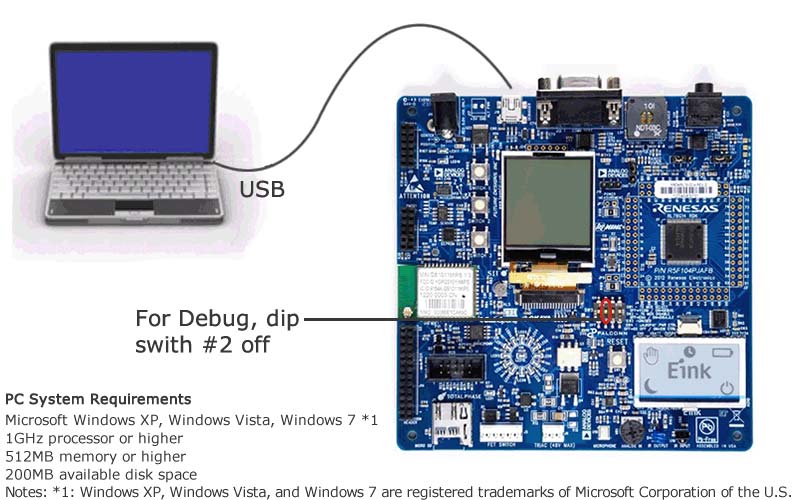
The Renesas Demonstration Kit (RDK) for RL78/G14 is an evaluation and demonstration tool for Renesas RL78/G14 microcontrollers and its partners. The goal is to provide the user with a powerful debug and demonstration platform targeted at common applications. To aid in the evaluation of the RL78 family of microcontrollers, we include 2 development environments: e2 studio : Renesas eclipse embedded studio, known as e2 studio, is a complete development and debug environment based on the popular Eclipse CDT project. Essentially open source, the Eclipse CDT covers build (editor, compiler and linker control) as well as debug phase based on an extended GDB interface. It supports GCC and IAR compiler. IAR's Embedded Workbench Kickstart Edition for the RL78 : this full featured tool suite allows for up to 16KB of application code to be implemented on the RL78/G14 RDK. To facilitate programming the RDK, both tools support the Renesas TK Debugger which is on-board the RL78/G14 RDK.
Features
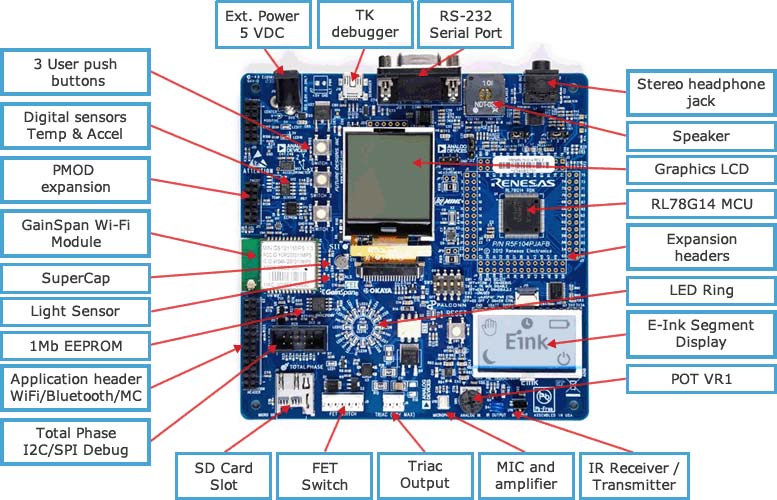
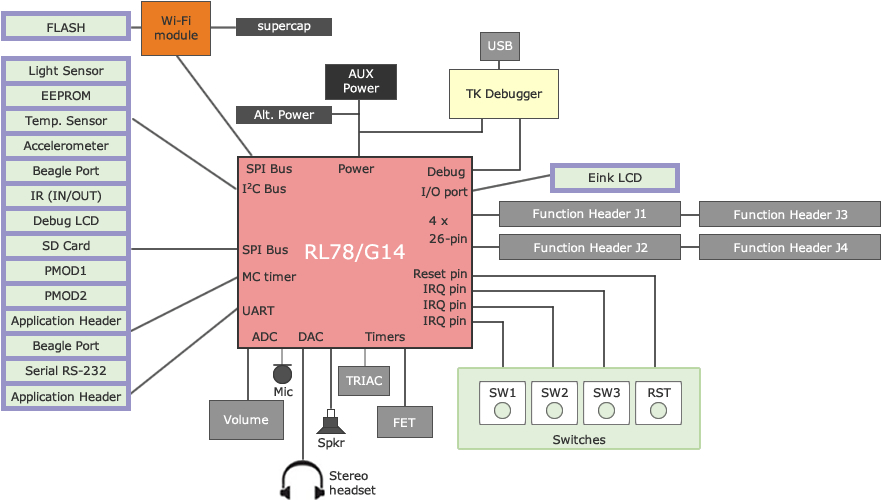
- Stereo audio driver connected to the PWM and DAC interfaces
- Amplified on-board speaker and external Stereo audio jack.
- On-board MEMS microphone to demonstrate sampling and recording capabilities (ADI)
- Volume Control Potentiometer, connected to ADC input.
- OKAYA Graphical LCD
- E Ink Corporation Display
- User pushbutton switches and a reset switch.
- 12 on-board LEDs (LED Wheel pattern)
- On-board Wi-Fi 802.11b Module from GainSpan Corporation
- RS-232 Interface
- I2C, SPI with Debug through the Beagle connector from Total Phase
- Application Header to support several external Wi-Fi modules.
- PMOD connections to support a variety of generic PMOD devices (Wi-Fi, Bluetooth, RF, motor control etc…).
- Micro SD card slot
- 512KB Serial EEPROM (Renesas)
- 256KB On-chip Flash Memory (program)
- 8KB On-Chip Flash Memory (Data)
- 8Mbit Serial Flash for Web Server data storage (Micron)
- 3 – Axis Accelerometer (ADI)
- Temperature Sensor (ADI)
- Ambient Light Sensor (CEL)
- FET Circuit for DC output
- Fully isolated TRIAC Circuit for AC output with Zero Crossing Detector
- On-board debugger for high-quality source code debugging (TK interface)
- User circuit breadboard area (located underneath E Ink unit)
Applications
Documentation
|
|
|
|
|---|---|---|
| Type | Title | Date |
| Quick Start Guide | PDF 1.29 MB | |
| Manual - Development Tools | PDF 7.52 MB | |
| Application Note |
PDF
711 KB
AI-generated Summary:
The RL78 Family Real-Time-Clock (RTC) error correction function calibrates the resonator frequency at 25°C by measuring the PPM offset error using factory equipment and storing it in MCU non-volatile memory. Two methods exist for storing this error: without self-programming libraries by reprogramming flash externally, or with self-programming libraries via serial communication. The RTC compensates for temperature-induced frequency drift, which can reach -148 PPM at -40°C and -126 PPM at +85°C, ensuring accurate timekeeping within ±189 PPM. The software project uses IAR and e2studio IDEs with a code size under 16KB for RL78/G14 MCUs running at 32 MHz.
|
|
| Application Note |
PDF
1.26 MB
AI-generated Summary:
The document explains how to increase the effective resolution of an 8-bit DAC by using dithering techniques that modulate output between adjacent codes and smooth the signal with an RC low-pass filter. This method can achieve up to 12-bit resolution by repeating dither patterns over 16 cycles. It describes both open-loop and closed-loop control methods, with closed-loop using ADC feedback for improved accuracy. The RL78 MCU hardware resources such as DTC, ELC, timers, and ADC are utilized to automate dithering without CPU intervention.
|
|
| Application Note |
PDF
1.38 MB
AI-generated Summary:
The RL78 MCU uses an 8-bit PWM dithering method to increase effective DC output resolution beyond 8 bits by modulating PWM duty cycles between adjacent values and filtering with an RC low-pass filter. This technique achieves nearly 12-bit resolution with faster response times than high-resolution PWM alone. The Data Transfer Control (DTC) automates duty cycle updates over 16 cycles, while closed-loop feedback with ADC monitoring improves DC accuracy. The method balances speed and precision for applications like LED lighting and analog control.
|
|
| Tool News - Release | PDF 111 KB 日本語 | |
| Tool News - Release | PDF 233 KB 日本語 | |
| PCB Design Files | RDK RL78G14 Design Data
|
|
8 items
|
||
Design & Development
Software & Tools
Software Downloads
|
|
|
|
|---|---|---|
| Type | Title | Date |
| Upgrade - IDE | e² studio 2020-10 Linux Host (for RA,RZ)
|
|
| Upgrade - IDE | e² studio 2020-04 installer (Offline installer)
|
|
| Upgrade - IDE | Code Generator for RL78 (CS+ for CC) V2.19.00
|
|
| Upgrade - IDE | e² studio 6.3.0 installer (Offline installer)
|
|
| Software & Tools - Other | Demonstrations Software Sample Projects
|
|
| Software & Tools - Other | YRDKRL78G14 Factory Demo Reload
|
|
| Software & Tools - Other | Demonstration software Sample Project
|
|
| Software & Tools - Other | Demonstrations software installation Package
|
|
| Software & Tools - Other | Sample Projects for RDKRL78G14
|
|
| Software & Tools - Other | Demonstration software installation Package
|
|
10 items
|
||
Sample Code
Sample Code
Filters
|
||
|---|---|---|
| Type | Title | Date Date |
| Sample Code | RL78 Family Real-Time-Clock Watch Error Correction function Rev.1.10
Application:
Consumer Electronics, Industrial
Compiler:
ICCRL78
Function:
Application Example, Other peripherals
IDE:
IAR EWRL78
|
|
| Sample Code | RL78 DAC Dithering Application Note Rev.1.00 - Sample Code
|
|
| Sample Code | RL78 PWM filtered output to create DAC DC output Rev.1.00 - Sample Code
|
|
3 items
|
||
Product Options
| Part Number | Status | Stock | Sampleable | Pb (Lead) Free | ECCN (US) | HTS (US) | RoHS Compliant | China RoHS Compliant |
|---|---|---|---|---|---|---|---|---|
| YRDKRL78G14 | Obsolete | Out of Stock | N/A | No | 3A991.a.2 | 8471.50.0150 | No | No |
Videos & Training
Additional Videos
Support
Support Communities
- YRDKRL78G14
... the site for the board at http://am.renesas.com/products/tools/introductory_evaluation_tools/renesas_demo_kits/yrdkrl78g14/index.jsp but I'm still hopeful that I've missed something obvious. Thanks for any tips that you can provide. I have ...
Dec 26, 2012 - YRDKRL78G14 using E2lite
hi, is it possible to debugg YRDKRLG14 dev board with E2 lite, if yes what changes i have to do in ide and dev board(S/W=CS+) thank you
Jul 20, 2018 - Looking for sample code SD Card Interface using SPI Mode in YRDKRL78G14
HI Renesas Team I am looking for SPI Mode SD Card Interface for YRDKRL78G14 Kit. If you have please share. Thanks Sateesh
Feb 21, 2024

Support Communities

Knowledge Base


