Features
- Delivers up to 30W as a receiver
- WattShare up to 6W as a transmitter
- WPC 1.3 compatible
- Supports proprietary fast charging modes with authentication
- 24kB Multiple-time programmable (MTP) non-volatile memory
- Full synchronous rectifier with low resistance switches
- High Performance LDO
- Integrated high efficiency capacitive divider
- Embedded 32-bit ARM Cortex-M0 processor
- Reliable over-voltage clamping
- Best-in-class EMI
- Proprietary Rx-to-Tx modulation/demodulation for Bi-Directional communication
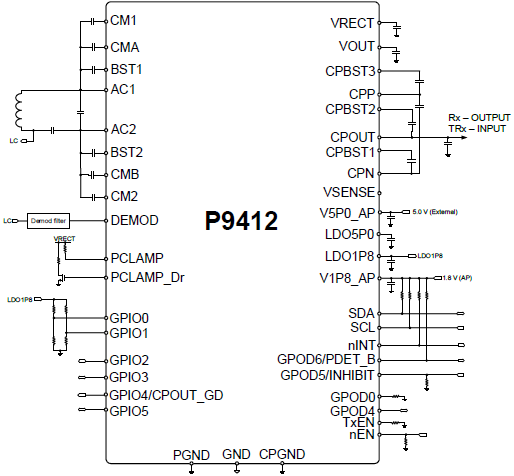
- Supports I2C 400kHz standard interface and GPIOs
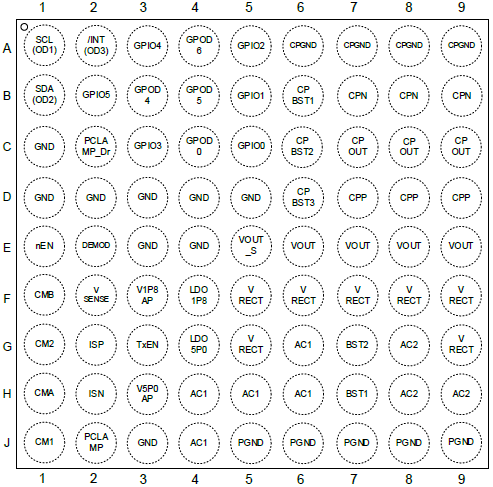
- WLCSP-81 4.02 × 4.01 mm, 0.4mm pitch package
Description
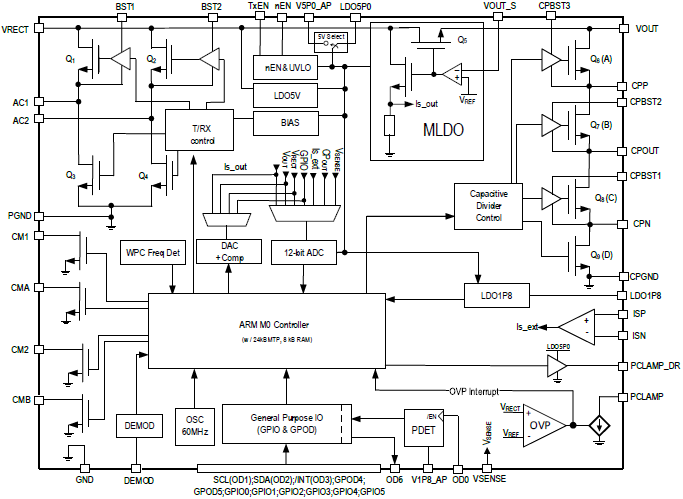
The P9412 is a highly-integrated single-chip wireless power receiver targeted for 30W applications. The device can be configured to receive or transmit an AC power signal through magnetic induction. When the device is configured as a wireless power transmitter, it uses an on-chip full/half-bridge inverter, a PWM generator, and a modulator/demodulator for communication, and a micro-controller to produce an AC power signal to drive external L-C tank and to power a receiver device (WattShare™).
As a receiver, the P9412 receives an AC power signal from a wireless transmitter, and first converts it into a rectified output voltage, then further divide it in half with the integrated capacitive divider. The output of the capacitive divider can then be used to power devices or supply the charger input in mobile applications. The P9412 features Multiple-Time programmable (MTP) non-volatile memory to easily update control firmware and device functions.
The P9412 receiver operates up to 20V out of the integrated LDO and 10V out of the integrated capacitive divider with ultra-accurate current sense capability necessary for high power applications.
The device includes over-temperature and robust over voltage protection. Fault conditions associated with power transfer are managed by an industry-leading 32bit ARM® Cortex®-M0 processor offering a high level of programmability while consuming extremely low standby power. The processor can also control GPIOs to indicate operating and fault modes. The P9412 is available in an ultra-small WLCSP-81 package.
| Part Number | Status | Samples | Stock | Package | Lead Count (#) | Temp. Grade | Pb (Lead) Free | Carrier Type |
|---|---|---|---|---|---|---|---|---|
| P9412-0AWQI8 | Obsolete | N/A | Out of Stock | WLCSP | 81# | I | Yes | Reel |
- Application NotePDF 388 KB Jul 21, 2020AI-generated Summary: The P9412 Ping Detect feature provides an interrupt-driven method for the host Application Processor (AP) to detect valid wireless power transmitter presence via digital ping signals. It uses an open-drain output to signal ping detection without AP polling, consuming very low power. The feature supports early detection of placement on a transmitter pad, continuous presence indication, and removal detection. It operates with a 1.8V supply and specific pin configurations (GPOD0 tied to ground, SW_Inhibit control). Use cases include managing power transfer states and conserving energy by signaling when the receiver is on or off the charging pad. The document details waveform behaviors and schematic implementation for reliable ping detection.
- Application Note
- White PaperPDF 627 KB 7WDXRDKU4E7E-5-61641 May 10, 2017Wireless power transfer uses an air-core transformer with separate transmitter and receiver coils, making accurate performance modeling difficult due to low magnetic coupling and increased losses. This paper addresses simulation challenges and describes methods to approximate circuit behavior. It demonstrates best practices for tuning Qi and PMA inductive resonance circuits to maximize charging efficiency for mobile devices.
Recommended Documents (1)
Datasheets (1)
Manuals & Guides (1)
- Application NotePDF 388 KB Jul 21, 2020AI-generated Summary: The P9412 Ping Detect feature provides an interrupt-driven method for the host Application Processor (AP) to detect valid wireless power transmitter presence via digital ping signals. It uses an open-drain output to signal ping detection without AP polling, consuming very low power. The feature supports early detection of placement on a transmitter pad, continuous presence indication, and removal detection. It operates with a 1.8V supply and specific pin configurations (GPOD0 tied to ground, SW_Inhibit control). Use cases include managing power transfer states and conserving energy by signaling when the receiver is on or off the charging pad. The document details waveform behaviors and schematic implementation for reliable ping detection.
- Application Note
- White PaperPDF 627 KB 7WDXRDKU4E7E-5-61641 May 10, 2017Wireless power transfer uses an air-core transformer with separate transmitter and receiver coils, making accurate performance modeling difficult due to low magnetic coupling and increased losses. This paper addresses simulation challenges and describes methods to approximate circuit behavior. It demonstrates best practices for tuning Qi and PMA inductive resonance circuits to maximize charging efficiency for mobile devices.
Application Notes & White Papers (4)
No Results Found.
Make sure all keywords are spelled correctly.
Try fewer, different, or more general terms to vary your search.
If you have filters applied, consider deselecting some to broaden your results.
- Search our extensive knowledgebase, designed to help customers with their FAQs.
- Get help from our expert Renesas technical staff and community on our support forums.
No Results Found.
Make sure all keywords are spelled correctly.
Try fewer, different, or more general terms to vary your search.
If you have filters applied, consider deselecting some to broaden your results.
- Search our extensive knowledgebase, designed to help customers with their FAQs.
- Get help from our expert Renesas technical staff and community on our support forums.
No Results Found.
Make sure all keywords are spelled correctly.
Try fewer, different, or more general terms to vary your search.
If you have filters applied, consider deselecting some to broaden your results.
- Search our extensive knowledgebase, designed to help customers with their FAQs.
- Get help from our expert Renesas technical staff and community on our support forums.
No Results Found.
Make sure all keywords are spelled correctly.
Try fewer, different, or more general terms to vary your search.
If you have filters applied, consider deselecting some to broaden your results.
- Search our extensive knowledgebase, designed to help customers with their FAQs.
- Get help from our expert Renesas technical staff and community on our support forums.
No Results Found.
Make sure all keywords are spelled correctly.
Try fewer, different, or more general terms to vary your search.
If you have filters applied, consider deselecting some to broaden your results.
- Search our extensive knowledgebase, designed to help customers with their FAQs.
- Get help from our expert Renesas technical staff and community on our support forums.
No Results Found.
Make sure all keywords are spelled correctly.
Try fewer, different, or more general terms to vary your search.
If you have filters applied, consider deselecting some to broaden your results.
- Search our extensive knowledgebase, designed to help customers with their FAQs.
- Get help from our expert Renesas technical staff and community on our support forums.
No Results Found.
Make sure all keywords are spelled correctly.
Try fewer, different, or more general terms to vary your search.
If you have filters applied, consider deselecting some to broaden your results.
- Search our extensive knowledgebase, designed to help customers with their FAQs.
- Get help from our expert Renesas technical staff and community on our support forums.
No Results Found.
Make sure all keywords are spelled correctly.
Try fewer, different, or more general terms to vary your search.
If you have filters applied, consider deselecting some to broaden your results.
- Search our extensive knowledgebase, designed to help customers with their FAQs.
- Get help from our expert Renesas technical staff and community on our support forums.
No Results Found.
Make sure all keywords are spelled correctly.
Try fewer, different, or more general terms to vary your search.
If you have filters applied, consider deselecting some to broaden your results.
- Search our extensive knowledgebase, designed to help customers with their FAQs.
- Get help from our expert Renesas technical staff and community on our support forums.
No Results Found.
Make sure all keywords are spelled correctly.
Try fewer, different, or more general terms to vary your search.
If you have filters applied, consider deselecting some to broaden your results.
- Search our extensive knowledgebase, designed to help customers with their FAQs.
- Get help from our expert Renesas technical staff and community on our support forums.
No Results Found.
Make sure all keywords are spelled correctly.
Try fewer, different, or more general terms to vary your search.
If you have filters applied, consider deselecting some to broaden your results.
- Search our extensive knowledgebase, designed to help customers with their FAQs.
- Get help from our expert Renesas technical staff and community on our support forums.