Features
- Single Chip Power solution
- Operation for 1-Tuner/1-Dish Applications
- Integrated DC/DC Converter and I2C Interface
- Switch-Mode Power Converter for Lowest Dissipation
- Boost PWMs with >92% Efficiency
- Selectable 13.3V or 18.3V Outputs
- Digital Cable Length Compensation (1V)
- I2C and Pin Controllable Output
- Output Back Bias Capability of 28V
- I2C Compatible Interface for Remote Device Control
- Registered Slave Address 0001 00XX
- 2.5V, 3.3V, 5V Logic Compatible
- External Pin to Toggle Between V and H Polarization
- Built-In Tone Oscillator Factory Trimmed to 22kHz
- Facilitates DiSEqC (EUTELSAT) Encoding
- External Modulation Input
- Internal Over-Temperature Protection and Diagnostics
- Internal OV, UV, Overload and Overtemp Flags (Visible on I2C)
- FLT signal
- LNB Short-Circuit Protection and Diagnostics
- QFN, EPTSSOP Packages
- Pb-Free Available (RoHS Compliant)
Description
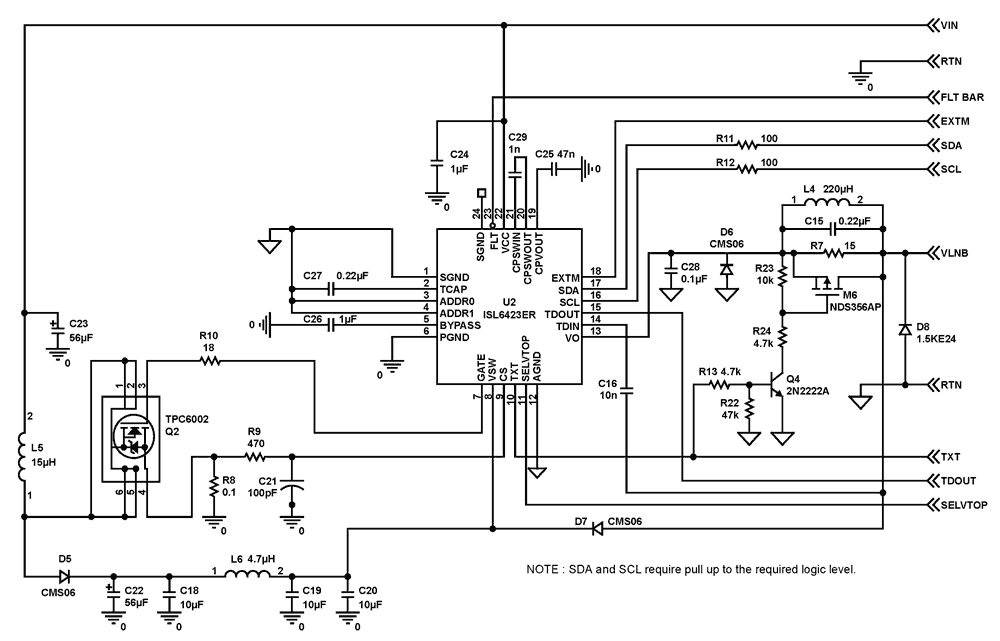
The ISL6423B is a highly integrated voltage regulator and interface IC, specifically designed for supplying power and control signals from advanced satellite set-top box (STB) modules to the low noise blocks (LNBs) of singe antenna ports. The device consists of a current-mode boost PWM and a low-noise linear regulator along with the circuitry required for 22kHz tone generation, modulation and I2C device interface. The device makes the total LNB supply design simple, efficient and compact with low external component count. The current-mode boost converters provides the linear regulator with input voltage that is set to the final output voltages, plus typically 0.8V to insure minimum power dissipation across each linear regulator. This maintains constant voltage drop across the linear pass element while permitting adequate voltage range for tone injection. The final regulated output voltage is available at output terminals to support the operation of an antenna port for single tuners. The outputs for each PWM can be controlled in two ways, full control from I2C using the VTOP and VBOT bits or set the I2C to the lower range i.e., 13V/14V, and switch to higher range i.e., 18V/19V, with the SELVTOP pin. All the functions on this IC are controlled via the I2C bus by writing 8 bits words onto the System Registers (SR). The same register can be read back, and five I2C bits will report the diagnostic status. Separate enable command sent on the I2C bus provides for standby mode control for the PWM and linear combination, disabling the output and forcing a shutdown mode. The output channel is capable of providing 750mA of continuous current. The overcurrent limit can be digitally programmed to four levels. The External modulation input EXTM can accept a modulated Diseqc command and transfer it symmetrically to the output. Alternatively the EXTM pin can be used to modulate the continuos internal tone. The FLT pin serves as an interrupt for the processor when any condition turns OFF the LNB controller (Over Temperature, Overcurrent, Disabled). The nature of the Disable can be read of the I2C registers.
Applications
- LNB Power Supply and Control for Satellite Set-Top Box
| Part Number | Status | Samples | Stock | RoHS | Package | Carrier Type | MOQ |
|---|---|---|---|---|---|---|---|
| ISL6423BERZ | Obsolete | N/A | In Stock | RoHS:EN | QFN | Tube | 1500 |
| ISL6423BERZ-T | Obsolete | N/A | Out of Stock | RoHS:EN | QFN | Reel | 6000 |
Filters
Applied Filters
- Product Change NoticePDF 326 KB May 21, 2021
- Product Change NoticePDF 398 KB PCN15046 Jan 07, 2016
- Product Change NoticePDF 248 KB PCN10055 Jun 30, 2010
- Application NotePDF 397 KB an1684 Jan 19, 2004AI-generated Summary: The document outlines important legal disclaimers and usage guidelines for semiconductor products. It emphasizes user responsibility for product design and safety, disclaims liability for damages, and clarifies no intellectual property licenses are granted. Products are categorized by quality grades with specific application recommendations. Users must comply with laws, avoid unauthorized modifications, and ensure safe use within specified conditions. Contact details for Renesas Electronics sales offices worldwide are provided.
- Application NotePDF 509 KB an1681 Jan 19, 2004AI-generated Summary: The document explains grounding techniques for PCB layouts using a dual op amp example on a single-layer copper board. It compares three grounding schemes: a center spine ground trace, an outer ground plane, and a split/star ground plane, highlighting the benefits of single-point grounding to minimize noise and antenna effects. It emphasizes following current paths, minimizing loop lengths, and ensuring close forward and return paths to reduce interference. The document also includes disclaimers on product use, quality grades, safety, and legal compliance.
Recommended Documents (1)
Datasheets (1)
Manuals & Guides (1)
- Application NotePDF 397 KB an1684 Jan 19, 2004AI-generated Summary: The document outlines important legal disclaimers and usage guidelines for semiconductor products. It emphasizes user responsibility for product design and safety, disclaims liability for damages, and clarifies no intellectual property licenses are granted. Products are categorized by quality grades with specific application recommendations. Users must comply with laws, avoid unauthorized modifications, and ensure safe use within specified conditions. Contact details for Renesas Electronics sales offices worldwide are provided.
- Application NotePDF 509 KB an1681 Jan 19, 2004AI-generated Summary: The document explains grounding techniques for PCB layouts using a dual op amp example on a single-layer copper board. It compares three grounding schemes: a center spine ground trace, an outer ground plane, and a split/star ground plane, highlighting the benefits of single-point grounding to minimize noise and antenna effects. It emphasizes following current paths, minimizing loop lengths, and ensuring close forward and return paths to reduce interference. The document also includes disclaimers on product use, quality grades, safety, and legal compliance.
Application Notes & White Papers (2)
- Product Change NoticePDF 326 KB May 21, 2021
- Product Change NoticePDF 398 KB PCN15046 Jan 07, 2016
- Product Change NoticePDF 248 KB PCN10055 Jun 30, 2010
Product Notices (PCN, EOL, etc) (4)
No Results Found.
Make sure all keywords are spelled correctly.
Try fewer, different, or more general terms to vary your search.
If you have filters applied, consider deselecting some to broaden your results.
- Search our extensive knowledgebase, designed to help customers with their FAQs.
- Get help from our expert Renesas technical staff and community on our support forums.
No Results Found.
Make sure all keywords are spelled correctly.
Try fewer, different, or more general terms to vary your search.
If you have filters applied, consider deselecting some to broaden your results.
- Search our extensive knowledgebase, designed to help customers with their FAQs.
- Get help from our expert Renesas technical staff and community on our support forums.
No Results Found.
Make sure all keywords are spelled correctly.
Try fewer, different, or more general terms to vary your search.
If you have filters applied, consider deselecting some to broaden your results.
- Search our extensive knowledgebase, designed to help customers with their FAQs.
- Get help from our expert Renesas technical staff and community on our support forums.
No Results Found.
Make sure all keywords are spelled correctly.
Try fewer, different, or more general terms to vary your search.
If you have filters applied, consider deselecting some to broaden your results.
- Search our extensive knowledgebase, designed to help customers with their FAQs.
- Get help from our expert Renesas technical staff and community on our support forums.
No Results Found.
Make sure all keywords are spelled correctly.
Try fewer, different, or more general terms to vary your search.
If you have filters applied, consider deselecting some to broaden your results.
- Search our extensive knowledgebase, designed to help customers with their FAQs.
- Get help from our expert Renesas technical staff and community on our support forums.
No Results Found.
Make sure all keywords are spelled correctly.
Try fewer, different, or more general terms to vary your search.
If you have filters applied, consider deselecting some to broaden your results.
- Search our extensive knowledgebase, designed to help customers with their FAQs.
- Get help from our expert Renesas technical staff and community on our support forums.
No Results Found.
Make sure all keywords are spelled correctly.
Try fewer, different, or more general terms to vary your search.
If you have filters applied, consider deselecting some to broaden your results.
- Search our extensive knowledgebase, designed to help customers with their FAQs.
- Get help from our expert Renesas technical staff and community on our support forums.
No Results Found.
Make sure all keywords are spelled correctly.
Try fewer, different, or more general terms to vary your search.
If you have filters applied, consider deselecting some to broaden your results.
- Search our extensive knowledgebase, designed to help customers with their FAQs.
- Get help from our expert Renesas technical staff and community on our support forums.
No Results Found.
Make sure all keywords are spelled correctly.
Try fewer, different, or more general terms to vary your search.
If you have filters applied, consider deselecting some to broaden your results.
- Search our extensive knowledgebase, designed to help customers with their FAQs.
- Get help from our expert Renesas technical staff and community on our support forums.
No Results Found.
Make sure all keywords are spelled correctly.
Try fewer, different, or more general terms to vary your search.
If you have filters applied, consider deselecting some to broaden your results.
- Search our extensive knowledgebase, designed to help customers with their FAQs.
- Get help from our expert Renesas technical staff and community on our support forums.
Filters
Applied Filters
Software & Tools
Filter by Type
Filter by Provider
Sample Code
Filter by Application
Filter by Function
Filter by Compiler
Filter by IDE
Simulation Models
Partner Solutions
- LibraryEXE 2.64 MB intersil_i2c_comm_installer_v316 Nov 17, 2017
No Results Found.
Make sure all keywords are spelled correctly.
Try fewer, different, or more general terms to vary your search.
If you have filters applied, consider deselecting some to broaden your results.
- Search our extensive knowledgebase, designed to help customers with their FAQs.
- Get help from our expert Renesas technical staff and community on our support forums.
- LibraryEXE 2.64 MB intersil_i2c_comm_installer_v316 Nov 17, 2017
Software & Tools (2)
No Results Found.
Make sure all keywords are spelled correctly.
Try fewer, different, or more general terms to vary your search.
If you have filters applied, consider deselecting some to broaden your results.
- Search our extensive knowledgebase, designed to help customers with their FAQs.
- Get help from our expert Renesas technical staff and community on our support forums.
No Results Found.
Make sure all keywords are spelled correctly.
Try fewer, different, or more general terms to vary your search.
If you have filters applied, consider deselecting some to broaden your results.
- Search our extensive knowledgebase, designed to help customers with their FAQs.
- Get help from our expert Renesas technical staff and community on our support forums.
No Results Found.
Make sure all keywords are spelled correctly.
Try fewer, different, or more general terms to vary your search.
If you have filters applied, consider deselecting some to broaden your results.
- Search our extensive knowledgebase, designed to help customers with their FAQs.
- Get help from our expert Renesas technical staff and community on our support forums.