
Overview
Description
The Renesas Flexible Software Package (FSP) is an enhanced software package designed to deliver user-friendly, scalable, high-quality software for embedded system designs using the Renesas RA family of Arm Microcontrollers, ensuring software compatibility across the RA family, from entry-level to high-performance microcontrollers. With the support of new Arm® TrustZone® and other advanced security features, FSP provides a quick and versatile way to build secure, connected IoT devices using production-ready drivers, Azure® RTOS, FreeRTOS™, and other middleware stacks.
download Download Latest FSP (v6.4.0):
FSP Platform Installer (Includes e² studio IDE, toolchain, and FSP packs):
RA Smart Configurator (RASC) Installer (FSP packages to use with 3rd party IDEs with IAR Embedded Workbench, Arm Keil MDK):
FSP Standalone Installer (FSP packs for the users who only update the FSP and no e² studio update):
- Download from the Assets section of the GitHub
The installation instructions can be found here. All the FSP Releases and Patches can be found on GitHub.
FSP includes best-in-class HAL drivers with high performance and low memory footprint. Middleware stacks with Azure RTOS and FreeRTOS integration are included to ease the implementation of complex modules like communication and security. The e² studio IDE provides support with intuitive configurators and intelligent code generation to make programming and debugging easier and faster.
FSP uses an open software ecosystem and provides flexibility in using bare-metal programming, including Azure RTOS or FreeRTOS, your preferred RTOS, legacy code, and third-party ecosystem solutions. FSP and e² studio can be used free of charge on any Renesas device.
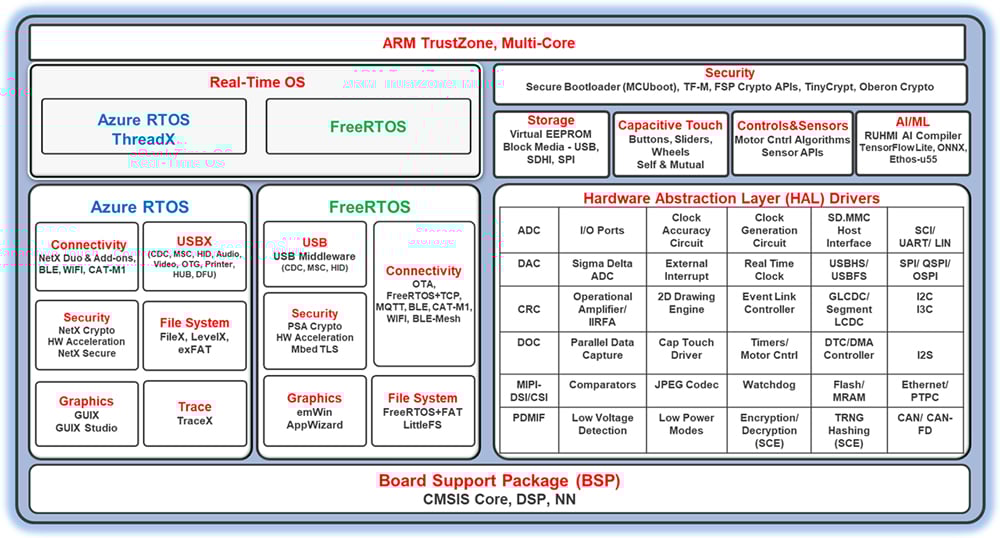
Features
- Multi-Core and Single Core support of Arm® Cortex®- M-based RA MCUs
- Small memory footprint HAL drivers
- Intuitive configurator and code generator
- Static and dynamic analysis using industry-standard tools
- Application support using RTOS and non-RTOS environments
- Azure RTOS and its middleware stacks with Flexible Software Package
- Azure RTOS ThreadX, NetX Duo & Add-ons, USBX, GUIX & GUIX Studio, FileX, TraceX, exFAT, LevelX, NetX Duo Secure & NetX Crypto (HW acceleration)
- FreeRTOS support – Includes Kernel and set of software libraries
- FreeRTOS Kernel, FreeRTOS-Plus-TCP, Core MQTT, Core HTTP/HTTPS, Task pool, Secure Sockets, Cellular Interface
- Tool configurable RTOS resources (Threads, mutexes, etc.)
- Middleware stacks from Renesas and third parties
- Ethos-U55 support for CM85-based MCUs for efficient AI/ML integration
- TCP/IP and other connectivity protocol stacks including MQTT
- USB middleware support for CDC, HID, and MSC
- Wireless connectivity through Cellular (Cat-M1), Wi-Fi, and Bluetooth Low Energy LE 5.0 (BLE Mesh)
- File System support with FreeRTOS+FAT and LittleFS
- Storage (Block Media) support for SDMMC, SPI, and USB.
- Virtual EEPROM on Flash
- Capacitive touch middleware to implement widgets like Button, Slider, and Wheels.
- Motor control algorithms
- Secure Bootloader through MCUboot
- Sensor Module APIs
- TrustZone support (for applications on CM33-based MCUs)
- TrustZone-enabled drivers and middleware
- Easy-to-use tool support for TrustZone configuration
- PSA Level 2 Certified
- AWS-qualified for FreeRTOS
- Easy connectivity options to major cloud providers
- Secure connections through NetX Duo Secure and Mbed TLS
- Cryptographic APIs and integrated Hardware Acceleration support
- Arm PSA Cryptographic APIs
- Azure RTOS NetX Crypto APIs
- Ultimate security with FSP Crypto APIs (SCE9 protected mode)
- Oberon Ocrypto targeting low end RA2E1 devices
- TinyCrypt targeting constrained devices
- Graphics interface support and tools
- LVGL integration support for RA devices
- Segger emWin (RA customers can use Segger emWin graphic tools and libraries for free from Downloads below)
- Azure RTOS GUIX and GUIX Studio (available free on Microsoft Apps Store)
- Secure debugging capabilities
- Extensive tool support from Renesas and leading third-party solutions
- Integrated package with all required components for easy setup and starting development (single installer with e2 studio, CMSIS packs, toolchain, and Segger J-Link drivers)
- Complete source code available through GitHub
Release Information
For additional information and links, go to GitHub.
v6.4.0
Release Notes
Flexible Software Package (FSP) for Renesas RA MCU Family, version 6.4.0
Minimum e2 studio version for FSP 6.4.0 is e2 studio 2025-12
- Download the FSP with e2 studio Windows installer for this release: FSP Windows Platform Installer
- Download the FSP with e2 studio Linux installer for this release: FSP Linux Platform Installer
- Refer to Installing e² studio in a Linux PC | Renesas Customer Hub for information on installing e2 studio and related software components on a Linux PC.
- Download the FSP with e2 studio MacOS (Apple Silicon) installer for this release: FSP MacOS Platform Installer
- Refer to the Quick Start Guide for the e² studio for macOS for information on installing e2 studio and related software components on a macOS PC.
If using IAR or Keil MDK, download the Renesas Advanced Smart Configurator (RASC) for this release.
- For Windows download: FSP RASC Windows Installer
- For Linux download: FSP RASC Linux Installer
- For macOS (Apple Silicon) download: FSP RASC macOS Installer
All installers are available in the Assets section of this release.
Refer to the README.md in the FSP root folder for setup instructions, hardware details, and related links.
New Features
- Added support for RA0E3 devices – Includes FPB-RA0E3 board support
- Added HMAC-SHA 512/224, 512/256 support for RSIP-E51A and RSIP-E50D PM drivers
- Added support for VSC8541 PHY on the EK-RA8T2 board
- Added support for the EK-RA8T2 board
- Added support for lwIP SNTP application
- Added support for gPTP middleware
- Added Motor Control Middleware support
- Added Trajectory module support in Motor Control Middleware
- Added Motor HAL driver support in Motor Control Middleware
- Added support for Hall sensor and BEMF sensor modules in Motor Control Middleware
- Added xDLMS InitiateRequest message decryption feature on RSIP-E31A PM driver
- Added KDF-SHA 512 support for RSIP-E51A and RSIP-E50D PM drivers
- Added features to verify public key certificate and key import using RSA algorithm on RSIP-E51A and RSIP-E50D PM drivers
- Released a new CAVP-certified module for RSIP-E31A Protected Mode driver
- Added support for 24-pin packages R7FA2T1073CNK and R7FA2T1074CNK
- Arm® Compiler for Embedded (Arm Compiler 6) updated to version 6.24
Fixes and Improvements
- Added SPI support to r_ble_gtl
- r_pdm: Fixed sample rate calculation in the configurator. The calculation was off by a factor of 2 due to decimation performed by the low-pass filter in hardware
- Simplified OSPI_B MDF configuration and constraints related to DOTF support
- Resolved an IAR compiler build failure that occurred when using the PQC crypto module with RA8 devices
- Enabled PLL startup when HOCO is selected as the clock source and MOSC is not populated
- Fixed edge case in PQC where a NULL check prevents a valid 0x00000000 address from being used as a pointer
- Fixed MCUBoot build failure when the Flash LP Bank Swap setting is configured to Instant
- Corrected the configuration for L3 forwarding feature in r_layer3_switch
- Updated module version information of the RSIP Protected Mode driver
- Added list of HAL drivers and supported RA MCUs to the FSP User's Manual
- Added support for 8-byte transfer size option in DTC
- Added support for 8-byte transfer size option in DMAC
- Added TFLM support on RA MCUs without NPU
- Please refer to https://renesas.github.io/fsp/group___r_m___e_t_h_o_s_u.html for configuring C/C++ build settings.
- Added ML-DSA support for MCUboot signing
- r_sci_b_uart: Added new configuration parameter 'Extra > TXI/TEI Synchronization Delay Cycles' to address the issue where the last transmit data was not always output when SCICLK was much slower than PCLK
- Removed AES-XTS key injection feature for RSIP-E31A according to the support policy.
- Added PM FOC motor algorithm support in Motor Control Middleware
- Added Motor Tuning module for permanent magnet (PM) motors in Motor Control Middleware
- Moved GTETRGx pins from GPT to GPT_POEG in RA6T2 Pin page
- Added support of UART_EVENT_TX_DATA_EMPTY event for SAU UART
- Updated r_rmac diver to support L2 over L3 fabric
- Secure and privilege attributes for NPU to access memories shall be configured via properties
- Updated control procedures for the RSIP-E31A PM driver to code size reduction version
- Fixed GCC C++ build warning in ThreadX port
- Updated Segger JLink version to 9.14
- Added constraint to check etherc buffer to netxduo
- Fixed error on EtherCAT SSC Port when adding one more timer instance
Known Issues
- Solution Projects (TrustZone, Multicore):
- There are issues related to pin configuration synchronization between projects in e2 studio 2025-12. Refer to this document for workarounds.
- RA0E1:
- e2 studio projects automatically reset compiler optimization to a Size setting on every generate or build operation
- Add optimization flags (e.g. -O0) manually to 'Other optimization flags' to override the -Oz setting
- HS400x and ZMOD4xxx sensors cannot be used on RA0E1
- FS3000 sensor does not support the SAU-I2C driver
- Selecting 'Safely Remove Hardware and Eject Media' on Windows and ejecting the mass storage (PMSC), when using the USBX composite device (PCDC+PMSC), the Windows Explorer for PMSC does not disappear.
- PMSC may not work properly when the USBX Composite Device (PCDC+PMSC) is connected to a specific Linux OS (USB Host).
- EWARM version 9.70.2 does not contain support for RA0E3. To develop with IAR for these devices, it is necessary to install a support patch file that can be downloaded by EWARM v9.70.2 users from the IAR MyPages system
- RA0E3 (arm_Renesas_RA0E3_20260106_1.zip)
- When importing projects in e2 studio that were created using a previous toolchain version, be sure that the version specified in the project is integrated (Window->Preferences->Renesas->Renesas Toolchain Integration) or select the appropriate toolchain version if upgrading the project to a later FSP version.
- When upgrading RA6T2 projects to FSP 6.4.0, the GTETRGx pin assignments might be lost. Please re-assign the pins manually.
- When upgrading RA0E1/E2/L1 projects to FSP 6.4.0, the SAU_SPI00 pin group might be changed; please restore the pin group manually.
- For known issues in the tools, please refer to the respective tool's release notes, e2 studio RN
Target Devices
Design & Development
Videos & Training
Learn how to import and run Flexible Software Package (FSP) example projects in e² studio using the RZ/A3UL Evaluation Board Kit. The same workflow applies to both RZ and RA device families. This video walks through three demos covering ADC configuration, USB PCDC communication, and LCDC display control.
Events & Webinars

News & Blog Posts
Blog Post Nov 15, 2022 |
Blog Post Apr 28, 2022 |
Blog Post Jan 28, 2022 |
Blog Post Jan 28, 2022 |
News Jun 15, 2021 |
Additional Details
Components
- CMSIS compliant pack files for e2 studio integrated development environment
- BSPs for RA MCUs and boards
- HAL drivers to access peripherals
- Real Time Operating Systems (RTOS)
- Middleware stacks and protocols
- Module configurators and code generators
- Source files to integrate with any development environment and third-party tools
Supported Toolchains
Software components in the FSP support following toolchains:
- e2 studio Integrated Development Environment, with toolchain supports of GCC Arm Embedded and LLVM Embedded Toolchain for Arm
- IAR Embedded Workbench
- Arm Keil MDK
Software Installation Instructions
Refer to the FSP GitHub page for installation and usage instructions: FSP GitHub Instructions
e2 studio Integrated Development Environment
The FSP provides a host of efficiency-enhancing tools for developing projects targeting the Renesas RA series of MCU devices. The e2 studio Integrated Development Environment provides a familiar development cockpit from which the key steps of project creation, module selection and configuration, code development, code generation, and debugging are all managed. FSP uses a Graphical User Interface (GUI) to simplify the selection, configuration, code generation and code development of high level modules and their associated Application Program Interfaces (APIs) to dramatically accelerate the development process.
e2 studio is equipped with set of options to configure various aspects of your application project. Some of these options include:
BSP configuration
Configure or change MCU and board-specific parameters from the initial project selection.
Clock Configuration
Configure the MCU clock settings for your project. The Clock Configuration presents a graphical view of the MCU's clock tree, allowing the various clock dividers and sources to be modified.
Pin Configuration
The Pin Configuration provides flexible configuration of the MCU's pins. This configures the electrical characteristics and functions of each port pin. As many pins are able to provide multiple functions, the pin configurator makes it easy to configure the pins on a peripheral basis. The Pin Configuration tool simplifies the configuration of large packages with highly multiplexed pins by highlighting errors and presenting the options for each pin or for each peripheral.
Module Configuration
The Module Configuration provides options to add FSP modules (HAL drivers, Middleware stacks and RTOS) for RTOS and non-RTOS based applications and configure various parameters of the modules. For each module selected, the Properties window provides access to the configuration parameters, interrupt priorities, pin selections etc.
Interrupt Configuration
Interrupt Configuration allows to add new user interrupts or events and set interrupt priorities. This will also allow the user to bypass a peripheral interrupt and have user-defined ISRs for the peripheral interrupts.
Components Configuration
The Components configuration enables the individual modules required by the application to be included or excluded. All modules that are necessary for the modules added to the application are included automatically. You can easily include or exclude additional modules by ticking the box next to the required component.
QE Tools
QE for Capacitive Touch is an assistance tool for applications which operate under the e2 studio. For the development of embedded systems that work with capacitive touch sensors, this tool simplifies the initial settings of the touch user interface and the tuning of the sensitivity, thus shortening developing times.
The QE for BLE is a dedicated tool for developing embedded software in systems which support the Bluetooth®low energy protocol stack. This solution toolkit runs in the e2 studio integrated development environment. The combination of the e2 studio and QE for BLE makes it easy to test the communications features of Bluetooth®low energy.
Other Tool Features
- Context-sensitive Autocomplete feature that provides intelligent options for completing a programming element
- Developer Assistance tool for selection of and drag and drop placement of API functions directly in application code
- Smart Manual that provides driver and device documentation in the form of tooltips right in the code
- Edit Hover feature to show detailed descriptions of code elements while editing
- Welcome Window with links to example projects, application notes and a variety of other self-help support resources
- Information Icon for each module is provided in the graphic configuration viewer that links to specific design resources for that module in the user manual.
Third Party Tool Support
In addition to the Renesas e2 studio IDE, FSP supports third party tools and IDEs as well. This support is provided through RA Smart configurators (RASC) application. The Renesas RA Smart Configurator is a desktop application that allows you to configure the software system (BSP, drivers, RTOS and middleware) for a Renesas RA microcontroller when using a 3rd-party IDE and toolchain. The RA Smart Configurator can currently be used with IAR Embedded Workbench, Keil MDK and the Arm compiler 6 toolchains.
Resources
Support
Support Communities
- Is there FSP(Flexible Software Package) in RL78/G23 as RA has like /ra, /ra_cfg, and ra_gen?
... product which has RA Flexible Software Package (FSP). I generated the code using Smart Configurator in RL78, but couldn't see the code style like RA on /ra, /ra_cfg, and ra_gen. Does Renesas support FSP(Flexible Software Package) for RL78/G23 and may I get ...
Feb 12, 2025 - RA2A1 and FSP package missing peripheral driver
Hi I see the SJ1A and RA2A1 are the same chip but using the RA Flexible Software Package (FSP) in the E2Studio Configurator are missing the driver for some analog pheripheral. The driver for OPAMP, SigmaDeltaADC, DAC8 driver .. are not in the TAB stack and are not selecteble using NewStack ...
Nov 28, 2019 - RA FSP based I2C library for RAJ240090/100 Fixed-Firmware Evaluation Kit for Battery Management
Hi, We are using FGIC EVK board RTK0EF0136DK0002BU with Fixed-Firmware. We are looking if you guys have any existing I2C code for RA series MCU to communicate with this board, ready to use code would be very helpful for fast forwarding the development process. We are using RA6M5 MCU ...
Dec 19, 2025
Knowledge Base
- LVGL: Using 32-bit Color Formats with GLCDC
... is a lightweight open-source embedded graphics library designed for microcontroller-based user interfaces. A Renesas-maintained port of LVGL is now included in the RA Flexible Software Package (FSP), making it straightforward to integrate LVGL into RA MCU projects through the FSP Configurator*. Several Renesas MCU families are designed ...
Jan 6, 2026 - RA and FSP Curriculum: I-009 Introduction to Security for RA and FSP (FSP 4.0.0)
- RA Family: Secure key injection and flash programming in mass production using RFP CLI interface
... Mode and Protected Mode: In Compatibility Mode, the security engines can inject secure keys as well as plaintext keys. Key injection must be performed using RA Family Flexible Software Package (FSP) APIs. All security engines support Compatibility Mode. In Protected Mode, the security engines can inject only secure keys. Key ...
Jan 29, 2026

Support Communities

