
Overview
Description
Support for this product is limited to customers who have already adopted these products.
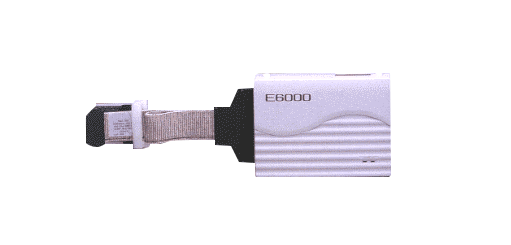
Features
- Zero wait-state real-time emulation
- Emulation memory 4M bytes, which can be mapped in 64 byte blocks into the target processor's address space
- 256 PC Breakpoints
- Up to 12 hardware breakpoints using the event and range channels in the Complex Event System (CES)
- Up to 32K cycles Trace Buffer, which can be stopped and read during program execution
- Trace buffer acquisition filtering using the CES
- Execution time measurement of total time, or relative time, with a resolution between 20ns and 16us
- 4 user logic probes which can be used as CES trigger events
- Automatic tracking of the target system supply voltage, to ensure that the emulator draws no power
- Multiple target clock selection
- Windows software supplied as standard
- No need to remove the casing to connect to target
- Learn more
Release Information
Target Devices
Downloads
|
|
|
|
|---|---|---|
| Type | Title | Date |
| Upgrade - IDE | High-performance Embedded Workshop V.4.09.01 Differential Update(From V.4.09.00)
|
|
| Upgrade - IDE | High-performance Embedded Workshop V.4.09.01 Full Update
|
|
2 items
|
||
Documentation
Log in required to subscribe
|
|
|
|
|---|---|---|
| Type | Title | Date |
| Manual - Development Tools | PDF 3.22 MB 日本語 | |
| Technical Update | PDF 117 KB 日本語 | |
| Tool News - Release | PDF 195 KB 日本語 | |
| Application Note |
PDF
1.08 MB
日本語
AI-generated Summary:
The document explains how to use the conditional trace function of the E6000 emulator for the H8S/2214 MCU. It details setting event points, configuring trace conditions, and acquiring trace data during program execution. It also covers software installation steps, including the E8 emulator software and necessary connection drivers. The guide walks through activating the High-performance Embedded Workshop, opening workspaces, downloading programs, and setting various trace conditions such as point-to-point, range, and event trace.
|
|
| Manual - Development Tools | PDF 458 KB 日本語 | |
| Manual - Development Tools | PDF 431 KB 日本語 | |
| Manual - Development Tools | PDF 590 KB 日本語 | |
| Manual - Development Tools | PDF 411 KB 日本語 | |
| Tool News - Release | PDF 231 KB 日本語 | |
| Application Note |
PDF
1.44 MB
日本語
AI-generated Summary:
The sequential break function allows stopping program execution based on multiple event points detected in sequence, enabling efficient debugging of complex conditions. This function is available on the H8S/2214 E6000 emulator and other H8S family E6000 emulators. The document explains setting event points, preparing software including the emulator and compiler installation, and using the High-performance Embedded Workshop to customize, build, and execute programs while monitoring break occurrences.
|
|
| Tool News - Release | PDF 197 KB 日本語 | |
| Tool News - Release | PDF 196 KB 日本語 | |
| Technical Update | PDF 21 KB 日本語 | |
| Technical Update | PDF 78 KB 日本語 | |
| Technical Update | PDF 18 KB 日本語 | |
| Manual - Development Tools | PDF 7.47 MB | |
| Manual - Development Tools | PDF 97 KB 日本語 | |
| Manual - Development Tools | PDF 73 KB 日本語 | |
| Technical Update | PDF 15 KB 日本語 | |
| Technical Update | PDF 16 KB 日本語 | |
| Technical Update | PDF 15 KB 日本語 | |
| Technical Update | PDF 17 KB 日本語 | |
| Technical Update |
Problem on Using the PCMCIA and PCI Drivers for Windows 2000 with the E10A/E10T/E6000/E8000 Emulator
PDF
20 KB
日本語
|
|
| Technical Update | PDF 31 KB 日本語 | |
| Manual - Development Tools | PDF 244 KB | |
| Technical Update | PDF 36 KB 日本語 | |
| Technical Update | PDF 17 KB 日本語 | |
| Technical Update | PDF 16 KB 日本語 | |
| Technical Update | PDF 18 KB 日本語 | |
| Technical Update | PDF 15 KB 日本語 | |
| Technical Update | PDF 15 KB 日本語 | |
| Technical Update | PDF 33 KB 日本語 | |
| Technical Update | PDF 110 KB 日本語 | |
| Technical Update | PDF 20 KB 日本語 | |
| Technical Update | PDF 20 KB 日本語 | |
| Technical Update | PDF 19 KB 日本語 | |
| Technical Update | PDF 19 KB 日本語 | |
| Technical Update | PDF 16 KB 日本語 | |
| Manual - Development Tools | PDF 731 KB | |
| Manual - Development Tools | PDF 801 KB 日本語 | |
| Technical Update | PDF 16 KB 日本語 | |
| Technical Update | PDF 61 KB 日本語 | |
| Technical Update | PDF 33 KB 日本語 | |
| Technical Update | PDF 38 KB 日本語 | |
| Technical Update | PDF 41 KB 日本語 | |
| Technical Update | PDF 37 KB 日本語 | |
| Technical Update | PDF 181 KB | |
47 items
|
||
Additional Details
Specifications
| Item | Description |
|---|---|
| Break |
|
| Trace |
|
| Parallel Access | Memory in User Program running, Reference/Modification of Internal I/O |
| Performance Analysis |
|
| Size (mm) | 219x170x54 |
System Configuration
Image
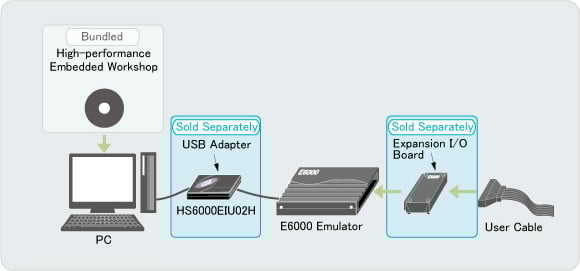
Note: An example of a target device H8S/2100 series. Refer to Information on Accessories for Connecting an Emulator to the System (PDF | English, 日本語) for the details.
Product Lineups
| Supported MCUs | E6000 Emulator Note1 | Successors | ||
|---|---|---|---|---|
| Families | Series | Groups | ||
| SH | SH7050 | - | HS7050EPI60H | - |
| SH7040 | - | HS7040EPI60H | ||
| SH7010 | - | HS7010EPI60H HS7040REPI60H | ||
| H8S | H8S/2600 | H8S/2678R, H8S/2678, H8S/2668 | HS2678REPI61H | - |
| H8S/2655 | HS2655EPI61H | - | ||
| H8S/2648, H8S/2646, H8S/2639, H8S/2638, H8S/2636, H8S/2635, H8S/2630, H8S/2607 | HS2646EPI61H | - | ||
| H8S/2643, H8S/2633 | HS2633REPI61H | - | ||
| H8S/2628, H8S/2615, H8S/2604 | HS2628EPI61H | - | ||
| H8S/2612, H8S/2602 | HS2612EPI61H | - | ||
| H8S/2500 | H8S/2552, H8S/2556, H8S/2506 | HS2556EPI62H | - | |
| H8S/2300 | H8S/2398, H8S/2350, H8S/2355, H8S/2357, H8S/2345 | HS2655EPI61H | - | |
| H8S/2378R, H8S/2378, H8S/2368 | HS2678REPI61H | - | ||
| H8S/2339, H8S/2329, H8S/2319 | HS2339EPI61H | - | ||
| H8S/2200 | H8S/2282 | HS2646EPI61H | - | |
| H8S/2264, H8S/2268 | HS2268EPI61H | - | ||
| H8S/2258, H8S/2238R/B, H8S/2237, H8S/2227 | HS2633REPI61H | - | ||
| H8S/2245 | HS2655EPI61H | - | ||
| H8S/2239, H8S/2212, H8S/2214, H8S/2215, H8S/2218 | HS2214EPI62H | - | ||
| H8S/2100 | H8S/2168 | HS2168EPI61H | - | |
| H8S/2148, H8S/2144, H8S/2144B, H8S/2140B, H8S/2138, H8S/2134, H8S/2134B, H8S/2128, H8S/2124, H8S/2110B, H8S/2111B | HS2140EPI61H | - | ||
| H8S/2600 | - | HS2633EPI61H | HS2633REPI61H | |
| - | HS2655EPI60H | HS2655EPI61H | ||
| - | HS2678EPI61H | HS2678REPI61H | ||
| H8S/2500 | - | HS2556EPI61H | HS2556EPI62H | |
| H8S/2300 | - | HS2678EPI61H | HS2678REPI61H | |
| - | HS2655EPI60H | HS2655EPI61H | ||
| - | HS2338EPI61H | HS2339EPI61H | ||
| H8S/2200 | - | HS2633EPI61H | HS2633REPI61H | |
| - | HS2214EPI61H | HS2214EPI62H | ||
| - | HS2655EPI60H | HS2655EPI61H | ||
| H8S/2100 | - | HS2148EPI61H HS2148EPI60H HS2195EPI60H | HS2140EPI61H | |
| H8 | H8/300H Tiny | H8/36064G, H8/36077, H8/36079, H8/36912G, H8/36902G, H8/36109, H8/36094, H8/36087, H8/36057, H8/36049, H8/36037, H8/36024, H8/36014, H8/3694, H8/3687, H8/3672, H8/3664N, H8/3664 | HS3664EPI62H (with USB IF) | - |
| H8/300L Super Low Power | H8/38002S, H8/38447, H8/38427, H8/3887, H8/3867, H8/3847R, H8/3847S, H8/3827R, H8/3827S, H8/38024, H8/38024S, H8/38024R, H8/38004, H8/3802 | HS38000EPI61H (with USB IF) | - | |
| H8/300H | - | HS3067EPI62H HS3067EPI60H HS3064BEPI61H Note2 HS3052EPI61H Note2 | - | |
| H8/300H Tiny | - | HS3664EPI61H | HS3664EPI62H | |
| H8/300 | - | HS3008EPI60H | - | |
| H8/300L Super Low Power | - | HS3800EPI60H HS388REPI60H HS3880EPI60H | HS38000EPI61H | |
| H8/300L | - | HS3L08EPI60H HS3644EIP60H | - | |
| AE | *See the product page for the details | HS0AE4XEPI61H | ||
Notes:
- See the documents for each product number.
- H8/3048 or H8/3052B is available for either HS3064BEPI61H or HS3052EPI61H.
Support

Support Communities
Get quick technical support online from Renesas Engineering Community technical staff.

Knowledge Base
Browse our knowledge base for helpful articles, FAQs, and other useful resources.

