Features
- Simultaneous transmission of IP video data and analog CVBS video over up to 500m of RG59 coaxial cable
- Analog CVBS video preview support
- Proprietary adaptive analog equalizer for extending the reach of CVBS video
- Proprietary SLOC-based IP DVR detection
- Creates a full-duplex 100BASE-T digital link
- 36Mbps downlink speed from TW3801 to TW3811
- 4Mbps uplink for SLOC compliance
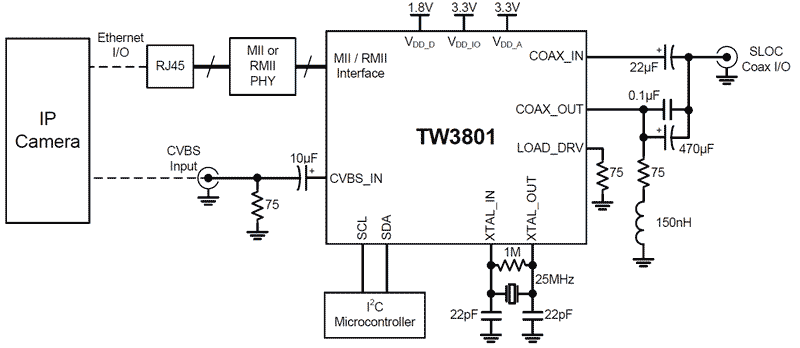
- Ethernet MAC MII/RMII interface for interfacing to Camera ISPs
- Ethernet PHY MII/RMII interface for interfacing to Ethernet PHY chip
- I2C 2-wire control interface
- Integrated PLL with 25MHz crystal interface
- 1.8V, 3.3V supplies
- 100-TQFP (12mmx12mm) Package
Description
SLOC™ (Security Link Over Coax) is a transmission protocol for simultaneously transmitting analog CVBS video and digital IP video over a single coaxial cable. The TW3801 is the transmitting (“camera”) end of a SLOC link, combining Ethernet digital video data and analog CVBS video into a single SLOC signal that can be transmitted over 500m of coaxial cable. It can be embedded into a camera or configured as a stand-alone IP+CVBS-to-SLOC converter. The TW3801 includes an AFE, digital modem, and two Ethernet MII/RMII interfaces. The device accepts an analog CVBS signal and an Ethernet (R)MII signal and encodes it into a SLOC signal.
Applications
- Single-channel SLOC transmitter modem
- Embedded SLOC camera modem
| Part Number | Status | Samples | Stock | RoHS | Package | Lead Count (#) | Carrier Type | Moisture Sensitivity Level (MSL) | Pb (Lead) Free | Pb Free Category | Temp. Range (°C) |
|---|---|---|---|---|---|---|---|---|---|---|---|
| TW3801-TC1-CR | Obsolete | N/A | In Stock | RoHS:EN | TQFP | 100# | Tray | 3 | Yes | Pb-Free 100% Matte Tin Plate w/Anneal-e3 | -40 to +85°C |
| TW3801-TC1-CRT | Obsolete | N/A | Out of Stock | RoHS:EN | TQFP | 100# | Reel | 3 | Yes | Pb-Free 100% Matte Tin Plate w/Anneal-e3 | -40 to +85°C |
Loading
Filters
Applied Filters
Log in required to subscribe
- Application NotePDF 1.1 MB an1804 May 02, 2018AI-generated Summary: The document provides hardware design and PCB layout guidelines for TW3801/TW3811, focusing on SLOC system operation over COAX cables. It explains three operating modes: Ethernet PHY interface for dongles, SOC (MAC) interface for embedded systems, and pass-through mode for legacy Ethernet support. It details signal spectrum, impedance matching, and necessary component configurations for optimal performance.
Recommended Documents (1)
Datasheets (1)
No Results Found.
Check Spelling
Make sure all keywords are spelled correctly.
Adjust Keywords
Try fewer, different, or more general terms to vary your search.
Review Filters
If you have filters applied, consider deselecting some to broaden your results.
Need help?
- Search our extensive knowledgebase, designed to help customers with their FAQs.
- Get help from our expert Renesas technical staff and community on our support forums.
- Application NotePDF 1.1 MB an1804 May 02, 2018AI-generated Summary: The document provides hardware design and PCB layout guidelines for TW3801/TW3811, focusing on SLOC system operation over COAX cables. It explains three operating modes: Ethernet PHY interface for dongles, SOC (MAC) interface for embedded systems, and pass-through mode for legacy Ethernet support. It details signal spectrum, impedance matching, and necessary component configurations for optimal performance.
Application Notes & White Papers (1)
Product Notices (PCN, EOL, etc) (1)
No Results Found.
Check Spelling
Make sure all keywords are spelled correctly.
Adjust Keywords
Try fewer, different, or more general terms to vary your search.
Review Filters
If you have filters applied, consider deselecting some to broaden your results.
Need help?
- Search our extensive knowledgebase, designed to help customers with their FAQs.
- Get help from our expert Renesas technical staff and community on our support forums.
No Results Found.
Check Spelling
Make sure all keywords are spelled correctly.
Adjust Keywords
Try fewer, different, or more general terms to vary your search.
Review Filters
If you have filters applied, consider deselecting some to broaden your results.
Need help?
- Search our extensive knowledgebase, designed to help customers with their FAQs.
- Get help from our expert Renesas technical staff and community on our support forums.
No Results Found.
Check Spelling
Make sure all keywords are spelled correctly.
Adjust Keywords
Try fewer, different, or more general terms to vary your search.
Review Filters
If you have filters applied, consider deselecting some to broaden your results.
Need help?
- Search our extensive knowledgebase, designed to help customers with their FAQs.
- Get help from our expert Renesas technical staff and community on our support forums.
No Results Found.
Check Spelling
Make sure all keywords are spelled correctly.
Adjust Keywords
Try fewer, different, or more general terms to vary your search.
Review Filters
If you have filters applied, consider deselecting some to broaden your results.
Need help?
- Search our extensive knowledgebase, designed to help customers with their FAQs.
- Get help from our expert Renesas technical staff and community on our support forums.
No Results Found.
Check Spelling
Make sure all keywords are spelled correctly.
Adjust Keywords
Try fewer, different, or more general terms to vary your search.
Review Filters
If you have filters applied, consider deselecting some to broaden your results.
Need help?
- Search our extensive knowledgebase, designed to help customers with their FAQs.
- Get help from our expert Renesas technical staff and community on our support forums.
No Results Found.
Check Spelling
Make sure all keywords are spelled correctly.
Adjust Keywords
Try fewer, different, or more general terms to vary your search.
Review Filters
If you have filters applied, consider deselecting some to broaden your results.
Need help?
- Search our extensive knowledgebase, designed to help customers with their FAQs.
- Get help from our expert Renesas technical staff and community on our support forums.
No Results Found.
Check Spelling
Make sure all keywords are spelled correctly.
Adjust Keywords
Try fewer, different, or more general terms to vary your search.
Review Filters
If you have filters applied, consider deselecting some to broaden your results.
Need help?
- Search our extensive knowledgebase, designed to help customers with their FAQs.
- Get help from our expert Renesas technical staff and community on our support forums.
No Results Found.
Check Spelling
Make sure all keywords are spelled correctly.
Adjust Keywords
Try fewer, different, or more general terms to vary your search.
Review Filters
If you have filters applied, consider deselecting some to broaden your results.
Need help?
- Search our extensive knowledgebase, designed to help customers with their FAQs.
- Get help from our expert Renesas technical staff and community on our support forums.
No Results Found.
Check Spelling
Make sure all keywords are spelled correctly.
Adjust Keywords
Try fewer, different, or more general terms to vary your search.
Review Filters
If you have filters applied, consider deselecting some to broaden your results.
Need help?
- Search our extensive knowledgebase, designed to help customers with their FAQs.
- Get help from our expert Renesas technical staff and community on our support forums.
No Results Found.
Check Spelling
Make sure all keywords are spelled correctly.
Adjust Keywords
Try fewer, different, or more general terms to vary your search.
Review Filters
If you have filters applied, consider deselecting some to broaden your results.
Need help?
- Search our extensive knowledgebase, designed to help customers with their FAQs.
- Get help from our expert Renesas technical staff and community on our support forums.
Support Communities
Get quick technical support online from Renesas Engineering Community technical staff.
Knowledge Base
Browse our knowledge base for helpful articles, FAQs, and other useful resources.