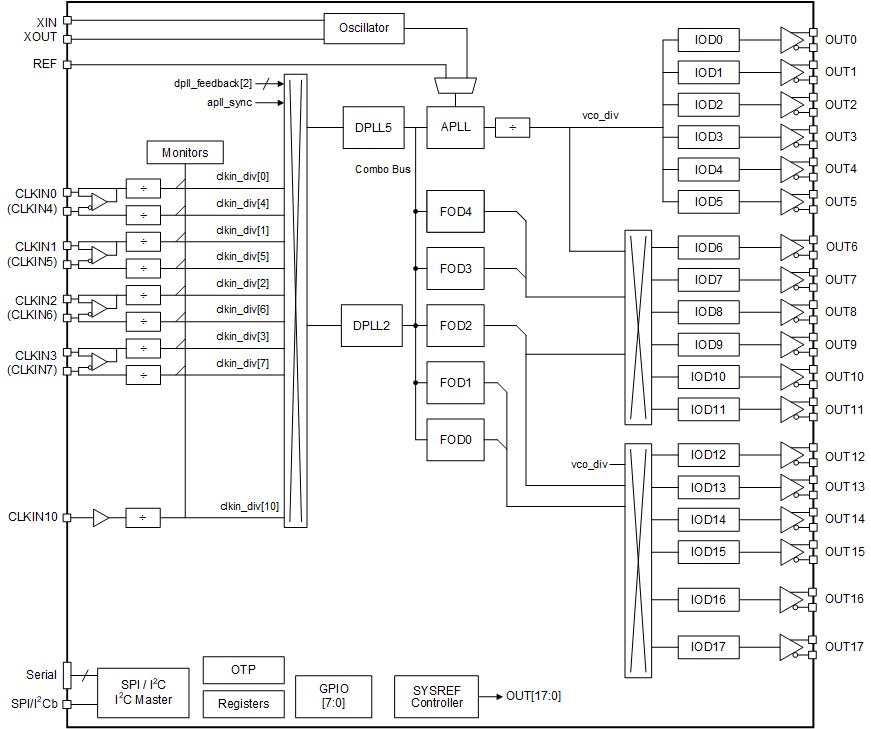
Features
- Ultra-low jitter performance: Achieve exceptional precision with jitter performance as low as 40fs at 312.5MHz within a wide 12kHz to 20MHz integration range in jitter attenuator mode
- Versatile power supply options: Operate the device with ease using a single 1.8V power supply while ensuring compatibility with a 3.3V level interface at SCL/SDA pin if the VDDD33_SERIAL is 3.3V
- SyncE support: Seamlessly integrate with SyncE technology for enhanced synchronization capabilities
- Digitally controlled oscillator (DCO) mode support: Leverage the benefits of the DCO mode for added flexibility and efficiency
- Configurable startup options: Load configurations at startup effortlessly with the support of an external EEPROM, streamlining your setup process
- Flexible communication interfaces: Choose between SPI or I²C communication protocols for seamless device integration
- Multiple one-time programmable (OTP) configurations: Benefit from up to 4 OTP configurations for startup
- Clock input monitoring: Monitor clock inputs with precision, ensuring reliable and stable performance
- Phase slope limit (ns/s): Support smooth phase adjustment under digital phase-locked loop (DPLL) control
- Wide loop bandwidth: Enjoy the flexibility of adjusting the loop bandwidth from 0.5Hz to 18kHz, catering to various application needs
- Combo mode support: Flexible frequency support
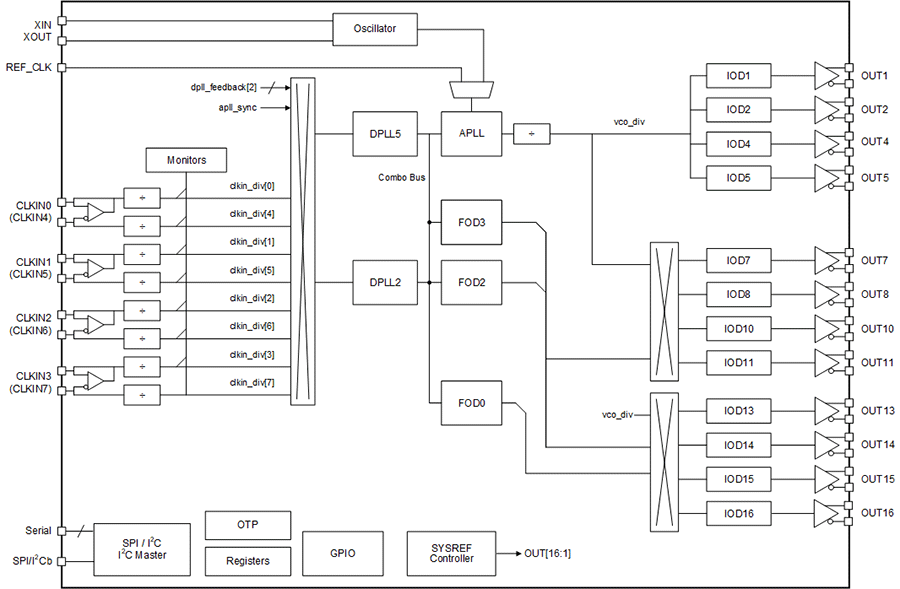
Description
The RC324xxA (RC32412A and RC32418A) is a high-performance, small-form factor, low-power jitter attenuator with network synchronization capabilities, belonging to the high-performance FemtoClock™ 4 family. It supports Synchronous Ethernet (SyncE) for network-based synchronization and outputs ultra-low jitter clocks that can directly synchronize SerDes running at up to 224G pulse amplitude modulation (PAM). This makes it an excellent choice for 100G/200G/400G/800G/1.6T telecom switch line cards, fabric cards, wireline infrastructure, data center equipment, and instrumentation applications. It allows locking to external reference clocks or free-run crystals/oscillators and supports hitless reference switching between redundant timing sources. The device is versatile, supporting timing channels for SyncE clock generation, jitter attenuation, and precise phase skew management for input-to-input, input-to-output, and output-to-output configurations.
Parameters
| Attributes | Value |
|---|---|
| Inputs (#) | 8, 9 |
| Input Type | CML, Crystal, HCSL, LVCMOS, LVDS, LVPECL |
| Product Category | FemtoClock 4 |
| Output Type | CML, HCSL, LVCMOS, LVDS |
| Output Voltage (V) | 1.8 |
| Input Freq (MHz) | 5.0E-7 - 1000 |
| Phase Jitter Typ RMS (ps) | 0.02 |
| Output Freq Range (MHz) | 5.0E-7 - 2500 |
| Core Voltage (V) | 1.8, 3.3 |
| Output Banks (#) | 12, 18 |
Applications
- AI Data Center Switching for 112G/224G
- Reference clock for high-speed SerDes 112Gbps, and 224Gbps for switch and router and data center Top-of-Rack (ToR) switch
- Application NotePDF 459 KB R31AN0096EU0100 Rev.1.00 Oct 29, 2026
- Application NotePDF 394 KB R31AN0093EU0101 Rev.1.01 Oct 23, 2026This application note explains the minor differences between the FemtoClock™ 3 Wireless (FC3W) 100BGA family of devices and the FemtoClock 4 (FC4) 100BGA family of devices and provides the customer with details to upgrade the device. The document does not apply to the 144BGA family of devices. The devices referenced herein are the FC3W devices RC38312/RC38112 and the FC4 devices RC32412/RC38412.
- Datasheet AddendumPDF 270 KB Jun 04, 2026This document details the custom configuration that is programmed into the one-time programmable (OTP) memory of the RC32418A200.
- Datasheet AddendumPDF 270 KB Jun 04, 2026This document details the custom configuration that is programmed into the one-time programmable (OTP) memory of the RC32418A100.
- Manual - SoftwarePDF 4.38 MB R31US0038EU0100 Rev.1.00 Dec 11, 2025This document explains how to use the Renesas IC Toolbox (RICBox) software to configure and control FemtoClock™ 4 devices.
- Application NotePDF 1.22 MB R31AN0061EU0100 Rev.1.00 Dec 02, 2025This document provides layout guidelines for a board that uses a FemtoClock™ 4 device (For example, RC38616, RC32418, RC38412, or RC32412). To obtain the best performance from a FemtoClock 4 device, the board layout must follow certain guidelines as described in this application note.
- Datasheet AddendumPDF 278 KB Nov 10, 2025This document details the custom configuration that is programmed into the one-time programmable (OTP) memory of the RC32418A101.
Recommended Documents (1)
- Datasheet AddendumPDF 270 KB Jun 04, 2026This document details the custom configuration that is programmed into the one-time programmable (OTP) memory of the RC32418A200.
- Datasheet AddendumPDF 270 KB Jun 04, 2026This document details the custom configuration that is programmed into the one-time programmable (OTP) memory of the RC32418A100.
- Datasheet AddendumPDF 278 KB Nov 10, 2025This document details the custom configuration that is programmed into the one-time programmable (OTP) memory of the RC32418A101.
Datasheets (4)
- Manual - SoftwarePDF 4.38 MB R31US0038EU0100 Rev.1.00 Dec 11, 2025This document explains how to use the Renesas IC Toolbox (RICBox) software to configure and control FemtoClock™ 4 devices.
Manuals & Guides (1)
- Application NotePDF 459 KB R31AN0096EU0100 Rev.1.00 Oct 29, 2026
- Application NotePDF 394 KB R31AN0093EU0101 Rev.1.01 Oct 23, 2026This application note explains the minor differences between the FemtoClock™ 3 Wireless (FC3W) 100BGA family of devices and the FemtoClock 4 (FC4) 100BGA family of devices and provides the customer with details to upgrade the device. The document does not apply to the 144BGA family of devices. The devices referenced herein are the FC3W devices RC38312/RC38112 and the FC4 devices RC32412/RC38412.
- Application NotePDF 1.22 MB R31AN0061EU0100 Rev.1.00 Dec 02, 2025This document provides layout guidelines for a board that uses a FemtoClock™ 4 device (For example, RC38616, RC32418, RC38412, or RC32412). To obtain the best performance from a FemtoClock 4 device, the board layout must follow certain guidelines as described in this application note.
Application Notes & White Papers (3)
No Results Found.
Make sure all keywords are spelled correctly.
Try fewer, different, or more general terms to vary your search.
If you have filters applied, consider deselecting some to broaden your results.
- Search our extensive knowledgebase, designed to help customers with their FAQs.
- Get help from our expert Renesas technical staff and community on our support forums.
No Results Found.
Make sure all keywords are spelled correctly.
Try fewer, different, or more general terms to vary your search.
If you have filters applied, consider deselecting some to broaden your results.
- Search our extensive knowledgebase, designed to help customers with their FAQs.
- Get help from our expert Renesas technical staff and community on our support forums.
No Results Found.
Make sure all keywords are spelled correctly.
Try fewer, different, or more general terms to vary your search.
If you have filters applied, consider deselecting some to broaden your results.
- Search our extensive knowledgebase, designed to help customers with their FAQs.
- Get help from our expert Renesas technical staff and community on our support forums.
No Results Found.
Make sure all keywords are spelled correctly.
Try fewer, different, or more general terms to vary your search.
If you have filters applied, consider deselecting some to broaden your results.
- Search our extensive knowledgebase, designed to help customers with their FAQs.
- Get help from our expert Renesas technical staff and community on our support forums.
No Results Found.
Make sure all keywords are spelled correctly.
Try fewer, different, or more general terms to vary your search.
If you have filters applied, consider deselecting some to broaden your results.
- Search our extensive knowledgebase, designed to help customers with their FAQs.
- Get help from our expert Renesas technical staff and community on our support forums.
No Results Found.
Make sure all keywords are spelled correctly.
Try fewer, different, or more general terms to vary your search.
If you have filters applied, consider deselecting some to broaden your results.
- Search our extensive knowledgebase, designed to help customers with their FAQs.
- Get help from our expert Renesas technical staff and community on our support forums.
No Results Found.
Make sure all keywords are spelled correctly.
Try fewer, different, or more general terms to vary your search.
If you have filters applied, consider deselecting some to broaden your results.
- Search our extensive knowledgebase, designed to help customers with their FAQs.
- Get help from our expert Renesas technical staff and community on our support forums.
No Results Found.
Make sure all keywords are spelled correctly.
Try fewer, different, or more general terms to vary your search.
If you have filters applied, consider deselecting some to broaden your results.
- Search our extensive knowledgebase, designed to help customers with their FAQs.
- Get help from our expert Renesas technical staff and community on our support forums.
No Results Found.
Make sure all keywords are spelled correctly.
Try fewer, different, or more general terms to vary your search.
If you have filters applied, consider deselecting some to broaden your results.
- Search our extensive knowledgebase, designed to help customers with their FAQs.
- Get help from our expert Renesas technical staff and community on our support forums.
No Results Found.
Make sure all keywords are spelled correctly.
Try fewer, different, or more general terms to vary your search.
If you have filters applied, consider deselecting some to broaden your results.
- Search our extensive knowledgebase, designed to help customers with their FAQs.
- Get help from our expert Renesas technical staff and community on our support forums.
Filters
Applied Filters
Software & Tools
Filter by Type
Sample Code
Filter by Application
Filter by Function
Filter by Compiler
Filter by IDE
Simulation Models
Partner Solutions
- Software PackageThe Renesas IC Toolbox (RICBox) software platform enables customers to configure Renesas devices on evaluation kits when attached to the computer running the software.
No Results Found.
Make sure all keywords are spelled correctly.
Try fewer, different, or more general terms to vary your search.
If you have filters applied, consider deselecting some to broaden your results.
- Search our extensive knowledgebase, designed to help customers with their FAQs.
- Get help from our expert Renesas technical staff and community on our support forums.
- Software PackageThe Renesas IC Toolbox (RICBox) software platform enables customers to configure Renesas devices on evaluation kits when attached to the computer running the software.
Software & Tools (1)
No Results Found.
Make sure all keywords are spelled correctly.
Try fewer, different, or more general terms to vary your search.
If you have filters applied, consider deselecting some to broaden your results.
- Search our extensive knowledgebase, designed to help customers with their FAQs.
- Get help from our expert Renesas technical staff and community on our support forums.
No Results Found.
Make sure all keywords are spelled correctly.
Try fewer, different, or more general terms to vary your search.
If you have filters applied, consider deselecting some to broaden your results.
- Search our extensive knowledgebase, designed to help customers with their FAQs.
- Get help from our expert Renesas technical staff and community on our support forums.
No Results Found.
Make sure all keywords are spelled correctly.
Try fewer, different, or more general terms to vary your search.
If you have filters applied, consider deselecting some to broaden your results.
- Search our extensive knowledgebase, designed to help customers with their FAQs.
- Get help from our expert Renesas technical staff and community on our support forums.