
Features
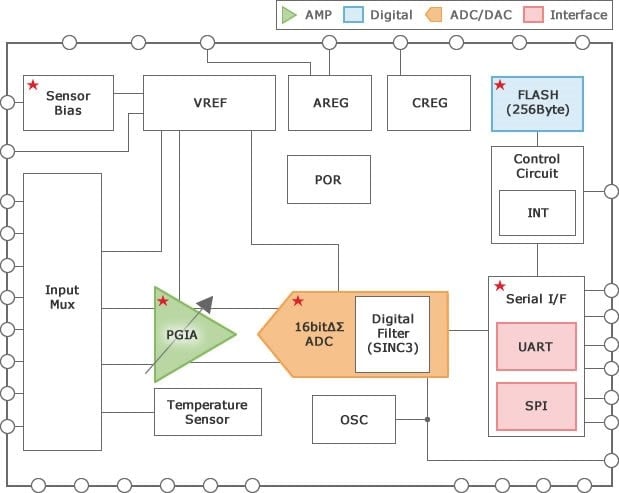
- RAA730101 (RAA7301014CBG, RAA7301013CBG) 16-bit ∆Σ A/D converter IC with programmable gain instrumentation amplifier
- Input Mux: 4 channels with differential input mode/single-end mode selectable
- Programmable gain instrumentation amplifier (PGIA) with gain/offset adjustment function
- Low-pass filter built into 16-bit delta-sigma A/D converter
- 5-bit D/A converter with offset adjustment function
- Power supply for external sensor (Sensor Bias)
- Temperature sensor circuit built into 16-bit delta-sigma A/D converter
- Communications: SPI/UART (selectable)
- 256 bytes Flash memory for storing system setting data
- Operating voltage range: 2.7V to 5.5V
- Operating temperature range: RAA7301014CBG Ta= -40 ℃ to +125 ℃; RAA7301013CBG Ta= -40 ℃ to +105 ℃
- Package: 36-pin FPBGA (4mm x 4mm)
Description
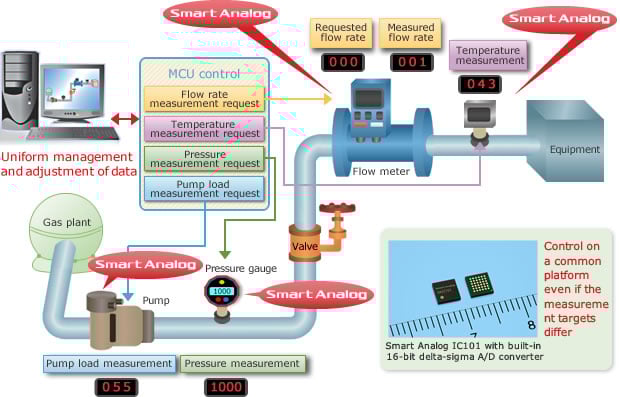
Smart Analog IC101 has a built-in 16-bit delta-sigma (ΔΣ) A/D converter and programmable gain amplifier and is suitable for industrial applications.
- Highly integrated analog front-end for bridge sensor reduces the number of components
- Easy expansion of host MCU variation reduces development time
- Suitable for small, low-cost, and reliable sensor modules, reduces PCB area
The RAA730101 is a 16-bit ΔΣ A/D converter IC with a programmable gain instrumentation amplifier ideal for differential output sensors used for measuring flow and pressure. The RAA730101 incorporates a temperature sensor, a power supply for an external sensor, and an internal reference voltage generator. Using Serial Peripheral Interface (SPI) communication or Universal Asynchronous Receiver Transmitter (UART) communication, the RAA730101 controls system configurations for each function block from an external device and outputs measured data to the external device. The RAA730101 also incorporates flash memory for storing system configurations for each function block. The RAA730101 uses a 36-pin FBGA package, which enables a more compact set design for measuring flow and pressure.
Applications
- Industrial applications
- Healthcare equipment
| Part Number | Status | Samples | Longevity | Stock | RoHS | Package | Lead Count (#) | Carrier Type | Moisture Sensitivity Level (MSL) | Pb (Lead) Free | Temp. Range (°C) |
|---|---|---|---|---|---|---|---|---|---|---|---|
| RAA7301013CBG#AC0 | NRND | N/A | 2029 Jul | Out of Stock | RoHS:EN RoHS:JA | TFBGA | 36# | Tape | 3 | Yes | -40 to +105 |
| RAA7301013CBG#HC0 | NRND | N/A | 2029 Jul | Out of Stock | RoHS:EN RoHS:JA | TFBGA | 36# | Tape | 3 | Yes | -40 to +105 |
| RAA7301014CBG#AC0 | NRND | N/A | 2029 Jul | Out of Stock | RoHS:EN RoHS:JA | TFBGA | 36# | Tape | 3 | Yes | -40 to +125 |
| RAA7301014CBG#HC0 | NRND | N/A | 2029 Jul | Out of Stock | RoHS:EN RoHS:JA | TFBGA | 36# | Tape | 3 | Yes | -40 to +125 |
Filters
Applied Filters
- GuidePDF 222 KB smartanalog-product-number-guide Apr 04, 2018
- Application NoteAI-generated Summary: The document details API specifications for controlling Smart Analog IC101 via UART and SPI interfaces. It covers functions for SPI data transmission, error checking, UART command handling, flash memory operations including read, write, erase, and verification, as well as ADC control and power supply management. It also specifies operation confirmation conditions, including target devices, development environments, and compiler versions.
- Application NoteAI-generated Summary: The document explains how to use Smart Analog IC101's API and sample code with other MCUs, focusing on compatibility with the RL78 family code generation tool. For supported MCUs, users add an MCU definition file to API Builder SAIC101 to automatically include sample code. For unsupported MCUs, users must manually create compatible functions and integrate the API. It provides a tutorial for adding an RL78/G14 MCU, detailing how to prepare and edit the MCU definition file using Excel or a text editor.
- Application NoteAI-generated Summary: The document provides sample code examples for operating the SAIC101 Smart Analog IC via SPI and UART interfaces. It explains how to read and write register bytes, including reading the fixed CHIPID register and writing to the CH4CNT2 register for DC offset adjustment. It also covers reading flash memory data from specified addresses with limitations on read size. Error handling for communication and parameter issues is included in the examples.Related Files:
- Application NoteAI-generated Summary: The document explains the usage flow of API Builder SAIC101 for integrating APIs or sample code into projects created with CubeSuite+ or e2studio. It guides through creating a project, setting MCU peripheral functions, connecting SAIC and MCU via serial communication, generating and integrating sample code, and finally building and running the project. It also details using CubeSuite+ for code generation, setting debug tools, and creating project templates for the RL78/L13 MCU, specifically for operating a thermistor on the TSA-OP-IC101 evaluation board via UART.
- Application NoteAI-generated Summary: This section explains how to solder pin sockets and headers to the RSK CPU board and TSA-OP-IC101 board for proper connection. Pin sockets on the RSK CPU board are soldered facing upward, while pin headers on the TSA-OP-IC101 board face downward. It also covers jumper settings, specifically setting the J5 jumper on the RSK CPU board to supply 5V power to the TSA-OP-IC101 board. Instructions ensure correct mounting orientation and jumper configuration for proper operation.
- Application NoteAI-generated Summary: The document outlines the development procedure for Smart Analog Systems using SA-Designer with the RX family. It details the hardware setup including the GR-SAKURA evaluation board and RX63N Smart Analog IC, and the software environment comprising SA-Designer and CubeSuite+. The development process involves designing the analog front-end circuit, programming source codes for system operation, registering circuit data into CubeSuite+, and performing operation checks using an emulator. Instructions for starting SA-Designer and creating new circuit designs are also provided.
- Flyer
Recommended Documents (1)
Datasheets (1)
- GuidePDF 222 KB smartanalog-product-number-guide Apr 04, 2018
Manuals & Guides (1)
- Application NoteAI-generated Summary: The document details API specifications for controlling Smart Analog IC101 via UART and SPI interfaces. It covers functions for SPI data transmission, error checking, UART command handling, flash memory operations including read, write, erase, and verification, as well as ADC control and power supply management. It also specifies operation confirmation conditions, including target devices, development environments, and compiler versions.
- Application NoteAI-generated Summary: The document explains how to use Smart Analog IC101's API and sample code with other MCUs, focusing on compatibility with the RL78 family code generation tool. For supported MCUs, users add an MCU definition file to API Builder SAIC101 to automatically include sample code. For unsupported MCUs, users must manually create compatible functions and integrate the API. It provides a tutorial for adding an RL78/G14 MCU, detailing how to prepare and edit the MCU definition file using Excel or a text editor.
- Application NoteAI-generated Summary: The document provides sample code examples for operating the SAIC101 Smart Analog IC via SPI and UART interfaces. It explains how to read and write register bytes, including reading the fixed CHIPID register and writing to the CH4CNT2 register for DC offset adjustment. It also covers reading flash memory data from specified addresses with limitations on read size. Error handling for communication and parameter issues is included in the examples.Related Files:
- Application NoteAI-generated Summary: The document explains the usage flow of API Builder SAIC101 for integrating APIs or sample code into projects created with CubeSuite+ or e2studio. It guides through creating a project, setting MCU peripheral functions, connecting SAIC and MCU via serial communication, generating and integrating sample code, and finally building and running the project. It also details using CubeSuite+ for code generation, setting debug tools, and creating project templates for the RL78/L13 MCU, specifically for operating a thermistor on the TSA-OP-IC101 evaluation board via UART.
- Application NoteAI-generated Summary: This section explains how to solder pin sockets and headers to the RSK CPU board and TSA-OP-IC101 board for proper connection. Pin sockets on the RSK CPU board are soldered facing upward, while pin headers on the TSA-OP-IC101 board face downward. It also covers jumper settings, specifically setting the J5 jumper on the RSK CPU board to supply 5V power to the TSA-OP-IC101 board. Instructions ensure correct mounting orientation and jumper configuration for proper operation.View More (6)
Application Notes & White Papers (6)
No Results Found.
Make sure all keywords are spelled correctly.
Try fewer, different, or more general terms to vary your search.
If you have filters applied, consider deselecting some to broaden your results.
- Search our extensive knowledgebase, designed to help customers with their FAQs.
- Get help from our expert Renesas technical staff and community on our support forums.
No Results Found.
Make sure all keywords are spelled correctly.
Try fewer, different, or more general terms to vary your search.
If you have filters applied, consider deselecting some to broaden your results.
- Search our extensive knowledgebase, designed to help customers with their FAQs.
- Get help from our expert Renesas technical staff and community on our support forums.
No Results Found.
Make sure all keywords are spelled correctly.
Try fewer, different, or more general terms to vary your search.
If you have filters applied, consider deselecting some to broaden your results.
- Search our extensive knowledgebase, designed to help customers with their FAQs.
- Get help from our expert Renesas technical staff and community on our support forums.
No Results Found.
Make sure all keywords are spelled correctly.
Try fewer, different, or more general terms to vary your search.
If you have filters applied, consider deselecting some to broaden your results.
- Search our extensive knowledgebase, designed to help customers with their FAQs.
- Get help from our expert Renesas technical staff and community on our support forums.
No Results Found.
Make sure all keywords are spelled correctly.
Try fewer, different, or more general terms to vary your search.
If you have filters applied, consider deselecting some to broaden your results.
- Search our extensive knowledgebase, designed to help customers with their FAQs.
- Get help from our expert Renesas technical staff and community on our support forums.
No Results Found.
Make sure all keywords are spelled correctly.
Try fewer, different, or more general terms to vary your search.
If you have filters applied, consider deselecting some to broaden your results.
- Search our extensive knowledgebase, designed to help customers with their FAQs.
- Get help from our expert Renesas technical staff and community on our support forums.
No Results Found.
Make sure all keywords are spelled correctly.
Try fewer, different, or more general terms to vary your search.
If you have filters applied, consider deselecting some to broaden your results.
- Search our extensive knowledgebase, designed to help customers with their FAQs.
- Get help from our expert Renesas technical staff and community on our support forums.
- Flyer
Marketing Collateral (1)
No Results Found.
Make sure all keywords are spelled correctly.
Try fewer, different, or more general terms to vary your search.
If you have filters applied, consider deselecting some to broaden your results.
- Search our extensive knowledgebase, designed to help customers with their FAQs.
- Get help from our expert Renesas technical staff and community on our support forums.
No Results Found.
Make sure all keywords are spelled correctly.
Try fewer, different, or more general terms to vary your search.
If you have filters applied, consider deselecting some to broaden your results.
- Search our extensive knowledgebase, designed to help customers with their FAQs.
- Get help from our expert Renesas technical staff and community on our support forums.
No Results Found.
Make sure all keywords are spelled correctly.
Try fewer, different, or more general terms to vary your search.
If you have filters applied, consider deselecting some to broaden your results.
- Search our extensive knowledgebase, designed to help customers with their FAQs.
- Get help from our expert Renesas technical staff and community on our support forums.
Filters
Applied Filters
Software & Tools
Filter by Type
Filter by Provider
Sample Code
Filter by Application
Filter by Function
Filter by Compiler
Filter by IDE
Simulation Models
Partner Solutions
- Code GeneratorAPI Builder SAIC101 is a coding assistance tool for editing the API for controlling the Smart Analog IC101.
- Circuit Design ToolSmart Analog Easy Starter is a GUI evaluation tool for designing the analog front-end circuit of Smart Analog devices.
- Sample CodeRelated Files:
No Results Found.
Make sure all keywords are spelled correctly.
Try fewer, different, or more general terms to vary your search.
If you have filters applied, consider deselecting some to broaden your results.
- Search our extensive knowledgebase, designed to help customers with their FAQs.
- Get help from our expert Renesas technical staff and community on our support forums.
- Code GeneratorAPI Builder SAIC101 is a coding assistance tool for editing the API for controlling the Smart Analog IC101.
- Circuit Design ToolSmart Analog Easy Starter is a GUI evaluation tool for designing the analog front-end circuit of Smart Analog devices.
Software & Tools (2)
- Sample CodeRelated Files:
Sample Code (1)
No Results Found.
Make sure all keywords are spelled correctly.
Try fewer, different, or more general terms to vary your search.
If you have filters applied, consider deselecting some to broaden your results.
- Search our extensive knowledgebase, designed to help customers with their FAQs.
- Get help from our expert Renesas technical staff and community on our support forums.
No Results Found.
Make sure all keywords are spelled correctly.
Try fewer, different, or more general terms to vary your search.
If you have filters applied, consider deselecting some to broaden your results.
- Search our extensive knowledgebase, designed to help customers with their FAQs.
- Get help from our expert Renesas technical staff and community on our support forums.

Support Communities


