
Overview
Description
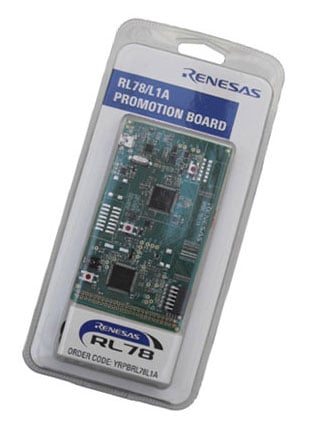
The Renesas Promotion Board for RL78/L1A is the perfect board for the first evaluation of the RL78/L1A MCU. The board includes a dot matrix display, on-chip debugging emulator and has rich analog features. The reference application shows a demonstration with oscilloscope and signal generator functions plus data logging.
Running the Demonstration
- A USB Serial driver is required to be installed on the PC for the Oscilloscope Datalog mode. Download and unzip the USB Serial Driver archive from this webpage. Run the file "dpinst.exe" from the "32bit" or "64bit" subfolder, depending upon the PC, and the driver will be installed automatically.
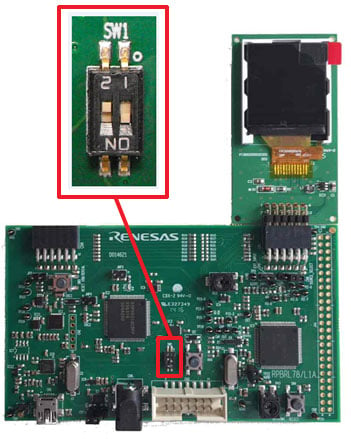
- Ensure that SW1 pin 1 is set to “ON” and SW1 pin 2 is set to “OFF”.
- Connect display to PMOD connector CN5.
- Connect the RPBRL78/L1A CN1 to the PC using the USB-mini cable supplied. The demonstration will start.
- Pot R43 can be used to navigate the on-screen menu (adjustment shaft supplied). Switch SW4 selects the current option. The oscilloscope and signal generators can be adjusted independently within the menus.
- Datalog mode samples the oscilloscope voltage at regular intervals and transmits this to the PC via the USB/serial interface to any terminal program as a voltage in mV in csv format. The serial format is 115200 baud 8N1.
Features
- Using the RL78/L1A LCD device with rich analog features of 12-bit ADC & DAC, comparators and R2R OPAMP multiplex function
- Ultra-low power mode with intelligent smart features like DTC and ELC to reduce CPU load
- 128 x 128 Colour Dot Matrix PMOD Display used for GUI control and demo display
- Header extender - option; it is possible to connect some LCD with direct drive
Applications
Documentation
|
|
|
|
|---|---|---|
| Type | Title | Date |
| Quick Start Guide | RPBRL78/L1A Quick Start Guide
|
|
| Manual - Development Tools | RPBRL78/L1A Promotion Board User's Manual Rev.1.00
|
|
| Datasheet | Bill of Material D014626 02 RPBRL78L1A BOM
|
|
| Other | RPBRL78/L1A Programmable Signal Generator / Oscilloscope Demonstration
|
|
| Manual - Development Tools | PDF 413 KB 日本語 | |
| Schematic | PDF 56 KB | |
6 items
|
||
Design & Development
Software & Tools
Software & Tools
| Software title
|
Software type
|
Company
|
|---|---|---|
| C Compiler Package for RL78 Family [CC-RL] C Compiler Package for RL78 Family [IDE: CS+, e² studio]
|
Compiler/Assembler | Renesas |
| AP4, Applilet Peripheral I/O driver generator compatible with third-party compilers and GNU compiler (for RZ, V850, RX, RL78, and 78K)
|
Code Generator | Renesas |
2 items
|
||
Sample Code
Sample Code
Filters
|
||
|---|---|---|
| Type | Title | Date Date |
| Sample Code | RL78/L1A Promotion Board Sample Code for IAR Rev.1.00
[Toolchains=EWRL78|v3.10.1]
ZIP
4.46 MB
Application:
Consumer Electronics, Industrial
Compiler:
ICCRL78
Function:
Application Example, Evaluation Kit
IDE:
IAR EWRL78
|
|
| Sample Code | RL78/L1A Promotion Board Sample Code for e2studio - Sample Code (r01an3557eg0100)
|
|
2 items
|
||
Product Options
| Part Number | Status | Stock | Sampleable | Pb (Lead) Free | ECCN (US) | HTS (US) | RoHS Compliant | China RoHS Compliant |
|---|---|---|---|---|---|---|---|---|
| YRPBRL78L1A | Obsolete | Out of Stock | N/A | No | 3A991.a.2 | 8471.50.0150 | No | No |
Videos & Training
Additional Videos
Support
Support Communities
- What is E2OB? at YRPBRL78G11
Hi all, I found the promotion board "YRPBRL78G11" on Renesas web page. There is an emulator named E2OB.Since the circuit diagram has not been released yet, I do not know the details, but it looks like a simple emulator.https://www.renesas.com/en-eu/ ...
Oct 11, 2017 - Power consumption in STOP mode
Hey everyone, I'm struggling to get an RL-78/G12 to run below about 300 µA in STOP mode. What is the correct procedure for putting the RL-78 into STOP mode? If I call HALT(), power consumption drops to about 580 µA, and if I replace the ...
Jul 24, 2017

Support Communities

Knowledge Base


