Features
- Buck Mode: Input Voltage Range 3V to 40V (Refer to "Input Voltage" on page 14 for more details)
- Boost Mode Expands Operating Input Voltage Lower Than 2.5V (Refer to "Input Voltage" on page 14 for more details)
- Selectable Forced PWM Mode or PFM Mode
- 300µA IC Quiescent Current (PFM, No Load); 180µA Input Quiescent Current (PFM, No Load, VOUT Connected to AUXVCC)
- Less than 3µA Shut Down Input Current (IC Disabled)
- Operational Topologies
- Synchronous Buck
- Non-Synchronous Buck
- Two Stage Boost Buck
- Programmable Frequency from 200kHz - 2.2MHz and Frequency Synchronization Capability
- ±1% Tight Voltage Regulation Accuracy
- Reliable Cycle-by-Cycle Overcurrent Protection
- Temperature Compensated Current Sense
- Frequency Foldback
- Programmable OC Limit
- Hiccup Mode Protection in Worst Case Short Condition
- 20 Ld HTSSOP Package
- AEC Q100 Qualified
- Pb-Free (RoHS Compliant)
Description
Support is limited to customers who have already adopted these products.
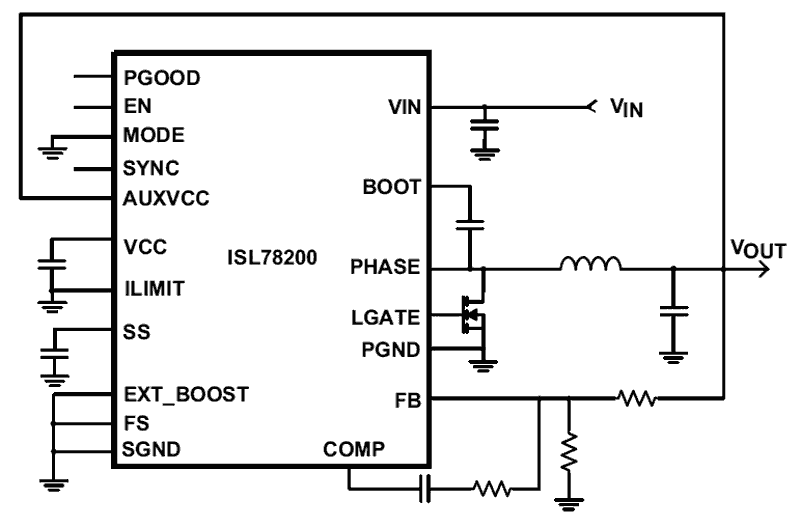
The ISL78200 is a synchronous buck controller with a 90mΩ high-side MOSFET and low-side driver integrated. The ISL78200 supports wide input range of 3V to 40V in buck mode. It supports 2. 5A continuous load under conditions of 5V VOUT, VIN range of 8V to 36V, 500kHz and +85°C ambient temperature with still air. For any specific application, the actual maximum output current depends upon the die temperature not exceeding +125°C with the power dissipated in the IC, which is related to input voltage, output voltage, duty cycle, switching frequency, ambient temperature and board layout, etc. Refer to section “Output Current” on page 14 for more details. The ISL78200 has flexible selection of operation modes of forced PWM mode and PFM mode. In PFM mode, the quiescent input current is as low as 300µA and can be further reduced to 180µA with AUXVCC connected to VOUT under 12V VIN and 5V VOUT application. The load boundary between PFM and PWM can be programmed to cover wide applications. The low-side driver can be either used to drive an external low-side MOSFET for a synchronous buck, or left unused for a standard non-synchronous buck. The low-side driver can also be used to drive a boost converter as a pre-regulator that greatly expands the operating input voltage range down to 2. 5V or lower (refer to “Typical Application Schematic III - Boost Buck Converters” on page 5). The ISL78200 offers the most robust current protections. It uses peak current mode control with cycle-by-cycle current limiting. It is implemented with frequency foldback under current limit condition; in addition, the hiccup overcurrent mode is also implemented to guarantee reliable operations under harsh short conditions. The ISL78200 has comprehensive protections against various faults including overvoltage and over-temperature protections, etc.
Applications
- Automotive Applications
- General Purpose Power Regulator
- 24V Bus Power
- Battery Power
- Embedded Processor and I/O Supplies
| Part Number | Status | Samples | Stock | Package | Lead Count (#) | Carrier Type | Pb (Lead) Free | Temp. Range (°C) |
|---|---|---|---|---|---|---|---|---|
| ISL78200AVEZ | Obsolete | N/A | Out of Stock | TSSOP-EP | 20# | Tube | No | -40 to +105°C |
| ISL78200AVEZ-T | Obsolete | N/A | Out of Stock | TSSOP-EP | 20# | Reel | No | -40 to +105°C |
Filters
Applied Filters
- End Of Life NoticePDF 292 KB PLC17007 Feb 15, 2017
- Product Change NoticePDF 168 KB PCN14006 Feb 18, 2014
- Application NotePDF 397 KB an1684 Jan 19, 2004AI-generated Summary: The document outlines important legal disclaimers and usage guidelines for semiconductor products. It emphasizes user responsibility for product design and safety, disclaims liability for damages, and clarifies no intellectual property licenses are granted. Products are categorized by quality grades with specific application recommendations. Users must comply with laws, avoid unauthorized modifications, and ensure safe use within specified conditions. Contact details for Renesas Electronics sales offices worldwide are provided.
- Application NotePDF 509 KB an1681 Jan 19, 2004AI-generated Summary: The document explains grounding techniques for PCB layouts using a dual op amp example on a single-layer copper board. It compares three grounding schemes: a center spine ground trace, an outer ground plane, and a split/star ground plane, highlighting the benefits of single-point grounding to minimize noise and antenna effects. It emphasizes following current paths, minimizing loop lengths, and ensuring close forward and return paths to reduce interference. The document also includes disclaimers on product use, quality grades, safety, and legal compliance.
Recommended Documents (1)
Datasheets (1)
Manuals & Guides (1)
- Application NotePDF 397 KB an1684 Jan 19, 2004AI-generated Summary: The document outlines important legal disclaimers and usage guidelines for semiconductor products. It emphasizes user responsibility for product design and safety, disclaims liability for damages, and clarifies no intellectual property licenses are granted. Products are categorized by quality grades with specific application recommendations. Users must comply with laws, avoid unauthorized modifications, and ensure safe use within specified conditions. Contact details for Renesas Electronics sales offices worldwide are provided.
- Application NotePDF 509 KB an1681 Jan 19, 2004AI-generated Summary: The document explains grounding techniques for PCB layouts using a dual op amp example on a single-layer copper board. It compares three grounding schemes: a center spine ground trace, an outer ground plane, and a split/star ground plane, highlighting the benefits of single-point grounding to minimize noise and antenna effects. It emphasizes following current paths, minimizing loop lengths, and ensuring close forward and return paths to reduce interference. The document also includes disclaimers on product use, quality grades, safety, and legal compliance.
Application Notes & White Papers (2)
- End Of Life NoticePDF 292 KB PLC17007 Feb 15, 2017
- Product Change NoticePDF 168 KB PCN14006 Feb 18, 2014
Product Notices (PCN, EOL, etc) (2)
No Results Found.
Make sure all keywords are spelled correctly.
Try fewer, different, or more general terms to vary your search.
If you have filters applied, consider deselecting some to broaden your results.
- Search our extensive knowledgebase, designed to help customers with their FAQs.
- Get help from our expert Renesas technical staff and community on our support forums.
No Results Found.
Make sure all keywords are spelled correctly.
Try fewer, different, or more general terms to vary your search.
If you have filters applied, consider deselecting some to broaden your results.
- Search our extensive knowledgebase, designed to help customers with their FAQs.
- Get help from our expert Renesas technical staff and community on our support forums.
No Results Found.
Make sure all keywords are spelled correctly.
Try fewer, different, or more general terms to vary your search.
If you have filters applied, consider deselecting some to broaden your results.
- Search our extensive knowledgebase, designed to help customers with their FAQs.
- Get help from our expert Renesas technical staff and community on our support forums.
No Results Found.
Make sure all keywords are spelled correctly.
Try fewer, different, or more general terms to vary your search.
If you have filters applied, consider deselecting some to broaden your results.
- Search our extensive knowledgebase, designed to help customers with their FAQs.
- Get help from our expert Renesas technical staff and community on our support forums.
No Results Found.
Make sure all keywords are spelled correctly.
Try fewer, different, or more general terms to vary your search.
If you have filters applied, consider deselecting some to broaden your results.
- Search our extensive knowledgebase, designed to help customers with their FAQs.
- Get help from our expert Renesas technical staff and community on our support forums.
No Results Found.
Make sure all keywords are spelled correctly.
Try fewer, different, or more general terms to vary your search.
If you have filters applied, consider deselecting some to broaden your results.
- Search our extensive knowledgebase, designed to help customers with their FAQs.
- Get help from our expert Renesas technical staff and community on our support forums.
No Results Found.
Make sure all keywords are spelled correctly.
Try fewer, different, or more general terms to vary your search.
If you have filters applied, consider deselecting some to broaden your results.
- Search our extensive knowledgebase, designed to help customers with their FAQs.
- Get help from our expert Renesas technical staff and community on our support forums.
No Results Found.
Make sure all keywords are spelled correctly.
Try fewer, different, or more general terms to vary your search.
If you have filters applied, consider deselecting some to broaden your results.
- Search our extensive knowledgebase, designed to help customers with their FAQs.
- Get help from our expert Renesas technical staff and community on our support forums.
No Results Found.
Make sure all keywords are spelled correctly.
Try fewer, different, or more general terms to vary your search.
If you have filters applied, consider deselecting some to broaden your results.
- Search our extensive knowledgebase, designed to help customers with their FAQs.
- Get help from our expert Renesas technical staff and community on our support forums.
No Results Found.
Make sure all keywords are spelled correctly.
Try fewer, different, or more general terms to vary your search.
If you have filters applied, consider deselecting some to broaden your results.
- Search our extensive knowledgebase, designed to help customers with their FAQs.
- Get help from our expert Renesas technical staff and community on our support forums.
Filters
Applied Filters
Software & Tools
Filter by Type
Filter by Provider
Sample Code
Filter by Application
Filter by Function
Filter by Compiler
Filter by IDE
Simulation Models
Partner Solutions
- SimulatoriSim Personal Edition (iSim:PE) speeds the design cycle and reduces risk early in any project, identifying parts that can be used in current as well as next-generation designs.
No Results Found.
Make sure all keywords are spelled correctly.
Try fewer, different, or more general terms to vary your search.
If you have filters applied, consider deselecting some to broaden your results.
- Search our extensive knowledgebase, designed to help customers with their FAQs.
- Get help from our expert Renesas technical staff and community on our support forums.
- SimulatoriSim Personal Edition (iSim:PE) speeds the design cycle and reduces risk early in any project, identifying parts that can be used in current as well as next-generation designs.
Software & Tools (1)
No Results Found.
Make sure all keywords are spelled correctly.
Try fewer, different, or more general terms to vary your search.
If you have filters applied, consider deselecting some to broaden your results.
- Search our extensive knowledgebase, designed to help customers with their FAQs.
- Get help from our expert Renesas technical staff and community on our support forums.
Simulation Models (1)
No Results Found.
Make sure all keywords are spelled correctly.
Try fewer, different, or more general terms to vary your search.
If you have filters applied, consider deselecting some to broaden your results.
- Search our extensive knowledgebase, designed to help customers with their FAQs.
- Get help from our expert Renesas technical staff and community on our support forums.