Features
- Real Time Clock/Calendar
- Tracks Time in Hours, Minutes, Seconds, and Hundredths of a Second
- Day of the Week, Day, Month, and Year
- 4 Selectable Frequency Outputs
- Alarm
- Settable to the Second, Minute, Hour, Day of the Week, Day, or Month
- Single Event or Pulse Interrupt Mode
- Timer
- 4 Selectable Timer Functions
- 4 Selectable Timer Clock Frequencies
- Single Event or Pulse Interrupt Mode
- Automatic Backup to Battery or Supercapacitor
- Power Failure Detection
- Battery ReSeal™
- On-Chip Oscillator Compensation
- I2C Interface
- 400kHz Data Transfer Rate
- 800nA Battery Supply Current
- Small Package Options
- 8 Ld SOIC Package
- 10 Ld MSOP Package
- Pb-Free (RoHS Compliant)
Description
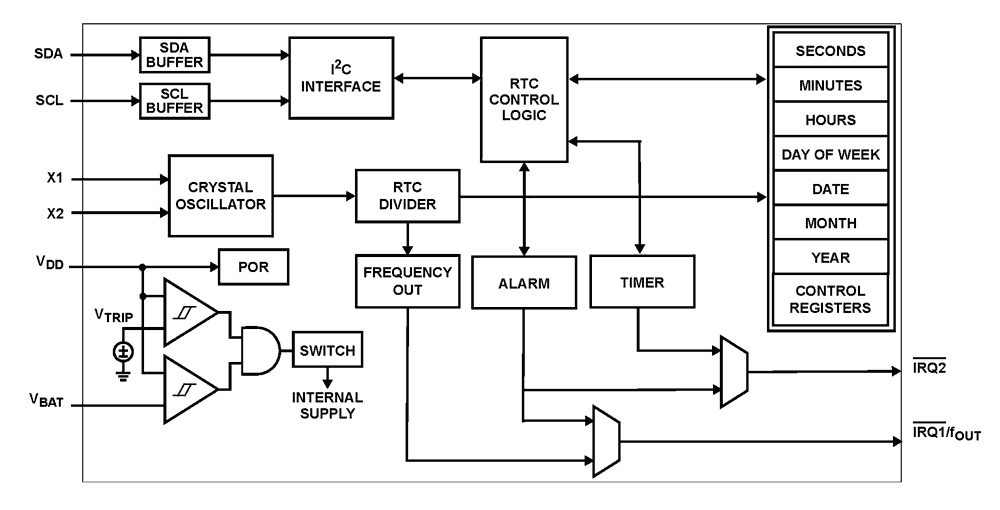
The ISL12082 device is a low power real time clock with timing and crystal compensation, clock/calendar, power fail indicator, 2 IRQs, periodic or polled alarm, timer/watchdog, and intelligent battery backup switching. The oscillator uses an external, low-cost 32. 768kHz crystal. The real time clock tracks time with separate registers for hours, minutes, seconds and hundredths of a second. The device has calendar registers for date, month, year and day of the week. The calendar is accurate through 2099, with automatic leap year correction.
Applications
- Utility Meters
- HVAC Equipment
- Audio/Video Components
- Set-Top Box/Television
- Modems
- Network Routers, Hubs, Switches, Bridges
- Cellular Infrastructure Equipment
- Fixed Broadband Wireless Equipment
- Pagers/PDA
- POS Equipment
- Test Meters/Fixtures
- Office Automation (Copiers, Fax)
- Home Appliances
- Computer Products
| Part Number | Status | Samples | Stock | RoHS | Package | Lead Count (#) | Carrier Type | Moisture Sensitivity Level (MSL) | Pb (Lead) Free | Pb Free Category | Temp. Range (°C) |
|---|---|---|---|---|---|---|---|---|---|---|---|
| ISL12082IB8Z | Obsolete | N/A | In Stock | RoHS:EN | SOIC | 8# | Tube | 1 | Yes | Pb-Free 100% Matte Tin Plate w/Anneal-e3 | -40 to +85°C |
| ISL12082IB8Z-T | Obsolete | N/A | In Stock | RoHS:EN | SOIC | 8# | Reel | 1 | Yes | Pb-Free 100% Matte Tin Plate w/Anneal-e3 | -40 to +85°C |
Filters
Applied Filters
- Product Change NoticePDF 152 KB PCN12085 Nov 07, 2012
- Application NotePDF 302 KB an1549 Nov 03, 2007AI-generated Summary: Power issues in real-time clock (RTC) applications include voltage spikes during AC turn-on, power glitches, and low or no battery backup voltage. Adding a medium power Schottky diode at the RTC Vpp pin helps clamp voltage spikes. Battery backup maintains time during power loss but fast glitches can corrupt RAM. Circuit designs with resistors and MOSFETs prevent SRAM corruption during power-up. Proper filtering and power-up delays ensure reliable 12C communication and data integrity.
- Manual - Development ToolsPDF 815 KB an1745 Feb 17, 2008
- DocumentPDF 243 KB tb481 May 28, 2009
Recommended Documents (1)
Datasheets (1)
- Manual - Development ToolsPDF 815 KB an1745 Feb 17, 2008
Manuals & Guides (1)
- Application NotePDF 302 KB an1549 Nov 03, 2007AI-generated Summary: Power issues in real-time clock (RTC) applications include voltage spikes during AC turn-on, power glitches, and low or no battery backup voltage. Adding a medium power Schottky diode at the RTC Vpp pin helps clamp voltage spikes. Battery backup maintains time during power loss but fast glitches can corrupt RAM. Circuit designs with resistors and MOSFETs prevent SRAM corruption during power-up. Proper filtering and power-up delays ensure reliable 12C communication and data integrity.
Application Notes & White Papers (1)
- Product Change NoticePDF 152 KB PCN12085 Nov 07, 2012
Product Notices (PCN, EOL, etc) (2)
No Results Found.
Make sure all keywords are spelled correctly.
Try fewer, different, or more general terms to vary your search.
If you have filters applied, consider deselecting some to broaden your results.
- Search our extensive knowledgebase, designed to help customers with their FAQs.
- Get help from our expert Renesas technical staff and community on our support forums.
No Results Found.
Make sure all keywords are spelled correctly.
Try fewer, different, or more general terms to vary your search.
If you have filters applied, consider deselecting some to broaden your results.
- Search our extensive knowledgebase, designed to help customers with their FAQs.
- Get help from our expert Renesas technical staff and community on our support forums.
No Results Found.
Make sure all keywords are spelled correctly.
Try fewer, different, or more general terms to vary your search.
If you have filters applied, consider deselecting some to broaden your results.
- Search our extensive knowledgebase, designed to help customers with their FAQs.
- Get help from our expert Renesas technical staff and community on our support forums.
No Results Found.
Make sure all keywords are spelled correctly.
Try fewer, different, or more general terms to vary your search.
If you have filters applied, consider deselecting some to broaden your results.
- Search our extensive knowledgebase, designed to help customers with their FAQs.
- Get help from our expert Renesas technical staff and community on our support forums.
No Results Found.
Make sure all keywords are spelled correctly.
Try fewer, different, or more general terms to vary your search.
If you have filters applied, consider deselecting some to broaden your results.
- Search our extensive knowledgebase, designed to help customers with their FAQs.
- Get help from our expert Renesas technical staff and community on our support forums.
No Results Found.
Make sure all keywords are spelled correctly.
Try fewer, different, or more general terms to vary your search.
If you have filters applied, consider deselecting some to broaden your results.
- Search our extensive knowledgebase, designed to help customers with their FAQs.
- Get help from our expert Renesas technical staff and community on our support forums.
No Results Found.
Make sure all keywords are spelled correctly.
Try fewer, different, or more general terms to vary your search.
If you have filters applied, consider deselecting some to broaden your results.
- Search our extensive knowledgebase, designed to help customers with their FAQs.
- Get help from our expert Renesas technical staff and community on our support forums.
- DocumentPDF 243 KB tb481 May 28, 2009
Other (1)
No Results Found.
Make sure all keywords are spelled correctly.
Try fewer, different, or more general terms to vary your search.
If you have filters applied, consider deselecting some to broaden your results.
- Search our extensive knowledgebase, designed to help customers with their FAQs.
- Get help from our expert Renesas technical staff and community on our support forums.
No Results Found.
Make sure all keywords are spelled correctly.
Try fewer, different, or more general terms to vary your search.
If you have filters applied, consider deselecting some to broaden your results.
- Search our extensive knowledgebase, designed to help customers with their FAQs.
- Get help from our expert Renesas technical staff and community on our support forums.
Support Communities
-
ISL12082 sub-second on time re-setting
The sub-second register for the ISL12082 is read-only. If I want to re-synchronize the RTC to a given time, does the SS register clear itself when I write to the other RTC registers or is there another way to synchronize the ISL12082 to another clock to the ...
Jun 26, 2020