Features
- 2.8V to 5.5V input voltage
- 0.3V to 1.57V output voltage
- 12A output current
- 24A output current in parallel configuration
- 3MHz nominal switching frequency
- Output voltage accuracy ±2.5%
- Adjustable soft start
- -40 to +85 ℃ Temperature Range
- Interface
- I2C and dedicated DVC
- SPI
- Dynamic Voltage Control (DVC)
- Integrated power switches
- Remote sensing at point of load
- High efficiency over a wide output range
- Low output ripple
- Scalable solution up to 24 Amp
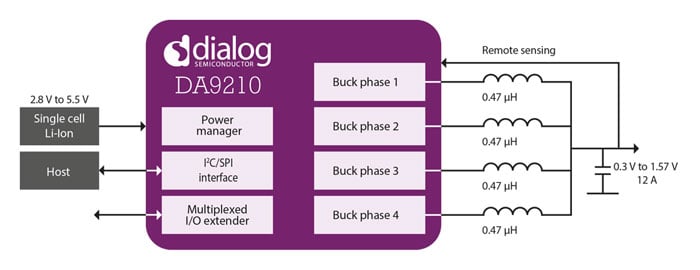
Description
The DA9210 is a synchronous 12 Amp step down converter supplying the processors core rail in smartphones, tablets, Ultrabooks™ and other handhelds applications requiring high currents. The DA9210 is also suitable for powering FPGA’s.
The input voltage range of 2.8 to 5.5V makes it suitable for the use of single cell Lithium-Ion battery applications as well as standard 5V supply or USB power supplies. Two DA9210 can be put in parallel to deliver 24A output current, suitable for the highest performing application processors such as the ARM Quad-core Cortex A15.
Applications
- Smartphones
- Ultrabooks™
- Tablet PCs
- eReaders
- Infotainment
- Portable Navigation Devices
- Personal Media Players
| Part Number | Status | Samples | Stock | Package | Lead Count (#) |
|---|---|---|---|---|---|
| DA9210-xxUK2 | Obsolete | N/A | Out of Stock | WLCSP | 48# |
Loading
Log in required to subscribe
- Application NotePDF 530 KB Feb 12, 2021AI-generated Summary: The R-Car H2 platform integrates the DA9063 PMIC and DA9210 multiphase buck converter to efficiently power the automotive infotainment SoC. The DA9063 supports dynamic voltage control and multiple buck converters and LDOs for optimized power management, enabling significant power savings and system size reduction. The DA9210 delivers high current with four-phase synchronous step-down conversion and remote sensing for accuracy. Together, they provide a scalable, efficient power solution tailored for the high-performance R-Car H2 SoC with multiple cores and GPU, suitable for automotive HMI and infotainment applications.
- Application NotePDF 514 KB Feb 12, 2021AI-generated Summary: The R-Car M2 platform integrates the DA9063 PMIC and DA9210 multiphase step-down converter to efficiently power automotive infotainment systems. The DA9063 supports dynamic voltage control and multiple buck converters and LDOs to optimize power delivery for multi-core processors. The DA9210 provides high current output with four-phase synchronous buck conversion and remote sensing for accuracy. Together, they reduce system cost and size while meeting the power requirements of the R-Car M2 SoC, which features ARM Cortex-A15 dual cores and an SH4A core. The document includes system block diagrams, power-up sequences, and register settings to guide implementation.
- Application NotePDF 267 KB Feb 12, 2021AI-generated Summary: IRQ line-sharing among multiple devices in Linux-based systems can cause unhandled interrupts, leading to kernel failures. When an IRQ remains unserviced, the Linux kernel disables the IRQ line, potentially affecting all devices sharing it. This behavior arises after a threshold of unhandled interrupts triggers a diagnostic message and disables the IRQ. Solutions include allocating dedicated IRQs, masking interrupts via OTP or bootloader, and managing driver installation order. Specific recommendations for PMIC devices like DA9210 and DA9063 address interrupt masks and fault log clearance to mitigate such issues.
- Application NotePDF 2.48 MB Feb 12, 2021AI-generated Summary: Optimizing PCB layout is essential for reliable and high-performance integrated power management solutions. Key principles include maintaining low ground impedance through thick current-carrying traces, ground planes, and multiple vias. Sensitive signals must be shielded from noise, and power and ground planes should be placed under PMICs to minimize inductance. Specific layout guidelines address buck, boost converters, LDOs, and battery chargers. Examples from Dialog’s reference designs illustrate best practices. Design-in services are available to review schematics and layouts to enhance efficiency and reliability.
- Application NotePDF 141 KB Apr 14, 2020AI-generated Summary: The DA9210 Linux Mainline device driver supports platform data, device tree integration, I2C communication, and IRQ handling. It enables control of buck regulators including activation, voltage setting, and current limit configuration. The driver requires a Linux kernel version 3.12 or later and integrates with the kernel’s sysfs and device tree frameworks. Instructions cover build, loading, platform-specific code, and device tree bindings to fully integrate the driver into the Linux kernel environment.
- Application NotePDF 499 KB Apr 14, 2020AI-generated Summary: The document explains limitations of the DA9210-xxUK2 buck converter when operating in PFM and AUTO modes, focusing on voltage output (VOUT) spikes and dynamic voltage control (DVC) transitions. It highlights conditions causing VOUT spikes, such as long no-switching intervals and immediate turn-on after turn-off without ramped power down. It recommends starting negative DVC transitions in PWM mode and actively ramping down output voltage during dynamic turn off/on to avoid spikes. The buck converter supports up to 12 A output current with input voltage from 2.8 to 5.5 V and operates in multi-phase synchronous step-down configuration optimized for low power and high current applications.
- Application NotePDF 1.86 MB Apr 14, 2020AI-generated Summary: The document provides detailed PCB layout recommendations for the DA9210 42 VF-BGA automotive variant, focusing on optimal placement and routing to ensure proper device functionality. It covers key aspects such as package information, multiphase Buck converter design, grounding strategies, reference voltage, communication interfaces, and GPIO/control signal routing. The layout supports a 4-layer PCB with standard drilled PTH VIAs and prioritizes critical design rules for power supply input/output, feedback lines, and component placement. Included figures illustrate schematic drawings, ball maps, and component placement examples. The document also references essential files like BOM, schematics, and Gerber files for PCB design.
Recommended Documents (2)
Datasheets (1)
No Results Found.
Check Spelling
Make sure all keywords are spelled correctly.
Adjust Keywords
Try fewer, different, or more general terms to vary your search.
Review Filters
If you have filters applied, consider deselecting some to broaden your results.
Need help?
- Search our extensive knowledgebase, designed to help customers with their FAQs.
- Get help from our expert Renesas technical staff and community on our support forums.
- Application NotePDF 530 KB Feb 12, 2021AI-generated Summary: The R-Car H2 platform integrates the DA9063 PMIC and DA9210 multiphase buck converter to efficiently power the automotive infotainment SoC. The DA9063 supports dynamic voltage control and multiple buck converters and LDOs for optimized power management, enabling significant power savings and system size reduction. The DA9210 delivers high current with four-phase synchronous step-down conversion and remote sensing for accuracy. Together, they provide a scalable, efficient power solution tailored for the high-performance R-Car H2 SoC with multiple cores and GPU, suitable for automotive HMI and infotainment applications.
- Application NotePDF 514 KB Feb 12, 2021AI-generated Summary: The R-Car M2 platform integrates the DA9063 PMIC and DA9210 multiphase step-down converter to efficiently power automotive infotainment systems. The DA9063 supports dynamic voltage control and multiple buck converters and LDOs to optimize power delivery for multi-core processors. The DA9210 provides high current output with four-phase synchronous buck conversion and remote sensing for accuracy. Together, they reduce system cost and size while meeting the power requirements of the R-Car M2 SoC, which features ARM Cortex-A15 dual cores and an SH4A core. The document includes system block diagrams, power-up sequences, and register settings to guide implementation.
- Application NotePDF 267 KB Feb 12, 2021AI-generated Summary: IRQ line-sharing among multiple devices in Linux-based systems can cause unhandled interrupts, leading to kernel failures. When an IRQ remains unserviced, the Linux kernel disables the IRQ line, potentially affecting all devices sharing it. This behavior arises after a threshold of unhandled interrupts triggers a diagnostic message and disables the IRQ. Solutions include allocating dedicated IRQs, masking interrupts via OTP or bootloader, and managing driver installation order. Specific recommendations for PMIC devices like DA9210 and DA9063 address interrupt masks and fault log clearance to mitigate such issues.
- Application NotePDF 2.48 MB Feb 12, 2021AI-generated Summary: Optimizing PCB layout is essential for reliable and high-performance integrated power management solutions. Key principles include maintaining low ground impedance through thick current-carrying traces, ground planes, and multiple vias. Sensitive signals must be shielded from noise, and power and ground planes should be placed under PMICs to minimize inductance. Specific layout guidelines address buck, boost converters, LDOs, and battery chargers. Examples from Dialog’s reference designs illustrate best practices. Design-in services are available to review schematics and layouts to enhance efficiency and reliability.
- Application NotePDF 141 KB Apr 14, 2020AI-generated Summary: The DA9210 Linux Mainline device driver supports platform data, device tree integration, I2C communication, and IRQ handling. It enables control of buck regulators including activation, voltage setting, and current limit configuration. The driver requires a Linux kernel version 3.12 or later and integrates with the kernel’s sysfs and device tree frameworks. Instructions cover build, loading, platform-specific code, and device tree bindings to fully integrate the driver into the Linux kernel environment.View More (7)
Application Notes & White Papers (7)
No Results Found.
Check Spelling
Make sure all keywords are spelled correctly.
Adjust Keywords
Try fewer, different, or more general terms to vary your search.
Review Filters
If you have filters applied, consider deselecting some to broaden your results.
Need help?
- Search our extensive knowledgebase, designed to help customers with their FAQs.
- Get help from our expert Renesas technical staff and community on our support forums.
No Results Found.
Check Spelling
Make sure all keywords are spelled correctly.
Adjust Keywords
Try fewer, different, or more general terms to vary your search.
Review Filters
If you have filters applied, consider deselecting some to broaden your results.
Need help?
- Search our extensive knowledgebase, designed to help customers with their FAQs.
- Get help from our expert Renesas technical staff and community on our support forums.
No Results Found.
Check Spelling
Make sure all keywords are spelled correctly.
Adjust Keywords
Try fewer, different, or more general terms to vary your search.
Review Filters
If you have filters applied, consider deselecting some to broaden your results.
Need help?
- Search our extensive knowledgebase, designed to help customers with their FAQs.
- Get help from our expert Renesas technical staff and community on our support forums.
No Results Found.
Check Spelling
Make sure all keywords are spelled correctly.
Adjust Keywords
Try fewer, different, or more general terms to vary your search.
Review Filters
If you have filters applied, consider deselecting some to broaden your results.
Need help?
- Search our extensive knowledgebase, designed to help customers with their FAQs.
- Get help from our expert Renesas technical staff and community on our support forums.
No Results Found.
Check Spelling
Make sure all keywords are spelled correctly.
Adjust Keywords
Try fewer, different, or more general terms to vary your search.
Review Filters
If you have filters applied, consider deselecting some to broaden your results.
Need help?
- Search our extensive knowledgebase, designed to help customers with their FAQs.
- Get help from our expert Renesas technical staff and community on our support forums.
No Results Found.
Check Spelling
Make sure all keywords are spelled correctly.
Adjust Keywords
Try fewer, different, or more general terms to vary your search.
Review Filters
If you have filters applied, consider deselecting some to broaden your results.
Need help?
- Search our extensive knowledgebase, designed to help customers with their FAQs.
- Get help from our expert Renesas technical staff and community on our support forums.
No Results Found.
Check Spelling
Make sure all keywords are spelled correctly.
Adjust Keywords
Try fewer, different, or more general terms to vary your search.
Review Filters
If you have filters applied, consider deselecting some to broaden your results.
Need help?
- Search our extensive knowledgebase, designed to help customers with their FAQs.
- Get help from our expert Renesas technical staff and community on our support forums.
Marketing Collateral (1)
No Results Found.
Check Spelling
Make sure all keywords are spelled correctly.
Adjust Keywords
Try fewer, different, or more general terms to vary your search.
Review Filters
If you have filters applied, consider deselecting some to broaden your results.
Need help?
- Search our extensive knowledgebase, designed to help customers with their FAQs.
- Get help from our expert Renesas technical staff and community on our support forums.
No Results Found.
Check Spelling
Make sure all keywords are spelled correctly.
Adjust Keywords
Try fewer, different, or more general terms to vary your search.
Review Filters
If you have filters applied, consider deselecting some to broaden your results.
Need help?
- Search our extensive knowledgebase, designed to help customers with their FAQs.
- Get help from our expert Renesas technical staff and community on our support forums.
No Results Found.
Check Spelling
Make sure all keywords are spelled correctly.
Adjust Keywords
Try fewer, different, or more general terms to vary your search.
Review Filters
If you have filters applied, consider deselecting some to broaden your results.
Need help?
- Search our extensive knowledgebase, designed to help customers with their FAQs.
- Get help from our expert Renesas technical staff and community on our support forums.
Loading
Filters
Applied Filters
Software & Tools
Filter by Type
Filter by Provider
Sample Code
Filter by Application
Filter by Function
Filter by Compiler
Filter by IDE
Simulation Models
Partner Solutions
- Software & Tools - Other
- Software & Tools - Software
No Results Found.
Check Spelling
Make sure all keywords are spelled correctly.
Adjust Keywords
Try fewer, different, or more general terms to vary your search.
Review Filters
If you have filters applied, consider deselecting some to broaden your results.
Need help?
- Search our extensive knowledgebase, designed to help customers with their FAQs.
- Get help from our expert Renesas technical staff and community on our support forums.
- Software & Tools - Other
- Software & Tools - Software
Software & Tools (3)
No Results Found.
Check Spelling
Make sure all keywords are spelled correctly.
Adjust Keywords
Try fewer, different, or more general terms to vary your search.
Review Filters
If you have filters applied, consider deselecting some to broaden your results.
Need help?
- Search our extensive knowledgebase, designed to help customers with their FAQs.
- Get help from our expert Renesas technical staff and community on our support forums.
No Results Found.
Check Spelling
Make sure all keywords are spelled correctly.
Adjust Keywords
Try fewer, different, or more general terms to vary your search.
Review Filters
If you have filters applied, consider deselecting some to broaden your results.
Need help?
- Search our extensive knowledgebase, designed to help customers with their FAQs.
- Get help from our expert Renesas technical staff and community on our support forums.
No Results Found.
Check Spelling
Make sure all keywords are spelled correctly.
Adjust Keywords
Try fewer, different, or more general terms to vary your search.
Review Filters
If you have filters applied, consider deselecting some to broaden your results.
Need help?
- Search our extensive knowledgebase, designed to help customers with their FAQs.
- Get help from our expert Renesas technical staff and community on our support forums.