
Overview
The TB-S1JA Target Board Kit features the ultra-low power, 48MHz Arm® Cortex®-M23 core S1JA microcontroller (MCU) Group that integrates best-in-class programmable analog and security functions for high-accuracy sensor signal acquisition and conditioning. Users can experience the full features of the Synergy™ S1JA MCUs with access to all pins, standardized expansion ports, and preinstalled demo software.
Features
- Access all pins and on‑board peripherals of the Synergy S1JA MCU Group
- Accelerate code development with the tightly integrated and qualified Synergy Software Package (SSP)
- View, step through, and debug code using the Renesas e² studio IDE or IAR Embedded Workbench® for Renesas Synergy
- Flexible connectivity options with USB and a Pmod™ connector, enabling rapid prototyping with plug‑in modules
- Best‑in‑class analog solution featuring a 16‑bit SAR ADC, 24‑bit sigma‑delta ADC, 12‑bit DAC, analog comparators, and operational amplifiers
- Human machine interface (HMI) functionality with a capacitive touch sensing unit (CTSU) and user push buttons
- Monitor system status and test functionality using programmable LEDs, capacitive buttons, or mechanical buttons
- Measure real‑time power consumption during program execution
- Operate using high‑precision on‑board crystals or a lower‑precision internal clock
- Security and encryption functions enable secure data communication and storage, with support for industry‑standard algorithms such as AES‑128 and AES‑256
- Safety features include hardware diagnostics, memory protection, and watchdog timers
- Debugging and programming supported by on‑board J‑Link® OB

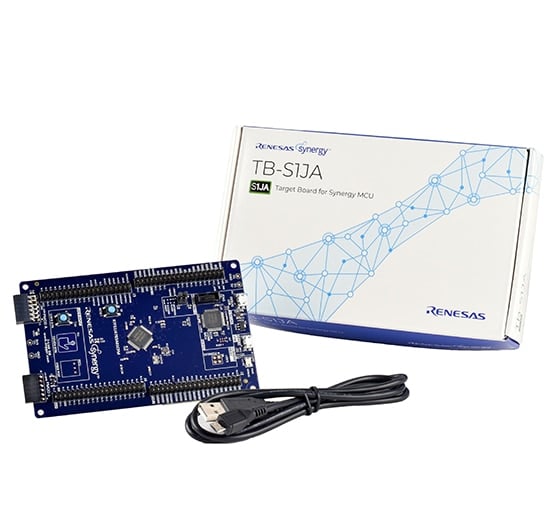
Sample & Buy

S1JA Target Board Kit
Support
Support Communities
- Unable to set GPIO Port0 001 pin(P001) to high and low in TB S1JA
When i tried to set Port 0 pin 1 (P001) to high it was not Rising to high or low i have tried using API and by setting register directly , Only this pin is not functioning properly remaining pins works fine but how to set this pin. I have configured ...
Jan 22, 2019 - Need Sample code for 16 bit ADC of TB S1JA
... proper i have checked the configuration and driver setup channel is initialized and configuration are happening properly but the read ADC value is not proper so it will be help full if there is any sample project for TB S1JA and i have attached source file for reference. src.zip
Dec 20, 2018 - TB-S1JA Examples
Hi, There are some example codes to TB-S1JA (I'm focusing on the 16-bit SAR ADC and the 24-bit Sigma-Delta ADC). I tried to compile the Out Of Box project using e2 Studio 7.3 and SSP 1.6 but lots of errors were shown. Thanks.
Apr 13, 2019
Knowledge Base
- Application Brief: Instrumentation Amplifier with S1JA
... signals (Analog IOs) to the OpAmp inputs and outputs. A completed project is provided that can be imported into e2 studio and run on the TB-S1JA if the required external components (Resistors and a temperature probe) are hooked up. Description The basic circuit used in the instrumentation amplifier application ...
- Application Brief: Programmable Gain Amplifier
... signals (Analog IOs) to the OpAmp inputs and outputs. A completed project is provided that can be imported into e2 studio and run on the TB-S1JA if the required external components are hooked up. Description The basic circuit used in the programmable gain amplifier application is shown in the ...
- Preliminary SDADC Module Guide
A preliminary version of the SDADC Module Guide and the associated application project are attached below. These target the TB-S1JA kit and use SSP 1.4.0. The application project is easily imported and has been verified with SSP 1.5.3.

Support Communities

