
Overview
Description
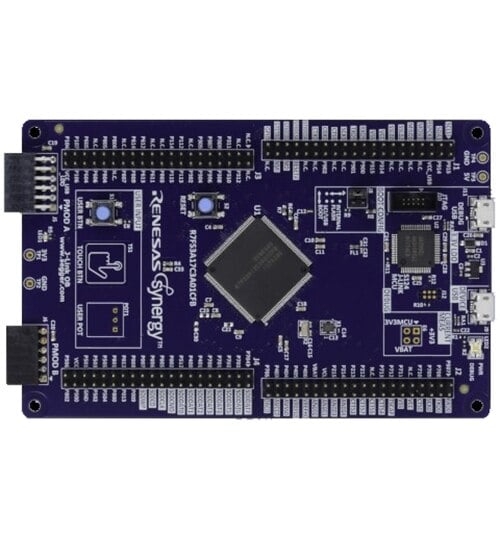
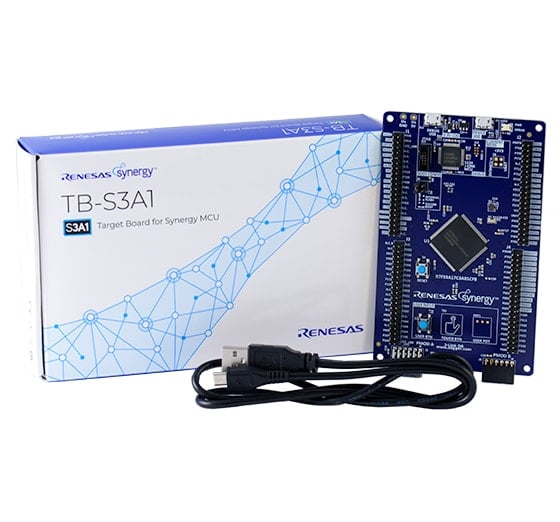
The S3A1 Target Board (TB-S3A1) allows developers to experience the full feature set of the 48MHz Arm® Cortex®-M4 core S3A1 microcontrollers (MCUs) that provide a host of analog and security functions to realize a variety of embedded systems and IoT designs. Users can experience the full features of the Synergy™ S3A1 MCUs with access to all pins, standardized expansion ports and preinstalled demo software.
System Requirements
- Microsoft® Windows® 7 or 10 with Intel® Core™ family processor or equivalent running at ≥2.0GHz
- ≥8GB system RAM
- ≥2GB free hard drive space
- ≥2 USB 2.0 ports
- Internet connection
Features
- Access all pins and on-board peripherals of the Synergy S3A1 MCU Group
- Accelerate code development with the tightly integrated and qualified Synergy Software Package (SSP)
- View, step through, and debug code with the e2 studio IDE from Renesas or IAR Embedded Workbench® for Renesas Synergy
- Flexible connectivity options with USB and Pmod™ connector, enabling rapid prototyping with plug-in modules
- Human machine interface (HMI) functionality with a capacitive touch sensing unit (CTSU), a segment LCD controller, and user push buttons
- See system status and test functionality with programmable LEDs or capacitive and mechanical buttons
- Measure the real-time power consumption of the current over program execution
- Operate from high-precision on-board crystals or a lower-precision internal clock
- Security and encryption functions enable secure data communications and storage, with support for industry-standard algorithms such as AES 128/256 and GHASH
- Safety features include hardware diagnostics, memory protection, and watchdog timeout
- Debugging and programming with J-Link® OB on-board
Applications
Documentation
Featured Documentation
Log in required to subscribe
|
|
|
|
|---|---|---|
| Type | Title | Date |
| Manual - Development Tools | PDF 2.12 MB 日本語 | |
| Application Note |
PDF
61 KB
AI-generated Summary:
The document provides a comprehensive look-up table for Synergy MCU Kits, listing current and new orderable part numbers to assist customers in ordering through distributors. It emphasizes precautions for handling microprocessing and microcontroller units, including electrostatic discharge prevention, power-on processing, signal input during power-off, unused pin handling, clock signal stability, and voltage waveform considerations. It also covers prohibitions on accessing reserved addresses, product differences, and safety and legal disclaimers. The document includes URLs for support, software, and additional resources related to the Synergy Platform. It highlights quality grades and usage restrictions for Renesas products, emphasizing user responsibility for safety and compliance.
|
|
| PCB Design Files | Renesas Synergy™ Target Board TB-S3A1 v1.1 Design Data
|
|
| Application Note | PDF 2.27 MB 日本語 | |
| Application Note | PDF 250 KB | |
| Application Note | PDF 586 KB | |
| Application Note |
PDF
650 KB
AI-generated Summary:
The document explains the use of the Capacitive Touch Sensing Unit (CTSU) button functionality on Renesas Synergy Target boards, integrating ThreadX RTOS, CTSU Framework, and device drivers. It details CTSU architecture, including self-capacitance single-scan mode for touch detection, and provides a block diagram of CTSU components. The CTSU framework resources and button states are described, along with configuration data specific to Renesas Synergy boards.
|
|
| Application Note |
PDF
1.71 MB
日本語
AI-generated Summary:
The guide explains how to import and build projects using IAR Embedded Workbench (EW) for Renesas Synergy. It details opening the workspace file from an extracted example project, viewing the project structure, and configuring settings for the Synergy Standalone Configurator (SSC) and Synergy Software Package (SSP). It also covers setting the SSC/SSP path and license file, and launching the Synergy Standalone Configurator within the IDE to generate project files.
|
|
| Application Note |
PDF
439 KB
AI-generated Summary:
The document explains how to create and migrate custom Board Support Packages (BSPs) for Renesas Synergy SSP versions 1.1.z and 1.2.0. It details the use of the Custom BSP Creator and Custom Pack Creator tools to generate, modify, and package BSPs. Custom BSPs mainly require changes in the board folder, including essential files like bsp.h and bsp_init.c. The process involves creating a base BSP, making a template pack for modifications, editing in e2 studio, and finalizing a standard pack for distribution. An example using the DK-S7G2 board illustrates these steps.
|
|
9 items
|
||
Design & Development
Sample Code
Sample Code
Filters
|
||
|---|---|---|
| Type | Title | Date Date |
| Sample Code | USBX™ CDC ACM (Device) Application for S1/S3/S5 Target Board Kits - Application Project Rev.1.07 - Sample Code
|
|
| Sample Code | Out-of-Box (OoB) Demonstration (Blinky) Application for S1/S3/S5 Target Board Kits Rev.1.05 - Sample Code
|
|
| Sample Code | User Button/CTSU Button Application for S1/S3/S5 Target Board Kits Rev.1.05 - Sample Code
|
|
| Sample Code | Creating a Custom Board Support Package for SSP 1.1.z - Application Project Rev.1.06 - Sample Code
|
|
4 items
|
||
Product Options
| Part Number | Status | Stock | Sampleable | Pb (Lead) Free | ECCN (US) | HTS (US) | RoHS Compliant | China RoHS Compliant |
|---|---|---|---|---|---|---|---|---|
| RTK7TBS3A1S00001BU | Preview | In Stock | N/A | No | 3A991.a.2 | 8471.50.0150 | No | No |
| YSTBS3A1E10 | NRND | Out of Stock | N/A | No | 3A991.a.2 | 8471.50.0150 | No | No |
Support

Support Communities
Get quick technical support online from Renesas Engineering Community technical staff.

Knowledge Base
Browse our knowledge base for helpful articles, FAQs, and other useful resources.

