
Overview
Description
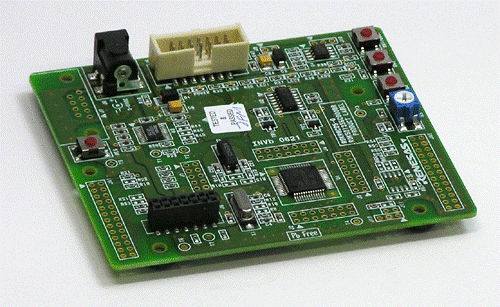
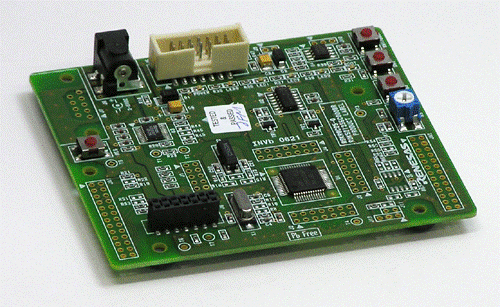
The Renesas Starter Kit for R8C/25 is intended as a user-friendly introductory and evaluation tool for the R8C/25 microcontroller. The board also provides a useful platform for evaluating the Renesas suite of development tools for coding and debugging, using High-performance Embedded Workshop as well as programming the device using E8a emulator and/or Flash Development Toolkit. The Renesas Starter Kit for R8C/25 may be connected to the host PC using a simple RS232 serial connection (not normally fitted) or via the included USB E8a on chip debugging interface.
The purpose of the board is to enable the user to evaluate the capabilities of the device and its peripherals by giving the user a simple platform on which code can be run only minutes from opening box. It can also prove an invaluable tool in development by providing a useful test platform for code already debugged using one of our more powerful emulation tools.
Configuration
- CPU Board
- Detachable LCD Display Module
- Detachable AD Adjustment Shaft
- E8a Emulator
- Connection Cable (USB Cable, User Interface Cable)
- Quick Start Guide
- CD-ROM - Documents : User Manual, Tutorial, and more
- IDE : High-performance Embedded Workshop
- C Compiler : M3T-NC30WA Evaluation Version
- Debugger : E8a Emulator Debugger
- Flash Memory Programmer : Flash Development Toolkit Evaluation Version
Notes
Evaluation versions differ from their full-versions in functionality and performance. And technical support services are NOT available.
Learn More (Evaluation Software Tools) >>
Ordering Information
This product can be purchased through the normal sales channels.
| Product Name | Debugger Supplied | Part Number (Ordering Number) | Availability |
|---|---|---|---|
| Renesas Starter Kit for R8C/25 | E8a | R0K521256S001BE | Available |
Applications
Documentation
|
|
|
|
|---|---|---|
| Type | Title | Date |
| Quick Start Guide | PDF 353 KB 日本語 | |
| Application Note |
PDF
62 KB
AI-generated Summary:
Renesas Starter Kits (RSK) provide complete development systems including evaluation boards, On Chip Debuggers, and peripheral sample code as Hi-performance Embedded Workshop (HEW) workspaces. Users copy the workspace to their PC, open it via HEW, and select specific sample projects containing source files for peripherals. Each project includes a main C source file with detailed comments explaining functionality, such as ADC single operation mode. The sample code aids peripheral initialization and debugging. Support and inquiries are available via the Renesas website.
|
|
| Manual - Development Tools | PDF 200 KB 日本語 | |
| Manual - Development Tools | PDF 326 KB 日本語 | |
4 items
|
||
Design & Development
Software & Tools
Software Downloads
|
|
|
|
|---|---|---|
| Type | Title | Date |
| Software & Tools - Evaluation Software | [Evaluation Software] Flash Development Toolkit V.4.09 Release 03
|
|
| Upgrade - Debugger | H8S/Tiny E8a Emulator debugger V.1.03.01 (Debugger package version of E8a Emulator Software V.1.05 Release 02)
|
|
| Upgrade - Debugger | E8a Emulator Software V.1.05 Release 01 (Full package)
|
|
| Upgrade - Debugger | M16C E8a Emulator debugger V.1.05.01 (Debugger package version of E8a Emulator Software V.1.05 Release 01)
|
|
| Upgrade - Debugger | R8C E8a Emulator debugger V.1.05.01 (Debugger package version of E8a Emulator Software V.1.05 Release 01)
|
|
| Upgrade - Debugger | 740 E8a Emulator debugger V.1.04.01 (Debugger package version of E8a Emulator Software V.1.05 Release 00)
|
|
| Upgrade - Debugger | H8 Tiny/Super Low Power E8a Emulator debugger V.1.05.00 (Debugger package version of E8a Emulator Software V.1.05 Release 00)
|
|
| Upgrade - Debugger | M32C E8a Emulator debugger V.1.04.01 (Debugger package version of E8a Emulator Software V.1.05 Release 00)
|
|
| Upgrade - Debugger | R32C E8a Emulator debugger V.1.01.01 (Debugger package version of E8a Emulator Software V.1.05 Release 00)
|
|
| Software & Tools - Evaluation Software | [Evaluation Software] C/C++ Compiler Package for M16C Series and R8C Family M3T-NC30WA V.6.00 Release 00
|
|
| Software & Tools - Evaluation Software | [Evaluation Software] C Compiler Package for M16C Series and R8C Family M3T-NC30WA V.5.45 Release 01
|
|
| Software & Tools - Other | E8a Renesas Starter Kit Installer V.8.07
|
|
| Software & Tools - Other | R8C/24, R8C/25 Group Register Definition
|
|
13 items
|
||
Sample Code
Product Options
| Part Number | Status | Stock | Sampleable |
|---|---|---|---|
| R0K521256S001BE | Obsolete | Out of Stock | N/A |
Resources
Support
Support Communities
- R8C/25 Starter Kit
Anybody having a sample code for R8C/25 Starter kit that includes Sample Code for DATA FLASH for R8C/25 . If so kindly share.Thanks and Regards.
Aug 23, 2011 - Please help!!! How do I output the voltage input into the LCD...R8C/25...
hello everyone, i need urgent help... is it possible to use R8C/25 starter kit to receive an analogue input from a sensor i made and output the voltage into the LCD screen...i only need 1 pin for input but i dont know how to do this...is ...
Sep 21, 2011

Support Communities


