
Overview
Description
Develop on the highly efficient S3A7 microcontroller (MCU) Group and stretch device battery life while running analog and digital peripherals in special low power modes.
System Requirements
- Microsoft® Windows® 7 or 10 with Intel® Core™ family processor or equivalent running at ≥2.0GHz
- ≥8GB system RAM
- ≥2GB free hard drive space
- ≥2 USB 2.0 ports
- Internet connection
Features
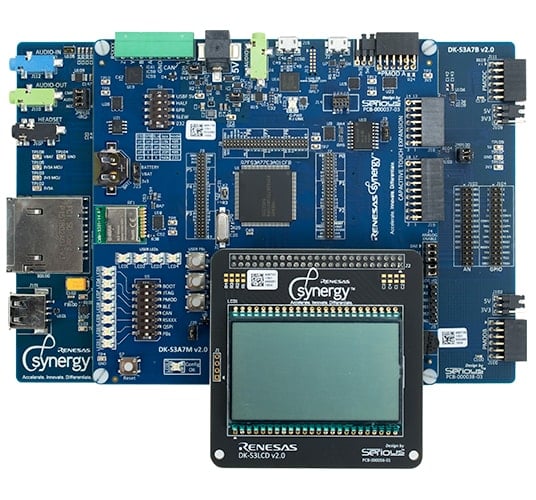
- Access all pins of the Synergy S3A7 MCU Group with a modular design, including a main MCU board with a custom segment LCD module and a replaceable breakout board with additional peripherals
- Accelerate code development with the tightly integrated and qualified Synergy Software Package (SSP)
- View, step through, and debug code with the e2 studio IDE from Renesas or IAR Embedded Workbench® for Renesas Synergy™
- Flexible connectivity options with USB, CAN, a Bluetooth® Low Energy (BLE) module, and Pmod™ connectors for third-party, off-the-shelf, and custom multi-function boards
- Human machine interface (HMI) functionality with a capacitive touch sensing unit (CTSU) and a segment LCD
- On-board compass, accelerometer, light, proximity, and temperature sensors
- Measure real-time power consumption of the current over program execution
- Security and encryption functions enable secure data communications and storage, with support for industry-standard algorithms such as AES 128/256 and GHASH
- Safety features include hardware diagnostics, memory protection, and watchdog timeout
- DIP switches for error-free function configuration
- Debugging and programming with J-Link® OB on board
Applications
Documentation
|
|
|
|
|---|---|---|
| Type | Title | Date |
| Quick Start Guide | PDF 1.12 MB 日本語 | |
| Application Note | PDF 2.27 MB 日本語 | |
| Application Note | PDF 277 KB | |
| Application Note | PDF 284 KB 日本語 | |
| Application Note |
PDF
285 KB
AI-generated Summary:
The document explains how to use PWM waveform output to control LED dimming on the Renesas Synergy Platform. It includes block diagrams, switch and jumper settings for the DK-S3A7S5 and DK-S3A7J4 boards, clock configurations with detailed frequency settings, and pin configurations for input, timer, and ADC functions. The settings enable precise control of LED brightness through PWM signals.
|
|
| Application Note | PDF 224 KB | |
| Application Note |
PDF
806 KB
日本語
AI-generated Summary:
This document explains how to implement a low-power sensor hub using the Synergy S3A7 MCU, where the CPU remains in Software Standby mode while periodically checking analog sensor inputs via the ADC in Snooze mode. It details the use of Low Power Modes (Sleep, Software Standby, Snooze) to minimize power consumption, describes transitions between these modes, and explains how ADC compare functions trigger CPU wake-up based on sensor conditions.
|
|
| Application Note |
PDF
327 KB
AI-generated Summary:
The Ambient Light Sensor (ALS) example program for the DK-S3A7 platform uses four threads—System, SLCD, LED Bar, and ALS Thread—each managing specific tasks via SSP modules and ThreadX RTOS features like message queues and mutexes. The System Thread controls overall operations, communicating with other threads for display and LED control. The DK-S3A7 board setup includes key components like the light sensor and SLCD panel. Instructions cover importing the project into e* studio, selecting the debug configuration, and setting up IAR EW for Synergy with SSC and SSP. On boot, the SLCD and LED bar cycle on/off, display firmware version, then enter Run Mode.
|
|
| Application Note |
PDF
223 KB
AI-generated Summary:
The document explains how to control the Segment LCD Display on the DK-S3A7 using Renesas Synergy Platform. It details writing to LCD Display Data Registers via API functions and provides a segment map for the LCD panel. Various drawing functions allow displaying digits, icons such as battery level, day of the week, AM/PM, and temperature units. Each function includes usage examples and error handling for out-of-range values.
|
|
| Application Note | PDF 456 KB | |
| Application Note | PDF 622 KB | |
| Application Note |
PDF
1.71 MB
日本語
AI-generated Summary:
The guide explains how to import and build projects using IAR Embedded Workbench (EW) for Renesas Synergy. It details opening the workspace file from an extracted example project, viewing the project structure, and configuring settings for the Synergy Standalone Configurator (SSC) and Synergy Software Package (SSP). It also covers setting the SSC/SSP path and license file, and launching the Synergy Standalone Configurator within the IDE to generate project files.
|
|
| Application Note |
PDF
439 KB
AI-generated Summary:
The document explains how to create and migrate custom Board Support Packages (BSPs) for Renesas Synergy SSP versions 1.1.z and 1.2.0. It details the use of the Custom BSP Creator and Custom Pack Creator tools to generate, modify, and package BSPs. Custom BSPs mainly require changes in the board folder, including essential files like bsp.h and bsp_init.c. The process involves creating a base BSP, making a template pack for modifications, editing in e2 studio, and finalizing a standard pack for distribution. An example using the DK-S7G2 board illustrates these steps.
|
|
| Application Note | PDF 3.31 MB 日本語 | |
| Application Note | PDF 436 KB | |
| Application Note |
PDF
1.77 MB
AI-generated Summary:
The document details the installation and setup of the Ethernet Add-on Driver for the Renesas Synergy Platform DK-S3A7 using the DM9051 Ethernet controller. It guides through verifying SSP v1.2.0 installation, downloading the Ethernet Add-on pack from the Synergy Gallery, and manually copying it into the SSP Packs folder. It also explains connecting the DM9051 Demo Board to the DK-S3A7 board’s PMODA connector, including necessary pin connections and interrupt wiring. Finally, it covers configuring the Ethernet Add-on components within e2 studio, selecting the appropriate SSP version and board for project creation.
|
|
| Application Note |
PDF
274 KB
日本語
AI-generated Summary:
The document details the setup and configuration of a simple proximity sensor application with snooze mode on the DK-S3A7 platform using the Renesas SynergyTM ecosystem. It includes hardware connections with the PmodMAXSONARTM sensor, switch settings for the DK-S3A7 board, and specific clock configurations necessary for operation, especially considering snooze mode limitations. Clock frequencies and their calculation formulas are provided to ensure proper timing and performance.
|
|
| Application Note |
PDF
291 KB
日本語
AI-generated Summary:
The SLCDC HAL module controls the Segment LCD display by initializing the LCD, configuring drive voltage, waveform, time slices, and bias methods. It provides APIs to open, write, modify, start, stop, adjust contrast, set display areas, and close the SLCD device. The module integrates with ThreadX RTOS but has no dependencies. Configuration is done via the SSP configurator, which highlights required settings and locks conflicting properties. Clock and pin configurations are essential for proper operation.
|
|
| PCB Design Files | Renesas Synergy™ Development Kit DK-S3A7 v2.0 Design Data
|
|
| Manual - Development Tools | PDF 2.06 MB 日本語 | |
20 items
|
||
Design & Development
Sample Code
Sample Code
Filters
|
||
|---|---|---|
| Type | Title | Date Date |
| Sample Code | USBX™ Host Class CDC-ACM Module Guide - Application Project Rev.1.02 - Sample Code
|
|
| Sample Code | USBX™ Device Class HID Module Guide - Application Project Rev.1.04 - Sample Code
|
|
| Sample Code | PWM Waveform Output to Control Dimming of LEDs - Application Project Rev.1.20 - Sample Code
|
|
| Sample Code | USBX™ Device Class Mass Storage Module Guide - Application Project (r11an0104eu0104) Rev.1.04 - Sample Code
|
|
| Sample Code | Checking Analog Inputs in Sleep State in S3A7 - Application Project Rev.1.26 - Sample Code
|
|
| Sample Code | DK-S3A7 Ambient Light Sensor Example - Application Project Rev.1.08 - Sample Code
|
|
| Sample Code | Segment LCD Display on DK-S3A7 - Application Project Rev.1.08 - Sample Code
|
|
| Sample Code | USBX™ Device Class CDC-ACM Module Guide - Application Project Rev.1.01 - Sample Code
|
|
| Sample Code | Audio Playback I2S Framework Module Guide - Application Project Rev.1.01 - Sample Code
|
|
| Sample Code | Creating a Custom Board Support Package for SSP 1.1.z - Application Project Rev.1.06 - Sample Code
|
|
| Sample Code | Power Profiles v2 (PPv2) Framework for DK-S3A7 - Application Project - Sample Code (r20an0498eu0100)
|
|
| Sample Code | DK-S3A7 v.2.0 Out-of-Box Demo Programming Guidelines - Application Project - Sample Code (r12an0025eu0115)
|
|
| Sample Code | DK-S3A7 Ethernet Application with DM9051 - Application Project (r30an0299et0100) Rev.1.00 - Sample Code
|
|
| Sample Code | Simple Proximity Sensor Application with Snooze Mode for DK-S3A7 - Application Project Rev.1.10 - Sample Code
|
|
| Sample Code | SLCDC HAL Module Guide - Application Project (r11an0100eu0101) Rev.1.01 - Sample Code
|
|
15 items
|
||
Product Options
| Part Number | Status | Stock | Sampleable |
|---|---|---|---|
| YSDKS3A7E20 | Obsolete | Out of Stock | N/A |
Support
Support Communities
- Selective SRAM initialization with MMF flash update on DK-S3A7
... code and jumping to the new application image, the key state variables were still there. I'm currently testing MMF-based flash updates with the DK-S3A7 evaluation board, based on examples by Richard Warner and Fatih Peksenar. I have two simple applications built to run at the MMF address ...
Apr 5, 2017 - Can an S3A7 carry ThreadX and frameworks???
I have a simple project that needs to monitor 5 sensors and communicate by highspeed serial to a master controller. Should be a piece of cake... I have built a simple project based on Blinky with ThreadX. I put in two threads with UART communications framework. This could not keep ...
May 11, 2017 - S3A7 Timer from External Oscillator
Hi all, I am using the S3A7 microcontroller on the DK-S3A7. I want to run a timer that is fed by an external 26MHz Oscillator. Our use case requires a timerfreq of 1MHz derived from the 26Mhz external oscillator. The timer will then be used to generate an interrupt ...
Jun 27, 2017
Knowledge Base
- What are the specifications for the DK-S3A7 V2 LCD Panel?
Question: What are the specifications for the LCD Panel for the DK-S3A7 V 2.0? Answer: The specifications are attached below documents. DK- LCD Specification:DK-S3A7-LCD_v2.0.pdf The Data Sheet: LXD-M7190A_DS_(4.3_300NIT_RT).pdf FEMA Specification: Fema_T6022A-1PRPO_BEV_B ...
- r_slcd Module Guide Resources
... project and import guide are available here. Module Guide Resources The following application projects are available from the Renesas web site at the referenced url.DK-S3A7 v.2.0 Out-of-Box Demo Programming Guidelines - Application Project here. Renesas Synergy™ Project DK-S3A7 Segment LCD Display Example here ...
- r_dmac Module Guide Resources
... from the Renesas web site at the referenced url. HMI Brushless DC (BLDC) Motor Controller - Application Project here. Bluetooth Low Energy on DK-S7G2 and DK-S3A7 - Application Project here. Getting Started with the Audio Player Application using SSP - Application Project here. Renesas Synergy™ Software Package (SSP) PDC Capture ...

Support Communities


