Renesas Electronics Corporation

Description

Part number of this kit has been changed. The new part number shall be used for orders. The old part number will continue to be referenced across the documentation. Refer to the look-up table for old/new part numbers.

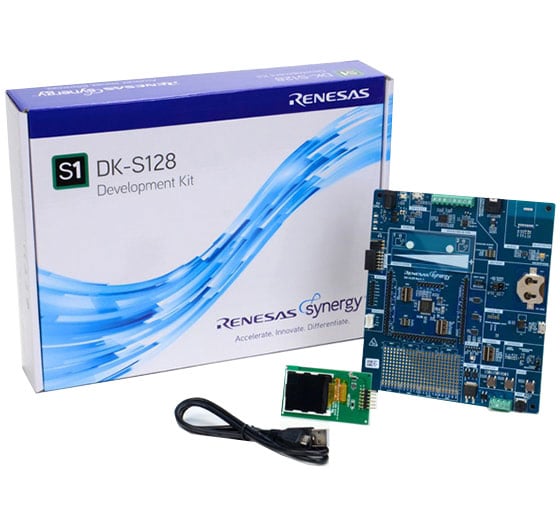
Evaluate all features of the Synergy™ S128 microcontroller (MCU) Group and develop low-power applications using Synergy software and tools.

System Requirements

  • Microsoft® Windows® 7 or 10 with Intel® Core™ family processor or equivalent running at ≥2.0GHz
  • ≥8GB system RAM
  • ≥2GB free hard drive space
  • ≥2USB 2.0 ports
  • Internet connection

Features

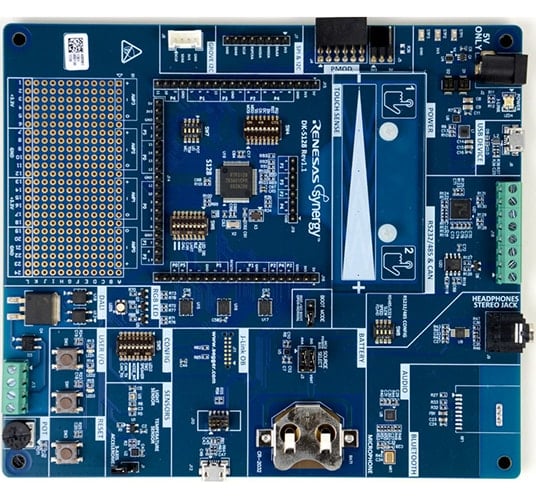
  • Access most pins and on-board peripherals of the Synergy S128 MCU Group
  • Accelerate code development with the tightly integrated and qualified Synergy Software Package (SSP)
  • View, step through, and debug code with the e2 studio IDE from Renesas or IAR Embedded Workbench® for Renesas Synergy
  • Flexible connectivity options with USB, CAN, DALI-2, SEEED Grove I2C I/F, and Pmod connectors for third party, off-the-shelf and custom multi-function boards
  • Human machine interface (HMI) functionality with a capacitive touch sensing unit (CTSU) and Pmod LCD display for developing user interface screens
  • On-board accelerometer, light, and temperature sensors
  • Measure real-time power consumption of the current over program execution
  • Security and encryption functions enable secure data communications and storage with support for industry-standard algorithms such as AES 128/256
  • Safety features include hardware diagnostics, memory protection, and watchdog timeout
  • Debugging and programming with J-Link® OB on-board
Applications

Type Title Date
Quick Start Guide PDF 636 KB 日本語
Application Note PDF 61 KB
AI-generated Summary: The document provides a comprehensive look-up table for Synergy MCU Kits, listing current and new orderable part numbers to assist customers in ordering through distributors. It emphasizes precautions for handling microprocessing and microcontroller units, including electrostatic discharge prevention, power-on processing, signal input during power-off, unused pin handling, clock signal stability, and voltage waveform considerations. It also covers prohibitions on accessing reserved addresses, product differences, and safety and legal disclaimers. The document includes URLs for support, software, and additional resources related to the Synergy Platform. It highlights quality grades and usage restrictions for Renesas products, emphasizing user responsibility for safety and compliance.
Application Note PDF 2.27 MB 日本語
Manual - Development Tools PDF 4.22 MB
Application Note PDF 280 KB 日本語
AI-generated Summary: The DAC8 HAL module configures an 8-bit digital-to-analog converter to output 256 voltage levels with selectable data formats and modes, including normal and real-time event link modes. It supports synchronous anti-interference with ADC to reduce noise and allows enabling or disabling a hardware charge pump for low voltage operation. The module requires manual configuration of output pins and Event Link Controller for real-time mode. Integration into applications involves adding the driver via the SSP configurator, setting properties like interrupt priority, data format, and synchronization with ADC. Typical usage includes initializing, writing data, starting, stopping, and closing the DAC8 module. Pin configuration must be set to analog in the SSP configurator.
Application Note PDF 1.71 MB 日本語
AI-generated Summary: The guide explains how to import and build projects using IAR Embedded Workbench (EW) for Renesas Synergy. It details opening the workspace file from an extracted example project, viewing the project structure, and configuring settings for the Synergy Standalone Configurator (SSC) and Synergy Software Package (SSP). It also covers setting the SSC/SSP path and license file, and launching the Synergy Standalone Configurator within the IDE to generate project files.
Application Note PDF 439 KB
AI-generated Summary: The document explains how to create and migrate custom Board Support Packages (BSPs) for Renesas Synergy SSP versions 1.1.z and 1.2.0. It details the use of the Custom BSP Creator and Custom Pack Creator tools to generate, modify, and package BSPs. Custom BSPs mainly require changes in the board folder, including essential files like bsp.h and bsp_init.c. The process involves creating a base BSP, making a template pack for modifications, editing in e2 studio, and finalizing a standard pack for distribution. An example using the DK-S7G2 board illustrates these steps.
Application Note PDF 947 KB
AI-generated Summary: The DK-S128 kit includes analog sensors and a 3-axis accelerometer connected via I2C. It continuously reads sensor values and displays them on a Pmod LCD. Three onboard LEDs flash or chase based on sensor inputs controlled by pushbuttons S1 and S2. The software uses multithreading with separate threads for reading inputs, updating the LCD, and controlling LEDs. The input thread samples sensors and switches every 50 ms, providing data to other threads without global variables. The LCD thread updates the display with the current mode and sensor data.
Application Note PDF 743 KB 日本語
AI-generated Summary: This example demonstrates creating a simple graphics application using an Okaya Pmod LCD display controlled by two pushbuttons and a potentiometer on the DK-S128 board. The software architecture includes an LCD thread handling button interrupts and display updates, and a control thread managing backlight intensity via ADC readings from the potentiometer. The LCD driver operates over SCI in Simple SPI mode, supporting screen rotation and multiple display stages. ADC sampling filters jitter to stabilize PWM backlight control.
PCB Design Files
Log in to Download ZIP 11.31 MB 日本語
Manual - Development Tools PDF 2.92 MB 日本語
PCB Design Files
Log in to Download ZIP 9.57 MB 日本語
12 items

Software & Tools

Software & Tools

Software title
Software type
Company
QuickConnect Platform
QuickConnect platform enables fast prototyping by providing compatible hardware and software building blocks.
Software and Hardware Development Tools Renesas
1 item

Sample Code

Sample Code

Filters
Type Title Date Date
Sample Code
Log in to Download ZIP 2.72 MB Compiler: GNUARM-NONE IDE: e2 studio, IAR EW for Synergy
Sample Code
Log in to Download ZIP 8.43 MB IDE: e2 studio
Sample Code
Log in to Download ZIP 2.69 MB Compiler: GNUARM-NONE IDE: e2 studio, IAR EW for Synergy
Sample Code
Log in to Download ZIP 2.51 MB Compiler: GNUARM-NONE IDE: e2 studio, IAR EW for Synergy
4 items
Part NumberStatusStockBudgetary Price (USD)Sampleable
RTK7DKS128S00001BUActiveIn Stock1u | $175.29N/A
YSDKS128E10NRNDOut of StockN/A

Support Communities

  1. DK-S128 CAN FIFO ?

    Is there an example of CAN bus for DK-S128 in FIFO mode? In normal mode, I had no problem, i can send and receive messages. I don't know how to configure the peripherals to work in FIFO mode.CTLR-> MBM set FIFO mode, in MIKIVLR set bits 31 ...

    Jul 5, 2022
  2. DK-S128 Code not executing on power up

    Hello, question is regarding the DK-S128 development kit, It seems my code executes no problem when i debug through J-link using e2 studio. However if i press the reset button on the kit OR power cycle the board, the green led in the "User I/O" section ...

    Jan 10, 2018
  3. DK-S128 OOB project error when flashing it via SCI

    ... and modes. All things went right except for flashing the micro using the Renesas Flash Programmer V3.05 via a comm port. Using the OOB_DK_S128 project it shows this message: Loading File (C:\Users\myuser\e2_studio\workspace_new\OOB_DK_S128\Debug\OOB_DK_S128.srec) CRC ...

    Dec 21, 2018
View All Results from Support Communities (5)

Knowledge Base

  1. Is the Synergy S128 MCU supported in the SSP 1.2.0 release?

    ... 2.0, however 1.2.0 does include partial support for the S128 MCU (including the BSP for ADK-S128, a test version of the DK-S128) that has gone through developer testing, but has not been fully verified by our Quality Analysis (QA) process. The DK-S128 will be ...

Support Communities

Support Communities

Get quick technical support online from Renesas Engineering Community technical staff.
Browse Articles

Knowledge Base

Browse our knowledge base for helpful articles, FAQs, and other useful resources.
Submit a Ticket

Submit a Ticket

Need to ask a technical question or share confidential information?