
Overview
Description
Available at affordable prices though, the Renesas' compact emulator has all the functions needed for the actual development, such as real-time trace and hardware breaks.
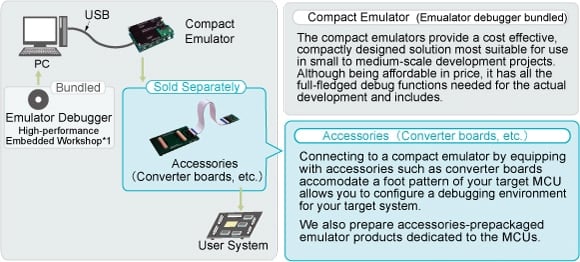
The emulator main unit comes in a significantly reduced size, compared with conventional emulator systems. This product package includes not only an emulator main unit and connectors but also the limited cross tools, so, you can program and debug your applications as soon as you open the package.
The compact emulator can be connected to the user system by equipping with accessories such as converter boards accommodate your target MCU. Accessories dedicated to the MCUs may be supplied with the compact emulator. We also prepare combined packages of the compact emulator and accessories you will need for some of the M16C and the H8 families.

Features
- Available at affordable prices though, the Renesas' compact emulator has all the functions needed for the actual development, such as real-time trace and hardware breaks.
- This product package includes not only an emulator main unit and connectors but also the limited cross tools, so, you can program and debug your applications as soon as you open the package.
- Learn More
Release Information
Details of upgrade (See Tool News)
Operating Environment
Target Devices
Documentation
|
|
|
|
|---|---|---|
| Type | Title | Date |
| Manual - Development Tools | PDF 3.22 MB 日本語 | |
| Application Note |
PDF
1.06 MB
日本語
AI-generated Summary:
The H8/300H Tiny series compact emulator features a realtime tracing function that records up to 64k cycles of program execution history. The [Trace] window displays this data in source-mode, allowing stepwise navigation through the program's execution path using a mouse. Users can perform single-step operations, move execution to the cursor position, and trace forward or backward. The document guides software installation, including the emulator software and compiler package, and explains how to activate the High-performance Embedded Workshop and use the trace step operations.
|
|
| Application Note |
PDF
923 KB
日本語
AI-generated Summary:
The document explains how to use GUI I/O functions with the H8/300H Tiny series compact emulator. It covers simulating input panels with buttons and output panels with labels and LEDs in the HEW environment. It details software preparation, including installing the emulator software and necessary compiler packages. The operation section guides activating the High-performance Embedded Workshop, opening workspaces, customizing source files, building projects, and using the GUI I/O window for debugging and simulation.
|
|
| Tool News - Notification | PDF 194 KB 日本語 | |
| Tool News - Note | PDF 195 KB 日本語 | |
| Tool News - Note | PDF 194 KB 日本語 | |
6 items
|
||
Additional Details
Components
- Emulator main unit
- Emulator debugger
- Limited-edition Cross tools
- Interface cables
- User's manual, etc.
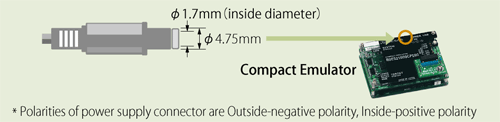
Please prepare a power source unit (5V/2A) for Compact Emulator separately which meets the following specification.
Product Lineups
Please check the emulator name and required optional accessories for your target device, before you purchase a compact emulator.
| Supported MCUs | Compact Emulator | Accessories (Converter board, etc.) (Sold Separately) | ||
|---|---|---|---|---|
| Famies | Series | Groups | ||
| M16C | M32C/80 | M32C/81, 82, 83 | Made by Sunny Giken Inc. (Discontinued product) Contact Sunny Giken Inc. for the details. | |
| M32C/80 Note5, 84, 85, 86, 8A Note5 | M30850T3-CPE (Discontinued product)Note4 | Accessories Sold SeparatelyNote7 | ||
| M32C/87 | M30870T2-CPE (Discontinued product) | Accessories Sold SeparatelyNote7 | ||
| M16C | M16C/80 | M16C/80 | M30800T-CPE (Discontinued product)Note2 | Accessories Sold SeparatelyNote7 |
| M16C/60 | M16C/62A | M30620T-CPENote2 | Accessories Sold SeparatelyNote7 | |
| M16C/62P | M3062PT3-CPE (Discontinued product) | Accessories Sold SeparatelyNote7 | ||
| M16C/6S Note1 | ||||
| M16C/6K (M16C/6K9) | M306K9T2-CPE (Discontinued product)Note2 | - | ||
| M16C/30 | M16C/30P | M3062PT3-CPE (Discontinued product) | Accessories Sold SeparatelyNote7 | |
| M16C/Tiny | M16C/26A M16C/28 M16C/29 | M3028BT2-CPE (Discontinued product)Note3 | Accessories Sold SeparatelyNote7 | |
| R8C/Tiny | R8C/10 -17, R8C/18, 19 R8C/1A, 1B R8C/20 - 29, 2A - 2D R8C/2K, 2L | R0E521000CPE00 | Accessories Sold SeparatelyNote7 | |
| H8 | H8/300H Tiny | H8/3664, H8/3694, H8/3687 H8/3672, H8/36014,H8/36049 H8/36064, H8/36077, H8/36079 H8/36087, H8/36094 | R0E436640CPE00 (Discontinued product) | Accessories Sold SeparatelyNote7 |
| 740 | 38000 | M38000T2-CPE (Discontinued product) Note6 | Accessories Sold SeparatelyNote7 | |
| 740 | ||||
| 7200 | ||||
| 720 | 4500 | 4508, 4509 | M34509T2-CPE (Discontinued product)Note2 | Accessories Sold SeparatelyNote7 |
| 4518, 4519 | M34519T2-CPE (Discontinued product)Note2 | Accessories Sold SeparatelyNote7 | ||
| 4552, 4553, 4556 | M34552T2-CPE (Discontinued product)Note2 | Accessories Sold SeparatelyNote7 | ||
| 4559 | M34559T2-CPE (Discontinued product)Note2 | Accessories Sold SeparatelyNote7 | ||
| 455A | M3455AT2-CPE (Discontinued product)Note2 | Accessories Sold SeparatelyNote7 | ||
| 4571 | M34571T2-CPE (Discontinued product)Note2 | Accessories Sold SeparatelyNote7 | ||
| 720 | 4282, 4283 | M34282T2-CPE (Discontinued product)Note2 | Accessories Sold SeparatelyNote7 | |
| 4286 | M34286T2-CPE (Discontinued product)Note2 | Accessories Sold SeparatelyNote7 | ||
Notes:
- Using with the converter board M306S0T-PRB allows to configure a M3062PT3-CPE (Discontinued product) emulation system for M16C/6S Group M306S0.
- An emulator debugger come with this product does not use the High-performance Embedded Workshop based graphical interface.
- M3028BT2-CPE (Discontinued product) is M30290T2-CPE's successor which enables operation at a MCU's maximum operating frequency of 24MHz.
- M30850T3-CPE (Discontinued product) is M30850T2-CPE's successor which enables debugging at a microprocessor mode by using a dedicated emulation memory board R0E330850MSRC0.
- M32C/80 and M32C/8A groups require a dedicated emulation memory board R0E330850MSRC0 to debug, since these groups support a microprocessor mode only.
- Emulator MCU is required.
- In order to connect to the user system in combination with the compact emulator, accessories are needed to be purchased separately according to the MCU you use. However, some of compact emulators include them in their packages.
Support
Support Communities
- Problems driving LED with M3062PT3-CPE
I seem to be having trouble attempting to light an LED on pin 9_4 with this compact emulator. I set the port direction register with the protection control and then tried setting P9_4 to 1, but I am not seeing any voltage on the pin. Any suggestions?
Mar 7, 2011 - HEW Debugger Help
Hi All-I have recently Migrated to Renesas and hence very new to this site and has certain basic doubts, this is my first question to be posted here and it may seem very elimentary, but the answers to these goes a long way in getting mysely acquinted with Renesas ...
Mar 14, 2011 - Partial Erase when programming
Hi,Is there a way to configure HEW to only erase part of the internal flash on a R8c/22 device when programming? I'd like to program two seperate projects into the same chip and it appears that once I program the entire flash is first erased.Hew ...
Jan 6, 2012
Knowledge Base
- How to set the offset to download an absolute file (*.abs) in High-performance Embedded Workshop when the debugger is connected
Setting the offset to an absolute file and downloading it when the debugger is connected is not guaranteed in the High-performance Embedded Workshop. The absolute file debug information is an absolute address, and it is assumed it will not be set as an offset. If it is only a ...
Apr 26, 2017 - Can 4559 Group MCUs programs be assembled using debugger M3T-PD45?
Programs can be assembled but not debugged with M3T-PD45.You will need to use compact emulator M34559T2-CPE or the emulator debugger bundled with M3T-PD45M to debug 4559 Group MCUs.
Sep 11, 2006 - Restrictions & usage notes applied in updating C compiler to V.6xx?
... 5.xx M3T-NC30WA V.6.xx PC4701 M3T-PDxx ○ × PC4701 Emulator Debugger (Note 1) ○ △ (Note 2) PC7501 M3T-PDxx ○ × PC7501 Emulator Debugger (Note 1) ○ △ (Note 2) CPE M3T-PDxx ○ ×Compact Emulator Debugger (Note 1) ○ △ (Note 2) E100 E100 Emulator Debugger ...
Feb 1, 2012

Support Communities


