
Features
- 55μA supply current
- 100μV max offset voltage (8 Ld SO)
- 2nA input bias current
- 400kHz gain-bandwidth product
- Single supply operation down to 2.4V
- Rail-to-rail input and output
- Output sources 31mA and sinks 26mA load current
- Pb-free (RoHS compliant)
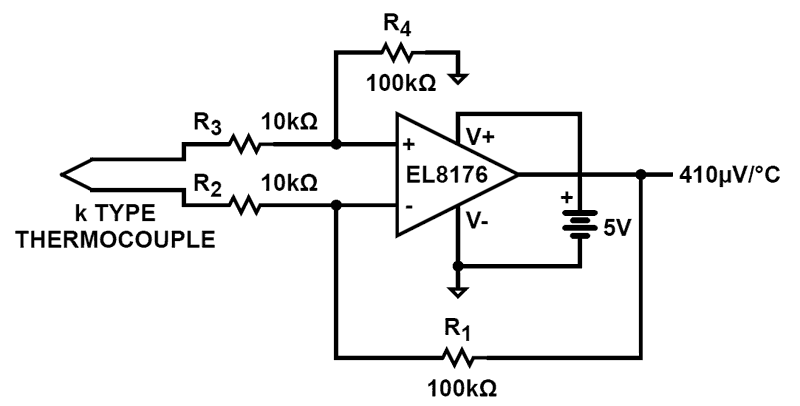
EL8176 Functional Diagram
Description
The EL8176 is a precision low power, operational amplifier. The device is optimized for single supply operation between 2. 4V to 5. 5V. The EL8176 draws minimal supply current while meeting excellent DC-accuracy noise and output drive specifications. Competing devices seriously degrade these parameters to achieve micropower supply current. The EL8176 can be operated from one lithium cell or two Ni-Cd batteries. The input range includes both positive and negative rail. The output swings to both rails.
Applications
- Battery- or solar-powered systems
- 4mA to 20mA current loops
- Handheld consumer products
- Medical devices
- Thermocouple amplifiers
- Photodiode pre amps
- pH probe amplifiers
| Part Number | Status | Samples | Stock | RoHS | Package | Lead Count (#) | Carrier Type | Moisture Sensitivity Level (MSL) | Pitch (mm) | Pkg. Dimensions (mm) | Pb (Lead) Free | Pb Free Category | Temp. Range (°C) |
|---|---|---|---|---|---|---|---|---|---|---|---|---|---|
| EL8176FSZ | Obsolete | N/A | In Stock | RoHS:EN | SOICN | 8# | Tube | 3 | 1.3mm | 4.9 x 3.9 x 0.00 | Yes | Pb-Free 100% Matte Tin Plate w/Anneal-e3 | -40 to +125°C |
| EL8176FSZ-T7 | Obsolete | N/A | In Stock | RoHS:EN | SOICN | 8# | Reel | 3 | 1.3mm | 4.9 x 3.9 x 0.00 | Yes | Pb-Free 100% Matte Tin Plate w/Anneal-e3 | -40 to +125°C |
| EL8176FWZ-T7 | Obsolete | N/A | In Stock | RoHS:EN | SOT23 | 6# | Reel | 2 | 1mm | 2.9 x 1.6 x 0.00 | Yes | Pb-Free 100% Matte Tin Plate w/Anneal-e3 | -40 to +125°C |
| EL8176FWZ-T7A | Obsolete | N/A | In Stock | RoHS:EN | SOT23 | 6# | Reel | 2 | 1mm | 2.9 x 1.6 x 0.00 | Yes | Pb-Free 100% Matte Tin Plate w/Anneal-e3 | -40 to +125°C |
Loading
Filters
Applied Filters
Log in required to subscribe
- TrainingPDF 162 KB R13TB0003EU0100 Rev.1.00 Dec 12, 2023
- Application NotePDF 381 KB R13AN0015EU0100 Rev.1.00 May 16, 2022AI-generated Summary: Low-voltage precision operational amplifiers from Renesas feature ultra-low input offset voltages with on-chip auto-zeroing, ideal for precise sensor signal conditioning in compact applications. Key design considerations include minimizing thermoelectric (Seebeck) voltages caused by PCB junctions and temperature gradients, which can introduce offset errors amplified by high gain. Techniques such as using dummy resistors, maintaining uniform PCB temperature with ground planes, and employing guard rings reduce these errors. The ISL28134 supports precision high-side current sensing with adaptations for high-voltage systems using level shifting via Zener diodes. Output current can be increased by adding an NPN transistor as a current booster, ensuring linear operation within voltage limits. The document provides detailed circuit examples and design guidelines for optimizing performance and minimizing errors in low-voltage op-amp applications.
- Application NotePDF 263 KB r13an0003eu0100-biasing-op-amps Dec 06, 2019AI-generated Summary: Proper biasing of operational amplifiers is essential to avoid malfunction in AC-coupled circuits. A missing DC bias path causes long stabilization times and potential failures. Adding input resistors to ground provides a DC path for bias currents, minimizing offset errors. For single-supply AC-coupled amplifiers, biasing uses a reference voltage, ideally from a high-PSRR voltage reference or buffered voltage divider, to maintain signal symmetry and reduce noise. Understanding frequency responses of input and feedback components is crucial for setting bandwidth and gain characteristics.
- Application NotePDF 564 KB an1993 May 22, 2018AI-generated Summary: Voltage feedback (VFB) amplifiers use a differential input pair, a high-impedance stage, and an output buffer to convert input voltage differences into output voltage. The VFB amplifier's gain decreases at a dominant pole frequency due to compensation capacitors. Current feedback (CFB) amplifiers include a class AB input amplifier, current mirror, high-impedance stage, and output buffer. CFB amplifiers provide faster switching and higher slew rates by drawing charge/discharge currents directly from supply rails, unlike VFB amplifiers which are limited by biasing current sources.
- Model - SPICETXT 5 KB el8176_isl28176_isl28276_isl28476 Nov 17, 2017
- Product Change NoticePDF 557 KB PCN13022 Feb 28, 2013
- Product Change NoticePDF 152 KB PCN12085 Nov 07, 2012
- Product Change NoticePDF 135 KB PCN12084 Oct 15, 2012
- Application NotePDF 357 KB an1694 Jan 19, 2004AI-generated Summary: The document outlines the four fundamental internal blocks of an operational amplifier and presents a simple 2:1 stage circuit diagram. It includes important legal notices from Renesas Electronics regarding the use, liability, and intellectual property rights of their semiconductor products. The document clarifies product quality grades, intended applications, and restrictions on use in life-critical or hazardous systems. It emphasizes compliance with applicable laws and safety responsibilities when using Renesas products. Contact information for Renesas sales offices worldwide is also provided.
- Application NotePDF 1.02 MB an1613 Jan 19, 2004AI-generated Summary: The document details the process of importing SPICE netlists into Allegro Design Entry CIS for simulation. It guides users through verifying no errors during schematic translation, associating and replacing symbols for SPICE models, and mapping model pins to symbol pins. It also explains setting up new projects, creating simulation profiles, adding libraries, and configuring analysis types such as AC Sweep/Noise. The instructions emphasize selecting appropriate symbols based on pin count and ensuring all files reside in the same directory for smooth simulation setup.
- Application NotePDF 556 KB an1561 Jan 19, 2004AI-generated Summary: This document investigates radiated interference in audio circuits using precision amplifiers. It compares the ISL28291 bipolar input and EL5220 MOSFET input operational amplifiers across frequencies from 100kHz to 6GHz. Results show the EL5220 exhibits significantly lower interference, especially in Bluetooth frequency bands. Higher feedback resistor values and RFI capacitors reduce interference, but placing the antenna near the IC increases it. MOSFET inputs prove less susceptible to interference than bipolar types. Antenna placement and radiation patterns critically affect circuit performance in sensitive audio applications.
Recommended Documents (1)
Datasheets (1)
No Results Found.
Check Spelling
Make sure all keywords are spelled correctly.
Make sure all keywords are spelled correctly.
Adjust Keywords
Try fewer, different, or more general terms to vary your search.
Try fewer, different, or more general terms to vary your search.
Review Filters
If you have filters applied, consider deselecting some to broaden your results.
If you have filters applied, consider deselecting some to broaden your results.
Need help?
- Search our extensive knowledgebase, designed to help customers with their FAQs.
- Get help from our expert Renesas technical staff and community on our support forums.
- Application NotePDF 381 KB R13AN0015EU0100 Rev.1.00 May 16, 2022AI-generated Summary: Low-voltage precision operational amplifiers from Renesas feature ultra-low input offset voltages with on-chip auto-zeroing, ideal for precise sensor signal conditioning in compact applications. Key design considerations include minimizing thermoelectric (Seebeck) voltages caused by PCB junctions and temperature gradients, which can introduce offset errors amplified by high gain. Techniques such as using dummy resistors, maintaining uniform PCB temperature with ground planes, and employing guard rings reduce these errors. The ISL28134 supports precision high-side current sensing with adaptations for high-voltage systems using level shifting via Zener diodes. Output current can be increased by adding an NPN transistor as a current booster, ensuring linear operation within voltage limits. The document provides detailed circuit examples and design guidelines for optimizing performance and minimizing errors in low-voltage op-amp applications.
- Application NotePDF 263 KB r13an0003eu0100-biasing-op-amps Dec 06, 2019AI-generated Summary: Proper biasing of operational amplifiers is essential to avoid malfunction in AC-coupled circuits. A missing DC bias path causes long stabilization times and potential failures. Adding input resistors to ground provides a DC path for bias currents, minimizing offset errors. For single-supply AC-coupled amplifiers, biasing uses a reference voltage, ideally from a high-PSRR voltage reference or buffered voltage divider, to maintain signal symmetry and reduce noise. Understanding frequency responses of input and feedback components is crucial for setting bandwidth and gain characteristics.
- Application NotePDF 564 KB an1993 May 22, 2018AI-generated Summary: Voltage feedback (VFB) amplifiers use a differential input pair, a high-impedance stage, and an output buffer to convert input voltage differences into output voltage. The VFB amplifier's gain decreases at a dominant pole frequency due to compensation capacitors. Current feedback (CFB) amplifiers include a class AB input amplifier, current mirror, high-impedance stage, and output buffer. CFB amplifiers provide faster switching and higher slew rates by drawing charge/discharge currents directly from supply rails, unlike VFB amplifiers which are limited by biasing current sources.
- Application NotePDF 357 KB an1694 Jan 19, 2004AI-generated Summary: The document outlines the four fundamental internal blocks of an operational amplifier and presents a simple 2:1 stage circuit diagram. It includes important legal notices from Renesas Electronics regarding the use, liability, and intellectual property rights of their semiconductor products. The document clarifies product quality grades, intended applications, and restrictions on use in life-critical or hazardous systems. It emphasizes compliance with applicable laws and safety responsibilities when using Renesas products. Contact information for Renesas sales offices worldwide is also provided.
- Application NotePDF 1.02 MB an1613 Jan 19, 2004AI-generated Summary: The document details the process of importing SPICE netlists into Allegro Design Entry CIS for simulation. It guides users through verifying no errors during schematic translation, associating and replacing symbols for SPICE models, and mapping model pins to symbol pins. It also explains setting up new projects, creating simulation profiles, adding libraries, and configuring analysis types such as AC Sweep/Noise. The instructions emphasize selecting appropriate symbols based on pin count and ensuring all files reside in the same directory for smooth simulation setup.View More (10)
Application Notes & White Papers (10)
- Product Change NoticePDF 557 KB PCN13022 Feb 28, 2013
- Product Change NoticePDF 152 KB PCN12085 Nov 07, 2012
- Product Change NoticePDF 135 KB PCN12084 Oct 15, 2012
Product Notices (PCN, EOL, etc) (5)
No Results Found.
Check Spelling
Make sure all keywords are spelled correctly.
Make sure all keywords are spelled correctly.
Adjust Keywords
Try fewer, different, or more general terms to vary your search.
Try fewer, different, or more general terms to vary your search.
Review Filters
If you have filters applied, consider deselecting some to broaden your results.
If you have filters applied, consider deselecting some to broaden your results.
Need help?
- Search our extensive knowledgebase, designed to help customers with their FAQs.
- Get help from our expert Renesas technical staff and community on our support forums.
No Results Found.
Check Spelling
Make sure all keywords are spelled correctly.
Make sure all keywords are spelled correctly.
Adjust Keywords
Try fewer, different, or more general terms to vary your search.
Try fewer, different, or more general terms to vary your search.
Review Filters
If you have filters applied, consider deselecting some to broaden your results.
If you have filters applied, consider deselecting some to broaden your results.
Need help?
- Search our extensive knowledgebase, designed to help customers with their FAQs.
- Get help from our expert Renesas technical staff and community on our support forums.
No Results Found.
Check Spelling
Make sure all keywords are spelled correctly.
Make sure all keywords are spelled correctly.
Adjust Keywords
Try fewer, different, or more general terms to vary your search.
Try fewer, different, or more general terms to vary your search.
Review Filters
If you have filters applied, consider deselecting some to broaden your results.
If you have filters applied, consider deselecting some to broaden your results.
Need help?
- Search our extensive knowledgebase, designed to help customers with their FAQs.
- Get help from our expert Renesas technical staff and community on our support forums.
No Results Found.
Check Spelling
Make sure all keywords are spelled correctly.
Make sure all keywords are spelled correctly.
Adjust Keywords
Try fewer, different, or more general terms to vary your search.
Try fewer, different, or more general terms to vary your search.
Review Filters
If you have filters applied, consider deselecting some to broaden your results.
If you have filters applied, consider deselecting some to broaden your results.
Need help?
- Search our extensive knowledgebase, designed to help customers with their FAQs.
- Get help from our expert Renesas technical staff and community on our support forums.
No Results Found.
Check Spelling
Make sure all keywords are spelled correctly.
Make sure all keywords are spelled correctly.
Adjust Keywords
Try fewer, different, or more general terms to vary your search.
Try fewer, different, or more general terms to vary your search.
Review Filters
If you have filters applied, consider deselecting some to broaden your results.
If you have filters applied, consider deselecting some to broaden your results.
Need help?
- Search our extensive knowledgebase, designed to help customers with their FAQs.
- Get help from our expert Renesas technical staff and community on our support forums.
No Results Found.
Check Spelling
Make sure all keywords are spelled correctly.
Make sure all keywords are spelled correctly.
Adjust Keywords
Try fewer, different, or more general terms to vary your search.
Try fewer, different, or more general terms to vary your search.
Review Filters
If you have filters applied, consider deselecting some to broaden your results.
If you have filters applied, consider deselecting some to broaden your results.
Need help?
- Search our extensive knowledgebase, designed to help customers with their FAQs.
- Get help from our expert Renesas technical staff and community on our support forums.
- TrainingPDF 162 KB R13TB0003EU0100 Rev.1.00 Dec 12, 2023
Marketing Collateral (2)
- Technical BriefPDF 405 KB tb512 Mar 14, 2018
Other (2)
No Results Found.
Check Spelling
Make sure all keywords are spelled correctly.
Make sure all keywords are spelled correctly.
Adjust Keywords
Try fewer, different, or more general terms to vary your search.
Try fewer, different, or more general terms to vary your search.
Review Filters
If you have filters applied, consider deselecting some to broaden your results.
If you have filters applied, consider deselecting some to broaden your results.
Need help?
- Search our extensive knowledgebase, designed to help customers with their FAQs.
- Get help from our expert Renesas technical staff and community on our support forums.
Loading
Filters
Applied Filters
Software & Tools
Filter by Type
Filter by Provider
Sample Code
Filter by Application
Filter by Function
Filter by Compiler
Filter by IDE
Simulation Models
Partner Solutions
- Model - SPICETXT 5 KB el8176_isl28176_isl28276_isl28476 Nov 17, 2017
No Results Found.
Check Spelling
Make sure all keywords are spelled correctly.
Make sure all keywords are spelled correctly.
Adjust Keywords
Try fewer, different, or more general terms to vary your search.
Try fewer, different, or more general terms to vary your search.
Review Filters
If you have filters applied, consider deselecting some to broaden your results.
If you have filters applied, consider deselecting some to broaden your results.
Need help?
- Search our extensive knowledgebase, designed to help customers with their FAQs.
- Get help from our expert Renesas technical staff and community on our support forums.
No Results Found.
Check Spelling
Make sure all keywords are spelled correctly.
Make sure all keywords are spelled correctly.
Adjust Keywords
Try fewer, different, or more general terms to vary your search.
Try fewer, different, or more general terms to vary your search.
Review Filters
If you have filters applied, consider deselecting some to broaden your results.
If you have filters applied, consider deselecting some to broaden your results.
Need help?
- Search our extensive knowledgebase, designed to help customers with their FAQs.
- Get help from our expert Renesas technical staff and community on our support forums.
No Results Found.
Check Spelling
Make sure all keywords are spelled correctly.
Make sure all keywords are spelled correctly.
Adjust Keywords
Try fewer, different, or more general terms to vary your search.
Try fewer, different, or more general terms to vary your search.
Review Filters
If you have filters applied, consider deselecting some to broaden your results.
If you have filters applied, consider deselecting some to broaden your results.
Need help?
- Search our extensive knowledgebase, designed to help customers with their FAQs.
- Get help from our expert Renesas technical staff and community on our support forums.
- Model - SPICETXT 5 KB el8176_isl28176_isl28276_isl28476 Nov 17, 2017
Simulation Models (1)
No Results Found.
Check Spelling
Make sure all keywords are spelled correctly.
Make sure all keywords are spelled correctly.
Adjust Keywords
Try fewer, different, or more general terms to vary your search.
Try fewer, different, or more general terms to vary your search.
Review Filters
If you have filters applied, consider deselecting some to broaden your results.
If you have filters applied, consider deselecting some to broaden your results.
Need help?
- Search our extensive knowledgebase, designed to help customers with their FAQs.
- Get help from our expert Renesas technical staff and community on our support forums.

Support Communities
Get quick technical support online from Renesas Engineering Community technical staff.

Knowledge Base
Browse our knowledge base for helpful articles, FAQs, and other useful resources.

