Renesas Electronics Corporation

Description

The RA2L1 capacitive touch evaluation system makes it easy for users to evaluate touch solutions offered by Renesas. You can start evaluating immediately out of the box using the board and software included in each kit.

Configuration

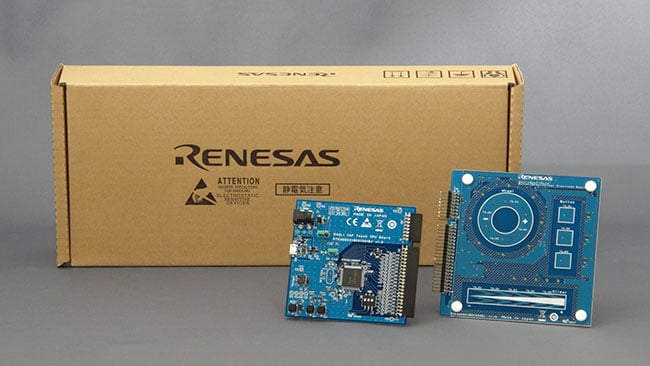
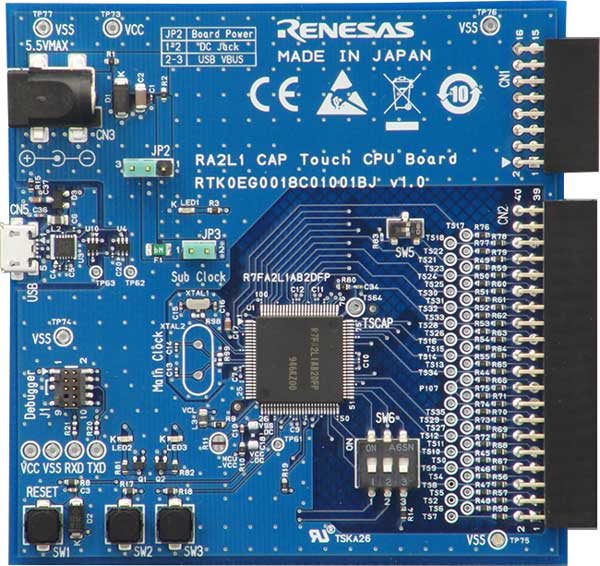
  • RA2L1 CPU board
  • Touch application board
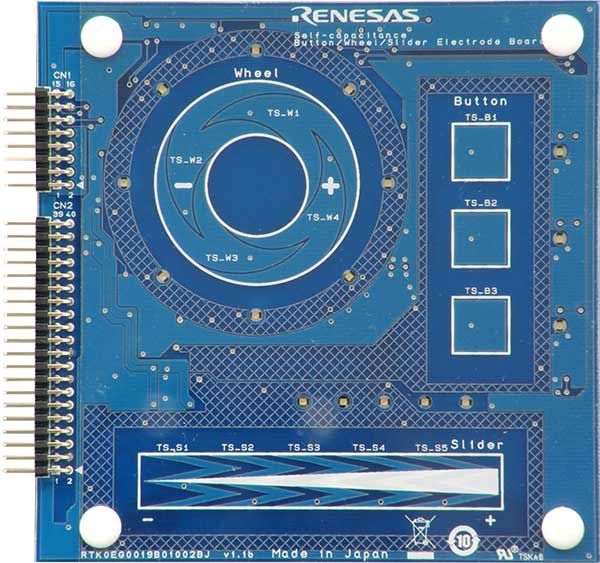
  • Self-capacitance evaluation board built-in basics for capacitive touch: switches, slider and wheel
Features

  • Use to evaluate various touch functions (button, slider, wheel)
  • Simple prototyping
  • Use as a reference when designing boards or software
  • Easily adjust the sensitivity by using QE for Capacitive Touch
    • Easy operation with intuitive interface
    • Easy to develop touch interfaces even for beginners with GUI
    • Automatically output adjusted source code

Applications

Type Title Date
Manual - Development Tools PDF 857 KB 日本語
The RA2L1 Capacitive Touch Evaluation System (RSSK-RA2L1 / RTK0EG0022S01001BJ) is a kit for evaluating the capacitive touch sensor (CTSU) of the Renesas RA2L1 MCUs. This manual provides an overview of the RA2L1 Capacitive Touch Evaluation System’s hardware.
Quick Start Guide PDF 994 KB 日本語
PCB Design Files
Log in to Download ZIP 2.65 MB
Application Note PDF 511 KB 日本語
AI-generated Summary: The RA2L1 Capacitive Touch Evaluation System example project demonstrates capacitive touch functionality across multiple electrodes, including buttons, slider, wheel, and shield. It integrates LED control linked to touch inputs and CPU board push buttons, and supports USB serial communication for tuning and monitoring via QE tools. The software structure relies on FSP-generated components, with detailed configuration files and tuning logs included. Operation is confirmed on RA2L1 MCU at 48MHz using e2 studio and GCC compiler, facilitating development of capacitive touch applications with precise sensitivity adjustments.
Application Note PDF 6.87 MB 日本語
Functional safety functions are becoming an important on system design as automatic electronic control systems continue to expand to a wide range of applications. This APN describes the software for capacitive touch sensor(CTSU) functional safety self test.
Tool News - Release PDF 176 KB 日本語
Application Note PDF 3.46 MB 日本語 , 简体中文
This application note describes parameter tuning methods using QE for Capacitive Touch for microcontrollers that incorporate a Capacitive Touch Sensing Unit (CTSU). In addition to the default auto-tuning process, it provides an overview of the Advanced mode and adjustable CTSU parameters for optimizing touch performance.
Application Note PDF 14.40 MB 日本語 , 简体中文
This application note provides the design principles and layout examples of touch electrodes for microcontrollers embedded with a Capacitive Touch Sensing Unit (CTSU). It outlines recommended design practices and considerations for both self‑capacitance and mutual‑capacitance methods, covering electrode geometry, routing, and shielding structures. In addition, it describes the application examples for each sensing method.
Application Note PDF 2.82 MB 日本語
The CTSU2, the enhanced version of the Renesas Capacitive Touch Sensing Unit (CTSU), supports an active shield as one of its anti-noise countermeasures. This document describes the self-capacitance waterproof touch button demo software, which implements the active shield function.
Application Note PDF 2.42 MB 日本語 , 简体中文
AI-generated Summary: Capacitive touch sensor microcontrollers utilize Renesas' Capacitive Touch Sensing Unit (CTSU) technology embedded in RX, RA, RL78 families, and Renesas Synergy™. The document explains capacitance detection principles, including self-capacitance and mutual-capacitance methods, and details the evolution from first-generation sensors to advanced CTSU2. It covers MCU lineups, hardware design guidelines, software configuration, tuning procedures, development environments, and evaluation kits to support capacitive touch product development. The CTSU converts capacitance changes into measurable signals, applying filtering and threshold judgment to detect touch inputs accurately.
Application Note PDF 1.50 MB 日本語
AI-generated Summary: Capacitive touch sensors measure capacitance changes caused by finger contact using a sensor drive pulse and current measurement. Ripple noise from the power supply or peripheral circuits distorts these measurements by adding noise currents, causing inaccurate touch detection. To ensure high accuracy and reliability, power supply design must minimize ripple noise. The document explains measurement principles, ripple noise effects, and countermeasures including power supply circuit selection, switching circuits, board layout, and touch parameter tuning. It covers RX, RL78, and RA family MCUs embedding CTSU1 and CTSU2 types of capacitive touch sensing units.
Application Note PDF 959 KB 日本語
Application Note PDF 14.17 MB 日本語
AI-generated Summary: The guide explains methods to enhance noise immunity for capacitive touch sensor MCUs by addressing environmental noise issues that affect capacitance measurements. It covers noise types such as radiated RF, conducted noise, electrostatic discharge (ESD), and electrical fast transients (EFT), referencing IEC 61000-4 standards. The document details hardware and software countermeasures, including board design, multi-frequency measurement, filtering techniques, and protection circuits. It targets RX, RA, RL78 MCU families and Renesas Synergy devices embedding the CTSU module, providing practical design guidelines and evaluation results to ensure stable capacitive touch operation under noisy conditions.
Application Note PDF 2.18 MB 日本語
AI-generated Summary: The software filters for capacitive touch systems include FIR, IIR, single-pole IIR, and median filters, each with detailed specifications, usage examples, and API descriptions. The document covers embedding these filters into existing projects for RA2L1, RX130, and RL78/G16 microcontroller groups, detailing operation conditions, software configuration, and filter parameter adjustments. It also provides development environment and hardware setup information to support capacitive touch evaluation systems.
Application Note PDF 3.34 MB 日本語
AI-generated Summary: Capacitive touch sensing integrates with Renesas RA microcontrollers using QE and FSP tools. The process includes creating a project with RA Smart Configurator, adding required modules, building a capacitive touch interface, tuning with QE for Capacitive Touch, and monitoring touch performance. Supported devices include RA6M2 and RA2L1 with CTSU/CTSU2 units. Development requires e2 studio IDE, GCC ARM compiler, QE for Capacitive Touch plug-in, and FSP middleware. The example demonstrates starting measurements with RM_TOUCH_ScanStart() and detecting touch via RM_TOUCH_DataGet().
Flyer PDF 446 KB 日本語
Application Note PDF 1.92 MB 日本語
AI-generated Summary: The document explains how to generate and transfer QE code for Capacitive Touch using e² studio and Keil® MDK on Renesas RA microcontrollers, specifically targeting the RA2L1 evaluation system. It details the setup of the development environment, including required IDE versions, toolchains, and configuration tools. Step-by-step instructions guide users through creating projects in e² studio, configuring Capacitive Touch, tuning, and migrating the code to Keil® MDK for execution. The workflow supports efficient development and debugging of capacitive touch applications on Renesas RA devices.
Application Note PDF 2.06 MB 日本語
AI-generated Summary: The document explains how to generate and transfer QE code for Capacitive Touch using e² studio and IAR Embedded Workbench for ARM with Renesas RA microcontrollers. It details steps for creating projects in e² studio, configuring capacitive touch, tuning, and migrating the code to IAR EWARM. The setup involves RA2L1 evaluation boards, specific IDE versions, toolchains, and configuration tools. It guides users through project creation, device selection, build settings, and integration of touch drivers to run capacitive touch applications efficiently.
White Paper PDF 660 KB 日本語 , 简体中文
Advanced capacitive touch sensing enables fast, accurate, and noise-immune multitouch user interfaces. Second-generation sensor technologies support rapid scanning, 3D gesture recognition, and reliable operation in challenging environments. These capabilities allow designers to implement intuitive, responsive, and durable touch interfaces for applications ranging from home appliances to public kiosks.
19 items

Software & Tools

Software & Tools

Software title
Software type
Company
RA Flexible Software Package (FSP)
FSP is an enhanced software package designed to provide easy-to-use, scalable, high-quality software for embedded system designs using Renesas RA Family of Arm Microcontrollers. Note: FSP with e² studio Installer (Platform Installer) will install the e² studio tool, FSP packs, GCC toolchain, and Segger J-Link drivers required to use this software. No additional installations are required.
Software Package Renesas
QE for Capacitive Touch: Development Assistance Tool for Capacitive Touch Sensors
In developing embedded system using the capacitive touch sensor of MCUs, you can easily setup initial configurations of the touch interface as well as process the tuning of sensors, and reduce development time. [Plugin for Renesas IDE "e2 studio"] [Standalone Version] [Support MCU/MPU:RA, RL78, RX, Renesas Synergy™]
Solution Toolkit Renesas
2 items

Sample Code

Sample Code

Filters
Type Title Date Date
Sample Code
[Software=RX Driver Package|V2.20;RA Flexible Software Package|v5.3.0],[Toolchains=CC-RL|V1.13.00;CC-RX|V3.06.00;GNU Arm Embedded|13.2.1.arm-13-7]
Log in to Download ZIP 16.10 MB 日本語
Application: Consumer Electronics
Compiler: CC-RL, CC-RX, GNU ARM Embedded Function: Application Example, HMI IDE: e2 studio
Sample Code
[Software=RA Flexible Software Package|v4.6.0],[Toolchains=GNU Arm Embedded|10.3-2021.10]
Log in to Download ZIP 2.56 MB 日本語
Application: Consumer Electronics
Compiler: GNU Arm Embedded Function: Evaluation Kit, HMI IDE: e2 studio
2 items

Related Boards & Kits

Boards & Kits

Part NumberStatusStockBudgetary Price (USD)Sampleable
RTK0EG0022S01001BJActiveIn Stock1u | $152.94N/A

Partners

Zephyr Logo
Zephyr Project

The Zephyr Project is an open-source, scalable real‑time operating system (RTOS) designed for resource-constrained embedded systems and supports a wide range of hardware architectures and development boards. For the Renesas RA2L1 Capacitive Touch Evaluation System, Zephyr provides focused documentation covering board features, supported peripherals, and basic build, flashing, and debugging workflows to help developers quickly get started.

See the Zephyr Project RA2L1 Capacitive Touch Evaluation System Documentation

Support Communities

  1. Error while tuning RSSK-RA2L1 (can't find a source file at...)

    Hello, I've this window showing up while I'm tuning the RSSK_RA2L1 development board. I really don't know how to fix that, could you please help me about ? Thank you. This thread was automatically locked due to age.

    Dec 8, 2021
  2. CTSU2 peripheral + low power modes - R7FA2E1A72DNH

    Hello, I'm working on a touch capacitive project on R7FA2E1A72DNH. I'm focused to read capacitive buttons and use the low power mode. I downloaded the "RSSK_RA2L1_CTSU_LOW_POWER" project for RA2L1 demo board and I edited it for my R7FA2E1A72DNH. I configured the touch screen buttons ...

    Aug 4, 2023
  3. Capacitive Touch HW trigger

    Hello,  Recently I am approching with Renesas RA and Capacitive Touch. I've started my application following Application Note "Using QE and FSP to Develop Capacitive Touch Applications" Rev.2.00. This AN suggests to use HW trigger (AGT) to start the touch button scan and a code example is ...

    Sep 15, 2022
View All Results from Support Communities (5)
Support Communities

Support Communities

Get quick technical support online from Renesas Engineering Community technical staff.
Browse Articles

Knowledge Base

Browse our knowledge base for helpful articles, FAQs, and other useful resources.
Submit a Ticket

Submit a Ticket

Need to ask a technical question or share confidential information?