
Overview
Description
The PG-FP5 installed in a system is a tool for erasing, programming, and verifying programs on Renesas MCUs with on-chip flash memory.
Warning
[Updated: Jul. 21, 2026 Rev. 1.10] [Notes] Emulator and Flash Memory Programmer Products Notice Regarding Changes to Windows Driver Policy (PDF | English, 日本語)
The PG-FP5 has been discontinued. The acceptance of final orders was in May 2018. If adopting new products, please consider the successor, the PG-FP6.
[PG-FP6] Higher productivity and security than its predecessor, PG-FP5 >>
Successor
Note: the PG-FP6 does not support V850 and 78K with dual power supply flash memory, which assume mass production with mask ROM. Use programmers produced by partners for programming of the V850 and 78K with dual power supply flash memory. Refer to Function and performance comparisons between PG-FP6 and PG-FP5 >>

Features
- Standalone programming
- PC-controlled programming using dedicated GUI
- Ability to store settings for up to eight programming environments
- Designed specifically for use on production lines (command control or remote control)
- Programming a unique code to a designated area of flash memory
- Security setting can be changed with the the Manager function
- Supports self-testing function
- Learn More
Release Information
Programming GUI
Latest Ver.: V2.17
Released: Apr 22, 2019
Firmware
Latest Ver.: V2.17
Released: Apr 22, 2019
FPGA
Latest Ver.: V4
Released: Jul 15, 2011
Parameter Files
Latest file released: Apr 20, 2022
Details of upgrade(See Tool News)
How to find the version number
Target Family
- RL78 Family
- RX Family
- RH850 Family
- Power & Power Management (USB Type-C & USB Power Delivery)
- Power & Power Management (Motor Control ICs)
- SuperH Family
- V850 Family
- 78K Family
- R8C Family
For details of support for individual device part numbers, see List of MCUs supported by PG-FP5 (PDF | English, 日本語) (incl. information on components and parameter files).
Target Devices
Additional Details
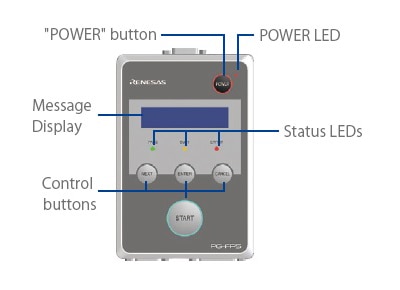
Control panel suitable for the stand-alone operation
Easy-to-Use Graphical User Interface (GUI)
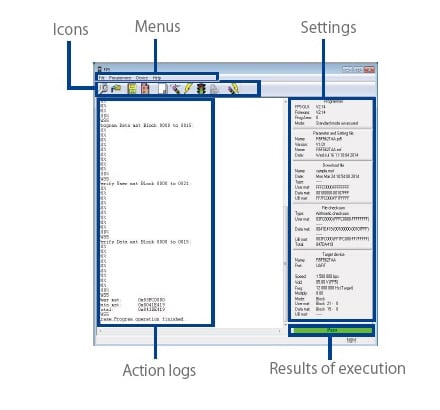
Major Functions
- Downloading and uploading program files and parameter files
- Editing program files (by using HEX editor)
- Checksum calculation
- Saving the action logs
- Manager function (Prohibition of uploading program files and changing the password and settings, etc.)
- Feasibility of blank checking, erasing, programming, verifying, reading, settings and obtainment of Flash options information, checksum and programming after erasing
- Execution of self-testing function
- Writing in the minimum unit of the flash memory is available for the following devices
- RX family
- RH850 family (excluding the RH850/P1x-C group)
- V850 family (V850E2/Fx4-L, V850/FF4-G, V850E2/FG4-G, V850E2/Px4-L, or V850PG4-S only)
Components
- PG-FP5
- USB cable
- Serial cable
- Target cables of two sorts (14-pin and 16-pin types)
- GND cable
- Setup manual
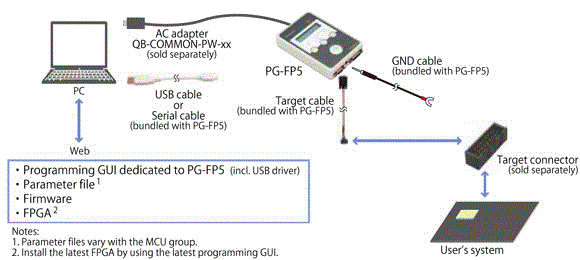
Note: Except for Europe, the power supply adapter, QB-COMMON-PW-xx, is not bundled in the product package of PG-FP5. Please purchase it separately.
System Configuration
PG-FP5 How to Find the Version Number
Programming GUI, Firmware and FPGA for PG-FP5
To check the version number, follow these steps:
Step1. PG-FP5 Startup
After the cables are connected, press the POWER button on the PG-FP5.
Step2. Startup of Programming GUI
Click the Start menu, "All Programs", point to "Renesas Electronics Utilities", "Programming Tools", and then select "PG-FP5 Vx.xx" of "PG-FP5 Vx.xx" to start the Programming GUI. When communication is established and the programming GUI is correctly started, the main window will be opened.
Step3. Check the Version Numbers of the Programming GUI, Firmware and FPGA with "Reset Command" or "Main Window", as Shown Below:
- Programming GUI
- - Open the Help menu and click the About FP5 command.
The version number of Programming GUI is displayed in the About FP5 dialog box.
or
- Refer to the programming parameter window on the right of the main window. The version number of Programming GUI is shown at the FP5_GUI row in the Programmer box of the programming parameter window.
- - Open the Help menu and click the About FP5 command.
- Firmware
- - Open the Programmer menu and click the Reset command.
The version number of Firmware is displayed in the action log window.
or
Refer to the programming parameter window on the right of the main window. The version number of Firmware is shown at the Firmware row in the Programmer box of the programming parameter window.
- - Open the Programmer menu and click the Reset command.
- FPGA
- - Open the Programmer menu and click the Reset command. The version number of FPGA is displayed in the action log window.
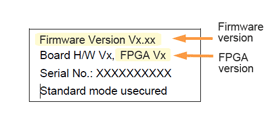
Display Example of Reset Command
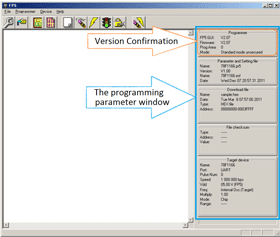
Display Example of Main Window
Support
Support Communities
- D70F3180GJ V850E/GP2
Good afternoonIs there a datasheet for D70F3180GJ V850E/GP2? I need to write the stock file to the processor. recording will be carried out using PG-FP5, PR5 file is available. From the processor pinout I only know the power supply - 5V and 2.5V (found on the board ...
Oct 30, 2024 - Programmer renesas D70F3379
Dear, Programmer E8a not manage MCU renesas D70F3379? What is the programmer i can use please? Thank you.
Jun 5, 2021 - 78k0s programmer
I need to program MCUs in the 78K0s series. The Minicube2 is supposed to support the series:http://www.renesas.com/products/tools/flash_prom_programming/flash_programmers/index.jspBut looking at the device list:http://documentation.renesas.com/doc ...
Feb 10, 2014
Knowledge Base
- Does the software for PG-FP6 or PG-FP5 flash programmer included upon purchase?
... if PG-FP5】Parameter files (PR5 files) for the PG-FP5**The parameter files differ according to the device you are using. Web page: https://www.renesas.com/software-tool/pg-fp5-discontinued-producthttps://www.renesas.com/software-tool/pg-fp6
Nov 21, 2014 - Error (E1203184) occurs when debug tool is connected. (CS+, E2, E1, E20) [RH850]
... Renesas Flash Programmer or PG-FP5) to initialize the flash area or edit the program to make it enter an endless loop at the reset vector address as a precautionary measure, and then try reconnecting the tool. Note: This answer also applies to the emulators listed in the applicable products.
Mar 4, 2021

Support Communities

