Features
- Unique compensation-free design – always stable
- Output voltage range: 0.54V to 5.5V
- Input voltage range: 4.5V to 14V
- 1% output voltage accuracy over line, load, and temperature
- ChargeMode control achieves fast transient response, reduced output capacitance, and provides output stability without compensation
- 2-channel output, 2-, 4-, 6-, or 8-phase output with two, three, or four devices
- Switching frequency range 200kHz to 1.33MHz
- Proprietary single-wire DDC (Digital-DC) serial bus enables voltage sequencing and fault spreading with other Intersil digital power ICs
- Inductor peak and averaged over and undercurrent protection
- Digital fault protection for output voltage UV/OV, input voltage UV/OV, temperature, and MOSFET driver voltage
- Accurate average output current measurement with adjustable gain settings for sensing with SPS current monitor outputs or high current, low DCR inductors
- Monitor ADC measures input voltage, input current, output voltage, driver voltage, internal and external temperature
- Nonvolatile memory for storing operating parameters and fault events
- PMBus compliant
Description
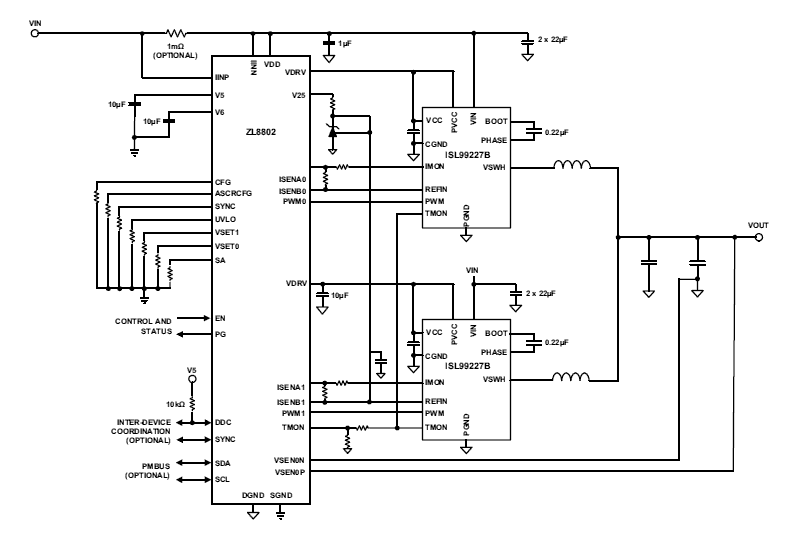
The ZL8802 is a dual output or dual phase digital DC/DC controller. Each output can operate independently or be used together in a dual phase configuration for high current applications supporting 2-, 4-, 6-, and 8-phase operation with up to four ZL8802 controllers. The ZL8802 supports a wide range of output voltages (0. 54V to 5. 5V) operating from input voltages as low as 4. 5V up to 14V. With the fully digital ChargeMode control, the ZL8802 will respond to a transient load step within a single switching cycle. This unique compensation-free modulation technique allows designs to meet transient specifications with minimum output capacitance, thus saving cost and board space. The proprietary single-wire Digital-DC™ (DDC) serial bus enables the ZL8802 to communicate between other Intersil digital power ICs. By using the DDC, the ZL8802 achieves complex functions such as inter-IC phase current balancing, sequencing, and fault spreading. This eliminates complicated power supply managers with numerous external discrete components. The ZL8802 features fast output overcurrent protection. The input voltage, output voltages, and DrMOS/MOSFET driver supply voltages are overvoltage and undervoltage protected. Two external temperature sensors and one internal temperature sensor are available for temperature monitoring, one of which can be configured for under- and over-temperature protection. A snapshot parametric capture feature allows users to take a snapshot of operating and fault data during normal or fault conditions. Integrated Low Dropout (LDO) regulators allow the ZL8802 to operate from a single input supply eliminating the need for additional linear regulators. The VDRV LDO output can be used to power external drivers or DrMOS devices. With full PMBus compliance, the ZL8802 is capable of measuring and reporting input voltage, input current, output voltage, output current, as well as the device's internal temperature, two external temperatures, and an auxiliary voltage or temperature input.
| Part Number | Status | Samples | Stock | RoHS | Package | Carrier Type |
|---|---|---|---|---|---|---|
| ZL8802ALAFT | Obsolete | N/A | In Stock | RoHS:EN | QFN | Reel |
| ZL8802ALAFT7A | Obsolete | N/A | Out of Stock | RoHS:EN | QFN | Reel |
| ZL8802ALAFTK | Obsolete | N/A | In Stock | RoHS:EN | QFN | Reel |
Filters
Applied Filters
- Manual - Development ToolsPDF 257 KB r12uz0043eu-islusbeval1z-user-manual Feb 28, 2019
- Manual - Development ToolsPDF 5.52 MB powernavigator-digital-multiphase-user-guide Apr 09, 2018
- Product Change NoticePDF 124 KB PCN16089A Oct 31, 2016
- GuidePDF 714 KB production-config-tool-guide Oct 29, 2016
- Manual - HardwarePDF 693 KB intersil-zlusb-install-guide May 25, 2010
- Application NotePDF 397 KB an1684 Jan 19, 2004AI-generated Summary: The document outlines important legal disclaimers and usage guidelines for semiconductor products. It emphasizes user responsibility for product design and safety, disclaims liability for damages, and clarifies no intellectual property licenses are granted. Products are categorized by quality grades with specific application recommendations. Users must comply with laws, avoid unauthorized modifications, and ensure safe use within specified conditions. Contact details for Renesas Electronics sales offices worldwide are provided.
- Application NotePDF 509 KB an1681 Jan 19, 2004AI-generated Summary: The document explains grounding techniques for PCB layouts using a dual op amp example on a single-layer copper board. It compares three grounding schemes: a center spine ground trace, an outer ground plane, and a split/star ground plane, highlighting the benefits of single-point grounding to minimize noise and antenna effects. It emphasizes following current paths, minimizing loop lengths, and ensuring close forward and return paths to reduce interference. The document also includes disclaimers on product use, quality grades, safety, and legal compliance.
Recommended Documents (1)
Datasheets (1)
- Manual - Development ToolsPDF 257 KB r12uz0043eu-islusbeval1z-user-manual Feb 28, 2019
- Manual - Development ToolsPDF 5.52 MB powernavigator-digital-multiphase-user-guide Apr 09, 2018
- GuidePDF 714 KB production-config-tool-guide Oct 29, 2016
- Manual - HardwarePDF 693 KB intersil-zlusb-install-guide May 25, 2010View More (6)
Manuals & Guides (6)
- Application NotePDF 397 KB an1684 Jan 19, 2004AI-generated Summary: The document outlines important legal disclaimers and usage guidelines for semiconductor products. It emphasizes user responsibility for product design and safety, disclaims liability for damages, and clarifies no intellectual property licenses are granted. Products are categorized by quality grades with specific application recommendations. Users must comply with laws, avoid unauthorized modifications, and ensure safe use within specified conditions. Contact details for Renesas Electronics sales offices worldwide are provided.
- Application NotePDF 509 KB an1681 Jan 19, 2004AI-generated Summary: The document explains grounding techniques for PCB layouts using a dual op amp example on a single-layer copper board. It compares three grounding schemes: a center spine ground trace, an outer ground plane, and a split/star ground plane, highlighting the benefits of single-point grounding to minimize noise and antenna effects. It emphasizes following current paths, minimizing loop lengths, and ensuring close forward and return paths to reduce interference. The document also includes disclaimers on product use, quality grades, safety, and legal compliance.
Application Notes & White Papers (2)
- Product Change NoticePDF 124 KB PCN16089A Oct 31, 2016
Product Notices (PCN, EOL, etc) (2)
No Results Found.
Make sure all keywords are spelled correctly.
Try fewer, different, or more general terms to vary your search.
If you have filters applied, consider deselecting some to broaden your results.
- Search our extensive knowledgebase, designed to help customers with their FAQs.
- Get help from our expert Renesas technical staff and community on our support forums.
No Results Found.
Make sure all keywords are spelled correctly.
Try fewer, different, or more general terms to vary your search.
If you have filters applied, consider deselecting some to broaden your results.
- Search our extensive knowledgebase, designed to help customers with their FAQs.
- Get help from our expert Renesas technical staff and community on our support forums.
No Results Found.
Make sure all keywords are spelled correctly.
Try fewer, different, or more general terms to vary your search.
If you have filters applied, consider deselecting some to broaden your results.
- Search our extensive knowledgebase, designed to help customers with their FAQs.
- Get help from our expert Renesas technical staff and community on our support forums.
No Results Found.
Make sure all keywords are spelled correctly.
Try fewer, different, or more general terms to vary your search.
If you have filters applied, consider deselecting some to broaden your results.
- Search our extensive knowledgebase, designed to help customers with their FAQs.
- Get help from our expert Renesas technical staff and community on our support forums.
No Results Found.
Make sure all keywords are spelled correctly.
Try fewer, different, or more general terms to vary your search.
If you have filters applied, consider deselecting some to broaden your results.
- Search our extensive knowledgebase, designed to help customers with their FAQs.
- Get help from our expert Renesas technical staff and community on our support forums.
No Results Found.
Make sure all keywords are spelled correctly.
Try fewer, different, or more general terms to vary your search.
If you have filters applied, consider deselecting some to broaden your results.
- Search our extensive knowledgebase, designed to help customers with their FAQs.
- Get help from our expert Renesas technical staff and community on our support forums.
No Results Found.
Make sure all keywords are spelled correctly.
Try fewer, different, or more general terms to vary your search.
If you have filters applied, consider deselecting some to broaden your results.
- Search our extensive knowledgebase, designed to help customers with their FAQs.
- Get help from our expert Renesas technical staff and community on our support forums.
Other (1)
No Results Found.
Make sure all keywords are spelled correctly.
Try fewer, different, or more general terms to vary your search.
If you have filters applied, consider deselecting some to broaden your results.
- Search our extensive knowledgebase, designed to help customers with their FAQs.
- Get help from our expert Renesas technical staff and community on our support forums.
No Results Found.
Make sure all keywords are spelled correctly.
Try fewer, different, or more general terms to vary your search.
If you have filters applied, consider deselecting some to broaden your results.
- Search our extensive knowledgebase, designed to help customers with their FAQs.
- Get help from our expert Renesas technical staff and community on our support forums.
Filters
Applied Filters
Software & Tools
Filter by Type
Filter by Provider
Sample Code
Filter by Application
Filter by Function
Filter by Compiler
Filter by IDE
Simulation Models
Partner Solutions
- Software & Tools - Other
No Results Found.
Make sure all keywords are spelled correctly.
Try fewer, different, or more general terms to vary your search.
If you have filters applied, consider deselecting some to broaden your results.
- Search our extensive knowledgebase, designed to help customers with their FAQs.
- Get help from our expert Renesas technical staff and community on our support forums.
- Software & Tools - Other
Software & Tools (1)
No Results Found.
Make sure all keywords are spelled correctly.
Try fewer, different, or more general terms to vary your search.
If you have filters applied, consider deselecting some to broaden your results.
- Search our extensive knowledgebase, designed to help customers with their FAQs.
- Get help from our expert Renesas technical staff and community on our support forums.
No Results Found.
Make sure all keywords are spelled correctly.
Try fewer, different, or more general terms to vary your search.
If you have filters applied, consider deselecting some to broaden your results.
- Search our extensive knowledgebase, designed to help customers with their FAQs.
- Get help from our expert Renesas technical staff and community on our support forums.
No Results Found.
Make sure all keywords are spelled correctly.
Try fewer, different, or more general terms to vary your search.
If you have filters applied, consider deselecting some to broaden your results.
- Search our extensive knowledgebase, designed to help customers with their FAQs.
- Get help from our expert Renesas technical staff and community on our support forums.